
1. Introduction
This manual provides detailed instructions for the Kadimendium ND0412SA DC-DC Step-up Module. This module is designed to convert a lower DC input voltage (2.6V-5.5V) into a higher, stable DC output voltage (selectable 5V, 6V, 9V, or 12V). It is suitable for various applications requiring a boosted power supply, such as battery-powered equipment, LED motors, and low-power electronic devices.
2. Safety Instructions
- Ensure all power sources are disconnected before making any connections to the module.
- Observe correct polarity for input and output connections (Vi, GND, Vo). Incorrect polarity can damage the module and connected devices.
- Do not exceed the specified maximum input voltage or output current ratings.
- Avoid short circuits on the input or output terminals. While the module has short-circuit protection, prolonged short circuits can cause damage.
- Operate the module within its specified temperature range (-40°C to +85°C).
- Keep the module away from moisture, dust, and corrosive environments.
3. Product Overview
The ND0412SA is a compact and efficient DC-DC boost converter. It features high efficiency (up to 93%) and incorporates multiple protection mechanisms including over current (OCP), over voltage (OVP), short circuit (SCP), and over temperature (OTP) to ensure reliable operation and extend the lifespan of the power supply.

Figure 3.1: Top view of the ND0412SA module, displaying its compact design and main components.
The module's input terminals are labeled Vi (Input Voltage) and GND (Ground). The output terminals are labeled Vo (Output Voltage) and GND. The bottom side of the module features solder pads for selecting the desired output voltage.
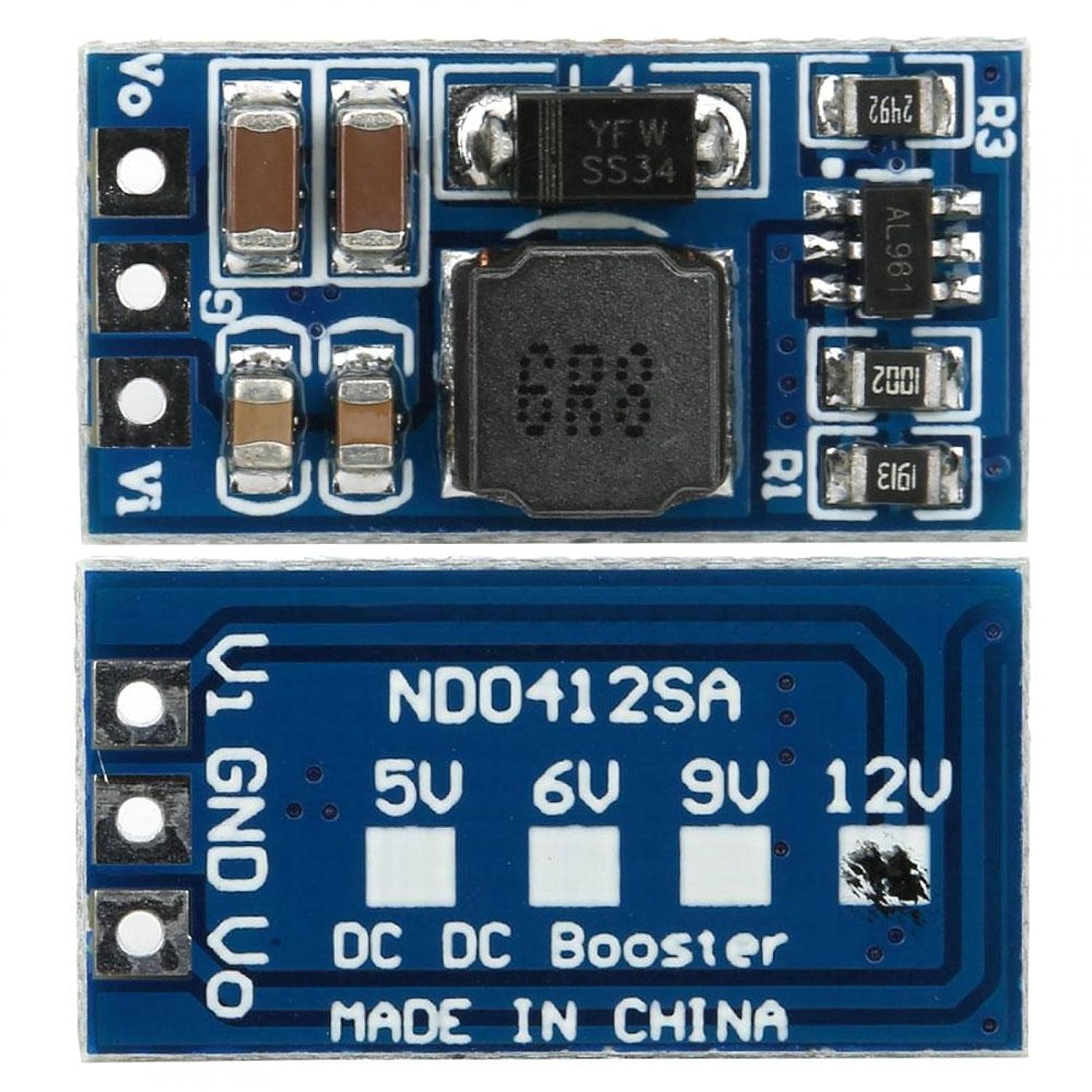
Figure 3.2: Bottom view of the ND0412SA module, showing the output voltage selection pads.
4. Setup
Follow these steps to set up your ND0412SA module:
- Output Voltage Selection: Before connecting power, select your desired output voltage (5V, 6V, 9V, or 12V) by bridging the corresponding solder pads on the bottom of the module (refer to Figure 3.2). For example, to set the output to 12V, bridge the pad labeled '12V'. If no pads are bridged, the module may default to a specific voltage or operate unpredictably.
- Input Connection: Connect your DC input power source to the Vi and GND input terminals. Ensure the input voltage is within the 2.6V to 5.5V range.
- Output Connection: Connect your load to the Vo and GND output terminals.
- Advanced Output Voltage and Current Limit Adjustment (Optional): For custom output voltages or current limits, the module allows adjustment via external resistors R1 and R3. This requires soldering and precise resistor values. Refer to Figure 4.1 for details.
- Output Voltage (R1): The R1 resistor sets the output voltage. The formula is R1(KΩ) = 10 * (Vout / 0.6 - 1).
- Current Limit (R3): The R3 resistor programs the peak switch current. The resistor value should be between 10kΩ and 100kΩ. The current limit will be set from 2.5A to 0.5A. The formula is Iin = 48000 / R3.

Figure 4.1: Diagram for R1 (output voltage) and R3 (current limit) resistor settings.
5. Operating Instructions
Once the module is correctly wired and the output voltage is selected, apply power to the input terminals. The module will automatically boost the input voltage to the selected output voltage. Monitor the output voltage and current to ensure it meets your application's requirements and stays within the module's specifications.
6. Maintenance
- Keep the module clean and free from dust and debris.
- Ensure adequate ventilation, especially when operating at higher loads, to prevent overheating.
- Regularly inspect connections for looseness or corrosion.
- Avoid physical shock or excessive vibration to the module.
7. Troubleshooting
- No Output Voltage:
- Check input voltage to ensure it is within the 2.6V-5.5V range.
- Verify input and output connections for correct polarity and secure contact.
- Ensure the output voltage selection pads are correctly bridged.
- Check for any short circuits on the output. The module's SCP may have activated.
- Incorrect Output Voltage:
- Re-verify the output voltage selection pads.
- If using custom R1 adjustment, double-check resistor value and soldering.
- Module Overheating:
- Reduce the load connected to the output.
- Ensure proper ventilation around the module.
- Check if the input voltage is too low, causing the module to draw excessive current.
- Intermittent Operation:
- Check for loose connections or poor soldering.
- Ensure the module is not exposed to excessive electromagnetic interference.
8. Specifications
| Parameter | Value |
|---|---|
| Model | ND0412SA |
| Input Voltage Range | DC 2.6V ~ 5.5V |
| Output Voltage Options | DC 5V, 6V, 9V, 12V (selectable) |
| Maximum Output Power | 7W |
| Efficiency | Up to 93% |
| Operating Frequency | 1MHz |
| Dimensions (approx.) | 21 x 11 x 4mm / 0.8 x 0.4 x 0.2in (without pin) |
| Operating Temperature | -40°C ~ +85°C |
| Protection Features | Over Current (OCP), Over Voltage (OVP), Short Circuit (SCP), Over Temperature (OTP) |
Typical Output Current (Reference Only):
| Output Voltage | Input Voltage Range | Max Output Current |
|---|---|---|
| 5V | DC 2.6 ~ 4.5V | 1300mA |
| 6V | DC 2.6 ~ 5.5V | 1200mA |
| 9V | DC 2.6 ~ 5.5V | 800mA |
| 12V | DC 2.6 ~ 5.5V | 600mA |
9. Warranty and Support
For warranty information or technical support, please refer to the product's purchase documentation or contact the retailer. Keep your proof of purchase for any warranty claims.