
1. Introduction
This manual provides detailed instructions for the Foleto Motorized Rotating Display Stand with LED Light. Designed for versatile display needs, this 10-inch turntable offers 360-degree rotation, adjustable speeds, and an integrated LED light, making it ideal for product photography, jewelry display, and various exhibition purposes.
Key Features
- Integrated LED Light: Bright LED light with adjustable rotating angles (45°/90°/180°/360°).
- Versatile Applications: Suitable for theme exhibitions, window displays, product showcases, and 360-degree product photography.
- User-Friendly Operation: Simple one-button start, supports clockwise and counter-clockwise rotation.
- Adjustable Rotation: Offers 4 angle display options (45°/90°/180°/360°) and multiple speed settings.
- Quiet Performance: Ultra-low noise and low power consumption ensure smooth, quiet operation for video shooting.
- Compact Size: 10-inch (25cm) diameter, 1.6-inch (6cm) height, weighing 0.63kg, with a maximum load capacity of 44 lbs.
- Power Options: Can be powered via 110V cord (included) or internal rechargeable battery (USB-C charging).
2. What's in the Box
Upon unboxing, verify that all components are present:
- Foleto Motorized Rotating Display Stand (Main Unit)
- Power Cord (110V)
- USB-C Charging Cable
- Interchangeable Display Plates (e.g., white, black, blue, peach, mirror finish)
- Remote Control (for models with remote functionality)
- User Manual (this document)

Image: Various interchangeable display plates and the main unit of the Foleto Rotating Display Stand.
3. Setup Instructions
3.1 Powering the Device
- Plug-in Operation: Connect the provided 110V power cord to the display stand and a compatible power outlet.
- Battery Operation: The stand can operate wirelessly after being charged. Connect the USB-C charging cable to the stand's 'IN' port and a compatible USB power source (e.g., wall adapter, power bank, laptop). The indicator light will turn green when the battery is fully charged.
- Important Note: To prolong the life of the turntable, the internal battery and USB cable should not be used simultaneously.
3.2 Attaching Display Plates
- Select the desired display plate (e.g., white, black, mirror).
- Align the chosen plate with the top surface of the rotating stand and gently place it on top. The plates are designed to fit securely.

Image: A hand placing a white display plate onto the motorized rotating stand, demonstrating how to interchange the surfaces.
4. Operating Instructions
4.1 Basic Operation (using buttons on the stand)
- Power On/Off: Press any button on the stand to turn the unit on. Long press any button for 3 seconds to turn it off.
- Direction Control (R/L Button): Press the "R/L" button to switch between clockwise and counter-clockwise rotation.
- Speed Adjustment (SR Button): Press the "SR" button to cycle through different rotation speeds (e.g., 8s, 15s, 30s per revolution).
- Angle Adjustment (ASA Button): Press the "ASA" button to set specific rotation angles (e.g., 45°, 90°, 180°, 360° continuous rotation).
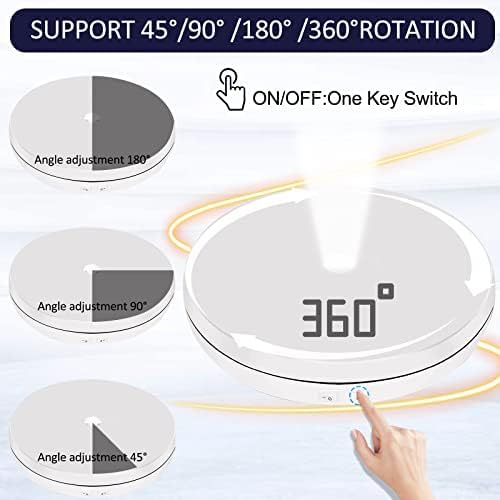
Image: Close-up of the control panel on the side of the display stand, showing buttons for R/L (direction), SR (speed), and ASA (angle adjustment), along with the USB-C input.
4.2 Using the Remote Control (if applicable)
For models equipped with a remote control, additional functionalities are available:
- Power: Turn the stand on or off.
- Speed Control: Adjust rotation speed with dedicated buttons.
- Direction: Change rotation direction.
- Pause: Temporarily stop rotation.
- Angle Presets: Select specific rotation angles for precise display.
Video: Demonstration of the remote control for the Foleto Motorized Rotating Display Stand, showing how to adjust speed, direction, and pause rotation.
5. Maintenance
5.1 Cleaning
Wipe the display stand and plates with a soft, dry cloth. Avoid using abrasive cleaners or solvents.
5.2 Storage
Store the unit in a cool, dry place away from direct sunlight and moisture when not in use.
6. Troubleshooting
6.1 Stand Not Turning On
- Ensure the power cord is securely connected to both the stand and a working power outlet.
- If using battery power, ensure the battery is fully charged (indicator light should be green).
- Check if the on/off switch is in the "on" position.
6.2 Irregular Rotation
- Ensure the item placed on the stand does not exceed the maximum weight capacity (44 lbs).
- Verify the item is centered on the display plate to maintain balance.
- Check for any obstructions preventing smooth rotation.
6.3 LED Light Not Working
- Ensure the stand is powered on.
- Check the dedicated light switch (if separate) or remote control setting for the LED light.
7. Specifications
| Feature | Detail |
|---|---|
| Item Weight | 2.01 pounds |
| Manufacturer | Foleto |
| ASIN | B0967XQK79 |
| Item Model Number | 10inch with led light |
| Diameter | 10 inches (25cm) |
| Maximum Recommended Load | 44 Pounds |
| Assembly Required | No |
| Number of Pieces | 1 (main unit) |
| Batteries Required | No (internal rechargeable battery) |
| Material | Acrylonitrile Butadiene Styrene (ABS), Engine |
| Color | White |
8. Warranty and Support
For any issues during use, please contact Foleto customer support. We are committed to providing a satisfactory solution.
For further assistance, visit the Foleto Store.