
C-LOGIC 580
C-LOGIC 580 Smart Digital Multimeter User Manual
Model: 580
1. Introduction
This manual provides comprehensive instructions for the safe and effective use of the C-LOGIC 580 Smart Digital Multimeter. Please read this manual thoroughly before operation and retain it for future reference.
The C-LOGIC 580 is a smart digital multimeter designed for accurate and efficient electrical measurements. Its smart technology allows for automatic recognition of measurement parameters, reducing potential errors for amateur users and saving time for professionals.
2. Safety Information
Always observe safety precautions when using electrical testing equipment. Failure to do so may result in injury or damage to the device.
- Do not exceed the maximum input values specified for each function.
- Ensure the test leads are properly connected and the function switch is in the correct position before making any measurements.
- Exercise extreme caution when working with live circuits.
- Do not use the multimeter if it appears damaged or if the test leads are compromised.
- Refer to the CAT III 600V and MAX 600V markings on the device for voltage limits.
3. Product Features
- Smart Technology: Automatic recognition of measurement parameters.
- Error Reduction: Designed to minimize errors for amateur users.
- Time Saving: Streamlines measurement processes for professional users.
- Digital Display: Clear and easy-to-read digital readout.
- Multiple Functions: Capable of measuring various electrical parameters.
4. Package Contents
Verify that all items are present and undamaged upon opening the package.
- C-LOGIC 580 Smart Digital Multimeter
- Test Leads (Red and Black)
- User Manual
5. Setup
5.1 Battery Installation
The C-LOGIC 580 is battery powered. Ensure batteries are correctly installed before first use.
- Locate the battery compartment cover on the back of the multimeter.
- Use a screwdriver to open the battery compartment.
- Insert the required batteries, observing the correct polarity (+ and -).
- Replace the battery compartment cover and secure it.
5.2 Connecting Test Leads
Proper connection of test leads is crucial for accurate and safe measurements.
- Insert the black test lead into the "COM" (Common) input jack.
- Insert the red test lead into the "VHz%" input jack for voltage, frequency, and duty cycle measurements.
- Ensure connections are firm and secure.
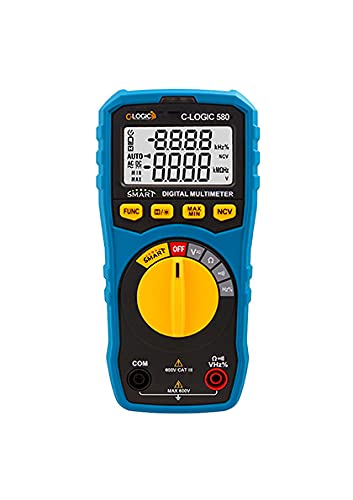
Figure 1: Front view of the C-LOGIC 580 Smart Digital Multimeter, showing the display, rotary switch, function buttons, and input jacks (COM and VHz%). The display shows "-8.8.8.8" and "0.0.0.0" with indicators for AUTO, AC/DC, kHz%, NCV, MAX, MIN, and V. The rotary switch is set to OFF. The input jacks are labeled "COM" and "VHz%".
6. Operating Instructions
6.1 Powering On/Off
To power on the multimeter, rotate the central yellow dial from the "OFF" position to any desired measurement function. To power off, rotate the dial back to "OFF".
6.2 Smart Measurement Mode
The C-LOGIC 580 features a smart mode that automatically identifies the type of measurement (e.g., AC voltage, DC voltage, resistance) when the leads are connected to a circuit. This simplifies operation by eliminating the need to manually select the measurement type.
6.3 Function Buttons
The multimeter includes several function buttons below the display:
- FUNC: Used to cycle through different measurement modes within a single rotary switch setting (e.g., AC/DC voltage, resistance/continuity).
- (Diode/Continuity): Activates diode test or continuity check.
- MAX/MIN: Toggles between maximum and minimum value hold during a measurement.
- NCV: Activates Non-Contact Voltage detection.
6.4 Basic Measurements
Voltage Measurement (AC/DC):
- Set the rotary switch to the 'V' position.
- Connect the black test lead to the 'COM' jack and the red test lead to the 'VHz%' jack.
- Connect the test leads in parallel to the circuit or component to be measured.
- The multimeter will automatically detect AC or DC voltage. Use the FUNC button if manual selection is needed.
Resistance Measurement:
- Set the rotary switch to the 'Ω' position.
- Connect the black test lead to the 'COM' jack and the red test lead to the 'VHz%' jack.
- Ensure the circuit is de-energized before measuring resistance.
- Connect the test leads across the component to be measured.
Continuity Test:
- Set the rotary switch to the 'Ω' position.
- Press the (Diode/Continuity) button to select continuity mode.
- Connect the test leads across the circuit or component. A beep indicates continuity.
Non-Contact Voltage (NCV) Detection:
- Set the rotary switch to the 'NCV' position.
- Move the top part of the multimeter near a live conductor. The device will indicate the presence of AC voltage without direct contact.
7. Maintenance
7.1 Cleaning
Wipe the multimeter casing with a damp cloth and mild detergent. Do not use abrasives or solvents. Ensure the device is dry before storage or use.
7.2 Battery Replacement
When the low battery indicator appears on the display, replace the batteries promptly to ensure accurate readings. Follow the battery installation steps in Section 5.1.
7.3 Storage
Store the multimeter in a cool, dry place away from direct sunlight and extreme temperatures. If storing for extended periods, remove the batteries to prevent leakage.
8. Troubleshooting
| Problem | Possible Cause | Solution |
|---|---|---|
| Multimeter does not power on. | Dead or incorrectly installed batteries. | Check battery polarity or replace batteries. |
| Inaccurate readings. | Incorrect function selected; poor test lead connection; low battery. | Ensure correct function is selected (if not in smart mode); check test lead connections; replace batteries. |
| No continuity beep. | Circuit is open; continuity mode not selected. | Verify circuit integrity; press FUNC button to select continuity mode. |
9. Specifications
| Parameter | Detail |
|---|---|
| Brand | C-LOGIC |
| Model | 580 |
| Power Source | Battery Powered |
| Measurement Type | Multimeter |
| Manufacturer | C-LOGIC |
| ASIN | B0967VMK1W |
| UPC | 810053671603 |
| Date First Available | May 31, 2021 |
10. Warranty and Support
For warranty information or technical support regarding your C-LOGIC 580 Smart Digital Multimeter, please contact C-LOGIC customer service. Refer to the product packaging or the official C-LOGIC website for contact details.
Note: Specific warranty terms may vary by region and retailer. Please retain your proof of purchase.
Related documents580


Ask a question about this manual
Ask about setup, troubleshooting, compatibility, parts, safety, or missing instructions. Manuals+ will review the question and use this page’s manual context to help answer it.