
1. Introduction
The eufy Security Floodlight Cam S330 is an advanced outdoor security camera system designed to provide comprehensive surveillance and intelligent lighting for your property. With its 360-degree pan and tilt capabilities, 2K Full HD video, and powerful 3,000-lumen floodlights, it ensures detailed monitoring day and night. The integrated AI subject lock and tracking feature enhances security by intelligently following detected individuals.
What's Included:
- Floodlight Cam 2 Pro unit
- Mounting Kit
- Screw Packs
- Quick Start Guide
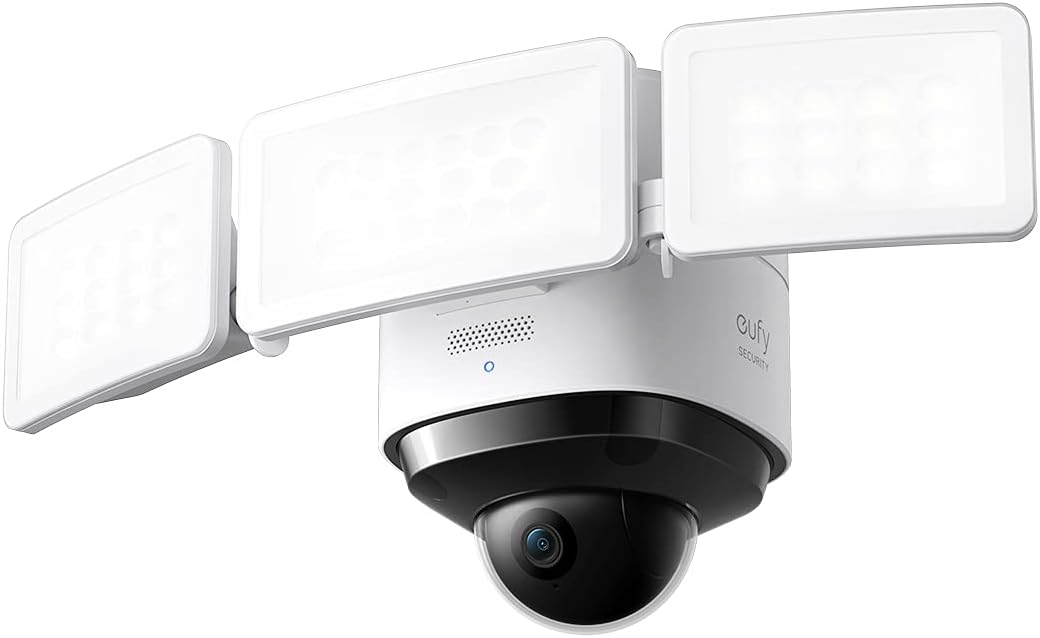
Image: The eufy Security Floodlight Cam S330, featuring a central camera unit with two adjustable floodlight panels.
2. Setup
2.1 Pre-Installation Considerations
- Power Source: This device is hardwired and requires a 120-volt power supply. Ensure power is turned off at the circuit breaker before beginning installation.
- Wi-Fi Connectivity: The camera connects via Wi-Fi. Ensure a strong Wi-Fi signal at the installation location for optimal performance.
- Mounting Location: The Floodlight Cam is designed for outdoor wall mounting. Choose a location that provides the desired coverage area and is within reach of existing electrical wiring.
2.2 Physical Installation
- Turn off Power: Locate the circuit breaker controlling the outdoor light fixture you intend to replace and turn off the power. Verify the power is off using a voltage tester.
- Remove Existing Fixture: Carefully remove your existing floodlight or outdoor fixture from the junction box. Disconnect all wiring.
- Install Mounting Bracket: Attach the provided mounting bracket to the junction box using the screw packs. Ensure it is securely fastened.
- Wire the Floodlight Cam: Connect the wires from the Floodlight Cam to your home's electrical wiring according to the Quick Start Guide. Typically, this involves connecting live, neutral, and ground wires.
- Secure the Unit: Mount the Floodlight Cam S330 onto the installed mounting bracket and secure it with the provided screws.
- Restore Power: Once the installation is complete and all connections are secure, turn the power back on at the circuit breaker.
2.3 App Setup
- Download the eufy Security App: Download the eufy Security app from your smartphone's app store (iOS or Android).
- Create an Account: If you are a new user, create a eufy Security account and log in.
- Add Device: In the app, tap the '+' icon or select "Add Device" and choose "Floodlight Cam S330" from the list.
- Follow On-Screen Instructions: The app will guide you through connecting the camera to your Wi-Fi network and completing the setup process. This typically involves scanning a QR code on the device.
3. Operating the Floodlight Cam S330
3.1 360° Pan and Tilt Camera Coverage
The Floodlight Cam S330 features a motorized pan and tilt lens, allowing you to remotely adjust the camera's viewing angle. This provides 360-degree horizontal coverage, eliminating blind spots and giving you a complete view of your property. Use the controls within the eufy Security app to pan (move horizontally) and tilt (move vertically) the camera lens.

Image: An aerial view demonstrating the 360-degree coverage provided by a single eufy Floodlight Cam, ensuring no blind spots around a property.

Image: A close-up of the camera's dome, illustrating its ability to rotate 360 degrees for comprehensive surveillance.
3.2 2K Full HD Video
The camera records and streams video in crisp 2K Full HD resolution, ensuring clear and detailed footage. This high resolution is crucial for identifying subjects and capturing important details, even when zoomed in.

Image: A scene demonstrating the clarity of 2K resolution, capturing fine details of a child and a dog.
3.3 Smart Lighting with Tunable Light Panels
The Floodlight Cam S330 features three tunable light panels that provide 3,000 lumens of super-bright illumination. You can adjust the spotlight color temperature (from warm to cool) and brightness levels directly from the eufy Security app. Lighting can be configured based on:
- Sunrise and Sunset: Automatically adjust light behavior based on natural light cycles.
- Schedules: Set custom schedules for when the lights should turn on or off.
- Motion Detection: Lights can be activated automatically when motion is detected, deterring intruders and illuminating the area for clear recordings.

Image: A visual representation of the adjustable brightness feature, allowing users to set the floodlight from super bright to a gentle glow.
3.4 AI Subject Lock and Tracking
The on-device AI recognizes when a person is present within the camera's view. Once a person is detected, the camera can automatically lock onto, track, and record the subject as they move across the monitored area. This ensures that critical events are captured even if the subject moves out of the initial field of view.

Image: A graphic illustrating the AI subject lock and tracking feature, showing the camera's ability to follow a moving person.
3.5 Night Vision
With its 3,000-lumen super-bright motion-activated floodlights, the Floodlight Cam S330 effectively turns night into day. This ensures that recordings are in detailed, full-color even in low-light conditions, enhancing visibility and deterrence.
4. Maintenance
To ensure optimal performance and longevity of your eufy Security Floodlight Cam S330, regular maintenance is recommended:
- Cleaning the Lens and Lights: Periodically wipe the camera lens and floodlight panels with a soft, damp cloth to remove dust, dirt, or water spots that may obstruct the view or reduce light output. Avoid abrasive cleaners.
- Check for Obstructions: Ensure no tree branches, foliage, or other objects are blocking the camera's view or the floodlights.
- Weatherproofing: The unit is weatherproof (IP65 rated). However, ensure all seals and connections remain intact and free from damage to maintain its resistance to outdoor elements.
5. Troubleshooting
If you encounter issues with your Floodlight Cam S330, consider the following common troubleshooting steps:
- No Power/Lights Not Turning On: Double-check the circuit breaker to ensure power is on. Verify all electrical connections are secure and correctly wired.
- Poor Wi-Fi Connection: Ensure the camera is within range of your Wi-Fi router. If necessary, consider using a Wi-Fi extender to boost the signal strength.
- Blurry Video/Moisture Inside Dome: If moisture appears inside the camera dome, it may indicate a seal issue. Contact eufy support for assistance.
- Motion Detection Issues: Adjust the motion detection sensitivity settings in the eufy Security app. Ensure the detection zones are correctly configured to cover the desired areas.
- AI Tracking Inaccuracy: Ensure the camera's mounting height and angle are appropriate for effective AI tracking. Adjust settings in the app if the camera overshoots or loses track of subjects.
- App Connectivity Problems: Ensure your eufy Security app is updated to the latest version. Try restarting the app or your smartphone.
6. Specifications
| Feature | Specification |
|---|---|
| Indoor/Outdoor Usage | Outdoor |
| Compatible Devices | Smartphone |
| Power Source | Hardwired |
| Connectivity Protocol | Wi-Fi |
| Controller Type | Apple HomeKit |
| Mounting Type | Wall Mount |
| Video Capture Resolution | 2K |
| Color | White |
| Number of Items | 1 |
| Included Components | Floodlight Cam 2 Pro, Mounting Kit, Screw Packs, Quick Start Guide |
| Number of Channels | 1 |
| Wireless Communication Technology | Wi-Fi |
| Form Factor | Dome |
| Viewing Angle | 360 Degrees |
| Installation Type | Screw In |
| Material | Plastic |
| Voltage | 120 Volts |
| Wattage | 30 watts |
| Item dimensions L x W x H | 12.2 x 7.87 x 7.09 inches |
| Water Resistance Level | Waterproof (IP65) |
| Batteries Required? | No |
| Item Weight | 3.02 Pounds |
| Luminous Flux | 3000 Lumen |
| Alert Type | Motion Only |
| Model Name | eufy Security Floodlight Cam 2 Pro |
7. Warranty and Support
7.1 Warranty Information
The product's warranty description states: "None." Please refer to your purchase documentation or contact eufy Security directly for the most current and detailed warranty information.
7.2 Customer Support
For technical assistance, troubleshooting, or further inquiries, please visit the official eufy Security support website or contact their customer service. Keep your product model number (T8423121) and purchase details ready when contacting support.