
Introduction
This manual provides detailed instructions for the installation, operation, and maintenance of your Westinghouse 7787900 Four Speed Black Ceiling Fan Remote Control. This remote control system is designed to offer convenient control over your ceiling fan's speed and light functions, featuring backlit buttons for enhanced visibility.
Package Contents
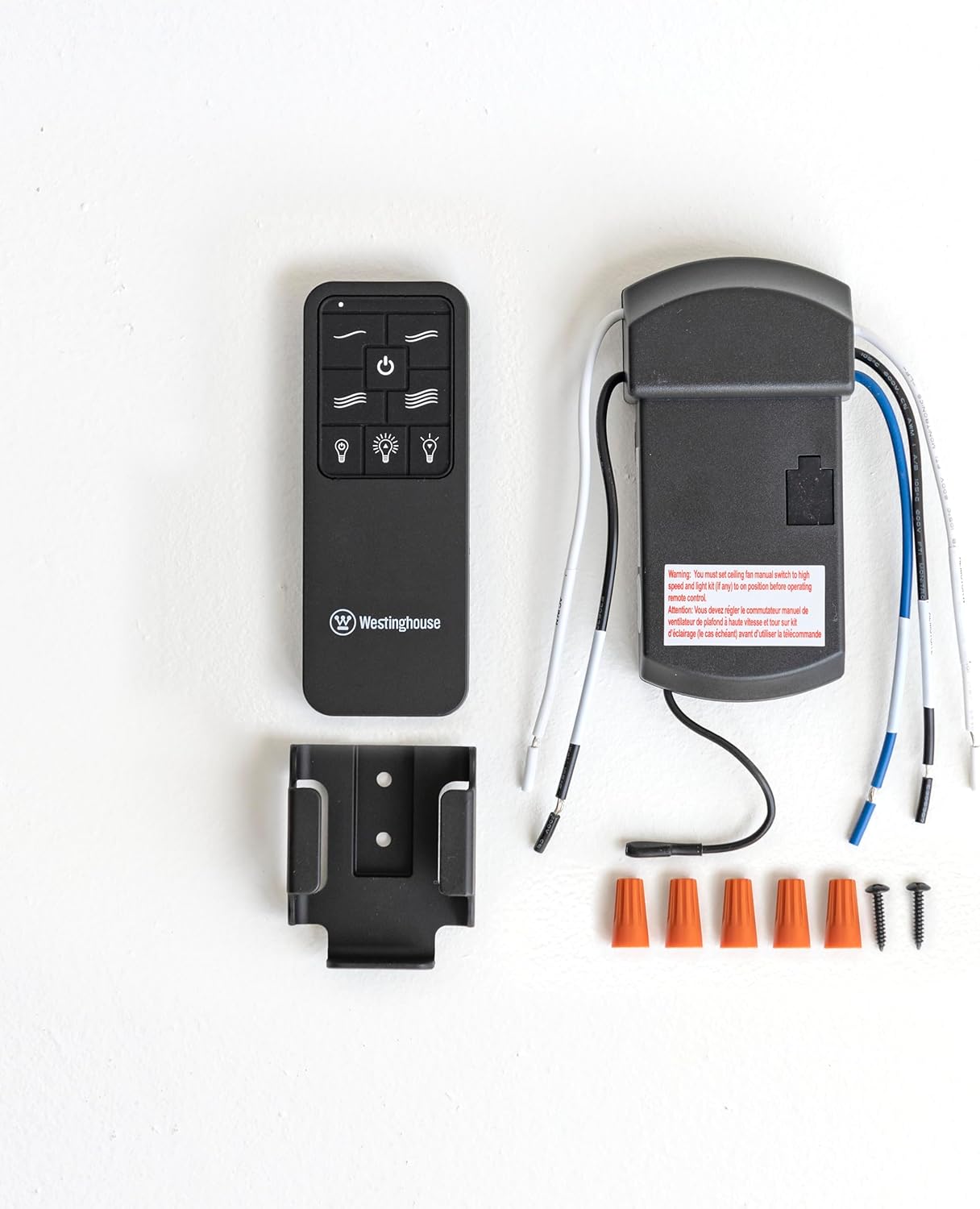
- Remote Control Transmitter
- Receiver Unit
- Wall Mounting Bracket
- Wire Nuts
- Mounting Screws

All components included in the remote control kit for installation.
Setup and Installation
Installation of the receiver unit requires electrical wiring knowledge. If you are not comfortable with electrical work, it is recommended to consult a qualified electrician. Ensure power is disconnected at the circuit breaker before beginning installation.
Receiver Installation
- Turn off power to the ceiling fan at the circuit breaker.
- Remove the existing canopy or cover from your ceiling fan to access the wiring.
- Connect the receiver unit's wires to the corresponding fan and household wires using the provided wire nuts. Follow the wiring diagram provided with your ceiling fan or the receiver for correct connections (typically matching colors: black to black, white to white, blue to blue for light, etc.).
- Carefully tuck the receiver unit into the fan's canopy, ensuring no wires are pinched.
- Reattach the canopy or cover.
Remote Control Battery Installation
The remote control requires two (2) AAA batteries (not included). Open the battery compartment cover on the back of the remote and insert the batteries, observing the correct polarity (+/-). Replace the cover securely.
Wall Mounting Bracket Installation
The included wall mounting bracket allows for convenient storage of your remote control. Choose a suitable location on a wall, away from direct sunlight or heat sources. Use the provided screws to secure the bracket to the wall.

The remote control can be conveniently stored in its wall-mounted bracket.
Operating Instructions
The Westinghouse 7787900 remote control provides intuitive operation for your ceiling fan and light kit. The buttons are backlit for easy use in dark environments.
Button Functions

Detailed explanation of each button's function on the remote control.
- On/Off Button (Power Symbol): Press to turn the fan and light on or off.
- Fan Speed Buttons (Wave Symbols):
- One wave: Low Speed
- Two waves: Medium Speed
- Three waves: Medium-High Speed
- Four waves: High Speed
- Light On/Off Button (Light Bulb Symbol with Power Symbol): Press to turn the light kit on or off.
- Increase Brightness Button (Light Bulb Symbol with Up Arrow): Press to increase the brightness of the light kit.
- Decrease Brightness Button (Light Bulb Symbol with Down Arrow): Press to decrease the brightness of the light kit.
Backlit Buttons
The remote control features illuminated buttons, making it easy to operate in dimly lit rooms. The backlight activates when any button is pressed.
Visual comparison of the remote control with its backlight off and on.
Product Video
Watch this video for a visual guide on the features and operation of the Westinghouse Backlit Ceiling Fan Remote.
Maintenance
Battery Replacement
When the remote control's range decreases or buttons become unresponsive, it is time to replace the batteries. Open the battery compartment on the back of the remote, remove the old batteries, and insert two new AAA batteries, ensuring correct polarity. Dispose of old batteries responsibly.
Cleaning
To clean the remote control, wipe it with a soft, dry cloth. Do not use abrasive cleaners, solvents, or harsh chemicals, as these can damage the finish or internal components. Avoid exposing the remote to excessive moisture.
Troubleshooting
| Problem | Possible Cause | Solution |
|---|---|---|
| Fan/Light does not respond to remote. | Dead or incorrectly installed batteries. | Check battery polarity and replace with fresh AAA batteries. |
| Power to the fan is off. | Ensure the circuit breaker for the fan is on. | |
| Receiver wiring issue. | Verify all wiring connections to the receiver are secure. Consult an electrician if unsure. | |
| Light does not dim. | Non-dimmable light bulbs installed. | Ensure dimmable light bulbs are used in the fan's light kit. |
| Remote range is poor. | Low batteries. | Replace batteries with fresh AAA batteries. |
| Obstruction between remote and receiver. | Ensure a clear line of sight or minimize obstructions between the remote and the fan. |
Specifications
- Brand: Westinghouse
- Model Number: 7787900
- Color: Black
- Connectivity Technology: Infrared
- Button Quantity: 4 (Fan Speed) + 3 (Light/Power)
- Maximum Range: 10 Meters (approximately 33 feet)
- Battery Type: 2 x AAA batteries (not included)
- Item Weight: 8.16 ounces
- Dimensions (approximate): 4.33" L x 1.65" W x 0.5" D

Dimensions of the remote control for reference.
Warranty Information
This Westinghouse product is covered by a 1-Year Limited Warranty from the date of purchase. This warranty covers defects in materials and workmanship under normal use. It does not cover damage resulting from misuse, accident, modification, or unauthorized repair. Please retain your proof of purchase for warranty claims.
Support
For technical assistance, troubleshooting beyond this manual, or warranty inquiries, please contact Westinghouse customer support. Refer to the product packaging or the official Westinghouse website for the most current contact information.

