
1. Introduction
This manual provides detailed instructions for the assembly, operation, and maintenance of your RD RD6006W 60V 6A DC DC Step Down Power Supply. This kit includes the RD6006W module, an S400 metal case, and a 400W Power Supply Unit (PSU). Please read this manual thoroughly before use to ensure proper functionality and safety.

2. Safety Information
- This power supply is provided as a kit and requires assembly. Refer to the assembly instructions or video before proceeding.
- The included PSU is defaulted to 220V AC input. If you are using 110V AC, ensure you change the input gear on the PSU accordingly before connecting to a power outlet. Failure to do so may cause damage to the unit or pose a safety risk.
- Always prepare a suitable AC power cable to connect the device to the wall outlet.
- A backup fuse is included. If the fuse burns out, replace it with the provided spare.
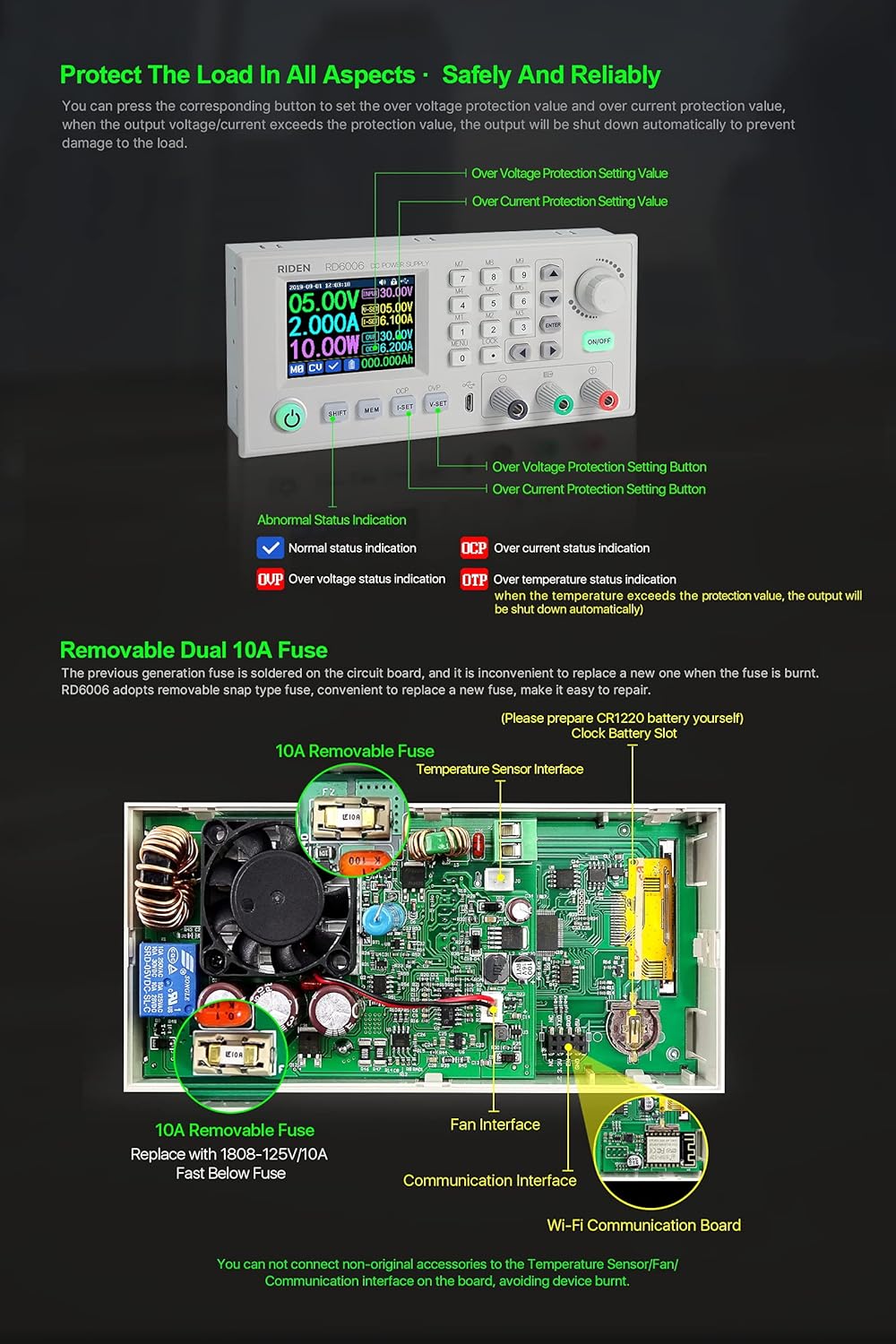
- Do not connect non-original accessories to the Temperature Sensor/Fan/Communication Interface on the board, as this may damage the device.
- For time display functionality, a CR1220 battery is required (not included).
3. Package Contents
The complete kit includes the following items:
- 1x RD6006W module
- 1x S400 metal case
- 1x 400W PSU
- 1x Backup fuse
- 1x Instruction card (for download link)

4. Product Features and Technical Parameters
The RD6006W is a digital control DC DC step-down power supply offering a range of features for precise power management.
Key Features:
- 2.4-inch HD color LCD screen with 160-degree wide view.
- User-friendly interface with keypad control.
- DIY display style options.
- APP control via WiFi (RD6006W model).
- PC software control via micro USB connection.
- Firmware upgrade support.
- Battery charging function.
- Over-voltage protection (OVP) and Over-current protection (OCP).
- Removable dual 10A fuses for easy replacement.

Technical Parameters:
| Parameter | Value |
|---|---|
| Input Voltage Range | 6-70.00V |
| Output Voltage Range | 0-60.00V |
| Output Current Range | 0-6.000A |
| Output Power Range | 0-360.0W |
| Output Voltage Accuracy | ±(0.3%+3 digits) |
| Output Current Accuracy | ±(0.5%+5 digits) |
| Output Ripple Typical | 100mV VPP |
| Working Temperature Range | -10℃~40℃ |
| Constant Voltage Mode Response Time | 2ms (0.1A-5A load) |
| Capacity and Energy Statistical Error | ±2% |
| Working Mode | Buck mode: Voltage drop >1V and >10% |
5. Setup and Assembly
The RD6006W is provided as a kit and requires assembly of the module, S400 case, and 400W PSU. Detailed assembly instructions are typically provided on an included card or via online video resources. Ensure all connections are secure and correct before powering on the device.

PSU Voltage Selection:
The 400W PSU is factory-set to 220V AC input. If your region uses 110V AC, you must adjust the voltage selector switch on the PSU. Locate the switch, remove any protective sticker, and set it to 110V AC. Failure to do so will damage the unit.
AC Power Cable:
An AC power cable is not included with the kit. You will need to provide your own cable to connect the assembled unit to a wall outlet.
6. Operating Instructions
6.1. Basic Operation
The RD6006W features a user-friendly interface with keypad and rotary encoder control for setting parameters and navigating menus.
6.2. Output Voltage and Current Setting
Use the dedicated buttons (e.g., V-SET, I-SET) and the rotary encoder to precisely adjust the output voltage and current. The large 2.4-inch screen provides a clear display of all parameters.

6.3. Over-Voltage Protection (OVP) and Over-Current Protection (OCP)
The device includes OVP and OCP features to protect your load. You can set the protection values, and the output will automatically shut down if these limits are exceeded.

6.4. Data Group Management
The RD6006W allows you to store and recall up to 9 sets of frequently used voltage and current settings for quick access.
6.5. Keypad Lock/Unlock
To prevent accidental changes to settings, the keypad can be locked. Refer to the device's menu for instructions on how to lock and unlock the keypad.
6.6. Menu Settings
Access the menu to configure various device settings, including:
- Language: Select English or other supported languages.
- Backlight: Adjust screen brightness.
- Interface: Choose communication interface (USB/WiFi).
- Baudrate: Set communication speed (adjustable under USB mode).
- Address: Set device address (001-255).
- Date/Time: Set the current date and time.
- Measure Rate: Adjust the refresh rate of output U/I/P on the main page.
6.7. Display Style Selection
The device offers different display styles for the main interface, allowing you to customize how information is presented.
6.8. Battery Charging Function
The RD6006W supports battery charging. Use the green and black charging terminals. Ensure correct polarity to avoid damage. The device displays external temperature, capacity, and energy statistics during charging.

7. Software and App Control
The RD6006W supports remote control and monitoring via PC software and a mobile application.
7.1. PC Software Control
Connect the RD6006W to your PC via a micro USB cable. The PC software (compatible with Windows 7 and above) allows for remote monitoring, setting parameters, and firmware upgrades. The keypad on the device will be locked when connected to the PC software.
7.2. Mobile App Wireless Control
The RD6006W model supports APP control via WiFi (Android 5.0 and above, iOS 10.0-13.4). Download the APP in advance to check for compatibility with your phone system. The WiFi communication only supports 2.4G signals; 5G signals are not supported. Do not install or remove the Wi-Fi module when the power is on, as this may damage the device.

7.3. Official Product Video: Operation video
Video 1: An operation video demonstrating the use of the RD6006 60V 6A Power Supply with PC software and APP via WiFi. This video provides a detailed walkthrough of the device's functions and connectivity options.
7.4. Official Product Video: RD6006/RD6006W USB/WiFi DC DC Step Down Power Supply
Video 2: This video provides an overview of the RD RD6006/RD6006W USB/WiFi DC DC Step Down Power Supply, highlighting its features and capabilities.
8. Maintenance
8.1. Fuse Replacement
The circuit board is designed with a removable snap-type fuse. If a fuse burns out, you can easily replace it with the spare provided in the box. Ensure the device is powered off and disconnected from the main supply before attempting to replace a fuse.

9. Troubleshooting
If you encounter any issues with your RD6006W power supply, please refer to the detailed instruction card provided with the product or contact the seller for support. Common issues may include connectivity problems with the APP/PC software or unexpected output behavior.
- Incompatibilities: The App supports Android 8.0 to Android 10.0 and iOS 10.0-13.4. PC software supports Windows 7 and above. Check your system compatibility.
- Firmware Update Issues: If a firmware update causes abnormal behavior, you may need to perform a factory reset. Refer to the instruction card for specific steps.
10. Specifications
| Specification | Detail |
|---|---|
| Model Name | RD6006W |
| Brand | RD |
| Item Weight | 6.24 pounds (2.84 Kilograms) |
| Product Dimensions | 12.2 x 7.09 x 3.54 inches |
| Wattage | 360 watts |
| Output Wattage | 400 Watts |
| Item Package Quantity | 1 |
| Batteries Included? | No |
| Batteries Required? | No (CR1220 for time display, not included) |
| Compatible Devices | Personal Computer |
| Connector Type | micro_usb |
| Form Factor | ATX |
| Cooling Method | Air |
11. Warranty and Support
For any product-related inquiries, technical support, or warranty claims, please contact the RuiDeng Official Store directly through the platform where the product was purchased. Ensure you have your purchase details and product serial number available for faster assistance.


