
1. Introduction
Thank you for choosing the Music Sound Drift Bluetooth In-Ear Headphones. This manual provides essential information for setting up, operating, and maintaining your headphones to ensure optimal performance and longevity. Please read this manual thoroughly before use.
2. Package Contents
Verify that all items listed below are present in your package:
- Music Sound Drift In-Ear Headphones (Left and Right Earbuds)
- Charging Case
- USB-C Charging Cable
- User Guide (This Manual)

Figure 2.1: Included components in the Music Sound Drift package.
3. Product Overview
The Music Sound Drift headphones feature an in-ear design for a secure fit and a compact charging case for portability. Key components include:
- Earbuds: Equipped with touch controls and integrated microphones.
- Charging Case: Stores and charges the earbuds, featuring LED indicators for battery status.

Figure 3.1: Music Sound Drift Earbuds and Charging Case.
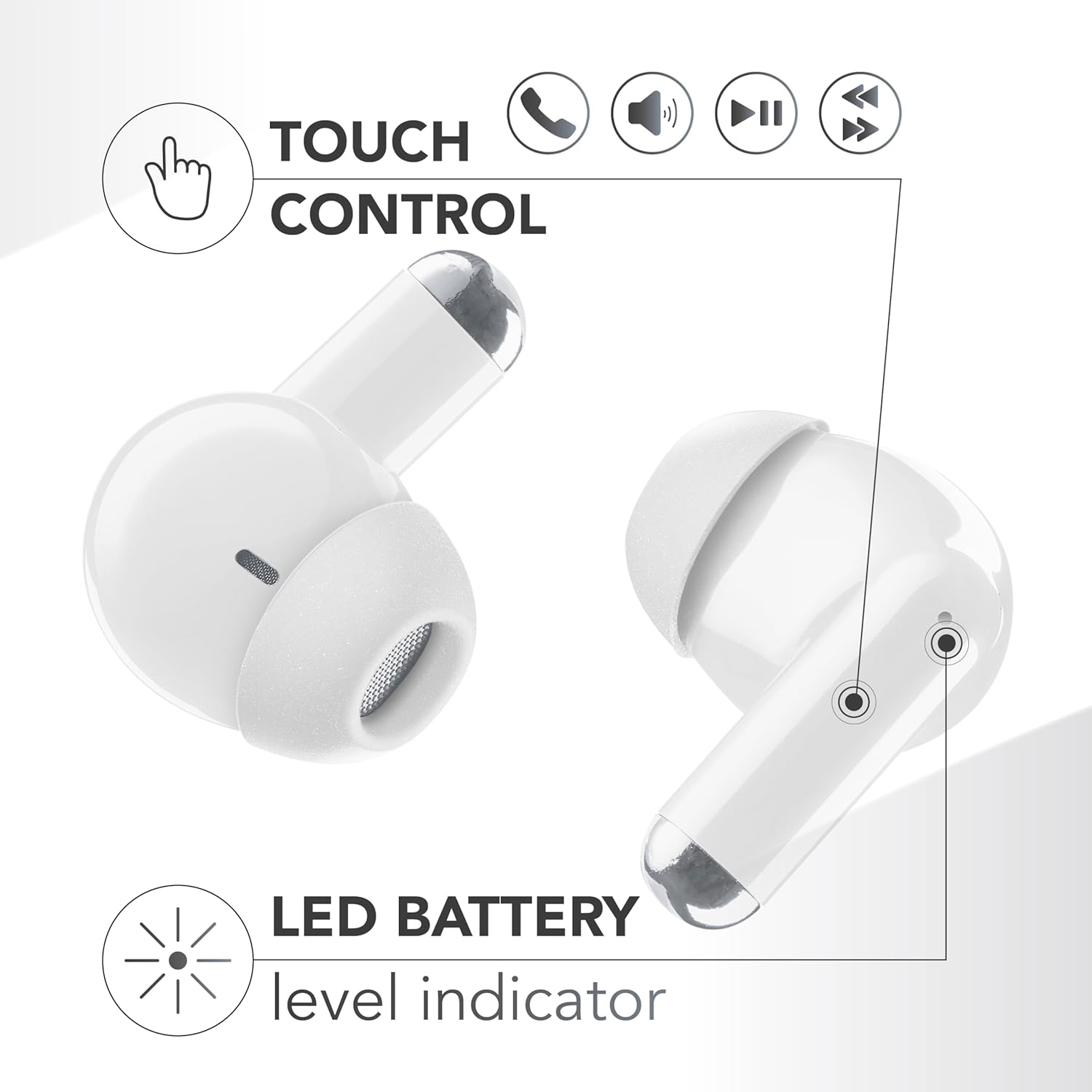
Figure 3.2: Earbud Touch Control Areas and Case LED Indicators.
4. Charging the Headphones
Before first use, fully charge the earbuds and the charging case.
- Place the earbuds into the charging case. Ensure they are correctly seated.
- Connect the USB-C charging cable to the charging port on the case and the other end to a USB power source (e.g., computer, wall adapter).
- The LED indicators on the charging case will illuminate to show charging status. Once fully charged, the indicators may change or turn off depending on the model.
- A full charge provides up to 5 hours of playback for the earbuds, with the charging case extending total playback time to approximately 22 hours.

Figure 4.1: Battery life overview for Music Sound Drift headphones.
5. Setup and Pairing
The Music Sound Drift headphones feature an auto-pairing function for quick connection.
- Initial Pairing:
- Open the charging case. The earbuds will automatically enter pairing mode.
- On your device (smartphone, tablet, etc.), enable Bluetooth.
- Search for "Music Sound Drift" in the list of available Bluetooth devices and select it to connect.
- Once connected, a confirmation sound or message may be heard.
- Automatic Reconnection: After initial pairing, the earbuds will automatically connect to the last paired device when removed from the case and Bluetooth is enabled on the device.
6. Operating the Headphones (Touch Controls)
The earbuds are equipped with touch-sensitive controls for managing audio playback, calls, and voice assistant functions.
| Function | Action |
|---|---|
| Play/Pause Music | Single tap on either earbud. |
| Next Track | Double tap on the right earbud. |
| Previous Track | Double tap on the left earbud. |
| Answer/End Call | Single tap on either earbud. |
| Reject Call | Press and hold either earbud for 2 seconds. |
| Activate Voice Assistant | Triple tap on either earbud. |
7. Wearing the Earbuds
For optimal sound quality and comfort, ensure the earbuds are properly seated in your ears.
- Gently insert each earbud into the corresponding ear canal (L for left, R for right).
- Rotate the earbud slightly until it feels secure and comfortable.
- Adjust as needed to achieve a snug fit that seals the ear canal for best audio performance.

Figure 7.1: Proper wearing of the Music Sound Drift earbuds for a comfortable fit.
8. Maintenance and Care
To prolong the life of your Music Sound Drift headphones, follow these care instructions:
- Cleaning: Use a soft, dry, lint-free cloth to clean the earbuds and charging case. Do not use abrasive cleaners or solvents.
- Storage: When not in use, store the earbuds in their charging case to protect them and keep them charged.
- Water Exposure: The headphones are not waterproof. Avoid exposure to water, moisture, or extreme temperatures.
- Charging Port: Keep the USB-C charging port free of dust and debris.
9. Troubleshooting
If you encounter issues with your headphones, refer to the following common problems and solutions:
| Problem | Solution |
|---|---|
| Earbuds not pairing |
|
| No sound from one earbud |
|
| Charging case not charging |
|
| Touch controls unresponsive |
|
10. Specifications
| Feature | Detail |
|---|---|
| Model Number | BTMSTWSDRIFTW |
| Connectivity | Bluetooth |
| Ear Placement | In Ear |
| Form Factor | True Wireless |
| Control Method | Touch |
| Battery Life (Earbuds) | Up to 5 hours (single charge) |
| Total Battery Life (with case) | Up to 22 hours |
| Frequency Range | 20Hz - 20,000Hz |
| Item Weight | 0.07 Kilograms |
| Material | Plastic, Silicone |
11. Safety Information
Please observe the following safety guidelines:
- Do not expose the product to extreme temperatures, direct sunlight, or fire.
- Do not disassemble or modify the product.
- Keep out of reach of children.
- Avoid listening at high volumes for extended periods to prevent hearing damage.
- Dispose of the product and its battery responsibly according to local regulations.
12. Warranty and Support
For warranty information or technical support, please refer to the documentation provided at the point of purchase or visit the official Music Sound website. Keep your proof of purchase for warranty claims.


