1. Introduction
This manual provides essential information for the safe and effective use of your ONETWOFIT Electric Walking Pad, model OT0341. Please read this manual thoroughly before operating the device and retain it for future reference.
2. Important Safety Instructions
To reduce the risk of serious injury, always follow basic precautions when using this appliance, including the following:
- Read all instructions before using the treadmill.
- Keep children and pets away from the treadmill during operation.
- Place the treadmill on a flat, stable surface.
- Ensure adequate clear space around the treadmill (at least 2 meters behind and 0.6 meters on each side).
- Do not operate the treadmill if it has a damaged cord or plug, or if it is not working properly.
- Wear appropriate athletic footwear.
- Do not use the treadmill outdoors or in damp areas.
- Disconnect power before cleaning or performing maintenance.
- The maximum user weight capacity is 110 kg (242.5 lbs).
3. Product Overview
The ONETWOFIT Electric Walking Pad OT0341 is designed for home and office use, offering a compact and convenient way to incorporate walking into your daily routine. It features a powerful 2.0HP brushless motor, an LED display, and remote control operation.
3.1 Key Features
- Compact Design: Small footprint for easy storage under desks or beds.
- Powerful Motor: 2.0HP brushless motor for smooth and quiet operation.
- Adjustable Speed: Speed range from 0.8 to 6.0 km/h.
- LED Display: Shows exercise data including speed, time, distance, and steps.
- Remote Control: Conveniently adjust settings during use.
- Shock Absorption: Multi-layer running belt designed for comfort and joint protection.
- Transport Wheels: Built-in wheels for easy movement.
3.2 Product Components

Figure 1: Treadmill dimensions (97cm length, 56cm width, 17cm height at motor, 8cm height at rear, 87cm x 42cm running area).

Figure 2: Multi-layer running belt construction for comfort and durability, including fine grass wear-resistant surface, polyester mesh mid-layer, PVC coating, and polyester mesh backing.

Figure 3: Overview of treadmill features including LED display, maneuverable wheels, remote control, and Fitshow APP compatibility.

Figure 4: Detailed view of the LED display showing speed, time, steps, and distance.

Figure 5: The included remote control for adjusting treadmill settings.

Figure 6: The Fitshow APP interface for controlling the treadmill via a smartphone. Download the app from http://fitshow.co/qr.
4. Setup and Initial Use
4.1 Unpacking and Placement
The ONETWOFIT Walking Pad comes fully assembled. Simply remove it from the packaging.
- Choose a flat, stable surface for placement.
- Ensure there is sufficient space around the treadmill for safe operation.
- Plug the power cord into a grounded electrical outlet.
- Turn on the power switch, usually located at the front of the treadmill.
4.2 Using with a Standing Desk
This walking pad is ideal for use with a standing desk to integrate exercise into your workday.

Figure 7: Illustration of correct posture (standing and walking) versus incorrect posture (sitting) when using the walking pad with a standing desk.

Figure 8: Example of using the walking pad under a standing desk for a healthier work routine.
4.3 Storage
The compact design and built-in wheels allow for easy storage.

Figure 9: The walking pad can be easily stored under a bed due to its slim profile.
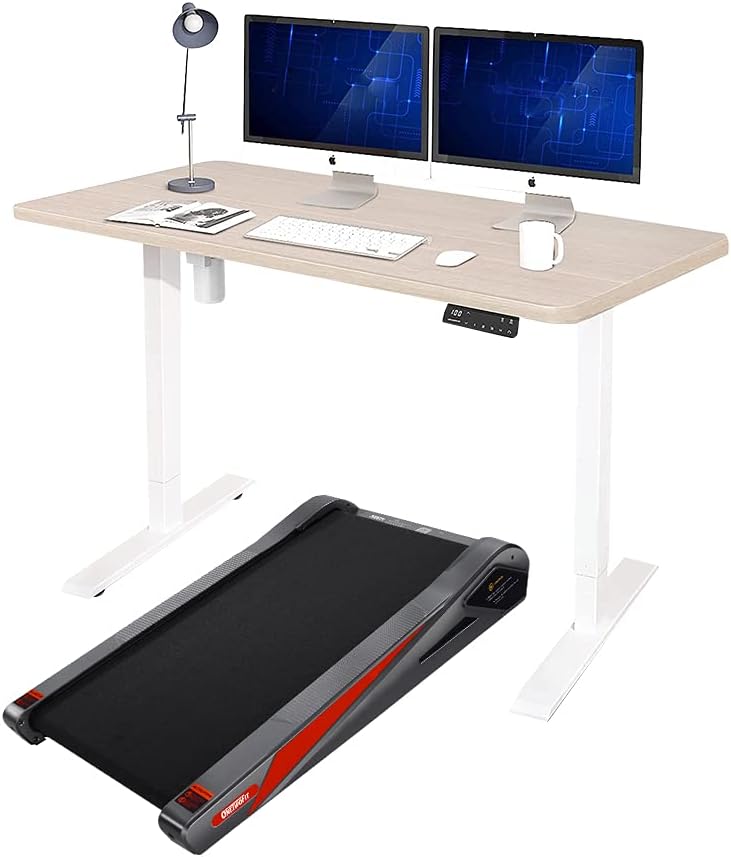
Figure 10: The walking pad can also be stored upright against a wall, utilizing its maneuverable wheels for easy positioning.
5. Operating Instructions
5.1 Remote Control
The treadmill is operated using the included remote control. Ensure the remote has working batteries.
- Start/Stop: Press the power button to start or stop the treadmill.
- Speed Adjustment: Use the '+' and '-' buttons to increase or decrease the walking speed. The speed range is 0.8 to 6.0 km/h.
5.2 LED Display
The integrated LED display shows your workout data in real-time.
- Speed: Current walking speed.
- Time: Duration of your workout.
- Distance: Total distance walked.
- Steps: Number of steps taken (if applicable).
5.3 Fitshow APP Control
For enhanced control and tracking, download the Fitshow APP to your smartphone. Scan the QR code or visit http://fitshow.co/qr to download.
- Connect the app to your treadmill via Bluetooth.
- Control speed and monitor workout data directly from your phone.
6. Maintenance
6.1 Lubrication
To ensure smooth operation and prolong the lifespan of your treadmill, it is recommended to add lubricating oil every 3 months. Refer to the specific instructions provided with your lubricating oil for application details.
6.2 Running Belt Adjustment
If the treadmill belt shifts or slips, it may require adjustment. This can be done using the provided Allen key.

Figure 11: Visual guide for correct running belt alignment (right) versus a misaligned belt (left).
- Turn off and unplug the treadmill before attempting any adjustments.
- Locate the adjustment bolts at the rear of the treadmill.
- If the belt has shifted to the right, turn the right bolt clockwise a quarter turn. If it shifted left, turn the left bolt clockwise a quarter turn.
- If the belt is slipping, turn both bolts clockwise a quarter turn to tighten the belt.
- Plug in and run the treadmill at a low speed to check alignment. Repeat small adjustments as needed.
7. Troubleshooting
| Problem | Possible Cause | Solution |
|---|---|---|
| Treadmill does not start. | Power cord not plugged in; Power switch off; Circuit breaker tripped. | Ensure power cord is securely plugged in. Turn on the power switch. Check household circuit breaker. |
| Running belt shifts to one side. | Belt misalignment. | Refer to Section 6.2 "Running Belt Adjustment" to center the belt. |
| Running belt slips during use. | Belt too loose; Insufficient lubrication. | Refer to Section 6.2 "Running Belt Adjustment" to tighten the belt. Apply lubricating oil as per Section 6.1. |
| Unusual noise during operation. | Lack of lubrication; Loose components. | Apply lubricating oil. Check for any loose screws or parts and tighten them. |
| Remote control not responding. | Dead batteries; Obstruction between remote and treadmill. | Replace remote control batteries. Ensure clear line of sight to the treadmill's receiver. |
8. Specifications
| Feature | Detail |
|---|---|
| Model Number | OT0341 |
| Product Dimensions (L x W x H) | 108.5 x 65.5 x 22 cm |
| Running Area (L x W) | 870 x 420 mm (34.25 x 16.53 inches) |
| Item Weight | 25 kg |
| Maximum User Weight | 110 kg (242.5 lbs) |
| Motor Horsepower | 2.0 HP |
| Speed Range | 0.8 - 6.0 km/h |
| Incline | Approximately 15-degree fixed incline |
| Display Type | LED (shows Distance, Speed, Time, Steps) |
| Frame Material | Alloy Steel |
| Power Source | Corded Electric |
| Sound Level | Less than 72 dB |
| Special Features | Portable, Remote Control, APP Control |
9. Warranty and Support
ONETWOFIT is committed to providing quality products and thoughtful after-sales service. For any questions, concerns, or support needs regarding your OT0341 Electric Walking Pad, please contact ONETWOFIT customer service.
Please retain your proof of purchase for any warranty claims.
For more information or to view other products, visit the official ONETWOFIT store: ONETWOFIT Store.
