
1. Important Safety Information
Please read all instructions before using this appliance to reduce the risk of fire, explosion, electric shock, or injury. This manual contains important information regarding the safe operation, installation, and maintenance of your GE Profile Opal 2.0 Nugget Ice Maker.
- Always unplug the appliance before cleaning or performing any maintenance.
- Do not immerse the appliance, cord, or plug in water or other liquids.
- Use only potable water in the ice maker.
- Keep children away from the appliance during operation.
- Ensure the appliance is placed on a stable, level surface.
- Do not operate any appliance with a damaged cord or plug, or after the appliance malfunctions or has been damaged in any manner.
2. Product Overview
The GE Profile Opal 2.0 Nugget Ice Maker produces chewable, crunchy nugget ice. It features a large capacity, built-in WiFi for smart control, and a side water tank for extended ice production.

Front view of the GE Profile Opal 2.0 Nugget Ice Maker, showcasing the ice bin and control panel.
Key Features:
- Nugget Ice Production: Produces chewable, compacted ice flakes.
- High Capacity: Makes up to 38 pounds of ice per day, with a 3-pound storage bin.
- Built-in WiFi & SmartHQ App: Monitor device status, schedule ice production, and receive automatic software updates.
- Side Water Tank: Increases ice production capacity and reduces the frequency of water refills.
- LED Display Screen: Intuitive controls that illuminate during use and dim when idle.
- Cleaning System: Advanced cleaning and descaling features to maintain ice quality and machine performance.
3. Setup and Installation
3.1 Unpacking
- Carefully remove the ice maker from its packaging.
- Verify all included components are present: Ice Maker, Drip Tray, Ice Scoop, Side Tank.
- Remove all packing materials, tape, and protective film.
3.2 Placement
Place the ice maker on a stable, level countertop. Ensure adequate clearance around the unit for proper ventilation. The dimensions are approximately 17.5"D x 13.43"W x 16.5"H.

Image illustrating the depth, width, and height of the GE Profile Opal 2.0 Nugget Ice Maker.
3.3 Side Tank Installation
The side tank provides additional water capacity. Attach the side tank to the designated port on the ice maker. Ensure it is securely connected to prevent leaks.

The GE Profile Opal 2.0 Nugget Ice Maker with its side tank clearly visible, highlighting its inclusion for more ice and fewer refills.
3.4 Initial Water Fill
Fill the side tank or the internal reservoir with potable water. For optimal performance and to minimize maintenance, using distilled water is recommended, especially in hard water areas. If the 'REFILL WATER' light appears despite a full tank, remove the ice bucket and lift the entire side tank assembly slightly for a few seconds to clear any air bubbles in the water line.
3.5 SmartHQ App Connection
Download the SmartHQ app on your smartphone. Follow the in-app instructions to pair your ice maker via built-in WiFi. This enables remote monitoring, scheduling, and voice control capabilities.

A smartphone screen showing the SmartHQ app interface, demonstrating the ability to schedule fresh ice production.
4. Operating Instructions
4.1 Making Ice
Press the 'Power' button on the control panel to begin ice production. The first batch of ice typically takes 10 minutes or less. The machine produces approximately 1.6 pounds of ice per hour and can hold up to 3 pounds in the ice bin.

A hand reaching into the ice bin of the GE Profile Opal 2.0 Nugget Ice Maker, which holds up to 3 pounds of ice.
4.2 SmartHQ App Scheduling
Utilize the SmartHQ app to set schedules for ice production. This allows you to have fresh ice ready when needed, optimizing energy consumption.
4.3 LED Display
The LED display screen provides operational status and controls. It illuminates when in use and darkens when the unit is at rest to minimize distraction.
4.4 Normal Operating Sounds
The ice maker will produce various sounds during operation, similar to a refrigerator ice maker. These sounds are normal and indicate the unit is functioning correctly.

An illustration indicating normal operating sounds from the GE Profile Opal Ice Maker, which are comparable to a refrigerator's ice maker.
4.5 Ice Storage
The innovative design recirculates melted ice back to the water reservoir, preventing clumping and ensuring a continuous supply of fresh ice. If the unit is turned off, any ice in the bin will melt.
5. Maintenance
Regular cleaning and descaling are crucial for maintaining ice quality and the longevity of your ice maker.
5.1 Cleaning
- The ice maker features an advanced cleaning system. Refer to the SmartHQ app or the full product manual for detailed cleaning cycle instructions.
- A cleaning kit (P4INKCLEAN) is available separately for thorough cleaning.
- Clean the unit weekly to prevent buildup and maintain fresh-tasting ice.
5.2 Descaling
Descaling removes mineral deposits that can affect performance. The frequency of descaling depends on your water hardness.
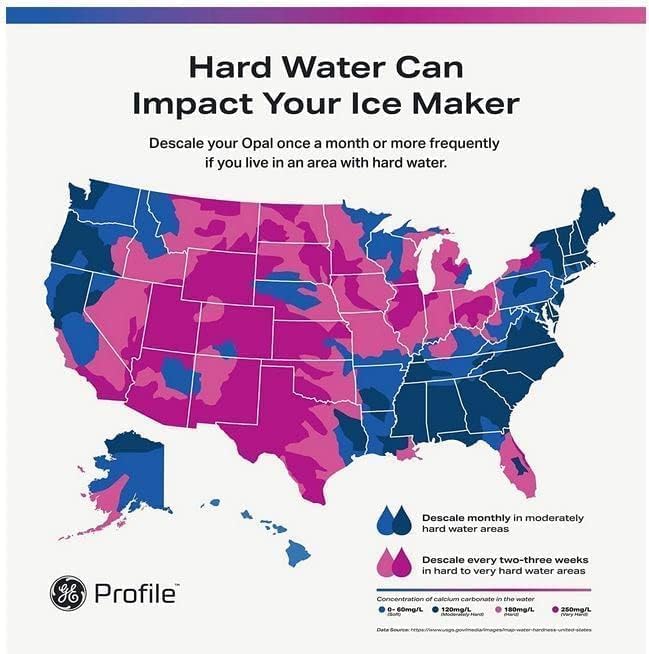
A map illustrating water hardness levels across the United States, with recommendations to descale monthly in moderately hard areas and every two to three weeks in very hard water areas.
- Descale your Opal ice maker once a month, or more frequently (every 2-3 weeks) if you reside in an area with hard water.
- A water filter (P4INKFILTR) is available separately and can help reduce mineral buildup.
5.3 Water Type
Using distilled water can significantly reduce the need for frequent descaling and cleaning, especially in areas with high mineral content in tap water.
6. Troubleshooting
This section addresses common issues you might encounter with your ice maker.
| Problem | Possible Cause | Solution |
|---|---|---|
| "Add Water" light is on, but reservoir/tank is full. | Air bubble in the water line or sensor issue. | Remove the ice bucket, then lift the side tank assembly slightly for a few seconds to clear air bubbles. Ensure the tank is properly seated. |
| Ice maker is making unusual loud noises. | Normal operating sounds, or potential internal issue. | Refer to the 'Normal Operating Sounds' section. If noises are excessive or new, contact customer support. |
| Ice melts quickly in the bin. | Ice is soft by nature; unit may be off. | Nugget ice is softer than traditional ice. Ensure the unit remains powered on to recirculate melted ice. |
| Ice maker stops producing ice or shuts off randomly. | Potential internal malfunction or sensor error. | Unplug the unit for 20-30 seconds, then plug it back in and restart. If the issue persists, contact customer support. |
7. Specifications
| Feature | Detail |
|---|---|
| Brand | Profile |
| Model Name | GE Profile Opal Nugget Ice Maker with Side Tank |
| Model Number | XPIO13BCBT |
| Product Dimensions | 17.5"D x 13.43"W x 16.5"H |
| Capacity | 3 Pounds (ice bin) |
| Daily Ice Production | Up to 38 lbs in 24 hours |
| Wattage | 300 watts |
| Voltage | 120 Volts |
| Refrigerant | R600a |
| Material | Stainless Steel |
| Color | Black Stainless |
| Installation Type | Countertop |
| Included Components | Ice Maker, Drip Tray, Ice Scoop, Side Tank |
| Special Features | Built-in WiFi and Voice Control, Fresh and Filtered Ice, LED Display Screen, Rapid Production, Water Tank |
8. Warranty and Support
8.1 Warranty Information
Specific warranty details for your GE Profile Opal 2.0 Nugget Ice Maker are typically provided with the product documentation at the time of purchase. Please refer to the warranty card or contact GE Appliances customer service for comprehensive information regarding coverage periods and terms.
8.2 Customer Support
For technical assistance, troubleshooting beyond this manual, or to inquire about replacement parts and accessories, please contact GE Appliances customer support. You can also find additional resources and FAQs through the SmartHQ app or the official GE Appliances website.


