
Hotpoint HAFC9 TA23SX O3
Hotpoint HAFC9 TA23SX O3 Refrigerator User Manual
Model: HAFC9 TA23SX O3
Introduction
This manual provides essential information for the safe and efficient use of your Hotpoint HAFC9 TA23SX O3 combined freestanding refrigerator. Please read these instructions carefully before installation and use, and keep them for future reference.
Your Hotpoint refrigerator features advanced technologies such as Total No Frost for automatic defrosting, MultiCool Flow for even temperature distribution, and Active Oxygen for enhanced food preservation.
Important Safety Information
WARNING: To reduce the risk of fire, electric shock, or injury, follow these basic precautions:
- Ensure the appliance is properly grounded.
- Do not use mechanical devices or other means to accelerate the defrosting process, other than those recommended by the manufacturer.
- Do not damage the refrigerant circuit.
- Do not use electrical appliances inside the food storage compartments of the appliance, unless they are of the type recommended by the manufacturer.
- Before cleaning or maintenance, always unplug the appliance from the power supply.
- Keep ventilation openings, in the appliance enclosure or in the built-in structure, clear of obstruction.
- This appliance is not intended for use by persons (including children) with reduced physical, sensory or mental capabilities, or lack of experience and knowledge, unless they have been given supervision or instruction concerning use of the appliance by a person responsible for their safety.
- Children should be supervised to ensure that they do not play with the appliance.
Setup and Installation
Unpacking
Carefully remove all packaging materials. Inspect the appliance for any damage. If damage is found, do not connect the appliance to the power supply and contact your retailer.
Placement
Place the refrigerator on a firm, level surface. Ensure adequate ventilation around the appliance. Maintain a minimum distance of 10 cm from the rear wall and 5 cm from the sides to allow for proper air circulation.
Avoid placing the appliance near heat sources (e.g., oven, radiator, direct sunlight) or in excessively cold environments.

Figure 1: Refrigerator placed in a kitchen environment. Ensure proper clearance for ventilation.
Electrical Connection
Connect the appliance to a dedicated, properly grounded electrical outlet. The voltage requirement is 200 Volts. The power plug is a Type F - 2 pin (German) type. Do not use extension cords or multiple adapters.
First Use
After installation, wait at least 4 hours before plugging in the appliance to allow the refrigerant fluids to settle. Clean the interior of the refrigerator and freezer compartments with a damp cloth and mild detergent before loading food.
Operating Instructions
Control Panel
The electronic control panel is located at the top of the refrigerator compartment. It allows you to adjust temperature settings and activate special functions.

Figure 2: Electronic control panel. Use to adjust temperature and activate features.
Temperature Control
Use the control panel to set the desired temperature for both the refrigerator and freezer compartments. Recommended refrigerator temperature is 4°C (39°F) and freezer temperature is -18°C (0°F).
Key Features
- Total No Frost: This system prevents ice build-up in both the refrigerator and freezer compartments, eliminating the need for manual defrosting. Cold air circulates evenly to maintain stable temperatures.
- MultiCool Flow: Ensures uniform distribution of cool air throughout the refrigerator, maintaining a consistent temperature and preserving food freshness.
- Active Oxygen (O3): Reduces the growth of bacteria by up to 99.99% (based on independent lab tests), helping to keep food fresh for longer and reduce odors.
- Super Freeze: Activates rapid freezing in the freezer compartment, ideal for quickly freezing fresh food items or making ice. The temperature automatically returns to the preset level after the function is complete.
- Active Fresh: Optimizes conditions for fresh food storage.
- Modular Balconies: Adjustable door shelves for flexible storage solutions.
- LED Lighting: Provides bright and energy-efficient illumination inside the refrigerator compartment.
- Active Inverter Compressor: Ensures efficient and quiet operation, adapting to cooling needs.

Figure 3: Interior layout with glass shelves and freezer drawers.
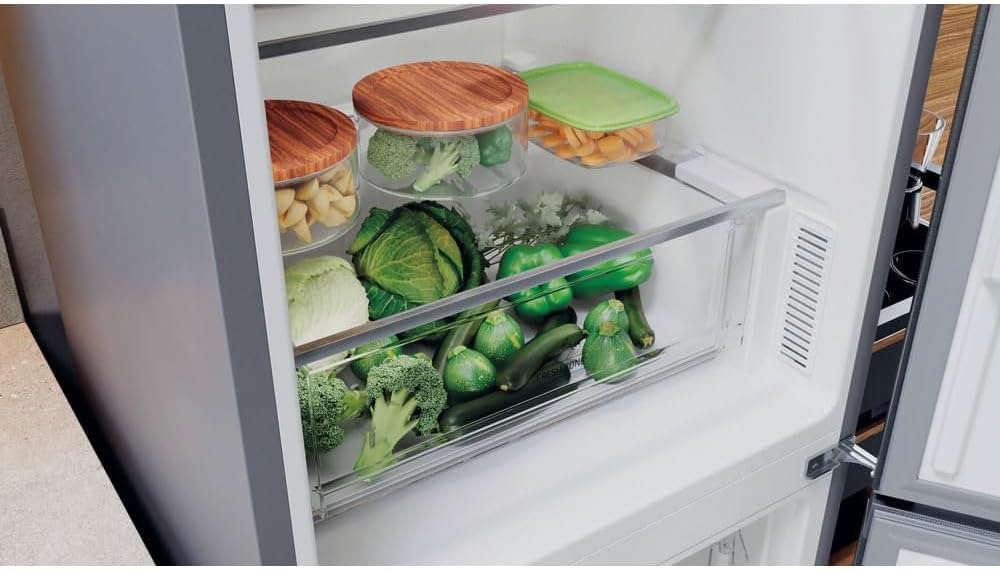
Figure 4: Crisper drawer designed for optimal storage of fruits and vegetables.
Maintenance and Cleaning
General Cleaning
Always unplug the appliance before cleaning. Clean the interior and exterior surfaces regularly with a soft cloth and a mild, non-abrasive detergent. Avoid using harsh chemicals or abrasive cleaners that could damage the surfaces.
Defrosting
Your Hotpoint HAFC9 TA23SX O3 refrigerator features Total No Frost technology, meaning manual defrosting is not required for either the refrigerator or freezer compartments. Any minor frost build-up will be automatically managed by the system.
Door Seals
Regularly check and clean the door seals to ensure they are free from food particles and remain flexible. A clean, tight seal helps maintain energy efficiency and proper cooling.
Power Cord
Periodically inspect the power cord for any signs of damage. If the power cord is damaged, it must be replaced by a qualified service technician to avoid hazards.
Troubleshooting
Before contacting customer service, please check the following common issues and solutions:
| Problem | Possible Cause | Solution |
|---|---|---|
| Appliance does not operate. | No power supply; power cord not plugged in; circuit breaker tripped. | Check power connection; ensure outlet is functional; reset circuit breaker. |
| Temperature is not cold enough. | Door left open; excessive food load; temperature setting too high; poor ventilation. | Ensure door is closed properly; reduce food load; adjust temperature setting lower; check ventilation clearances. |
| Excessive noise. | Appliance not level; objects vibrating against the unit; normal compressor operation. | Adjust leveling feet; ensure no objects are touching the appliance; some compressor noise is normal. |
| Water on the floor. | Drain hole blocked; drip tray overflowing. | Clear the drain hole (usually at the back of the refrigerator compartment); check and empty the drip tray if accessible. |
Technical Specifications
| Model Number | HAFC9 TA23SX O3 |
| Brand | Hotpoint |
| Type | Combined Freestanding Refrigerator |
| Dimensions (D x W x H) | 67.8 cm x 59.6 cm x 203 cm |
| Total Capacity | 367 Liters |
| Net Refrigerator Capacity | 267 Liters |
| Net Freezer Capacity | 100 Liters |
| Weight | 75 Kilograms |
| Color | Silver (Dark Grey) |
| Defrost System | Automatic (Total No Frost) |
| Voltage | 200 Volts |
| Annual Energy Consumption | 203 Kilowatt-hours |
| Number of Doors | 2 |
| Shelf Type | Glass |
| Included Components | Power cable |
| Country of Origin | Poland |
Warranty Information
This Hotpoint HAFC9 TA23SX O3 refrigerator comes with a Two-Year Warranty from the date of purchase. This warranty covers manufacturing defects and faulty materials under normal domestic use.
Please retain your proof of purchase for any warranty claims. The warranty does not cover damage caused by improper installation, misuse, neglect, unauthorized repairs, or normal wear and tear.
For full terms and conditions of the warranty, please refer to the warranty card included with your appliance or visit the official Hotpoint website.
Customer Support
If you encounter any issues that cannot be resolved using the troubleshooting guide, or if you require technical assistance or spare parts, please contact Hotpoint Customer Service.
When contacting support, please have your appliance model number (HAFC9 TA23SX O3) and serial number ready. The serial number is typically located on a label inside the refrigerator compartment.
You can find contact information for Hotpoint Customer Service on their official website or in the documentation provided with your appliance.
Ask a question about this manual
Ask about setup, troubleshooting, compatibility, parts, safety, or missing instructions. Manuals+ will review the question and use this page’s manual context to help answer it.