
1. Introduction
Thank you for choosing the ShopSmart Deals Ultra Slim Flat TV Wall Mount Bracket. This manual provides essential information for the safe and correct installation, operation, and maintenance of your wall mount. Please read these instructions thoroughly before beginning installation and retain them for future reference. This mount is designed for LCD, Curved, OLED, and Plasma flat-panel TVs from 37 to 95 inches, with a maximum weight capacity of 165 lbs (75 kg).
2. Safety Information
Improper installation or use of this product can result in serious injury or damage. Please observe the following safety precautions:
- Weight Capacity: Do not exceed the maximum weight capacity of 165 lbs (75 kg). Ensure your TV's weight is within this limit.
- TV Size: This mount is suitable for TVs between 37 and 95 inches.
- Wall Structure: The wall must be capable of supporting the combined weight of the mount and your TV. Consult a professional if unsure about your wall's structural integrity.
- Tools: Use appropriate tools for installation. Always wear safety glasses.
- Assembly: Ensure all components are securely fastened before mounting the TV. Do not overtighten screws.
- Children: Keep children away from the installation area. Small parts may be a choking hazard.
- Cables: Ensure all cables are properly routed and secured to prevent tripping hazards or damage.
3. Package Contents
Verify that all components are present and undamaged before proceeding with installation.
- TV Wall Mount Bracket (Wall Plate and TV Brackets)
- Mounting Hardware Kit (various screws, anchors, washers)
- Bubble Level
- Instruction Manual
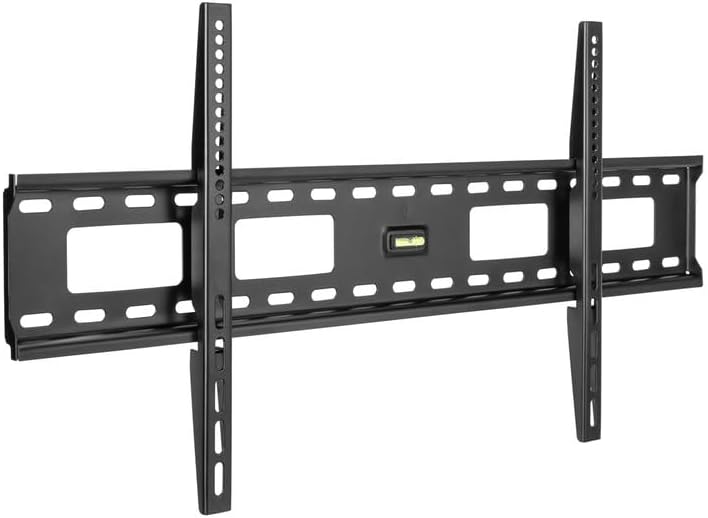
Image 3.1: Main components of the wall mount bracket, including the wall plate and TV brackets.
4. Setup and Installation
4.1 Tools Required (Not Included)
- Pencil
- Drill
- Stud Finder (for wood stud installation)
- Phillips Head Screwdriver
- Measuring Tape
4.2 Installation Steps
Follow these three easy steps for secure installation:
- Attach Wall Plate to Wall:
Locate the desired mounting position on your wall. Use a stud finder to identify wood studs or appropriate anchors for concrete/brick walls. Mark the drilling points. Drill pilot holes as per the instructions provided with the hardware kit. Secure the wall plate to the wall using the provided screws and anchors. Use the included bubble level to ensure the wall plate is perfectly horizontal before tightening all screws.
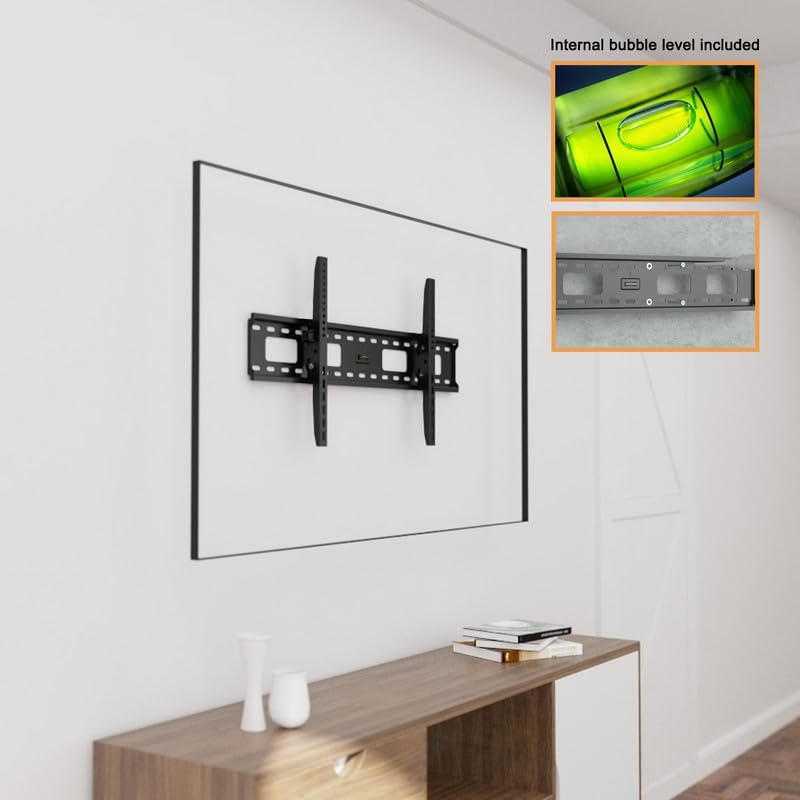
Image 4.1: The wall plate mounted on a wall, demonstrating the use of the internal bubble level for accurate installation.
- Attach Brackets to TV:
Identify the VESA mounting holes on the back of your TV. Select the appropriate screws and spacers from the hardware kit that fit your TV's VESA pattern. Attach the two vertical TV brackets to the back of your TV, ensuring they are securely fastened. The mount supports VESA patterns from 200x200mm to 800x400mm.

Image 4.2: Illustration of VESA compatibility (Min 200x200mm, Max 800x400mm) and supported TV sizes (37"-102").
- Attach TV to Wall Plate:
Carefully lift the TV with the attached brackets and hook the brackets onto the wall plate. Ensure both brackets are properly seated on the wall plate. The sliding bracket design allows for horizontal adjustment of the TV for perfect screen placement even after installation. Once the TV is positioned, use the safety screws to anchor the TV brackets to the wall bracket, limiting shifting and movement. This step is crucial for securing your TV. Note that the low-profile design positions the TV approximately 1.4 inches (20mm) from the wall.

Image 4.3: A side view demonstrating the ultra-slim design, showing the TV mounted approximately 20mm (0.8 inches) from the wall.
5. Operating and Adjustment
Once installed, the ShopSmart Deals wall mount provides a fixed position for your TV. The primary adjustment available is horizontal positioning:
- Horizontal Adjustment: The sliding bracket design allows you to shift the TV left or right along the wall plate for optimal viewing alignment. Ensure the safety screws are loosened before adjustment and re-tightened afterward.
- Cable Management: Utilize the large rectangular access holes in the wall plate for easy cable routing and wiring access.
6. Maintenance
Regular maintenance ensures the longevity and safety of your TV wall mount.
- Cleaning: Dust the mount periodically with a soft, dry cloth. Avoid abrasive cleaners or solvents.
- Security Check: Periodically check all screws and bolts to ensure they remain tight and secure. Do not overtighten.
- Damage Inspection: Inspect the mount for any signs of wear, corrosion, or damage. If any damage is observed, discontinue use and contact customer support.
7. Troubleshooting
If you encounter issues during or after installation, refer to the following common problems and solutions:
- TV is not level: Ensure the wall plate was installed level using the bubble level. If the wall plate is level, check if the TV brackets are installed symmetrically on the TV. Minor adjustments can sometimes be made by slightly loosening and re-tightening the TV bracket screws.
- Difficulty securing TV to wall plate: Ensure the TV brackets are correctly hooked onto the wall plate. The safety screws are designed to secure the TV in place once it is flat against the wall. If access is difficult, consider temporarily removing the TV to ensure the safety screws are properly aligned and tightened.
- Mount feels loose: Re-check all mounting screws on both the wall plate and the TV brackets. Ensure they are tightened securely, but do not overtighten. Verify that the wall structure is adequate for the weight.
- Missing parts: If any parts are missing from the package, contact ShopSmart Deals customer support immediately.
8. Specifications
| Brand | ShopSmart Deals |
| Model Number | FLUSH2021-102 |
| Material | Alloy Steel |
| Color | Black |
| Mounting Type | Wall Mount |
| Movement Type | Fixed |
| Compatible TV Sizes | 37 – 95 inches |
| Max Load Capacity | 165 lbs (75 kg) |
| Max VESA Compatibility | 800x400 mm |
| Profile from Wall | 1.4 inches (approx. 20mm) |
| Item Weight | 5.74 pounds |
| Package Dimensions | 34 x 10.9 x 2.3 inches |
9. Warranty and Support
For warranty information, please refer to the documentation included with your purchase or contact the seller directly. If you require technical assistance or have questions regarding your ShopSmart Deals wall mount, please reach out to ShopSmart Deals customer support through your purchase platform or their official website.