
1. Introduction
This manual provides essential information for the safe and efficient operation of your Equator Super Washer Model EW 835. Please read these instructions thoroughly before installation and use, and retain them for future reference. This appliance is designed for household use to wash laundry.
2. Safety Information
Always follow basic safety precautions when using electrical appliances to reduce the risk of fire, electric shock, or injury to persons.
- Read all instructions before using the appliance.
- Do not wash articles that have been previously cleaned in, washed in, soaked in, or spotted with gasoline, dry-cleaning solvents, or other flammable or explosive substances as they emit vapors that could ignite or explode.
- Do not allow children to play on or in the appliance. Close supervision of children is necessary when the appliance is used near children.
- Do not reach into the appliance if the tub or agitator is moving.
- Do not install or store this appliance where it will be exposed to the weather.
- Do not tamper with controls.
- Do not repair or replace any part of the appliance or attempt any servicing unless specifically recommended in the user-maintenance instructions or in published user-repair instructions that you understand and have the skills to carry out.
- Always disconnect the appliance from the power supply before cleaning or performing any maintenance.
3. Product Overview
The Equator Super Washer Model EW 835 is a compact, front-load washing machine designed for efficient laundry care. It features a 1.9 cubic feet capacity, equivalent to 18 pounds of laundry, and operates on a standard 110V power supply.

Figure 3.1: Front view of the Equator Super Washer Model EW 835, showcasing its compact design and front-loading door.
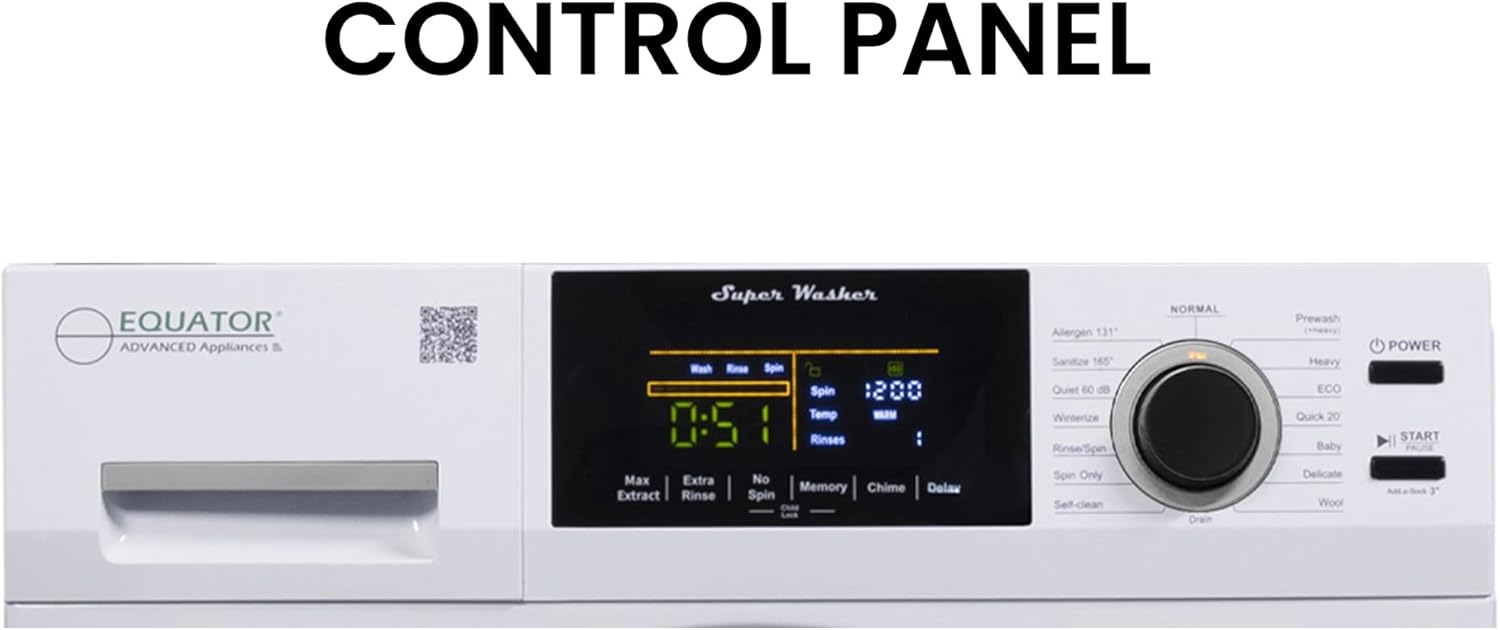
Figure 3.2: Close-up of the digital touch control panel, displaying wash cycle information, time, temperature, and spin settings.

Figure 3.3: Diagram illustrating the dimensions of the Equator Super Washer Model EW 835, with a height of 33.5 inches, width of 23.5 inches, and depth of 24.8 inches.
4. Setup and Installation
Proper installation is crucial for the safe and efficient operation of your washer. This appliance is designed for freestanding installation.
4.1 Unpacking
- Remove all packaging materials, including the shipping bolts located at the rear of the machine. Keep the shipping bolts for future transport if needed.
- Inspect the washer for any damage incurred during transit.
4.2 Location Requirements
- Place the washer on a firm, level floor.
- Ensure adequate space around the washer for ventilation and access.
- Avoid direct sunlight or extreme temperatures.
4.3 Leveling the Washer
The washer must be perfectly level to prevent excessive vibration and noise during operation. Use the adjustable leveling legs at the bottom of the machine to achieve this. Use a spirit level to verify.
4.4 Water Supply Connection
Connect the hot and cold water inlet hoses to the corresponding valves on the back of the washer and to your household water supply. Ensure all connections are tight to prevent leaks.
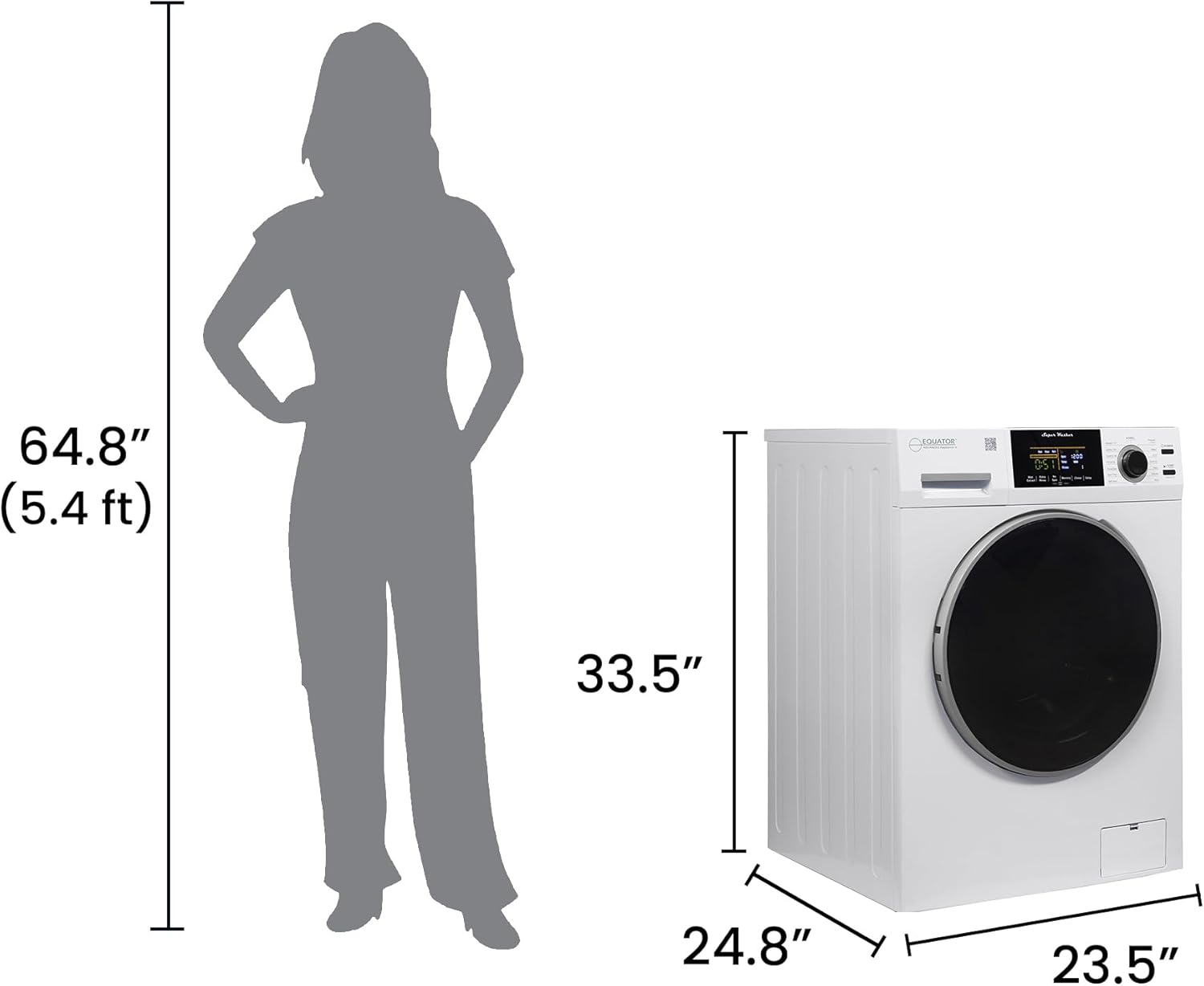
Figure 4.1: Rear view of the washer showing the water inlet connections (red for hot, blue for cold) and the drain hose.
4.5 Drain Hose Installation
Securely attach the drain hose to a standpipe or laundry tub, ensuring it is properly positioned to prevent siphoning or backflow.
4.6 Electrical Connection
Plug the washer into a grounded 110V electrical outlet. Do not use extension cords or adapters.

Figure 4.2: Illustration depicting curbside delivery of a large appliance. Please note that installation services are not included with delivery.
5. Operating Instructions
Familiarize yourself with the control panel and various wash cycles to optimize your laundry experience.

Figure 5.1: Detailed view of the digital control panel, highlighting the display and various function buttons for cycle selection and customization.
5.1 Loading Laundry
- Open the washer door and load clothes loosely into the drum. Do not overload.
- Close the door firmly.
5.2 Adding Detergent and Additives
Add appropriate amounts of detergent, fabric softener, and other laundry additives to their designated compartments in the dispenser drawer.
5.3 Selecting a Wash Cycle
Turn the program selector knob to choose from the available wash cycles such as Normal, Prewash, Heavy, ECO, Quick 20, Allergen, Sanitize, Quiet, Winterize, Rinse+Spin, Spin Only, Delicate, Baby, and Wool. The selected cycle will be displayed on the digital screen.
5.4 Customizing Settings
After selecting a cycle, you can adjust settings like temperature, spin speed, and rinse options using the touch controls. The washer features an automatic water sensor that weighs clothes and selects the appropriate water level, preventing water waste.
5.5 Special Features
- Winterize Cycle: This quick 2-minute cycle is designed to prepare the washer for storage in cold environments. To use, pour antifreeze into the drum, select 'Winterize' on the control panel, and press 'Start'.
- Memory Programs: The washer allows you to set and store up to 4 customized wash programs. This enables quick access to your preferred settings without needing to reconfigure them each time.
- Quiet Cycle: This cycle operates at a low RPM, ensuring noise levels remain below 60 dB. It is ideal for use in environments where minimal disturbance is desired, such as during sleep times or in shared living spaces.
- Hot Water Wash: The washer can heat water up to 165°F (74°C) for thorough cleaning. For drum maintenance, the DRUM-clean option heats water to 131°F (55°C) to clean the inner drum and tub.
- Delay Start: Program the washer to begin a cycle up to 24 hours in advance. This feature offers convenience and allows you to take advantage of off-peak electricity rates.
- Child Lock: Activate the Child Lock feature to prevent accidental changes to the wash cycle by locking the control buttons.
- Add-a-Sock Option: This feature allows you to pause the cycle and add forgotten items during the initial stages of the wash.
- End of Cycle Chime: An audible chime signals the completion of a wash cycle. This feature can be turned on or off by holding the corresponding button for 3 seconds.
5.6 Starting the Wash
Press the 'Start/Pause' button to begin the selected wash cycle. The display will show the remaining time.
6. Maintenance
Regular maintenance ensures the longevity and optimal performance of your Equator Super Washer.
6.1 Cleaning the Exterior
Wipe the exterior surfaces with a soft, damp cloth. Avoid abrasive cleaners or solvents.
6.2 Cleaning the Drum
Utilize the built-in 'DRUM-clean' cycle periodically to clean the inner drum and tub. This cycle uses hot water (131°F / 55°C) to remove residue and maintain hygiene.
6.3 Cleaning the Detergent Dispenser
Remove the detergent dispenser drawer and rinse it under running water to clear any detergent or softener buildup.
6.4 Cleaning the Coin Trap / Drain Filter
The washer is equipped with an easy-to-open coin trap. Regularly check and clean this filter to remove lint, coins, or other small objects that may obstruct the drain pump.
6.5 Winterizing (for storage in cold climates)
If storing the washer in an unheated area, perform the 'Winterize' cycle as described in Section 5.5 to prevent freezing damage.
7. Troubleshooting
Before contacting customer support, refer to the following common issues and solutions:
| Problem | Possible Cause | Solution |
|---|---|---|
| Washer does not start | Power cord unplugged; Door not closed properly; 'Start/Pause' not pressed; Child Lock active. | Check power connection; Ensure door is latched; Press 'Start/Pause'; Deactivate Child Lock. |
| Excessive vibration/noise | Washer not level; Shipping bolts not removed; Overloaded drum. | Adjust leveling legs; Remove shipping bolts; Reduce load size. |
| Water leakage | Loose hose connections; Clogged drain filter; Excessive detergent causing foam. | Tighten hoses; Clean drain filter; Use appropriate detergent amount. |
| Clothes not clean | Overloading; Insufficient detergent; Incorrect cycle selection. | Reduce load; Use recommended detergent; Select appropriate cycle for fabric type. |
| Washer not draining | Clogged drain hose or filter; Drain hose kinked. | Clean drain filter and hose; Straighten drain hose. |
8. Specifications
| Feature | Specification |
|---|---|
| Brand | Equator |
| Model Number | EW 835 |
| Capacity | 1.9 cu. ft. / 18 Pounds |
| Dimensions (D x W x H) | 24.8 x 23.5 x 33.5 inches |
| Item Weight | 180 pounds |
| Max Spin Speed | 1400 RPM |
| Noise Level | 60 Decibels |
| Installation Type | Freestanding |
| Control Console | Touch |
| Access Location | Front Load |
| Color | White |
| Material Type | Metal |
| Special Features | Child Lock, Delay Start, Foam Control, Add-a-Sock Option, End of Cycle Chime, Start / Pause Function, Easy to Open Coin Trap, Adjustable Levelling Legs |
| Included Components | Equator Digital Touch 18 lbs Compact 110V Washer 1400 RPM 4 Memory & 16 Programs |
9. Warranty and Support Information
For warranty details and customer support, please refer to the documentation provided with your purchase or visit the official Equator website.
9.1 Protection Plans
Extended protection plans may be available for your appliance. For example, a 3-Year Protection Plan is offered for $139.99, and a Complete Protect plan is available for $16.99/month, covering eligible past and future purchases.
9.2 Customer Support
For technical assistance, service requests, or general inquiries, please contact Equator customer support. You can often find contact information on the manufacturer's website or within your product packaging.
Visit the Equator Store for more information and products.


