AULCMEET AN-MR650A

User Manual: AN-MR650A Replacement Voice Remote Control

Brand: AULCMEET | Model: AN-MR650A

1. Introduction

This manual provides detailed instructions for the AULCMEET AN-MR650A Replacement Voice Remote Control. Designed for seamless compatibility with a wide range of LG Smart TV UHD 4K OLED TV models, this remote offers intuitive control and voice search functionality, enhancing your television viewing experience.

Please read this manual thoroughly before using the remote control to ensure proper operation and to maximize its features.
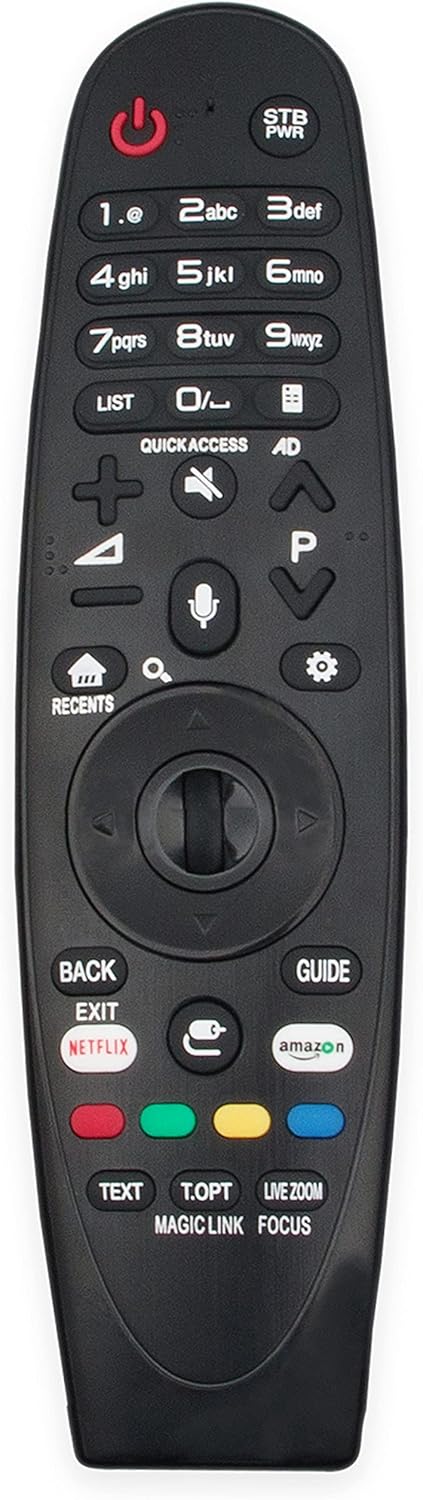
Front view of the AN-MR650A Replacement Voice Remote Control

Image 1.1: Front view of the AN-MR650A Replacement Voice Remote Control. This image displays the full layout of the remote, including the power button, number pad, navigation wheel, voice command button, and dedicated app buttons for Netflix and Amazon.

2. Setup

2.1 Battery Installation

The AN-MR650A remote control requires two (2) AAA 1.5V Alkaline batteries for operation.

  1. Locate the battery compartment cover on the back of the remote control.
  2. Slide the cover downwards or press the latch (if present) to open the compartment.
  3. Insert two AAA 1.5V Alkaline batteries, ensuring the positive (+) and negative (-) terminals align correctly with the indicators inside the compartment.
  4. Close the battery compartment cover securely until it clicks into place.

2.2 Initial Pairing (If Required)

This remote control uses Bluetooth connectivity. While many replacement remotes are plug-and-play, some may require initial pairing with your LG Smart TV. If the remote does not respond after battery installation, follow these general pairing steps:

  1. Ensure your TV is powered on.
  2. Point the remote control towards the TV.
  3. Press and hold the HOME button and the BACK button simultaneously for 5-10 seconds until a pairing message appears on your TV screen.
  4. Release the buttons once the pairing message is displayed. The remote should now be paired and ready for use.

Note: Specific pairing instructions may vary slightly depending on your LG TV model. Refer to your TV's user manual for detailed pairing procedures if the above steps are unsuccessful.

3. Operating the Remote Control

The AN-MR650A remote control provides comprehensive functionality for navigating your LG Smart TV. Below are key features and button descriptions:

3.1 Key Button Functions

3.2 Voice Control Function

The AN-MR650A features a built-in microphone for voice commands. This allows you to search for content, change settings, or control your TV using your voice.

  1. Press and hold the Microphone Button (🎤) located below the navigation wheel.
  2. Speak clearly into the microphone on the remote control.
  3. Release the Microphone Button when you have finished speaking. Your TV will process the command.

Tip: Ensure your TV's voice recognition settings are enabled for optimal performance.

Person using the AN-MR650A remote control to watch TV

Image 3.1: A user operating the AN-MR650A remote control while watching television. This image illustrates the remote being used in a typical home entertainment setting, highlighting its ergonomic design and ease of use.

4. Maintenance

4.1 Cleaning the Remote Control

To maintain the remote control's appearance and functionality, clean it regularly.

4.2 Battery Replacement

Replace batteries when the remote's response becomes sluggish or it stops functioning. Always replace both batteries at the same time with new AAA 1.5V Alkaline batteries.

5. Troubleshooting

If you encounter issues with your AN-MR650A remote control, try the following troubleshooting steps:

If the problem persists after trying these steps, please contact customer support.

6. Specifications

FeatureDescription
BrandAULCMEET
ModelAN-MR650A
Key FeatureVoice Search
Maximum Supported Devices1 (Television)
Connectivity TechnologyBluetooth
Battery Type Required2 x AAA 1.5V Alkaline batteries
Compatible LG TV ModelsW7, G7, E7, C7, B7A SJ9570, SJ9500, SJ8570, SJ857A, SJ8500, SJ850A, SJ8000, UJ7700, UJ6570, UJ657A, UJ6540, UJ6500 Series, 65UJ7700, 65UJ7700-UA, 65UJ7750-UB, 70UJ6520-UA, 70UJ6570, 70UJ6570-UB, 70UJ657A-UC, 70UJ657T, 72SJ8570, 74UJ6450, 74UJ6450UD, 74UJ6450-UD, 75SJ8570, 75SJ8570UB, 75SJ8570-UB, 75SJ857A, 75SJ857AUC, 75SJ857A-UC, 75UJ6450UD, 75UJ6450-UD, 75UJ6470UC, 75UJ6470-UC, 75UJ6520-UA, 75UJ657A-UB, 86SJ9570, 86SJ9570UA, 86SJ9570-UA, OLED55B7A, OLED55B7AU, OLED55B7A-U, OLED55B7P, OLED55B7PU, OLED55B7P-U, OLED55C7C, OLED55C7P, OLED55C7PU, OLED55C7P-U, OLED55E7P, OLED55E7PU, OLED55E7P-U, OLED65B7, OLED65B7A, OLED65B7AUA, OLED65B7A-UA, OLED65B7AU, OLED65B7A-U, OLED65B7P, OLED65B7PU, OLED65B7P-U, OLED65C7P, OLED65C7PU, OLED65C7P-U, OLED65E7P, OLED65E7PU, OLED65E7P-U, 49SM8670PUA, 55SM8670PUA, 65SM8670PUA, 70UJ6570, 43UJ6500-UB, 49UJ6500-UB, 49UJ6560-UF, 49UJ7700, 49UJ7700-UA, 55SJ8000, 55SJ8000UA, 55SJ8000-UA, 55SJ800A, 55SJ8500, 55SJ8500UB, 55SJ8500-UB, 55UJ6520-UD, 55UJ6540-UB, 55UJ6580-UE, 55UJ7700, 55UJ7700-UA, 55UJ7750-UB, 60SJ8000, 60SJ8000UA, 60SJ8000-UA, 60SJ800A, 60SJ8500, 60SJ8500UB, 60SJ8500-UB, 60UJ6540-UB, 60UJ7700, 60UJ7700-UA, 65SJ8000, 65SJ8000UA, 65SJ8000-UA, 65SJ800A, 65SJ800AUB, 65SJ800A-UB, 65SJ850AUC, 65SJ850A-UC, 65SJ8500, 65SJ8500UB, 65SJ8500-UB, 65SJ850A, 65SJ9500, 65SJ9500UA, 65SJ9500-UA, 65UJ6520-UD, 65UJ6540-UB, 65UJ6580-UE.

7. Warranty and Support

For any questions, concerns, or issues regarding your AULCMEET AN-MR650A Replacement Voice Remote Control, please contact the seller or manufacturer directly. Refer to your purchase documentation for specific warranty information and contact details.

The manufacturer is committed to providing quality products and support to ensure your satisfaction.

Related Documents - AN-MR650A

Preview LG LED TV Owner's Manual: Safety, Setup, and Specifications
Comprehensive owner's manual for LG LED TVs (SJ8000, SJ8500, SJ9500, SJ8570, SJ9570 series) covering safety, setup, connections, remote control, troubleshooting, and specifications.
Preview LG LED LCD TV 取扱説明書: 設置・接続・準備
LG LED LCD TVの取扱説明書(設置・接続・準備)。安全上の注意、各部名称、リモコン操作、接続方法、トラブルシューティング、仕様など、製品を安全かつ効果的に使用するための包括的なガイドです。
Preview LG AN-MR650A Magic Remote Control: Features, Specifications, and Compatible TVs
Explore the LG AN-MR650A Magic Remote Control, designed for 2017 LG Smart TVs. Discover its key features including voice recognition, intuitive pointing, and dedicated hotkeys for Netflix and Amazon. View compatible LG TV models, dimensions, and warranty information.
Preview RoHS Test Report for Remote Control - Tianchang Junlin Trading CO.,LTD - UTT202311456S
Comprehensive RoHS (Restriction of Hazardous Substances) test report for a remote control sample, conducted by Dongguan UTT Service Co., Ltd. Details tested components, test results, methods, and compliance with RoHS Directive 2011/65/EU.