
1. Introduction
This manual provides essential instructions for the safe and efficient use of your Kratax rechargeable lithium AA and AAA batteries and the accompanying fast charger. Please read this manual thoroughly before use and retain it for future reference.

Image 1.1: Kratax Fast Charger with AA and AAA Lithium Batteries. The image displays the white charger unit with four battery slots, two containing AA batteries and two containing AAA batteries. Four additional batteries (two AA, two AAA) are shown next to the charger.
2. Package Contents
Verify that all items are present in your package:
- 4 x Kratax 3500mWh AA Rechargeable Lithium Batteries (Model J818)
- 4 x Kratax 1100mWh AAA Rechargeable Lithium Batteries (Model J816A)
- 1 x Kratax Fast Charger (Type-C 5V 2A Input)
3. Specifications
| Feature | Specification |
|---|---|
| AA Battery Capacity | 3500mWh |
| AAA Battery Capacity | 1100mWh |
| Output Voltage | 1.5V Constant Voltage |
| AA Battery Size | 50.5mm x 14.6mm |
| AAA Battery Size | 44.5mm x 10.5mm |
| AA Cycle Life | Over 1600 cycles |
| AAA Cycle Life | Over 1500 cycles |
| Charger Input | Type-C 5V 2A |
| AA Charging Time | Approximately 2 hours (for 1-4 batteries) |
| AAA Charging Time | Approximately 1 hour (for 1-4 batteries) |
| Battery Composition | Lithium Ion |
| Charger Dimensions | 3.15 x 3.15 x 2.76 inches |
| Total Item Weight | 9 ounces |
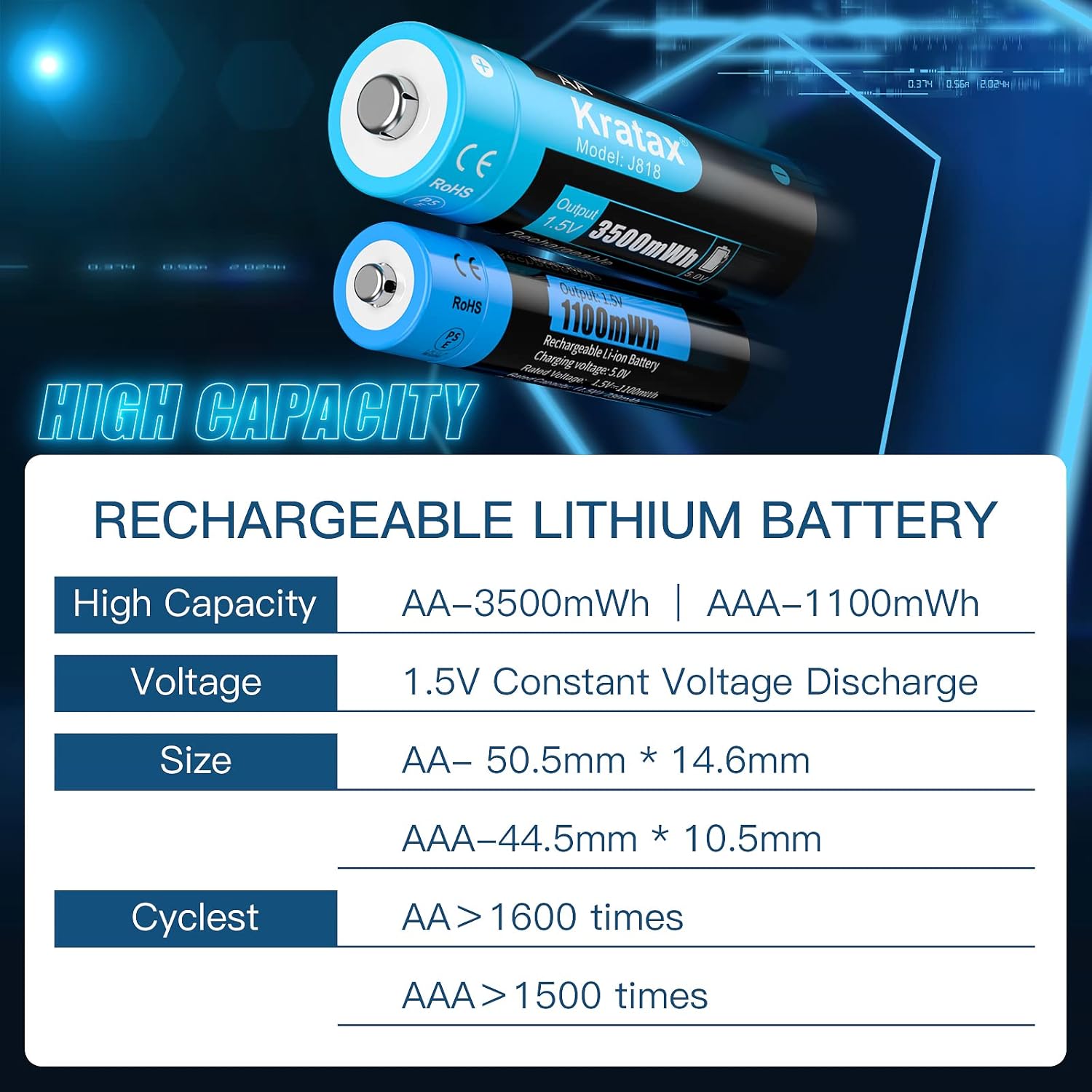
Image 3.1: Kratax Rechargeable Lithium Battery Specifications. This image presents a table detailing the high capacity (AA-3500mWh, AAA-1100mWh), constant 1.5V voltage, physical dimensions, and cycle life for both AA and AAA batteries.
4. Safety Information
To ensure safe operation and prolong the lifespan of your batteries and charger, please observe the following safety guidelines:
- Do not disassemble, crush, puncture, or short-circuit the batteries or charger.
- Do not expose batteries or charger to water, fire, or extreme temperatures.
- Do not use the batteries in devices that are incompatible with 1.5V constant voltage lithium batteries, such as camera flashes.
- Use only the provided Kratax charger for these batteries. Using other chargers may cause damage or pose a safety risk.
- Keep batteries and charger out of reach of children and pets.
- The charger features built-in protection against overcharge, overvoltage, overcurrent, and over-discharge. It also includes reverse polarity protection.
- Automatically power off when fully charged, it is safe and can extend battery cycle life.

Image 4.1: Kratax AA Battery Internal Protection Layers. This exploded view illustrates the internal components of an AA battery, highlighting the electric core, protection board, bracket, top cover, gasket, and metal rivet, which contribute to its safe and secure design.

Image 4.2: Kratax Battery Triple Protection Technology. This graphic emphasizes the anti-explosion, anti-leakage, and bottom insulator features designed to prevent short circuits, along with intelligent chip protection, coiling process protection, and 304 steel protection.
5. Setup
Follow these steps for initial setup:
- Unpack all components from the packaging.
- Connect the Type-C cable (not included) to the charger's input port and then to a 5V 2A USB power adapter (e.g., phone charger, power bank, computer USB port).
- The charger's LED indicators will briefly illuminate upon connection.
6. Operating Instructions
6.1. Charging Batteries
- Insert AA or AAA batteries into the corresponding slots on the charger, ensuring correct polarity (+ and - ends match the charger markings).
- The LED indicator above each slot will turn red to indicate that charging is in progress.
- Once fully charged, the LED indicator will turn green. The charger will automatically stop charging to prevent overcharge.
- Remove the batteries from the charger once charging is complete.
Charging Times:
- AA batteries: Approximately 2 hours for 1 to 4 batteries.
- AAA batteries: Approximately 1 hour for 1 to 4 batteries.
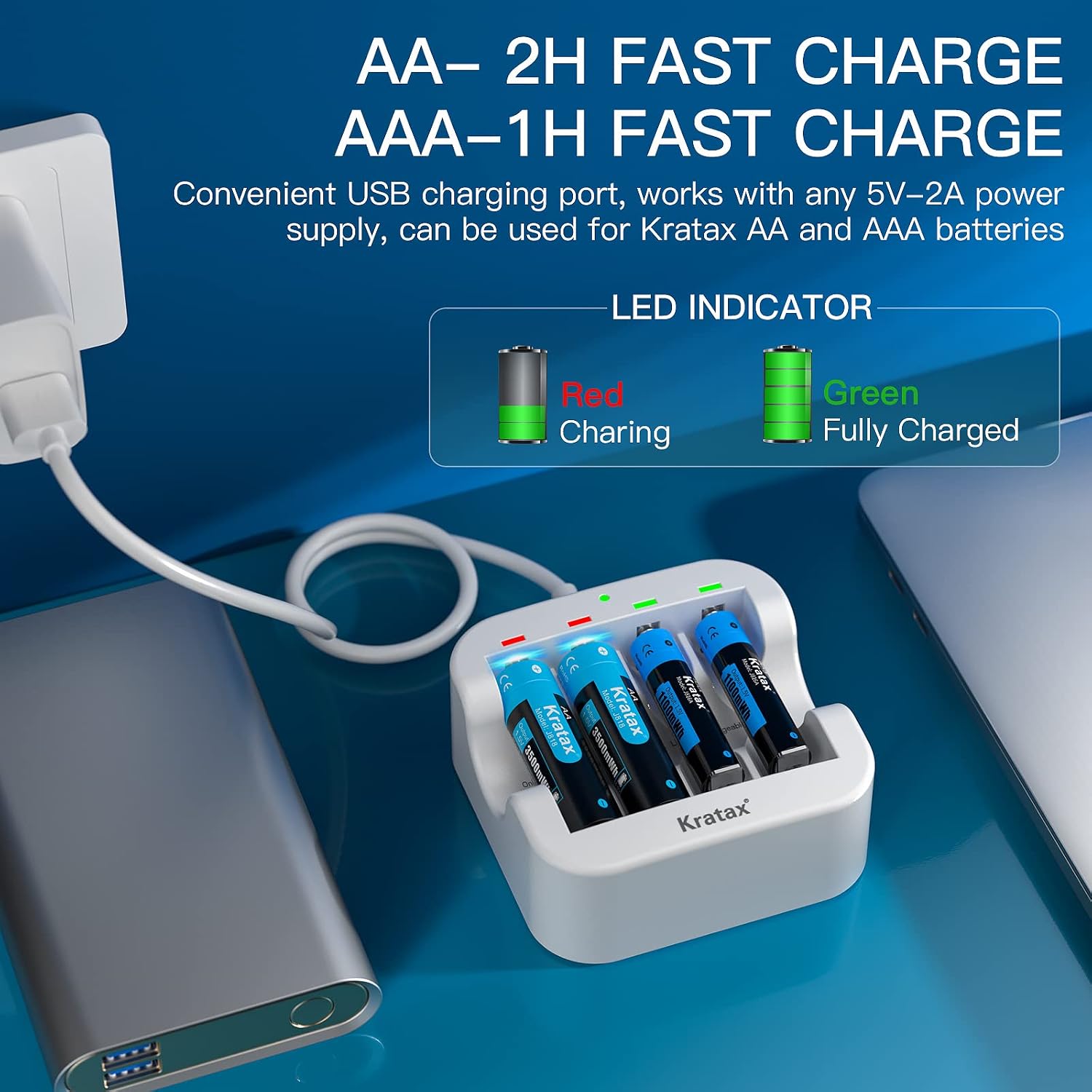
Image 6.1: Kratax Fast Charger in Use. The image shows the white charger connected via a USB-C cable to a power bank, with AA and AAA batteries inserted. The LED indicators are visible, showing red for charging and green for fully charged.
6.2. Battery Usage
Kratax lithium batteries provide a constant 1.5V output throughout their discharge cycle, ensuring consistent performance for your devices. This differs from traditional alkaline or Ni-MH batteries, which experience a voltage drop as they discharge.
- Insert the charged batteries into your compatible electronic devices, observing correct polarity.
- These batteries are suitable for a wide range of devices such as Xbox controllers, toys, flashlights, and other household electronics.
- Note: These batteries are not recommended for use in camera flashes or devices that require a specific discharge curve or higher instantaneous current that lithium-ion batteries may not provide optimally.

Image 6.2: Kratax 1.5V Constant Output Graph. This graph compares the voltage output of Kratax rechargeable Li-ion batteries (constant 1.5V) against alkaline and Ni-MH/Ni-CD/Ni-ZN batteries, which show a gradual voltage decrease as capacity diminishes.

Image 6.3: Kratax Stabilized Voltage Comparison. This image shows two graphs side-by-side, illustrating how Kratax Li-ion batteries maintain a stable 1.5V output across their discharge cycle, unlike Ni-MH batteries which exhibit a declining voltage.
7. Maintenance
Proper maintenance helps extend the life of your Kratax batteries:
- Store batteries in a cool, dry place when not in use.
- The batteries feature a low self-discharge rate of approximately 0.03% per month, significantly lower than Ni-MH batteries.
- Clean battery contacts and charger terminals periodically with a dry cloth to ensure good connection.
- These batteries are free of lead and mercury, making them an environmentally friendly choice. Please dispose of them responsibly at designated recycling centers.

Image 7.1: Kratax Eco-friendly and Recyclable Batteries. This graphic highlights the environmental benefits, stating the batteries do not contain harmful substances like Mercury (Hg), Lead (Pb), or Cadmium (Cd), and are safe and pollution-free.
8. Troubleshooting
If you encounter issues with your Kratax batteries or charger, refer to the table below for common problems and solutions:
| Problem | Possible Cause | Solution |
|---|---|---|
| Battery not charging (LED remains off or blinks erratically) | 1. Incorrect battery insertion. 2. Poor contact between battery and charger. 3. Faulty power adapter or cable. 4. Defective battery. | 1. Reinsert battery, ensuring correct polarity. 2. Clean battery contacts and charger terminals. 3. Try a different USB cable or 5V 2A power adapter. 4. If issue persists with a specific battery, it may be defective. |
| Batteries do not hold charge for long or discharge quickly in device | 1. Device incompatibility (e.g., camera flash). 2. High power consumption of device. 3. Battery nearing end of life cycle. 4. Defective battery. | 1. Ensure the device is compatible with 1.5V constant voltage lithium batteries. 2. For high-drain devices, battery life may naturally be shorter. 3. Replace batteries if they have exceeded their expected cycle life. 4. If a new battery exhibits this, it may be defective. |
| Charger LED does not turn green after expected charging time | 1. Battery not fully charged. 2. Charger or battery issue. | 1. Allow more time for charging, especially if batteries were deeply discharged. 2. Try charging a different battery. If the issue is consistent, contact support. |
9. Warranty and Support
Kratax products are manufactured with quality and reliability in mind. While specific warranty details are not provided in this manual, for any product-related inquiries, technical support, or warranty claims, please contact Kratax customer service through your purchase platform or the official Kratax website. Please have your purchase details and product model information ready when contacting support.