
1. Introduction
Thank you for choosing the DynaScan M-6D-V VHF FM Radio. This manual provides detailed instructions for the proper installation, operation, and maintenance of your radio. Please read this manual thoroughly before using the device to ensure optimal performance and safety. The M-6D-V is a robust VHF FM radio designed for reliable communication within the 136-174 MHz frequency range, featuring 200 programmable channels, CTCSS/DCS tones, and various advanced functions.
2. Safety Information
Always observe the following safety precautions to prevent fire, injury, or damage to the radio:
- Do not operate the radio in explosive atmospheres (e.g., near flammable gas, dust particles, metallic powders, etc.).
- Do not transmit without an antenna connected.
- Ensure the power supply voltage matches the radio's requirements (13.8 Vdc). Incorrect voltage can damage the unit.
- Avoid exposing the radio to direct sunlight for extended periods or to extreme temperatures.
- Keep the radio away from water and moisture.
- Do not attempt to open or modify the radio. Repairs should only be performed by qualified technicians.
- Use only approved accessories.
3. Package Contents
Verify that all items are present in the package:
- DynaScan M-6D-V VHF FM Radio Unit
- Microphone with DTMF keypad
- DC Power Cable
- Mounting Bracket
- Mounting Hardware (screws, washers)
- Instruction Manual (this document)

Image 3.1: Contents of the DynaScan M-6D-V package, including the radio unit, microphone, power cable, and mounting bracket.
4. Product Overview
The DynaScan M-6D-V is a compact and powerful VHF mobile radio. Familiarize yourself with its main components:
4.1 Radio Unit

Image 4.1.1: Front view of the DynaScan M-6D-V radio unit with the microphone connected. Shows the display, control knobs, and function buttons.
- Front Panel: Features an LCD screen, power button, volume/squelch knob, channel selector, and various function buttons (FUN, SET, CAL, H/L, SQL, POW).
- Rear Panel: Includes the antenna connector (SO-239 type), DC power input, and external speaker jack (if applicable).
- Heat Sink: The ribbed metal casing on the top and sides acts as a heat sink to dissipate heat during transmission.

Image 4.1.2: Rear view of the DynaScan M-6D-V radio unit, highlighting the antenna connector and the extensive heat sink fins.
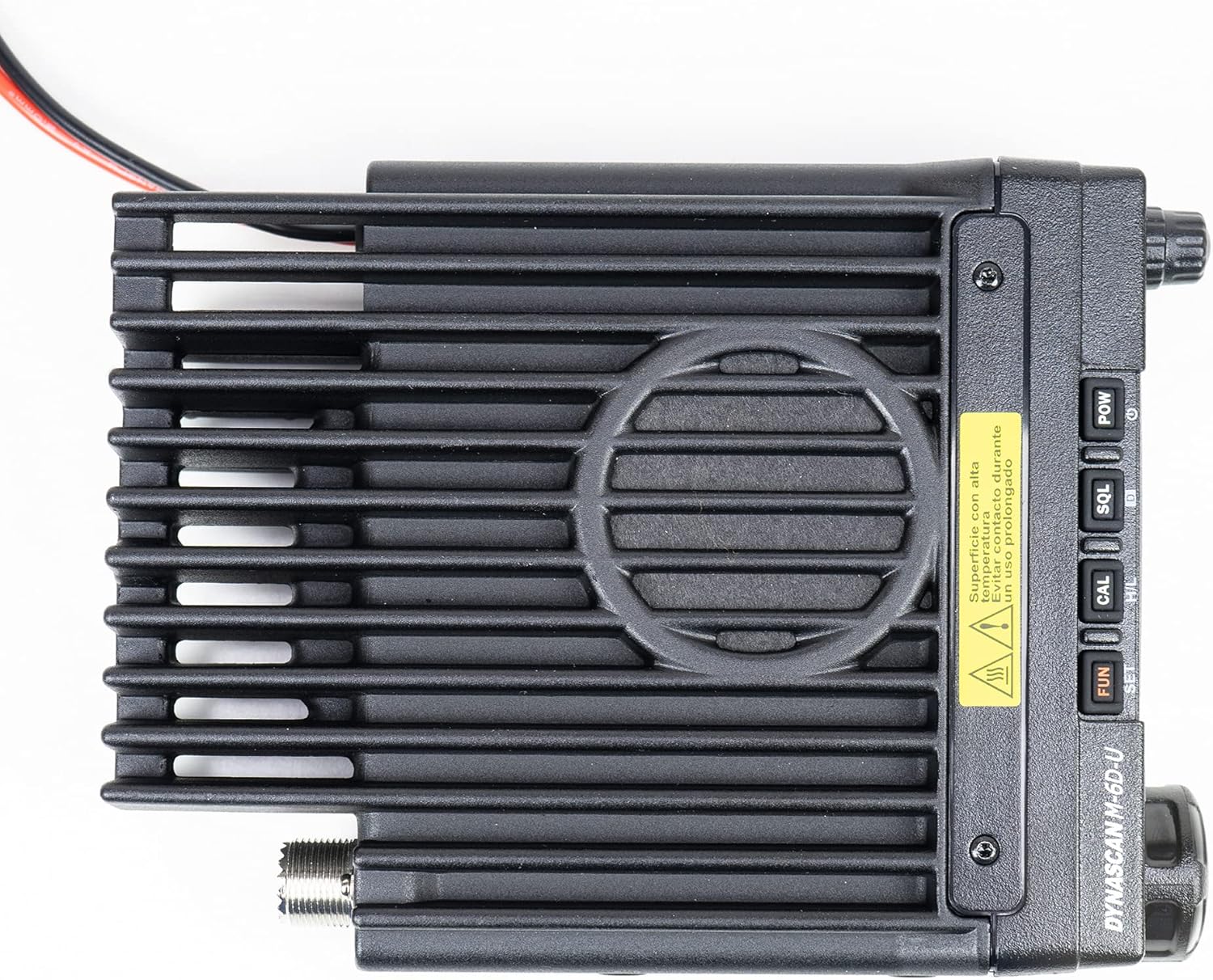
Image 4.1.3: Top view of the DynaScan M-6D-V radio unit, emphasizing the heat sink design for thermal management.
4.2 Microphone

Image 4.2.1: Close-up view of the DynaScan M-6D-V microphone, featuring a full DTMF keypad and function buttons.
The supplied microphone includes a DTMF keypad for direct frequency entry, channel selection, and accessing various functions. It also has a PTT (Push-To-Talk) button on the side.
5. Setup
Follow these steps for initial setup of your DynaScan M-6D-V radio:
5.1 Mounting the Radio
- Choose a secure and accessible location for mounting the radio, ensuring adequate ventilation around the heat sink.
- Use the provided mounting bracket as a template to mark drilling locations.
- Drill pilot holes and secure the mounting bracket using the supplied screws.
- Slide the radio into the bracket and secure it with the bracket screws.
5.2 Antenna Connection
Connect a suitable VHF antenna (136-174 MHz) to the SO-239 connector on the rear of the radio. Ensure the connection is tight to prevent signal loss and potential damage to the radio's final amplifier stage.
5.3 Power Supply Connection
- Connect the supplied DC power cable to the power input on the rear of the radio.
- Connect the red wire to the positive (+) terminal of a 13.8 Vdc power supply and the black wire to the negative (-) terminal.
- Ensure the power supply can provide sufficient current for the radio's maximum output power (60W).
- Caution: Incorrect polarity or insufficient power supply can damage the radio.
5.4 Microphone Connection
Plug the microphone's RJ-45 connector into the corresponding jack on the front panel of the radio.
6. Operating Instructions
6.1 Power On/Off and Volume Control
- Power On: Press and hold the POW button on the front panel.
- Power Off: Press and hold the POW button again.
- Volume: Rotate the outer knob (Volume) on the front panel clockwise to increase volume, counter-clockwise to decrease.
6.2 Squelch Adjustment
The squelch function mutes the speaker when no signal is received, eliminating background noise.
- Adjust Squelch: Rotate the inner knob (Squelch) on the front panel. Turn it clockwise until the background noise disappears. Turn it counter-clockwise to open the squelch and hear all signals, including noise.
6.3 Channel and Frequency Selection
The radio supports both VFO (Variable Frequency Oscillator) mode for direct frequency input and Memory Channel mode for pre-programmed channels.
- Switch Modes: Press the VFO/MR button on the microphone or the corresponding function on the front panel.
- VFO Mode: Use the channel selector knob on the front panel or the microphone keypad to enter frequencies directly.
- Memory Channel Mode: Rotate the channel selector knob to cycle through the 200 programmable channels.
6.4 Frequency Step
The frequency step determines the increment when tuning. Available steps are 12.5 KHz, 20 KHz, and 25 KHz.
- Change Step: Refer to the programming software manual or the radio's menu system for step adjustment.
6.5 CTCSS/DCS Tones
CTCSS (Continuous Tone-Coded Squelch System) and DCS (Digital Coded Squelch) tones are used to filter unwanted signals and allow private group communication. The radio supports 50 CTCSS and 1024 DCS codes.
- Setting Tones: Access the menu system (usually via the FUN or SET button) to select and set the desired CTCSS or DCS codes for both transmit and receive.
6.6 Scanning
The scanning function allows the radio to automatically search for active signals across frequencies or memory channels.
- Activate Scan: Press the SCN button on the microphone or the corresponding function on the front panel.
- Stop Scan: Press SCN again or the PTT button.
6.7 Time Out Timer (TOT)
The TOT feature prevents excessively long transmissions by automatically stopping transmission after a pre-set time. This protects the radio from overheating and ensures fair use of the channel.
- Setting TOT: The TOT duration is typically configured via the programming software.
6.8 Busy Channel Lockout (BCL)
BCL prevents transmission on a channel that is already in use, avoiding interference with ongoing conversations.
- Enable/Disable BCL: This feature is usually enabled or disabled through the radio's menu or programming software.
6.9 High/Low Power Selection
The radio offers selectable transmit power levels (Hi/Low) to conserve battery power and reduce interference when full power is not required.
- Switch Power: Press the H/L button on the front panel or microphone. The display will indicate the current power setting.
6.10 Other Features
- Scrambler: Provides basic voice privacy. Activation is typically via a menu setting or a dedicated function key.
- Talk Around: Allows direct communication between two radios on a repeater output frequency, bypassing the repeater.
- DTMF Lock: Locks the DTMF keypad on the microphone to prevent accidental key presses.
- Compander: Compresses the audio signal during transmission and expands it during reception, improving audio clarity in noisy environments.
- Alphanumeric Display: The LCD screen displays channel names, frequencies, and status icons.
- Programmable by Software: Advanced settings, channel programming, and feature customization are performed using dedicated PC software and a programming cable (sold separately).
7. Maintenance
Proper maintenance ensures the longevity and reliable operation of your radio.
- Cleaning: Use a soft, dry cloth to clean the radio's exterior. For stubborn dirt, a slightly damp cloth with mild soap can be used, followed by a dry cloth. Do not use harsh chemicals or solvents.
- Antenna: Regularly check the antenna connection for tightness and ensure the antenna itself is in good condition.
- Power Cable: Inspect the power cable for any signs of damage or fraying.
- Storage: When not in use for extended periods, store the radio in a dry, cool place, away from direct sunlight and extreme temperatures.
8. Troubleshooting
If you encounter issues with your DynaScan M-6D-V, refer to the following common problems and solutions:
| Problem | Possible Cause | Solution |
|---|---|---|
| No power | Power cable disconnected; Blown fuse; Incorrect power supply voltage. | Check power cable connection; Replace fuse (if applicable); Verify power supply is 13.8 Vdc. |
| No sound from speaker | Volume too low; Squelch set too high; External speaker connected. | Increase volume; Adjust squelch level; Check external speaker connection or disconnect it. |
| Cannot transmit or receive | Antenna not connected; Incorrect frequency/channel; CTCSS/DCS mismatch; BCL enabled. | Connect antenna; Verify frequency/channel; Check CTCSS/DCS settings; Disable BCL. |
| Poor audio quality | Weak signal; Antenna issue; Compander setting. | Check antenna and connections; Adjust squelch; Try enabling/disabling compander. |
If the problem persists after trying these solutions, please contact DynaScan customer support or a qualified service technician.
9. Specifications
| Characteristic | Value |
|---|---|
| Frequency Range | 136 - 174 MHz (VHF) |
| Number of Channels | 200 |
| Security Codes | 1024 DCS / 50 CTCSS |
| Frequency Step | 12.5 / 20 / 25 KHz |
| Power Supply | 13.8 Vdc |
| Operating Temperature | -20 to +60 degrees C |
| Maximum Humidity | 90% |
| Output Power | 60W |
| Audio Output Power | 2W |
| Weight | 1550 grams (1.55 kg) |
| Dimensions (W x H x D) | 190 x 145 x 27 mm |
| Display | LCD Alphanumeric |
| Features | Scrambler, Talk Around, Scanning, TOT, BCL, Squelch, Hi/Low Power, Programmable by software, DTMF Lock, Transmit Indicator, Compander |
10. Warranty and Support
DynaScan products are manufactured to high-quality standards. For specific warranty terms and conditions, please refer to the warranty card included with your product or visit the official DynaScan website. For technical support, service, or inquiries, please contact your authorized DynaScan dealer or customer service representative.


