
1. Introduction
Thank you for choosing the Qiumi Tuya ZigBee3.0 Smart Radiator Actuator Valve. This intelligent thermostat allows for precise temperature control of your radiators, enhancing comfort and energy efficiency in your home. With ZigBee3.0 connectivity, it integrates seamlessly with your smart home system, offering app control and voice command capabilities via Alexa and Google Assistant. This manual provides comprehensive instructions for installation, operation, and maintenance to ensure optimal performance.
2. Safety Information
- Read all instructions carefully before installation and use.
- Installation should be performed by a qualified professional if you are unsure.
- Ensure the power supply is disconnected before performing any installation or maintenance.
- Do not expose the device to extreme temperatures, humidity, or direct sunlight.
- Keep out of reach of children.
- Use only 2xAA batteries (not included) for power. Do not mix old and new batteries or different types of batteries.
3. Package Contents
Please check the box for the following items:
- Radiator Thermostat: 1 pc
- Brass Valve: 1 pc
- User Guide: 1 pc
- RA Adapter: 1 pc
- RAV Adapter: 1 pc
- RAVL Adapter: 1 pc
- Comap Adapter: 1 pc
- T+A Herz Adapter: 1 pc
- Herz Adapter: 1 pc

Image: Qiumi Smart Radiator Actuator Valve and the brass valve included in the package.
4. Specifications
| Feature | Detail |
|---|---|
| Power Supply | 3 V, 2xAA batteries (not included) |
| Maximum Stroke | 4.5 mm |
| Accuracy | ± 0.5 °C |
| Set Temperature Range | 5-45 °C |
| Display Temperature Range | 0-70 °C |
| Ambient Temperature | 0-45 °C |
| Ambient Humidity | 5-95% RH (non-condensing) |
| Storage Temperature | 5-45 °C |
| Timing Error | <1% |
| Protection Class | IP 20 |
| Buttons | Capacitive touch buttons |
| Brand | Qiumi |
| Model Number | QM-TRV-100White-DN15 |
| Material | PC+ABS (flame retardant) + Brass |

Image: Detailed dimensions and screen layout of the Qiumi Smart Radiator Actuator Valve.
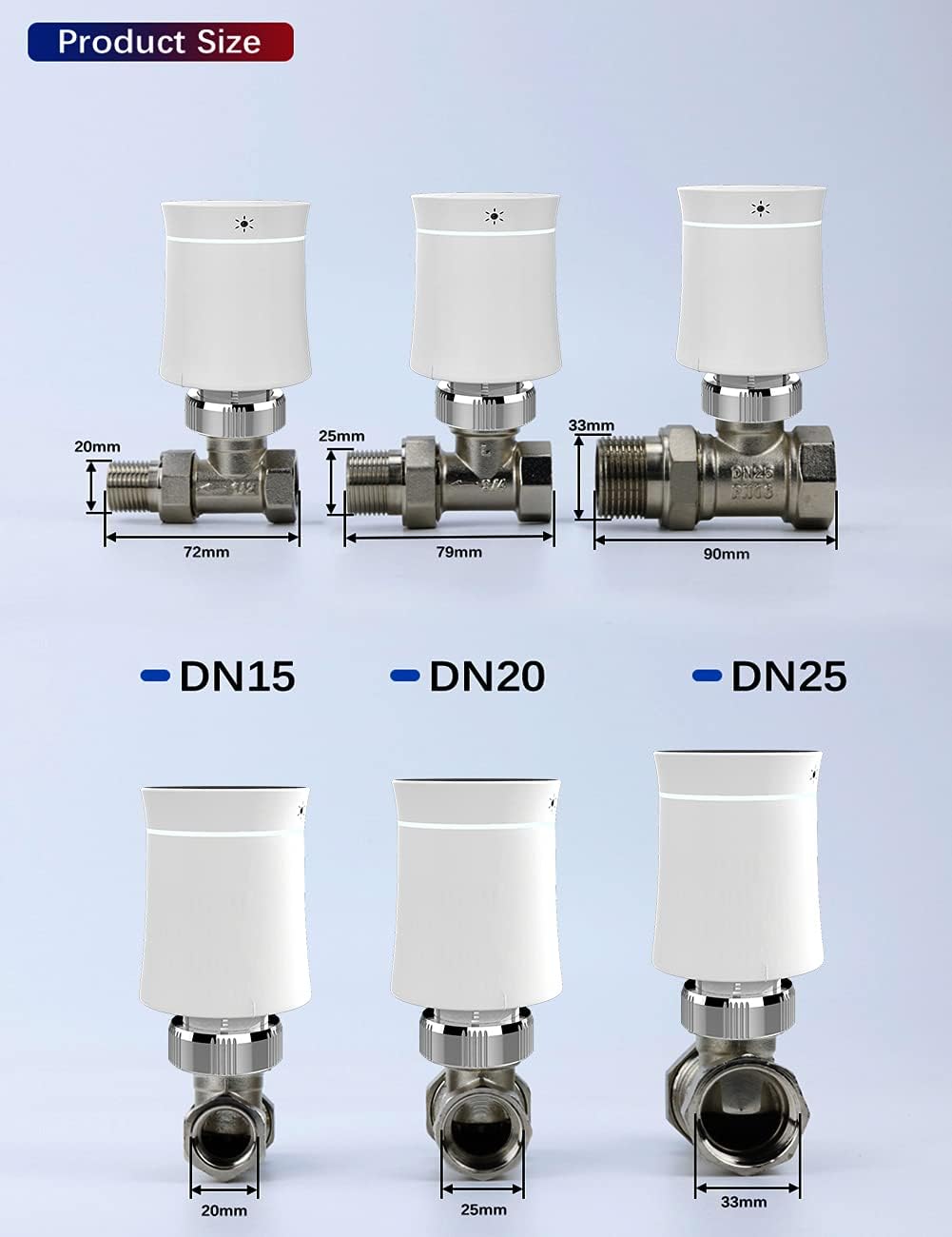
Image: Product size comparison illustrating DN15, DN20, and DN25 valve dimensions.
5. Setup and Installation
5.1. Battery Installation
- Gently twist the bottom part of the actuator valve counter-clockwise to separate it from the main body.
- Insert two AA batteries into the battery compartment, ensuring correct polarity.
- Reattach the bottom part by aligning and twisting clockwise until secure.

Image: Step-by-step guide for installing batteries into the radiator actuator valve.
5.2. Valve Installation
The Qiumi Smart Radiator Actuator Valve is designed to be compatible with most radiator valves using the provided adapters. Identify your existing valve type and select the appropriate adapter.
- Turn off your heating system and allow radiators to cool down.
- Remove your existing thermostatic head from the radiator valve.
- Select the correct adapter (RA, RAV, RAVL, Comap, T+A Herz, Herz) that matches your radiator valve.
- Mount the selected adapter onto your radiator valve.
- Attach the Qiumi Smart Radiator Actuator Valve onto the adapter and secure it firmly.

Image: The Qiumi Smart Radiator Actuator Valve being easily installed on a radiator.
Image: Illustration of different radiator valve adapters and their compatibility.
5.3. Connecting to Tuya ZigBee Wireless Gateway (Hub)
A Tuya ZigBee Wireless Hub is required to connect the radiator actuator valve to the Tuya/Smart Life app and enable smart features like remote control and voice commands.
- Ensure your Tuya ZigBee Wireless Gateway (Hub) is powered on and connected to your home network.
- Open the Tuya Smart or Smart Life app on your smartphone.
- Add your gateway to the app if you haven't already.
- Follow the app's instructions to add a new device and select the radiator actuator valve.
- The valve will enter pairing mode (refer to the valve's display for indication).
- Once successfully paired, you can control the valve via the app.
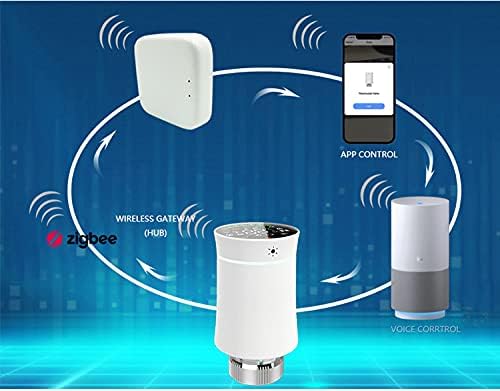
Image: Overview of the smart home ecosystem, showing the radiator valve connecting to a ZigBee hub, smartphone app, and voice control devices.
6. Operating Instructions
6.1. Manual Control
You can adjust the temperature directly on the device using the capacitive touch buttons. The display shows the current temperature and settings.
- Up/Down Buttons: Press to increase or decrease the target temperature.
- Menu Button: Access various settings and modes.
- Key Lock: Prevents accidental changes. Activate/deactivate via the app or by holding a specific button combination (refer to on-screen prompts).
6.2. App Control (Tuya Smart / Smart Life)
Once connected to the ZigBee hub and app, you can control the valve remotely:
- Remote Temperature Adjustment: Change the target temperature from anywhere.
- Weekly Programmable Schedule: Set 5+2 weekly schedules with four periods per day to automate heating based on your routine.
- Manual Mode: Override the schedule temporarily or permanently.
- Holiday Mode: Set a specific temperature for an extended period, ideal for vacations.
- External Sensor: The valve features an external sensor for more accurate room temperature readings, ensuring precise control.
6.3. Voice Control (Alexa & Google Assistant)
Integrate your Qiumi Smart Radiator Actuator Valve with Alexa or Google Assistant for hands-free control:
- Ensure your ZigBee hub is linked to your Alexa or Google Home account via the Tuya Smart/Smart Life app.
- Discover new devices in your Alexa or Google Home app.
- Use voice commands such as:
- "Alexa, set [Radiator Name] to 22 degrees."
- "Hey Google, what is the temperature in [Room Name]?"
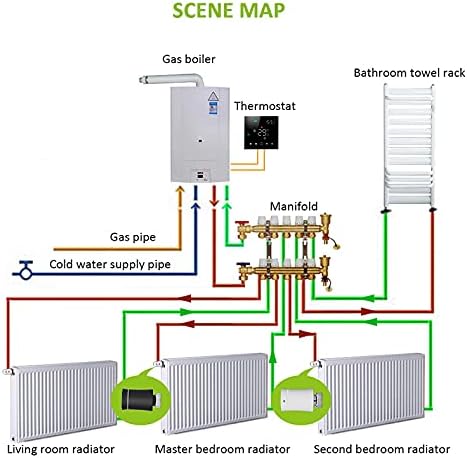
Image: A scene map illustrating a typical smart home heating system configuration with the Qiumi valves controlling individual radiators.
7. Maintenance
- Cleaning: Wipe the device with a soft, dry cloth. Do not use abrasive cleaners or solvents.
- Battery Replacement: Replace batteries when the low battery indicator appears on the display. Ensure to use 2xAA batteries.
- Firmware Updates: Periodically check the Tuya Smart/Smart Life app for available firmware updates to ensure optimal performance and new features.
8. Troubleshooting
| Problem | Possible Cause / Solution |
|---|---|
| Device not powering on | Check battery installation and ensure batteries are new and correctly inserted. |
| Cannot connect to ZigBee hub | Ensure the hub is powered on and connected to the internet. Place the valve closer to the hub. Re-initiate pairing mode on the valve and in the app. |
| Inaccurate temperature readings | Ensure the external sensor is not obstructed. Avoid placing the radiator near drafts or direct heat sources that could affect readings. |
| Valve not responding to commands | Check ZigBee network connection. Ensure batteries are not low. Restart the device and the app. |
| Radiator not heating/cooling as expected | Verify the set temperature. Check if the valve is fully open/closed. Ensure the heating system is operational. |
9. Warranty and Support
Qiumi products are designed for reliability and performance. For warranty information and technical support, please refer to the documentation provided with your purchase or contact Qiumi customer service through the retailer where the product was purchased. Please have your model number (QM-TRV-100-DN15) and purchase details ready when contacting support.
For further assistance, you may also visit the Tuya Smart website for general smart home device support and resources.