
1. Introduction
The Volt Polska AVR Pro 1000VA Automatic Voltage Regulator (AVR) is designed to protect your electronic devices from voltage fluctuations, surges, and interference. It functions as both a voltage regulator and a surge protector, ensuring a stable power supply to connected equipment. This device automatically adjusts the input voltage to maintain a consistent output, improving the quality of power from the local grid or a power generator.
2. Safety Information
Please read all safety instructions carefully before operating the device. Failure to follow these instructions may result in electric shock, fire, or damage to the product.
- Indoor Use Only: This unit is designed for indoor use in dry environments. Do not expose it to rain, moisture, or excessive humidity.
- Ventilation: Ensure adequate ventilation around the unit. Do not block ventilation openings.
- Power Source: Connect the AVR only to a grounded power outlet with the correct voltage and frequency as specified in the specifications section.
- Overload Protection: Do not exceed the maximum load capacity of 1000VA (1000 Watts). Overloading can cause damage to the unit and connected devices.
- Servicing: This unit contains high voltage. Do not attempt to open or service the unit yourself. Refer all servicing to qualified personnel.
- Placement: Place the AVR on a stable, flat surface away from direct sunlight, heat sources, and flammable materials.
- Switching Order: Always switch on the regulator before switching on connected appliances.
3. Package Contents
Verify that all items are present in the package:
- Volt Polska AVR Pro 1000VA Automatic Voltage Regulator
- User Manual (this document)

Image: The packaging box for the Volt Polska AVR Pro 1000VA Stabilizer, indicating the brand and model.
4. Product Overview
Front Panel

Image: Front view of the Volt Polska AVR Pro 1000VA Stabilizer, showing the digital display, indicator lights, and the red ON/OFF switch.
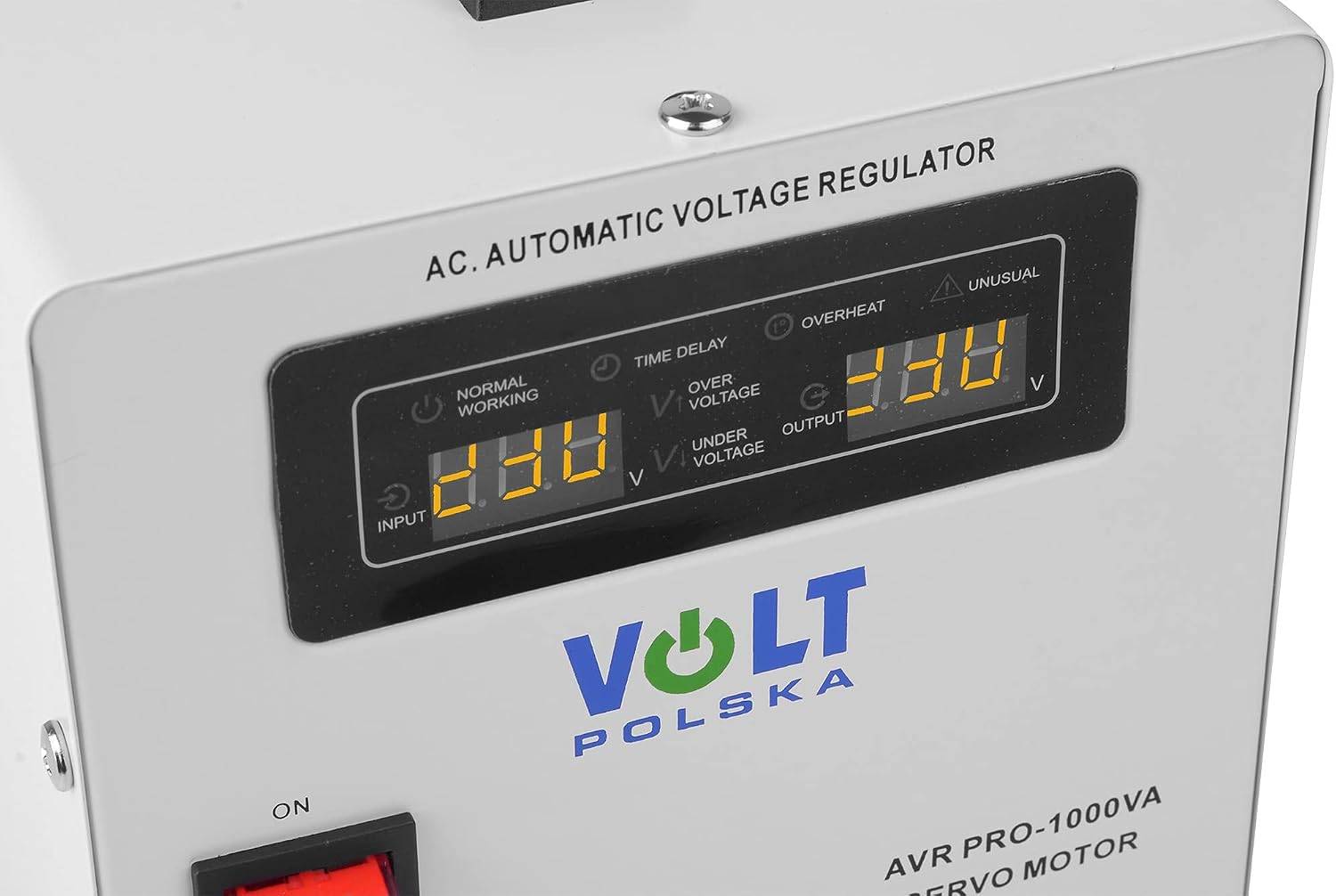
Image: Close-up of the digital display and indicator lights. The display shows input and output voltage. Indicators include Normal Working, Time Delay, Overheat, Over Voltage, Under Voltage, and Unusual.
- Digital Display: Shows real-time input and output voltage.
- Indicator Lights:
- NORMAL WORKING: Illuminates when the stabilizer is operating normally.
- TIME DELAY: Indicates a delay during startup or after power restoration to protect connected devices.
- OVERHEAT: Illuminates if the unit is overheating.
- OVER VOLTAGE: Illuminates if the input voltage is too high.
- UNDER VOLTAGE: Illuminates if the input voltage is too low.
- UNUSUAL: Indicates an abnormal operating condition.
- ON/OFF Switch: Main power switch for the unit.
Rear Panel

Image: Rear view of the Volt Polska AVR Pro 1000VA Stabilizer, displaying two output sockets, the integrated input power cable, and the circuit breaker button.

Image: Close-up of the rear panel, showing the caution label, importer information, model specifications (AVR PRO-1000VA, Input AC 130V-260V~50Hz, Output AC 230V~50Hz, Capacity 1000VA, Precision ±3%), and the circuit breaker.
- Output Sockets: Two standard power outlets for connecting your devices.
- Input Power Cable: Permanently attached cable for connecting to the mains power supply.
- Circuit Breaker: Provides overload protection. If tripped, press to reset after reducing the load.
- Rating Label: Contains detailed electrical specifications and manufacturer information.
5. Setup
- Unpack the Unit: Carefully remove the AVR from its packaging.
- Placement: Place the AVR on a flat, stable surface in a well-ventilated area. Ensure there is sufficient space around the unit for heat dissipation.
- Connect to Mains Power: Plug the AVR's input power cable into a grounded wall outlet.
- Connect Devices: Plug your electronic devices (e.g., computer, TV, refrigerator) into the output sockets on the rear panel of the AVR. Ensure the total power consumption of all connected devices does not exceed 1000VA.
6. Operating Instructions
- Power On: Ensure all devices are connected to the AVR. Flip the ON/OFF switch on the front panel to the 'ON' position.
- Initial Delay: The 'TIME DELAY' indicator may illuminate, and the unit will undergo a brief startup delay (typically a few seconds) to protect connected equipment. The digital display will show the input voltage.
- Normal Operation: Once the delay is complete, the 'NORMAL WORKING' indicator will light up. The digital display will show both input and output voltage, and the AVR will begin stabilizing the power to your connected devices.
- Monitoring: Periodically check the digital display for input and output voltage readings and observe the indicator lights for any warnings.
- Power Off: To turn off the unit, flip the ON/OFF switch to the 'OFF' position. Disconnect devices if they will not be used for an extended period.
7. Maintenance
- Cleaning: Disconnect the AVR from the power outlet before cleaning. Use a soft, dry cloth to wipe the exterior. Do not use liquid cleaners or aerosols.
- Ventilation: Ensure that the ventilation openings are free from dust and obstructions.
- Storage: If storing the unit for an extended period, disconnect it from power and store it in a cool, dry place.
8. Troubleshooting
| Problem | Possible Cause | Solution |
|---|---|---|
| AVR does not power on. | No power from wall outlet; ON/OFF switch is off; Circuit breaker tripped. | Check wall outlet with another device; Ensure ON/OFF switch is 'ON'; Press the circuit breaker button on the rear panel to reset. |
| 'OVERHEAT' indicator is on. | Unit is overloaded; Insufficient ventilation. | Reduce the total load connected to the AVR; Ensure ventilation openings are clear and the unit is in a well-ventilated area. Allow unit to cool down. |
| 'OVER VOLTAGE' or 'UNDER VOLTAGE' indicator is on. | Input voltage is outside the normal operating range. | This indicates the AVR is actively stabilizing the voltage. If the condition persists or the 'UNUSUAL' indicator also lights up, disconnect sensitive equipment and consult an electrician. |
| 'UNUSUAL' indicator is on. | Internal fault or severe power anomaly. | Immediately disconnect all connected devices and turn off the AVR. Do not attempt to use the unit. Contact customer support for assistance. |
9. Specifications
| Feature | Specification |
|---|---|
| Model | AVR Pro 1000VA (5AVRZP1000) |
| Manufacturer | Volt Polska |
| Input Voltage Range | AC 130V - 260V |
| Output Voltage | AC 230V ~50Hz |
| Capacity | 1000VA / 1000 Watts (Maximum) |
| Voltage Precision | ±3% |
| Power Source Type | AC |
| Product Dimensions (L x W x H) | 14.7 x 22.8 x 13 cm |
| Item Weight | 5.7 Kilograms |
| Included Components | Voltage stabilizer |
| Color | White |
10. Warranty and Support
For warranty information or technical support, please refer to the contact details provided by your retailer or visit the official Volt Polska website. Keep your purchase receipt as proof of purchase.
Importer: Volt Polska Sp. z o.o.
ul. Grunwaldzka 76
81-771 Sopot
POLAND
Website: www.voltpolsk.pl
Email: sales@voltpolsk.pl