
Introduction
This manual provides comprehensive instructions for the setup, operation, and maintenance of your Pioneer Elite VSX-LX105 7.2 Channel Network AV Receiver. Designed for optimal audio and video performance, this receiver integrates advanced features for an immersive home entertainment experience. Please read this manual thoroughly before using the product to ensure correct and safe operation.
Setup
1. Initial Inspection and Placement
Carefully remove the receiver from its packaging. Inspect for any signs of damage. Place the receiver on a stable, level surface with adequate ventilation. Ensure there is sufficient space around the unit for heat dissipation.
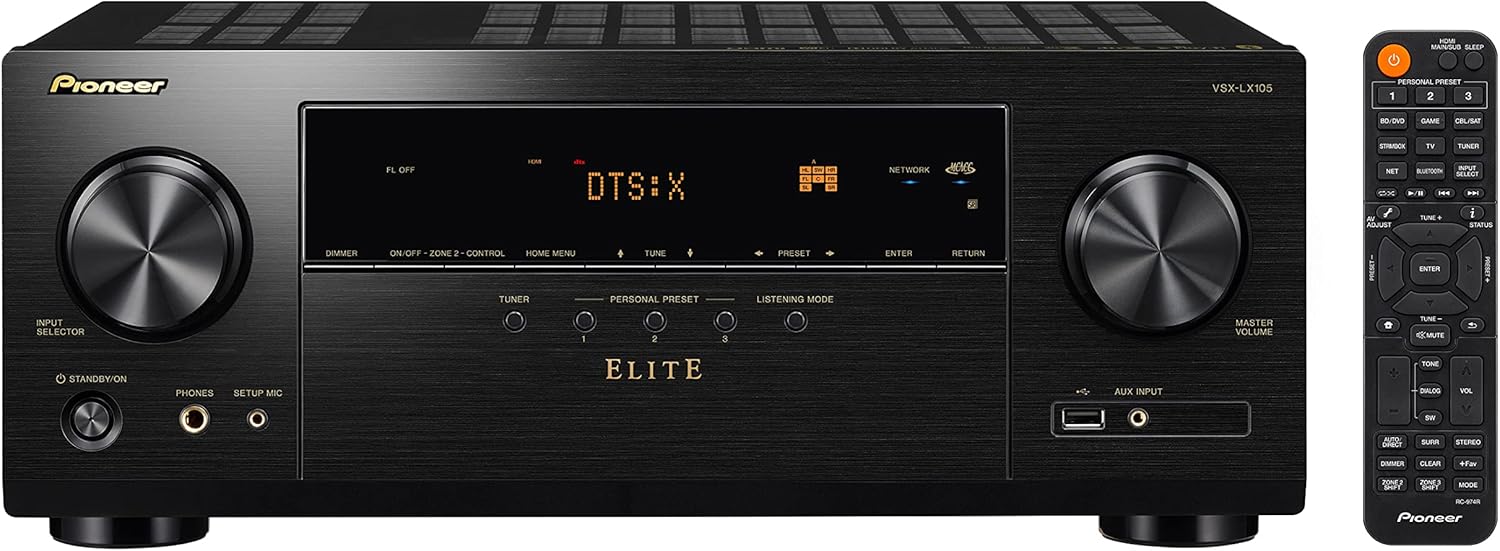
Figure 1: Front view of the Pioneer Elite VSX-LX105 receiver and included remote control. The receiver features an input selector knob, display, control buttons, and a master volume knob.
2. Connecting Your Components
Connect your audio and video sources, such as Blu-ray players, gaming consoles, and streaming devices, to the appropriate HDMI inputs on the rear panel. For optimal performance, utilize HDMI 2.1 compatible cables for 8K and 4K/120Hz pass-through. Connect your speakers to the corresponding speaker terminals, ensuring correct polarity (+ to + and - to -).

Figure 2: Rear panel connections of the VSX-LX105. This includes multiple HDMI inputs and outputs, digital audio inputs (optical/coaxial), analog audio inputs, network port, USB, and speaker terminals for 7.2 channel setup.
- HDMI Connections: The receiver features 7 HDMI inputs and 2 HDMI outputs. HDMI 2.1 ports support 8K/60Hz and 4K/120Hz pass-through, VRR, ALLM, and QFT for enhanced gaming.
- Speaker Connections: Connect your speakers to the clearly labeled terminals. The receiver supports 5.2.2-channel surround sound for Dolby Atmos or DTS:X configurations.
- Network Connection: Connect an Ethernet cable to the NETWORK port for wired internet access, or use the built-in Wi-Fi for wireless connectivity.
- Antenna Connections: Connect the supplied FM/AM antennas for radio reception.
3. MCACC Auto Room Tuning
The Multi-Channel Acoustic Calibration System (MCACC) automatically adjusts the sound output to optimize for your listening room and speaker setup. This process helps to suppress standing waves and create a clearer sound. Connect the supplied setup microphone to the SETUP MIC jack on the front panel and follow the on-screen instructions to initiate the calibration process. Up to nine measurement positions can be saved.
Operating
1. Basic Operation
- Power On/Off: Press the STANDBY/ON button on the front panel or remote control.
- Input Selection: Use the INPUT SELECTOR knob on the front panel or the dedicated input buttons on the remote control to switch between connected devices.
- Volume Control: Adjust the MASTER VOLUME knob on the front panel or the VOL +/- buttons on the remote control.
2. Enhanced Gaming Features
The VSX-LX105 is equipped with HDMI 2.1 enhancements to optimize your gaming experience:
- 4K/120Hz HDR Pass-through: Enables ultra-fast motion for smooth gameplay.
- VRR (Variable Refresh Rate): Eliminates lag, stutter, and frame-tearing for fluid visuals.
- ALLM (Auto Low Latency Mode): Optimizes latency from source to screen, reducing input lag.
- QFT (Quick Frame Transport): Limits lag for a smoother, more responsive experience.

Figure 3: HDMI 2.1 logo, indicating support for advanced video features.
3. Immersive Audio Experience
- Dolby Atmos® and DTS:X: Experience multi-dimensional surround sound with overhead effects.
- Dolby Atmos Height Virtualizer and DTS Virtual:X: Enjoy similar immersive effects without the need for physical height or surround speakers.
- E-ARC (Enhanced Audio Return Channel): Simplifies connectivity and supports high-bitrate audio formats from your TV apps, including Dolby Atmos, DTS-HD Master Audio, DTS:X, and Dolby TrueHD.
4. Streaming Music Services and Connectivity
The receiver supports a wide range of streaming options:
- Built-in Streaming: Access services like Spotify, Amazon Music, Pandora, TIDAL, Deezer, or TuneIn.
- Wireless Technologies: Works with Sonos, Chromecast built-in, AirPlay 2, and DTS Play-Fi for seamless audio streaming from your devices.
- Bi-directional Bluetooth: Send and receive audio wirelessly via Bluetooth technology.
- Roon Tested: Ensures optimal music streaming from your personal music library with Roon software.

Figure 4: Roon Tested certification logo.
Maintenance
To ensure the longevity and optimal performance of your receiver, follow these maintenance guidelines:
- Cleaning: Gently wipe the exterior surfaces with a soft, dry cloth. Avoid using abrasive cleaners, waxes, or solvents.
- Ventilation: Ensure that the ventilation openings on the top, sides, and rear of the unit are not blocked. Proper airflow prevents overheating.
- Power Cord: Regularly check the power cord for any damage. Disconnect the power cord from the wall outlet if the unit will not be used for an extended period.
Troubleshooting
If you encounter issues with your receiver, refer to the following common troubleshooting steps:
| Problem | Possible Cause | Solution |
|---|---|---|
| No sound output. | Incorrect input selected, speaker wires loose, volume too low, mute activated. | Verify correct input, check speaker connections, increase volume, deactivate mute. Run MCACC Auto Room Tuning. |
| No picture on TV. | Incorrect HDMI connection, incorrect TV input, source device off. | Ensure HDMI cables are securely connected to the correct ports. Select the correct HDMI input on your TV. Power on the source device. |
| Bluetooth connection issues. | Device out of range, interference, pairing mode not active. | Ensure Bluetooth device is within range. Check for other wireless interference. Put the receiver and device into pairing mode. Try resetting Bluetooth on both devices. |
| Network connectivity problems. | Loose Ethernet cable, Wi-Fi signal weak, router issue. | Check Ethernet cable connection. Relocate receiver closer to Wi-Fi router or use wired connection. Restart your router and receiver. |
For more detailed troubleshooting, please refer to the full online manual available on the Pioneer website.
Specifications
| Feature | Detail |
|---|---|
| Product Dimensions | 17.13 x 14.59 x 6.81 inches |
| Item Weight | 25.6 pounds |
| Model Number | VSX-LX105 |
| Brand | PIONEER |
| Connectivity Technology | Bluetooth, Wi-Fi, Ethernet |
| Controller Type | Remote |
| Special Features | Dolby Atmos, DTS:X, HDMI 2.1 (8K/60Hz, 4K/120Hz, VRR, ALLM, QFT), MCACC Auto Room Tuning, E-ARC, Roon Tested, Bi-directional Bluetooth, Streaming Services (Sonos, Chromecast, AirPlay 2, DTS Play-Fi, Spotify, Amazon Music, Pandora, TIDAL, Deezer, TuneIn) |
| Compatible Devices | Speakers, TVs, Gaming Consoles, Blu-ray Players, Streaming Devices |
| Total HDMI Ports | 7 inputs, 2 outputs |
| Audio Output Mode | Stereo, Surround Sound |
| Surround Sound Channel Configuration | 5.2 Channel, 7.2 Channel |
| Video Encoding | H.265/HEVC |
| Batteries Required | 2 AA batteries (for remote) |
Warranty and Support
Your Pioneer Elite VSX-LX105 receiver comes with a manufacturer's warranty. For specific warranty terms, conditions, and registration details, please refer to the warranty card included with your product or visit the official Pioneer website. For technical support, product registration, or service inquiries, please contact Pioneer customer support or visit their official support portal.
Online Resources:
- Visit the Official Pioneer Store on Amazon
- For the most up-to-date information and full user manual, please visit the Pioneer global support website.


