
UrbanX UXBTREC1
UrbanX Mini Bluetooth Receiver User Manual
Model: UXBTREC1
Introduction
The UrbanX Mini Bluetooth Receiver is a versatile device designed to transform your non-Bluetooth audio systems into wireless ones. It allows you to stream audio from your mobile phone, tablet, or other Bluetooth-enabled devices to car stereos, home audio systems, headphones, and speakers via a 3.5mm audio jack. This compact receiver also features a built-in microphone for hands-free calling.
Product Overview
Familiarize yourself with the components and features of your UrbanX Mini Bluetooth Receiver.

Figure 1: The UrbanX Mini Bluetooth Receiver, a compact device for wireless audio.
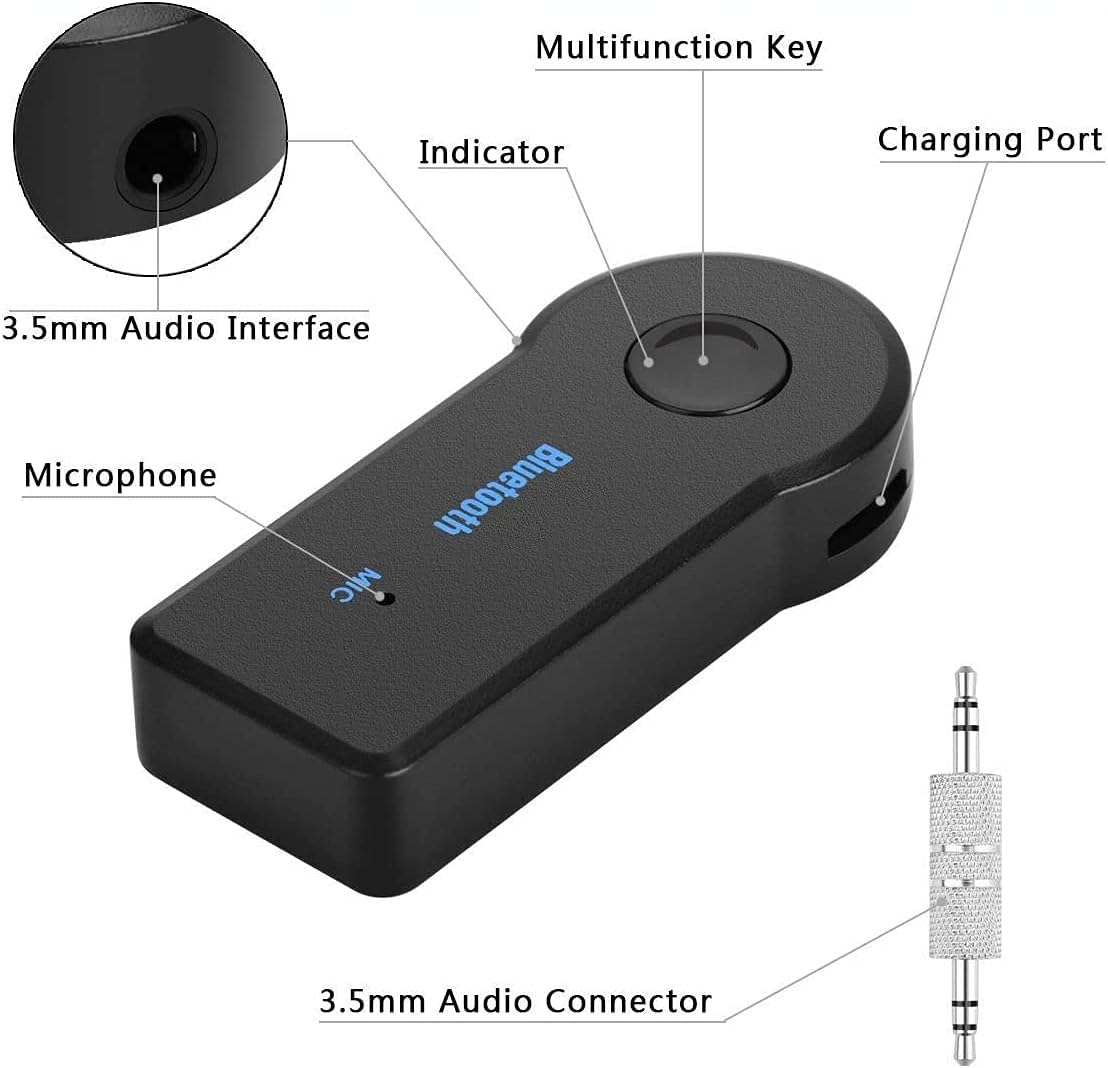
Figure 2: Labeled diagram of the UrbanX Mini Bluetooth Receiver, showing the Multifunction Key, Indicator, Charging Port, 3.5mm Audio Interface, Microphone, and 3.5mm Audio Connector.
- Multifunction Key: Used for power on/off, play/pause, answer/end calls, redial, and reject calls.
- Indicator Light: Displays device status (pairing, connected, charging).
- Charging Port: Micro USB port for charging the internal battery.
- 3.5mm Audio Interface: Connects to audio input devices (e.g., car AUX port, headphone jack).
- Microphone: For hands-free calling.
- 3.5mm Audio Connector: The male jack that plugs into the receiver's audio interface.
Setup
1. Initial Charging
Before first use, ensure the receiver is fully charged. Connect the provided USB charging cable to the receiver's charging port and a 5V DC power source (e.g., USB wall adapter, computer USB port). The indicator light will show charging status and turn off or change color when fully charged (approx. 1.5 hours).

Figure 3: The UrbanX Mini Bluetooth Receiver, its detachable 3.5mm audio connector, and the USB charging cable.
2. Powering On and Pairing
- Power On: Long press the Multifunction Key until the indicator light flashes (e.g., blue/red alternately), indicating it's in pairing mode.
- Enable Bluetooth: On your mobile phone or other device, enable Bluetooth and search for available devices.
- Connect: Select "Receiver BT" (or similar name) from the list of found devices. Once connected, the indicator light will typically stop flashing and remain solid blue.
3. Connecting to Audio System
Plug the 3.5mm audio connector into the receiver's 3.5mm audio interface, then plug the other end of the 3.5mm connector into the AUX input of your car stereo, home audio system, or headphone jack.

Figure 4: The receiver in a car's AUX port, enabling wireless audio streaming from a smartphone.

Figure 5: The receiver integrated with a home audio system, turning it into a wireless Bluetooth speaker.

Figure 6: The receiver converting wired headphones into Bluetooth headphones.
Operating Instructions
Music Playback
- Play/Pause: Short press the Multifunction Key.
- Next Track: Double press the Multifunction Key.
- Previous Track: Triple press the Multifunction Key.
- Volume Control: Adjust volume directly on your connected Bluetooth device (phone, tablet, etc.).
Hands-Free Calling
When connected to your phone, the receiver allows for hands-free communication.

Figure 7: Visual representation of call management features.
- Answer Call: Short press the Multifunction Key when a call comes in.
- End Call: Short press the Multifunction Key during a call.
- Reject Call: Long press the Multifunction Key when a call comes in.
- Redial Last Number: Double press the Multifunction Key when not on a call.
Power Off
Long press the Multifunction Key until the indicator light turns off.
Maintenance
- Cleaning: Use a soft, dry cloth to clean the device. Do not use liquid cleaners or aerosols.
- Storage: Store the device in a cool, dry place away from direct sunlight and extreme temperatures.
- Battery Care: To prolong battery life, avoid fully discharging the battery frequently. Charge the device regularly, even if not in use for extended periods.
Troubleshooting
| Problem | Possible Cause | Solution |
|---|---|---|
| Device does not power on. | Battery is low or depleted. | Charge the device fully (approx. 1.5 hours). |
| Cannot pair with Bluetooth device. | Receiver not in pairing mode; Bluetooth on source device is off or already connected to another device. | Ensure receiver is flashing blue/red (pairing mode). Turn off and on Bluetooth on your source device. Ensure no other devices are connected to the receiver. |
| No audio or low audio output. | Incorrect connection; volume too low; incorrect audio input selected on stereo. | Ensure 3.5mm jack is fully inserted. Increase volume on both the receiver (via source device) and the connected audio system. Select the correct AUX input on your stereo. |
| Poor audio quality or disconnections. | Interference; device too far from source; low battery. | Move the receiver closer to the source device (within 30ft/10m). Avoid obstacles. Charge the receiver. |
Specifications
| Feature | Detail |
|---|---|
| Model Number | UXBTREC1 |
| Bluetooth Version | V4.1 (Supports A2DP, AVRCP, HSP, HFP) |
| Connection Range | Up to 10 meters (33 feet) |
| Charging Voltage | DC 5V |
| Charging Time | Up to 1.5 hours |
| Working Time | Up to 5 hours |
| Headphone Jack | 3.5mm |
| Item Weight | 0.55 ounces (approx. 15.6 grams) |
| Dimensions | Approx. 2 x 2 x 1 inches (Package Dimensions) |
| Material | Composite |
Warranty and Support
For warranty information or technical support, please contact UrbanX customer service through the retailer where the product was purchased or visit the official UrbanX website. Please retain your proof of purchase for warranty claims.
Manufacturer: URBANX
Country of Origin: China
Date First Available: May 21, 2021
Related Documents - UXBTREC1
 |
Digital Indoor TV Antenna User Guide This guide provides instructions for setting up and optimizing a digital indoor TV antenna for the best reception. It covers antenna placement, connection, and channel scanning, along with tips for improving signal quality. |
 |
Wireless Bluetooth Keyboard User Manual - Setup, Connection, and Specifications Comprehensive user manual for the wireless Bluetooth keyboard, covering product specifications, setup guide, connection steps for various devices, charging instructions, and regulatory compliance information. |
 |
UrbanX: Vielseitige 3in1 Fahrradtasche & Rucksack von Valkental Entdecken Sie die multifunktionalen Einsatzmöglichkeiten des UrbanX von Valkental. Diese Anleitung erklärt, wie Sie die 3in1 Tasche als Fahrradtasche oder Rucksack verwenden und sicher befestigen, inklusive wichtiger Sicherheitshinweise. |
Ask a question about this manual
Ask about setup, troubleshooting, compatibility, parts, safety, or missing instructions. Manuals+ will review the question and use this page’s manual context to help answer it.