
1. Introduction
This manual provides essential information for the installation, configuration, operation, and maintenance of your Sophos XGS 107 Next-Gen Firewall. The Sophos XGS 107 is designed to deliver robust network security with advanced threat protection capabilities, including Xstream Protection, for small to medium-sized businesses and branch offices.
Please read these instructions carefully before setting up and using your device to ensure optimal performance and security.
2. Package Contents
Before proceeding with the installation, verify that all items are present in your package:
- Sophos XGS 107 Next-Gen Firewall appliance
- US power cord
- Quick Start Guide (if included)
- Safety and Regulatory Information
3. Physical Overview
3.1 Front Panel

Figure 3.1: Sophos XGS 107 Front Panel
The front panel of the Sophos XGS 107 features status indicators and a USB port. These indicators provide visual feedback on the device's operational status, network activity, and potential issues.

Figure 3.2: Sophos XGS 107 Front Panel Diagram with LED Indicators
Key indicators include:
- Status LEDs: Indicate power, system health, and alarm conditions.
- LAN/WAN LEDs: Show link status and activity for network ports.
- USB Port: For connecting external devices or storage.
3.2 Rear Panel
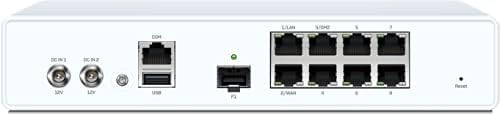
Figure 3.3: Sophos XGS 107 Rear Panel
The rear panel provides all necessary connectivity ports for power, network, and console access.

Figure 3.4: Sophos XGS 107 Rear Panel Diagram with Ports
Key ports and buttons include:
- DC IN 1 & 2: Power input ports (12V).
- COM Port: Console port for direct management access.
- USB Ports: For connecting external devices.
- LAN/WAN Ports: Multiple Ethernet ports for network connections.
- SFP Port: For fiber optic connectivity (SFP transceivers sold separately).
- Reset Button: Used to restore factory default settings.
4. Setup and Installation
4.1 Placement
Place the Sophos XGS 107 on a stable, flat surface or mount it in a rack (rackmount kit available separately). Ensure adequate ventilation around the device to prevent overheating. Avoid placing it near heat sources or in direct sunlight.
4.2 Connecting the Device
- Connect Power: Connect the provided US power cord to one of the DC IN ports on the rear panel and then to a power outlet. The device will power on automatically.
- Connect to Network:
- Connect your internet service provider's modem or router to the designated WAN port on the XGS 107.
- Connect your internal network switch or a computer directly to one of the LAN ports.
- Initial Access: Use a web browser on a computer connected to a LAN port to access the device's web-based management interface. Refer to the Quick Start Guide for the default IP address and login credentials.
4.3 Initial Configuration
Upon first login, you will be guided through an initial setup wizard. This wizard typically covers:
- Setting a new administrator password.
- Configuring network interfaces (WAN, LAN).
- Setting up basic security policies.
- Registering the device with Sophos Central for management and licensing.
5. Operating the Device
The Sophos XGS 107 Next-Gen Firewall provides comprehensive security features managed through its web interface or Sophos Central. Key operational aspects include:
5.1 Xstream Protection
Xstream Protection is a suite of advanced security features designed to block unknown threats, expose hidden risks, and automatically respond to incidents.

Figure 5.1: Sophos XGS Xstream Protection
Components of Xstream Protection include:
- Deep Packet Inspection (DPI): For advanced threat scanning.
- TLS Inspection: Decrypts and inspects encrypted traffic for hidden threats.
- Zero-Day Threat Protection: Utilizes machine learning and sandboxing to detect and block new, unknown threats.
- Intrusion Prevention System (IPS): Protects against network exploits.
- Web Protection: Controls web access and blocks malicious websites.
5.2 Network Security Features
The XGS 107 provides robust network security functionalities:
- Firewall Rules: Configure rules to control traffic flow between network zones.
- VPN (Virtual Private Network): Establish secure connections for remote access or site-to-site connectivity.
- SD-WAN: Optimize network performance and reliability for distributed environments.
- Application Control: Manage and prioritize application usage on your network.
5.3 Sophos Central Management
Sophos Central provides a unified cloud management platform for your XGS 107, offering centralized control, reporting, and synchronized security with other Sophos products.

Figure 5.2: Sophos Central Management and Orchestration
6. Maintenance
Regular maintenance ensures the longevity and optimal performance of your Sophos XGS 107.
- Firmware Updates: Regularly check for and apply the latest firmware updates through the device's web interface or Sophos Central. Updates often include security patches and new features.
- Configuration Backups: Periodically back up your device configuration. This allows for quick restoration in case of unexpected issues or hardware replacement.
- Environmental Checks: Ensure the device is operating within recommended temperature and humidity ranges (see Specifications). Keep ventilation clear.
- Log Monitoring: Regularly review system logs for any unusual activity or error messages that may indicate a problem.
7. Troubleshooting
This section provides solutions to common issues you might encounter.
7.1 Status LED Indicators
Refer to the front panel LEDs (Figure 3.2) for quick diagnostics:
- No Power LED: Check power cord connection and power outlet.
- Alarm LED (Red): Indicates a critical system error. Consult system logs for details.
- Link/Activity LEDs (Off/Amber): Verify network cable connections and ensure connected devices are powered on and functioning.
7.2 Network Connectivity Issues
- Cannot Access Web Interface: Ensure your computer is on the same subnet as the firewall's LAN interface. Verify the IP address and check network cable connections.
- No Internet Access: Check WAN port connection, ISP modem status, and firewall rules that might be blocking outbound traffic.
7.3 Factory Reset
If you encounter persistent issues or forget your password, you can perform a factory reset using the reset button on the rear panel (Figure 3.4). Warning: This will erase all configurations and restore the device to its default settings.
- With the device powered on, use a paperclip or similar pointed object to press and hold the reset button for approximately 10 seconds.
- Release the button when the status LEDs change.
- The device will reboot with factory default settings.
8. Specifications
Below are the technical specifications for the Sophos XGS 107 Next-Gen Firewall:
| Feature | Specification |
|---|---|
| Model Number | XGS 107 |
| Brand | Sophos |
| Item Weight | 8 pounds |
| Connectivity Technology | Ethernet |
| Included Components | US power cord |
| Recommended Uses | Network security and performance optimization |
| Compatible Devices | Laptop (for management) |
| Wireless Communication Standard | 802.11ac (if applicable to specific variant) |
| Frequency Band Class | Dual-Band (if applicable to specific variant) |
| Security Protocol | WPA2 (for wireless, if applicable) |
| Special Feature | WPS (for wireless, if applicable) |
| Firewall Throughput | 7,000 Mbps |
| IPS Throughput | 1,355 Mbps |
| Threat Protection Throughput | 330 Mbps |
| Concurrent Connections | 1,800,000 |
| New Connections/Sec | 40,400 |
| IPsec VPN Throughput | 420 Mbps |
| Xstream SSL/TLS Inspection | 420 Mbps |
| Xstream SSL/TLS Concurrent Connections | 8,192 |
| Operating Temperature | 0°C to 40°C (32°F to 104°F) |
| Operating Humidity | 10% to 90%, non-condensing |
Note: Performance metrics are based on Sophos testing methodologies. Specifications may vary slightly based on specific product revisions or regional models.
9. Warranty and Support
The Sophos XGS 107 Next-Gen Firewall typically includes a standard manufacturer's warranty. The specific duration and terms of your warranty, including the 1-Year Xstream Protection, are detailed in the documentation provided with your purchase or available on the official Sophos website.
For technical support, warranty claims, or additional resources, please visit the official Sophos support portal. Sophos offers various support options, including knowledge bases, forums, and direct technical assistance.
Consider purchasing extended protection plans, such as the 4-Year Protection Plan or Asurion Complete Protect, for continued coverage and support beyond the standard warranty period.


