
1. Introduction
This manual provides essential instructions for the setup, operation, and maintenance of your Sophos XGS 126 Next-Gen Firewall. The Sophos XGS 126 is designed to provide robust network security, accelerating SaaS, SD-WAN, and cloud application traffic while protecting against advanced threats.
1.1 What's in the Box
- Sophos XGS 126 Firewall Appliance
- US Power Cord
- Base License
- Network Protection License
- Web Protection License
- Enhanced Support
- Xstream TLS and DPI engine
- Web Security and Control features
- Application Control features
- Reporting capabilities
- Intrusion Prevention System (IPS)
- Advanced Threat Protection (ATP)
- Security Heartbeat functionality
- SD-RED VPN support
- SD-WAN and Cloud Application Traffic Control

Figure 1: Sophos XGS 126 Next-Gen Firewall appliance with its software packaging.
2. Setup
2.1 Physical Installation
Place the Sophos XGS 126 on a stable, flat surface in a well-ventilated area. Ensure adequate space around the device for proper airflow.
2.2 Connecting Power
- Connect the provided US power cord to the power input on the rear of the XGS 126 appliance.
- Plug the other end of the power cord into a grounded electrical outlet.
- The device will power on automatically. Observe the status indicators on the front panel.
2.3 Network Connections
The XGS 126 features multiple RJ45 ports for network connectivity. Refer to the diagrams below for port identification.

Figure 2: Front Panel of Sophos XGS 126. Displays status indicators and front-facing ports.

Figure 3: Rear Panel of Sophos XGS 126. Shows network interfaces, power inputs, and the reset button.
- Connect your internet service provider's modem or router to the designated WAN port (typically Port 1 or a labeled WAN port).
- Connect your internal network devices (switches, access points) to the LAN ports.
- For initial configuration, connect a computer directly to a LAN port using an Ethernet cable.
3. Operating the Firewall
The Sophos XGS 126 operates as a Next-Gen Firewall, providing comprehensive security and network management.
3.1 Key Features
- Xstream Protection: Utilizes Sophos Firewall’s Xstream architecture for advanced threat protection and optimized traffic handling for SaaS, SD-WAN, and cloud applications.
- TLS 1.3 Decryption: Provides intelligent and fast TLS inspection, supporting the latest standards with flexible policy tools.
- Deep Packet Inspection: Offers high-performance streaming deep packet inspection, including next-gen IPS, web protection, application control, deep learning, and sandboxing via SophosLabs Intelix.
- Standard Protection Bundle: Includes Base License, Network Protection, Web Protection, and Enhanced Support for a foundational security posture.
3.2 Initial Configuration
Access the firewall's web-based administration interface via a web browser on a connected computer. The default IP address and login credentials can be found in the quick start guide or Sophos documentation. Follow the on-screen prompts for initial setup, including setting up network zones, security policies, and user authentication.

Figure 4: Overview of Xstream Protection features for the Sophos XGS Series.
4. Maintenance
Regular maintenance ensures optimal performance and longevity of your Sophos XGS 126 firewall.
- Physical Inspection: Periodically check the device for dust accumulation, especially around ventilation openings. Clean with a soft, dry cloth. Ensure all cables are securely connected.
- Firmware Updates: Keep the firewall's firmware updated to the latest version. Sophos regularly releases updates that include security patches, new features, and performance improvements. Refer to the Sophos documentation for the update procedure.
- Configuration Backup: Regularly back up your firewall configuration. This allows for quick restoration in case of an unexpected issue or hardware replacement.
- Environmental Conditions: Ensure the operating environment remains within specified temperature and humidity ranges to prevent overheating or damage.
5. Troubleshooting
This section provides solutions to common issues you might encounter with your Sophos XGS 126 firewall.
5.1 No Power
- Check Power Cord: Ensure the power cord is securely connected to both the firewall and the electrical outlet.
- Verify Outlet: Test the electrical outlet with another device to confirm it is functional.
- Power Cycle: Disconnect the power cord, wait 10 seconds, then reconnect it.
5.2 No Network Connectivity
- Check Cables: Ensure all Ethernet cables are properly connected to the correct ports on the firewall and connected devices.
- Status LEDs: Observe the link/activity LEDs on the firewall ports. If they are off, check the cable and the connected device.
- IP Configuration: Verify that your connected devices are receiving IP addresses from the firewall (if configured as a DHCP server) or have correct static IP settings.
- Firewall Rules: Incorrect firewall rules can block legitimate traffic. Review your security policies in the administration interface.
5.3 Slow Performance
- Resource Usage: Check the firewall's resource monitor in the administration interface to see if CPU, memory, or disk usage is high.
- Threat Protection: High levels of threat protection (e.g., deep packet inspection, antivirus scanning) can impact throughput. Ensure your policies are optimized for your network's needs.
- Network Congestion: Investigate if the slowdown is due to network congestion upstream or downstream from the firewall.
6. Specifications
Detailed technical specifications for the Sophos XGS 126 Next-Gen Firewall.
- Model Number: XGS 126
- Dimensions (L x W x H): 12.6 x 8.35 x 1.73 inches
- Item Weight: 8 pounds
- Case Material: Plastic
- Interface Type: RJ45
- Number of Ports: 8
- Data Transfer Rate: 10500 Megabits Per Second (Firewall throughput)
- Firewall IMIX: 4,000 Mbps
- Firewall Latency (64 byte UDP): 8 µs
- IPS Throughput: 2,600 Mbps
- Threat Protection Throughput: 900 Mbps

Figure 5: Sophos XGS Series Desktop Technical Specifications, including XGS 126 details.
7. Licensing and Protection Modules
The Sophos XGS 126 comes with a Standard Protection Bundle. Additional protection modules and licensing options are available to customize your security posture.
7.1 Standard Protection Bundle
The included Standard Protection Bundle provides:
- Base License: Core firewall functionality.
- Network Protection: Intrusion Prevention System (IPS), Advanced Threat Protection (ATP), SD-RED VPN.
- Web Protection: Web security and control, application control, Xstream TLS and DPI engine.
- Enhanced Support: Includes 24/7 technical support, access to feature updates, and an advanced replacement hardware warranty.

Figure 6: Sophos Firewall Licensing Options.
7.2 Protection Modules Overview
Sophos Firewall offers a range of protection modules to tailor security to specific organizational needs. These include advanced features for network, web, and zero-day protection, as well as centralized management and reporting.
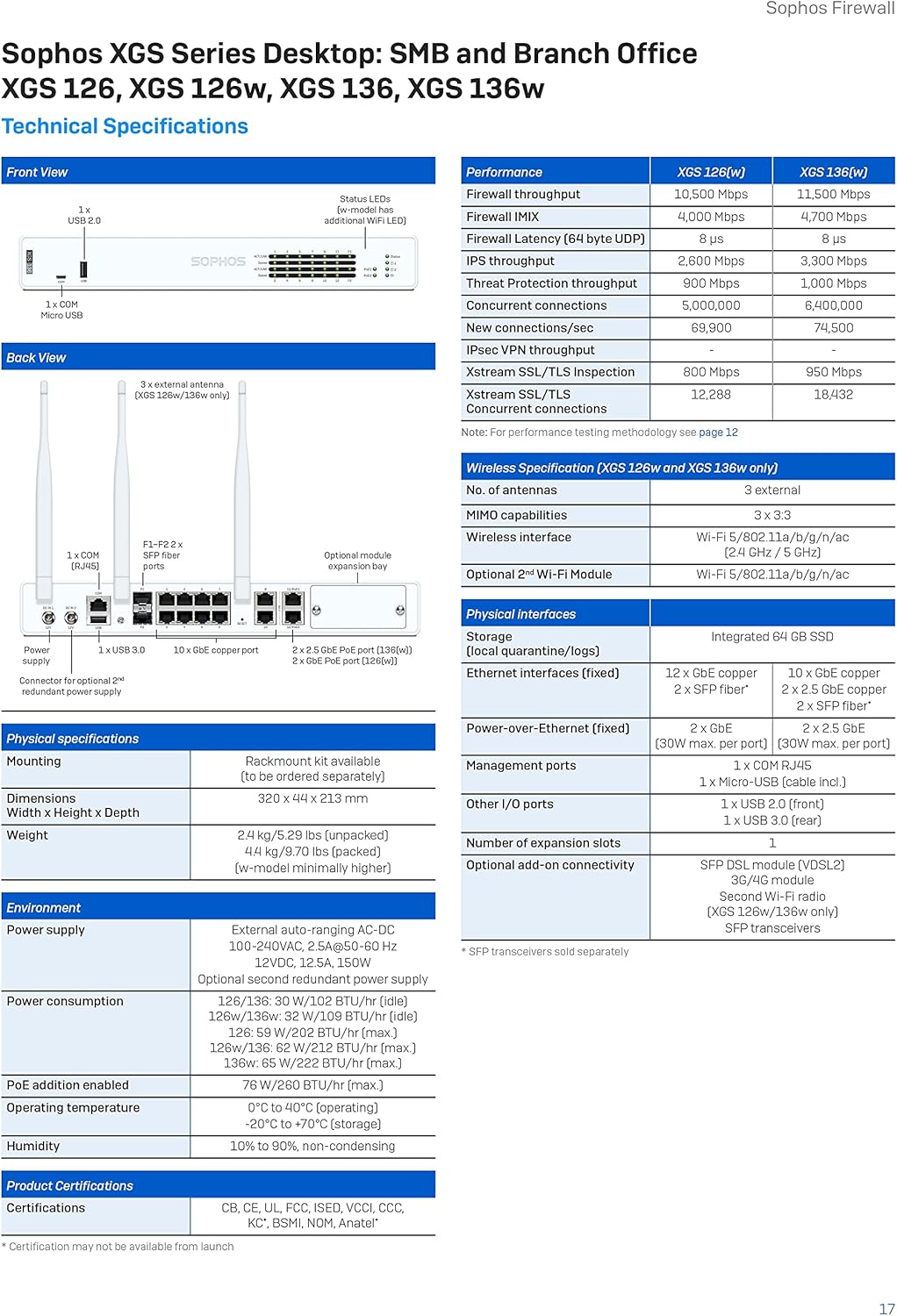
Figure 7: Sophos Firewall Protection Modules.
8. Support and Warranty
Your Sophos XGS 126 Next-Gen Firewall includes a 1-year Standard Protection bundle, which provides Enhanced Support.
- Enhanced Support: This includes 24/7 technical support, access to feature updates, and an advanced replacement hardware warranty.
- Warranty Coverage: The hardware warranty covers defects in materials and workmanship for the duration of the included protection plan.
- Contacting Support: For technical assistance or warranty claims, please refer to the official Sophos support website or contact your Sophos partner. Ensure you have your product serial number and license information ready.
For more information, visit the Sophos Store on Amazon.


