
Mean Well USA DDR-480C-48
Mean Well USA DDR-480C-48 DIN Rail DC-DC Converter Instruction Manual
Model: DDR-480C-48
Introduction
This manual provides essential information for the safe and efficient installation, operation, and maintenance of the Mean Well USA DDR-480C-48 Module DIN Rail DC-DC Converter. Please read this manual thoroughly before using the product and retain it for future reference.
The DDR-480C-48 is a high-performance 480W DC-DC converter designed for DIN rail mounting, accepting an input voltage range of 33.6V to 67.2V DC and providing a stable 48V DC output at 10A. It features adjustable output voltage for various applications.
Safety Instructions
WARNING: Failure to follow these safety instructions may result in electric shock, fire, or serious injury.
- Ensure all power sources are disconnected before installation or maintenance.
- Installation must be performed by qualified personnel only.
- Verify input and output voltage/current ratings match your application requirements.
- Do not operate the converter in environments exceeding its specified temperature and humidity limits.
- Ensure proper grounding to prevent electrical hazards.
- Do not open the converter casing; there are no user-serviceable parts inside.
Product Overview
The DDR-480C-48 is a robust DC-DC converter designed for industrial control, automation, and telecommunication systems. Its compact design allows for efficient use of space on a standard DIN rail.
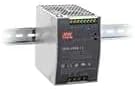
Image: Mean Well USA DDR-480C-48 DIN Rail DC-DC Converter. This image shows the compact design of the converter, mounted on a standard DIN rail, highlighting its terminal blocks for input and output connections and ventilation slots.
Key Features:
- DIN rail mountable
- Wide input voltage range (33.6V - 67.2V DC)
- Adjustable output voltage (48V DC nominal)
- High efficiency
- Protections: Short circuit, overload, over voltage, input reverse polarity
Setup and Installation
1. Mounting:
- Ensure the DIN rail is securely mounted in a well-ventilated enclosure.
- Hook the top edge of the converter onto the DIN rail.
- Push the bottom edge of the converter firmly until it clicks into place on the DIN rail.
- Verify the converter is securely attached and cannot be easily dislodged.
2. Wiring Connections:
Refer to the terminal block markings on the unit for correct connections. Use appropriate wire gauges for the expected current.
- Input (DC IN): Connect the DC input power source to the designated input terminals. Observe correct polarity (+ and -). The input voltage must be within the 33.6V to 67.2V DC range.
- Output (DC OUT): Connect your load to the designated output terminals. Observe correct polarity (+ and -). The nominal output is 48V DC.
- Ground (PE): Connect the protective earth (ground) terminal to a reliable earth ground.
Important: Double-check all wiring connections for correctness and tightness before applying power.
Operating Instructions
1. Power On:
Once all connections are secure and verified, apply the DC input power. The converter should power on, and the output voltage will be present at the output terminals.
2. Output Voltage Adjustment:
The DDR-480C-48 features an adjustable output voltage. Locate the "V.ADJ" potentiometer on the unit. Using a small screwdriver, carefully turn the potentiometer clockwise to increase the output voltage or counter-clockwise to decrease it. Monitor the output voltage with a multimeter during adjustment to ensure it remains within the safe operating range for your connected load.
Caution: Do not adjust the output voltage beyond the specified limits to avoid damaging the converter or connected equipment.
Maintenance
The DDR-480C-48 is designed for reliable operation with minimal maintenance. However, periodic checks can help ensure longevity and performance.
- Cleaning: Keep the converter free from dust and debris. Use a soft, dry cloth to clean the exterior. Do not use liquid cleaners or solvents.
- Ventilation: Ensure that the ventilation openings are not obstructed to allow for proper heat dissipation.
- Connections: Periodically check all wiring connections for tightness, especially in environments with vibration.
- Inspection: Visually inspect the unit for any signs of damage, discoloration, or overheating.
No internal user-serviceable parts. Refer all servicing to qualified service personnel.
Troubleshooting
If the converter is not operating as expected, refer to the following common issues and solutions:
| Problem | Possible Cause | Solution |
|---|---|---|
| No output voltage | No input power; Input polarity reversed; Overload protection activated; Short circuit on output | Check input power supply; Verify input wiring polarity; Reduce load; Check for short circuits on output and remove them. |
| Output voltage too low/high | Incorrect V.ADJ setting; Overload condition | Adjust V.ADJ potentiometer; Reduce load. |
| Unit is hot | Insufficient ventilation; Overload condition; High ambient temperature | Ensure proper airflow around the unit; Reduce load; Operate within specified temperature range. |
If the problem persists after attempting these solutions, contact Mean Well USA technical support or a qualified service technician.
Specifications
- Model: DDR-480C-48
- Input Voltage Range: 33.6 ~ 67.2V DC
- Output Voltage: 48V DC (Adjustable)
- Output Current: 10A
- Output Power: 480W
- Brand: Mean Well USA
- Manufacturer: Mean Well USA
- Item Weight: 6.99 pounds
- UPC: 790409687253
- Mounting: DIN Rail
Note: Specifications are subject to change without notice. Refer to the official product datasheet for the most current and detailed specifications.
Warranty and Support
For warranty information, technical support, or service inquiries, please contact Mean Well USA directly or refer to their official website. Keep your purchase receipt as proof of purchase.
Protection plans may be available through your retailer. For details on extended protection plans, please consult your point of purchase.
Mean Well USA Contact Information: Please visit www.meanwellusa.com for the latest contact details and support resources.
Related Documents - DDR-480C-48
 |
MEAN WELL DDR-480 Series 480W DIN Rail DC-DC Converter Datasheet Comprehensive datasheet for the MEAN WELL DDR-480 series 480W DIN Rail DC-DC converters. This document details features, specifications, applications, environmental immunity, safety standards, and mechanical data, making it suitable for industrial and railway control systems. |
 |
MEAN WELL DDR-480 Series 480W DIN Rail DC-DC Converter Specifications Detailed technical specifications, features, applications, and compliance information for the MEAN WELL DDR-480 series 480W DIN Rail DC-DC converter. Suitable for industrial, railway, automation, and telecom applications. |
 |
MEAN WELL DDR-480 Series 480W DIN Rail DC-DC Converter Datasheet Datasheet for the MEAN WELL DDR-480 series 480W DIN Rail mount DC-DC converters. Features include wide input voltage ranges, -40°C to +80°C operating temperature, 150% peak load, current sharing, and 4KVdc isolation, suitable for industrial and railway applications. |
 |
MEAN WELL DDR-480 Series 480W DIN Rail DC-DC Converter Specifications and Features Comprehensive technical specifications, features, applications, and environmental compliance for the MEAN WELL DDR-480 series 480W DIN Rail Type DC-DC Converter, designed for industrial and railway applications. |
 |
MEAN WELL DDR-480 Series 480W DIN Rail DC-DC Converter Datasheet Comprehensive datasheet for the MEAN WELL DDR-480 series 480W DIN Rail Type DC-DC Converters, detailing features, specifications, applications, environmental testing, and mechanical data for industrial and railway systems. |
 |
MEAN WELL DDR-480 Series 480W DIN Rail DC-DC Converter Datasheet Comprehensive technical specifications, features, applications, and performance data for the MEAN WELL DDR-480 series 480W DIN Rail Type DC-DC Converters. This document covers electrical characteristics, environmental compliance, safety standards, mechanical dimensions, and operational curves, making it a comprehensive resource for engineers and system integrators. |
Ask a question about this manual
Ask about setup, troubleshooting, compatibility, parts, safety, or missing instructions. Manuals+ will review the question and use this page’s manual context to help answer it.