
Introduction
Thank you for choosing the Cecotec BigDry 9000 Professional Dehumidifier. This manual provides essential information for the safe and efficient operation, maintenance, and troubleshooting of your new appliance. Please read this manual thoroughly before use and keep it for future reference.
This dehumidifier is designed to significantly reduce humidity levels in your environment, contributing to improved comfort and preventing issues caused by excessive moisture, such as mold growth or damage to furniture. With its advanced features, including Wi-Fi control and a large capacity tank, it offers a convenient and effective solution for humidity management.
Safety Instructions
Always follow basic safety precautions when using electrical appliances to reduce the risk of fire, electric shock, and injury.
- Ensure the appliance is placed on a stable, level surface.
- Do not operate the dehumidifier near water or in excessively wet environments.
- Keep the appliance away from heat sources and direct sunlight.
- Do not block the air inlets or outlets. Ensure adequate clearance around the unit for proper airflow.
- Unplug the dehumidifier from the power outlet before cleaning, maintenance, or when not in use.
- Do not use if the power cord or plug is damaged. Contact qualified service personnel for repair.
- This appliance is for indoor use only.
- Do not allow children to play with the dehumidifier.
- Important: After transport, allow the unit to stand upright for at least 24 hours before plugging it in. This allows the refrigerant to settle.
Product Overview
Components
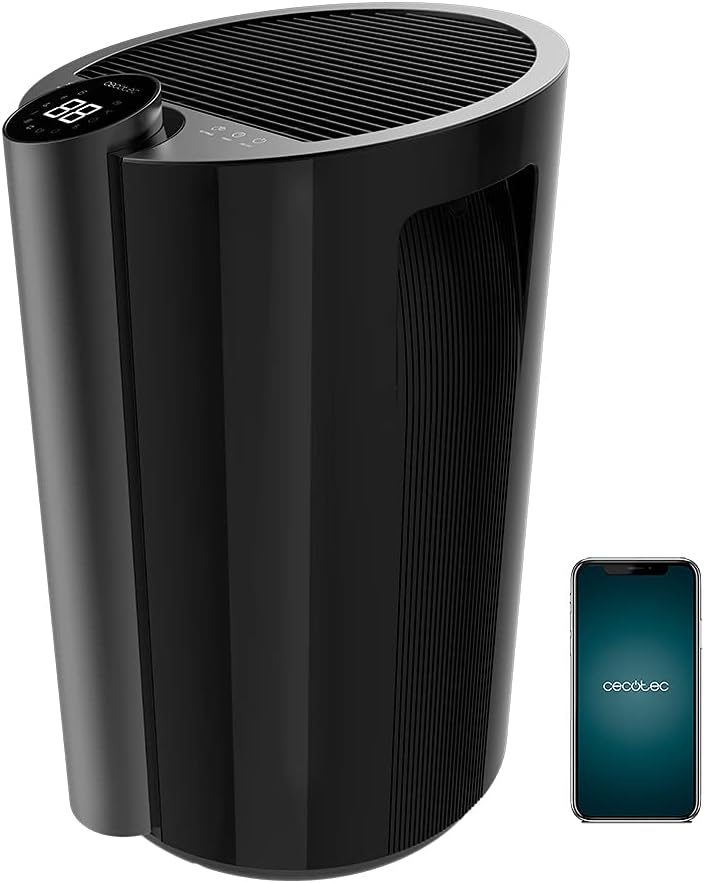
- Control Panel with LED Display
- Air Inlet Grille
- Air Outlet Grille
- Water Tank (4.5 Liters)
- Wheels for portability
- Integrated Handle
- Power Cord
- Air Filter
Key Features
- High Dehumidification Capacity: Up to 20 liters per day.
- Large Water Tank: 4.5-liter removable tank minimizes emptying frequency.
- Wi-Fi Control: Manage settings remotely via your smartphone.
- Wide Coverage: Effective for areas up to 90 m² (250 m³/h).
- Full Tank Warning: Prevents overflows and conserves energy.
- Adjustable Humidity: Set desired ambient humidity between 40% and 80%.
- LED Display: Shows current ambient humidity, temperature, and selected settings.
- Touch Controls: Intuitive and easy-to-use interface.
- Programmable Timer: Up to 12 hours with automatic shut-off.
- Two Speeds: Low and High dehumidification speeds.
- Quiet Operation: Designed for minimal noise disruption.
- Air Filter: Improves air quality by preventing large particle entry.
- Portability: Equipped with wheels and a handle for easy movement.
Setup
- Unpacking: Carefully remove the dehumidifier from its packaging. Retain packaging materials for future storage or transport.
- Placement: Place the dehumidifier on a firm, level surface in the desired room. Ensure there is at least 20 cm (8 inches) of space around all sides of the unit for proper air circulation. Avoid placing it against walls or furniture that could obstruct airflow.
- Initial Standby: After transport, it is crucial to let the dehumidifier stand upright for a minimum of 24 hours before plugging it into a power outlet. This allows the refrigerant fluid to stabilize, preventing potential damage to the compressor.
- Power Connection: Plug the power cord into a grounded electrical outlet. Ensure the voltage matches the specifications of the unit.
- Water Tank Installation: Ensure the water tank is correctly inserted into its compartment. The unit will not operate if the tank is not properly seated or is full.
- Wi-Fi Setup (Optional):
- Download the official Cecotec app on your smartphone.
- Create an account or log in.
- Follow the in-app instructions to add your BigDry 9000 dehumidifier. This typically involves pressing the Wi-Fi button on the unit for 5 seconds to enter pairing mode. Note that the device requires a 2.4 GHz Wi-Fi network.

Operating Instructions
Control Panel Overview

- ON/OFF Button: Press to turn the unit on or off.
- MODE Button: Cycle through different operating modes (e.g., continuous dehumidification, auto mode).
- FAN SPEED Button: Adjust fan speed between Low and High.
- SETTINGS Button: Used to set the desired humidity level. Press repeatedly to cycle through humidity percentages (40% - 80%).
- TIMER Button: Set the automatic shut-off timer (up to 12 hours).
- LED Display: Shows current ambient humidity, temperature, and selected settings.
Basic Operation
- Power On: Press the ON/OFF button to start the dehumidifier. The LED display will show the current ambient humidity.
- Set Desired Humidity: Press the SETTINGS button to select your target humidity level. The unit will operate until the desired humidity is reached, then cycle on and off to maintain it.
- Adjust Fan Speed: Press the FAN SPEED button to switch between low and high fan speeds. Lower speed provides quieter operation, while higher speed offers faster dehumidification.
- Set Timer: Press the TIMER button to set the desired operating duration (e.g., 1 hour, 2 hours, up to 12 hours). The unit will automatically turn off after the set time.
- Wi-Fi Control: If connected to Wi-Fi, use the Cecotec app on your smartphone to control all functions remotely.
Maintenance
Regular maintenance ensures optimal performance and extends the lifespan of your dehumidifier.
Emptying the Water Tank

- When the water tank is full, the unit will automatically stop operating and an indicator light (or message on the LED display) will alert you.
- Carefully pull out the water tank from the front of the unit.
- Empty the collected water.
- Slide the empty tank back into its position until it clicks securely. The unit will resume operation.
Cleaning the Air Filter
- It is recommended to clean the air filter every two weeks or more frequently depending on usage and air quality.
- Turn off the dehumidifier and unplug it from the power outlet.
- Locate and remove the air filter (refer to your specific model's diagram for exact location, usually at the back or side).
- Clean the filter using a vacuum cleaner to remove dust and debris. For heavier dirt, wash it gently with lukewarm water and a mild detergent.
- Allow the filter to air dry completely before reinserting it into the unit. Do not use a dryer or direct heat.
- Reinsert the dry filter and plug the unit back in.
General Cleaning
- Wipe the exterior of the dehumidifier with a soft, damp cloth. Do not use abrasive cleaners or solvents.
- Ensure no water enters the electrical components.
Troubleshooting
Before contacting customer support, please refer to the following troubleshooting guide for common issues.
| Problem | Possible Cause | Solution |
|---|---|---|
| Dehumidifier does not turn on. | No power; Water tank full or incorrectly inserted. | Check power connection; Empty and reinsert water tank correctly. |
| No water collected or low dehumidification. | Ambient humidity too low; Air filter clogged; Room temperature too low; Unit size too small for room. | Increase target humidity setting; Clean air filter; Ensure room temperature is above 5°C (41°F); Consider a larger unit for the space. |
| Unit is noisy. | Unit not on a level surface; Air filter clogged; Obstruction in fan. | Place on a level surface; Clean air filter; Check for and remove any obstructions. |
| Wi-Fi connection issues. | Incorrect Wi-Fi password; Router too far; Only supports 2.4 GHz network. | Verify password; Move unit closer to router; Ensure your Wi-Fi is 2.4 GHz. |
Specifications
| Feature | Specification |
|---|---|
| Brand | Cecotec |
| Model Number | 05655 |
| Color | Black - Bigdry 9000 Professional Black Connected |
| Dehumidification Capacity | 20 Liters/day |
| Water Tank Capacity | 4.5 Liters |
| Power | 320 Watts |
| Coverage Area | Up to 90 m² (250 m³/h) |
| Timer | Up to 12 hours (automatic shut-off) |
| Number of Speeds | 2 (Low, High) |
| Dimensions (L x W x H) | 38.1 x 60.5 x 38.3 cm |
| Item Weight | 14 Kilograms |
| Special Features | Wi-Fi Control, Timer, High Dehumidification Capacity |
Warranty and Support
Cecotec products are manufactured to the highest quality standards. For warranty information and customer support, please refer to the official Cecotec website or contact their customer service directly.
- Spare Parts Availability: 10 Years (as per product specifications).
- For technical assistance, troubleshooting beyond this manual, or warranty claims, please visit www.cecotec.com or contact your local authorized dealer.
