
1. Introduction
This manual provides instructions for the TILTA Nucleus-Nano Motor Kit 2 (WLC-T04-M2). This kit is designed to add a focus motor to your camera setup, compatible with various lenses and control systems. It includes the Nucleus Nano Motor, a power cable, a 15mm rod, and a gear ring for lens adaptation.
2. What's Included
The TILTA Nucleus-Nano Motor Kit 2 includes the following components:
- Nucleus Nano Motor (WLC-T04-M2)
- Micro USB to Micro USB Power Cable (WLC-T04-PC)
- 15mm Rod
- Photographic Lens Follow Focus Gear Ring

Figure 2.1: Overview of the Nucleus-Nano Motor Kit 2 components.
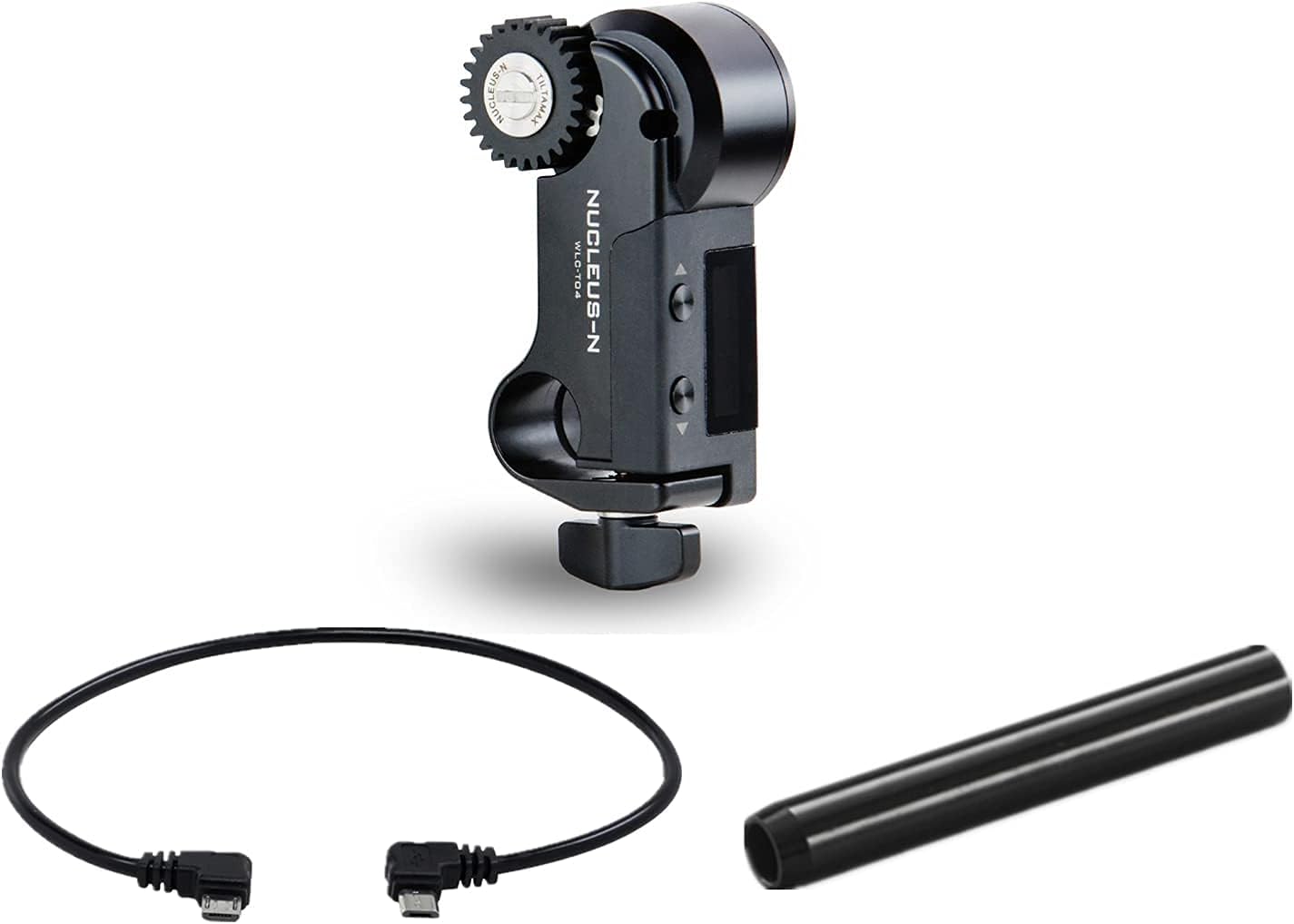
Figure 2.2: The Nucleus-Nano Motor, Micro USB power cable, and 15mm rod.

Figure 2.3: The Micro USB to Micro USB power cable.
3. Setup
3.1 Mounting the Motor
- Attach the Nucleus Nano Motor to the included 15mm rod. Ensure it is securely fastened.
- Mount the 15mm rod to your camera rig in a position that allows the motor's gear to align with your lens's focus gear.
3.2 Power Connection
- Connect one end of the Micro USB to Micro USB Power Cable (WLC-T04-PC) to the Micro USB port on the Nucleus Nano Motor.
- Connect the other end of the power cable to a compatible power source, such as a side handle or a power bank. The motor supports 5-18V input. Higher voltage sources (e.g., P-Tap via optional cable) can provide greater torque.
3.3 Lens Gear Ring Installation
- If your lens does not have a built-in 0.8 pitched gear, install the Photographic Lens Follow Focus Gear Ring onto your lens's focus barrel.
- Ensure the gear ring is positioned correctly to engage with the motor's 0.8 mod gear.
3.4 Controller Pairing and Calibration
- The Nucleus Nano Motor features a built-in motor drive that communicates with various TILTA controllers, including the Nano Hand Wheel Controller, Nucleus M FIZ, Hand Grips, or Side Focus Handles.
- Set the Nucleus Nano Motor and your chosen controller to the same channel to establish a wireless connection.
- Automatic Calibration: For lenses with hard end stops, the motor can perform automatic calibration. Refer to your controller's manual for specific instructions on initiating automatic calibration.
- Manual Calibration (A-B Limits): For lenses without hard end stops, you can manually set A-B limits. Move the lens to your desired 'A' point (e.g., close focus) and set the limit on your controller. Then, move the lens to your desired 'B' point (e.g., infinity) and set the second limit.
4. Operating Instructions
4.1 Wireless Control
Once paired, the Nucleus Nano Motor can be controlled wirelessly from your compatible TILTA controller. The wireless range is approximately 300 feet (91 meters).
4.2 Focus Adjustment
Use the hand wheel or controls on your paired device to adjust the lens focus. The motor is designed for efficient and quiet focus adjustments.
4.3 Run/Stop Functionality
The Nucleus Nano Motor supports Run/Stop functionality for various camera systems. This requires specific camera-compatible Run/Stop cables, which are not included in this kit. Ensure you use only cables developed by TILTA for the Nucleus-Nano system. Cables designed for wooden handles are not compatible and should not be used.
4.4 Motor Torque
The motor's torque varies with input voltage:
- At 5.5V: 0.65 N·m
- At 14.8V: 1 N·m
5. Maintenance
- Keep the motor and its components clean and free from dust and debris. Use a soft, dry cloth for cleaning.
- Avoid exposing the unit to extreme temperatures or moisture.
- Regularly inspect the motor's gear for any signs of wear or damage.
- Ensure all cable connections are secure before operation.
6. Troubleshooting
6.1 Motor Not Responding
- Check Power: Ensure the motor is receiving adequate power. Verify the Micro USB cable is securely connected to both the motor and the power source.
- Check Pairing: Confirm that the motor and your controller are set to the same channel and are within the wireless range.
- Inspect Cables: Examine the power cable for any damage or loose connections. A loose power port can interrupt power supply.
6.2 Inaccurate Focus or Grinding Noise
- Gear Alignment: Ensure the motor's gear is properly aligned and engaged with the lens's focus gear or the installed gear ring.
- Gear Condition: Inspect the motor's gear and the lens gear ring for any wear, damage, or debris that might impede smooth operation. Worn gears can cause grinding noises or inconsistent movement.
- Calibration: Re-perform lens calibration (automatic or manual A-B limits) to ensure the motor accurately maps the lens's focus range.
7. Specifications
| Feature | Specification |
|---|---|
| Product Dimensions | 3.15 x 0.89 x 3.15 inches |
| Item Weight | 2.69 ounces |
| Power Input | 5-18V via Micro USB |
| Motor Gear Mod | 0.8 |
| Torque (5.5V) | 0.65 N·m |
| Torque (14.8V) | 1 N·m |
| Wireless Range | Up to 300 feet (91 meters) |
| Compatible Devices | Camera systems with appropriate Run/Stop cables |
| Color | Black |
8. Warranty and Support
For warranty information and technical support, please refer to the official TILTAING website or contact their customer service directly. Keep your proof of purchase for any warranty claims.