
usamjtable B095JCDR4R
Ultra-Thin Automatic Mahjong Table User Manual
Model: B095JCDR4R | Brand: usamjtable
1. Introduction
This manual provides comprehensive instructions for the setup, operation, and maintenance of your new Ultra-Thin Automatic Mahjong Table. Please read this manual thoroughly before using the table to ensure proper function and longevity of the product. This automatic mahjong table is designed to provide a seamless and enjoyable mahjong experience, featuring automatic tile shuffling and a convenient folding design.

Figure 1.1: The Ultra-Thin Automatic Mahjong Table with tiles ready for play.
2. Important Safety Information
To prevent injury or damage to the product, please observe the following safety precautions:
- Ensure the table is placed on a stable, level surface before operation.
- Keep hands and foreign objects clear of the shuffling mechanism during operation.
- Use only the magnetic mahjong tiles provided with the table. DO NOT USE MAGNETIC CHIPS, as they may cause the mechanism to jam.
- Do not attempt to disassemble or repair the table yourself. Contact customer support for assistance.
- Keep the table away from water and excessive moisture.
- Ensure the power cable (110V) is properly connected and not damaged.
- This product is heavy (approximately 220 lbs). Exercise caution and seek assistance when moving or setting up the table.
3. What's in the Box
Your package should contain the following items:
- 1 x Ultra-Thin Automatic Mahjong Table
- 2 sets of Magnetic Mahjong Tiles (1 Blue & 1 Green) - 144 tiles per set.
- 1 x Built-in Hard Table Cover
- Power Cable (110V, 5 feet long)

Figure 3.1: Example of the included magnetic mahjong tiles. The tiles feature Arabic numerals for easier identification.
4. Setup Instructions
Follow these steps to set up your automatic mahjong table:
- Unpacking: Carefully remove all components from the packaging. Due to the weight, it is recommended to have at least two people for unpacking and positioning.
- Positioning: Place the table on a flat, stable surface in your desired playing area. Ensure there is enough space around the table for players and movement.
- Power Connection: Locate the power input on the table and connect the provided 110V power cable. Plug the other end into a standard wall outlet.
- Folding Mechanism (if applicable): This table features a folding roller coaster style. If the table is in its folded state upon arrival, gently unfold it until it locks securely into the upright playing position.
- Table Cover: The table comes with a built-in hard table cover. This cover can be attached when the table is folded for storage or protection. Ensure it is removed before playing.

Figure 4.1: The automatic mahjong table in its folded configuration, showing the attached hard table cover.

Figure 4.2: Detail of the built-in hard table cover attachment mechanism when the table is folded.
5. Operating Instructions
5.1 Powering On and Initial Use
Once the table is set up and plugged in, it is ready for use. There is typically a power button located on the control panel or side of the table.
5.2 Shuffling and Tile Dispensing
The table automatically shuffles tiles. To begin a game:
- Place all mahjong tiles into the designated tile input area (usually the center well of the table).
- The table will automatically begin shuffling the tiles internally. This process typically takes a few seconds.
- Once shuffling is complete, walls of tiles will be automatically raised from the four sides of the table, ready for play.

Figure 5.1: The central control panel, featuring the automatic dice roller and various function buttons.
5.3 Dice Rolling
To roll the dice, press the dedicated dice button on the control panel. The table will automatically roll the dice and display the result, typically within 3 seconds.
5.4 Switching Play Styles (Chinese/Philippine/American)
This table supports Chinese, Philippine, and American mahjong styles. Refer to the control panel for buttons or settings to switch between these modes. The specific method for switching modes may vary slightly, but typically involves a dedicated button or a sequence of presses.
5.5 Tile Compatibility
The table is designed for 36mm magnetic tiles. The included tiles measure approximately 35.5mm (height) x 25mm (length) x 18mm (width). These tiles feature Arabic numerals in addition to traditional characters for easier recognition.

Figure 5.2: Various mahjong tile sizes, highlighting the 36mm tile compatible with this table.
5.6 Hidden USB Design
The table features a hidden USB port for convenience, likely for charging small devices. Locate the discreetly placed USB port, typically on the side panel, and use it as needed.
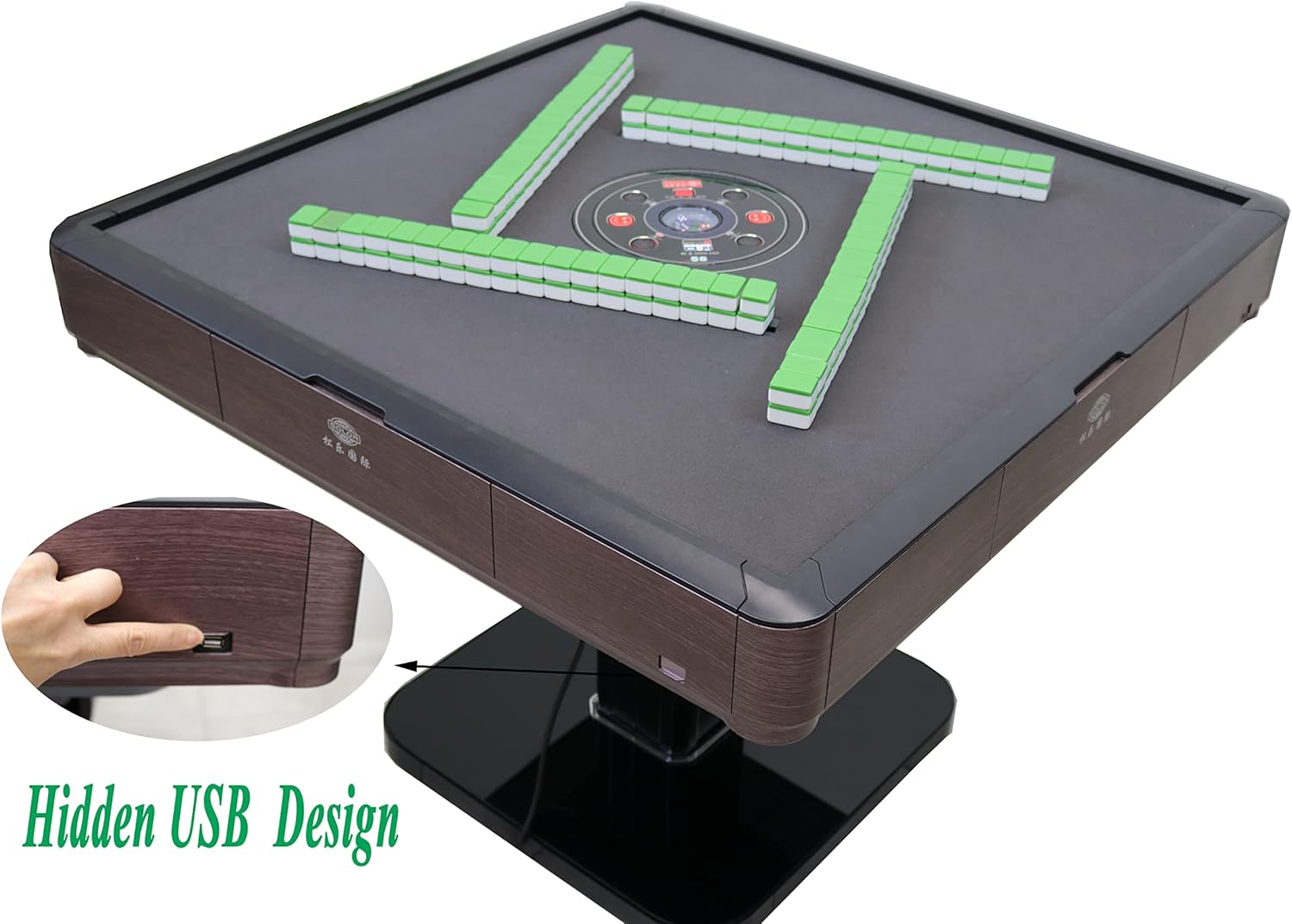
Figure 5.3: Location of the hidden USB port on the side of the table.
6. Maintenance
Regular maintenance ensures the longevity and optimal performance of your automatic mahjong table.
- Cleaning the Table Surface: Use a soft, damp cloth to wipe down the playing surface and exterior. Avoid abrasive cleaners or solvents that could damage the finish.
- Cleaning Tiles: Periodically clean the mahjong tiles with a soft, dry cloth to remove dust and oils.
- Internal Mechanism: Do not attempt to clean the internal shuffling mechanism yourself. If you suspect debris or issues, contact customer support.
- Storage: When not in use for extended periods, fold the table and attach the hard cover to protect it from dust and damage. Store in a dry, cool place.
7. Troubleshooting
If you encounter issues with your automatic mahjong table, refer to the following common problems and solutions:
| Problem | Possible Cause | Solution |
|---|---|---|
| Table does not power on. | Power cable not connected; outlet not working; power switch off. | Ensure power cable is securely plugged into the table and a working outlet. Check if the power switch is in the "On" position. |
| Tiles are not shuffling or dispensing correctly. | Foreign objects in mechanism; incorrect tiles used; tile jam. | Ensure only magnetic mahjong tiles are used. Power off the table, carefully inspect the tile input area for any obstructions, and remove them. If the problem persists, contact support. |
| Dice roller not functioning. | Obstruction in dice area; electronic malfunction. | Check for any small objects or debris in the dice rolling area. If clear, try restarting the table. If still not working, contact support. |
| Table is unstable or wobbly. | Uneven surface; improper setup. | Ensure the table is placed on a completely flat and level surface. Verify that all folding mechanisms are securely locked in place. |
If the problem persists after attempting these solutions, please contact customer support.
8. Product Specifications
| Feature | Detail |
|---|---|
| Product Dimensions | 36 x 36 x 36 inches (Tabletop dimensions: 38″ x 38″, Height from floor to tabletop: 30.5") |
| Item Weight | 220 pounds |
| ASIN | B095JCDR4R |
| Manufacturer | usamjtable |
| Power Requirement | 110V |
| Cable Length | 5 feet |
| Tile Compatibility | 36mm magnetic tiles (35.5mm H x 25mm L x 18mm W) |
| Supported Play Styles | Chinese, Philippine, American |

Figure 8.1: Dimensional overview of the automatic mahjong table.
9. Warranty and Customer Support
Your Ultra-Thin Automatic Mahjong Table comes with a one-year warranty from the date of purchase. This warranty covers manufacturing defects and malfunctions under normal use.
For warranty claims, technical assistance, or any questions regarding your product, please do not hesitate to contact the seller. We guarantee to resolve your problem 100%.
Contact information for customer support can typically be found on your purchase receipt or the seller's page on the platform where you purchased the product.
Note: Please retain your proof of purchase for warranty purposes.
Ask a question about this manual
Ask about setup, troubleshooting, compatibility, parts, safety, or missing instructions. Manuals+ will review the question and use this page’s manual context to help answer it.