
1. Introduction
Thank you for purchasing the LVYUAN BC200PRO Automatic Pulse Battery Charger. This manual provides essential information for the safe and efficient operation, maintenance, and troubleshooting of your new charger. Please read this manual thoroughly before use and keep it for future reference.
The LVYUAN BC200PRO is a versatile smart battery charger designed for various 12V and 24V lead-acid batteries, as well as 12V LiFePO4 batteries. It features advanced 4-stage smart charging and pulse repair functions to optimize battery life and performance.
2. Safety Information
Always prioritize safety when operating electrical equipment. Failure to follow these instructions may result in electric shock, fire, or serious injury.
- Read all instructions: Before using the charger, read all instructions and cautionary markings on the charger, the battery, and the product using the battery.
- Ventilation: Ensure adequate ventilation during charging. Batteries can produce explosive gases.
- Eye and Skin Protection: Always wear eye protection and protective clothing when working with batteries.
- Avoid Sparks and Flames: Do not smoke or allow a spark or flame in the vicinity of the battery or engine.
- Proper Connection: Connect and disconnect DC output clips only after setting any charger switches to the off position and removing the AC cord from the electric outlet.
- Reverse Polarity Protection: The charger includes reverse polarity protection, but always double-check connections.
- Overcharge Protection: The charger features overcharge protection, but do not leave unattended for extended periods.
- Children: Keep out of reach of children.
3. Product Overview
The LVYUAN BC200PRO is a compact and robust battery charger designed for ease of use and durability. It features an aluminum body with a heat sink for efficient cooling and a clear LCD display for monitoring charging status.

Figure 1: Front view of the LVYUAN BC200PRO charger.
3.1 Components
- Main Unit: The charger unit with an LCD display and control buttons.
- Power Cord: For connecting to an AC power outlet. Length: approximately 130 cm.
- Connection Cables with Clamps: For connecting to the battery terminals. Length: approximately 150 cm.
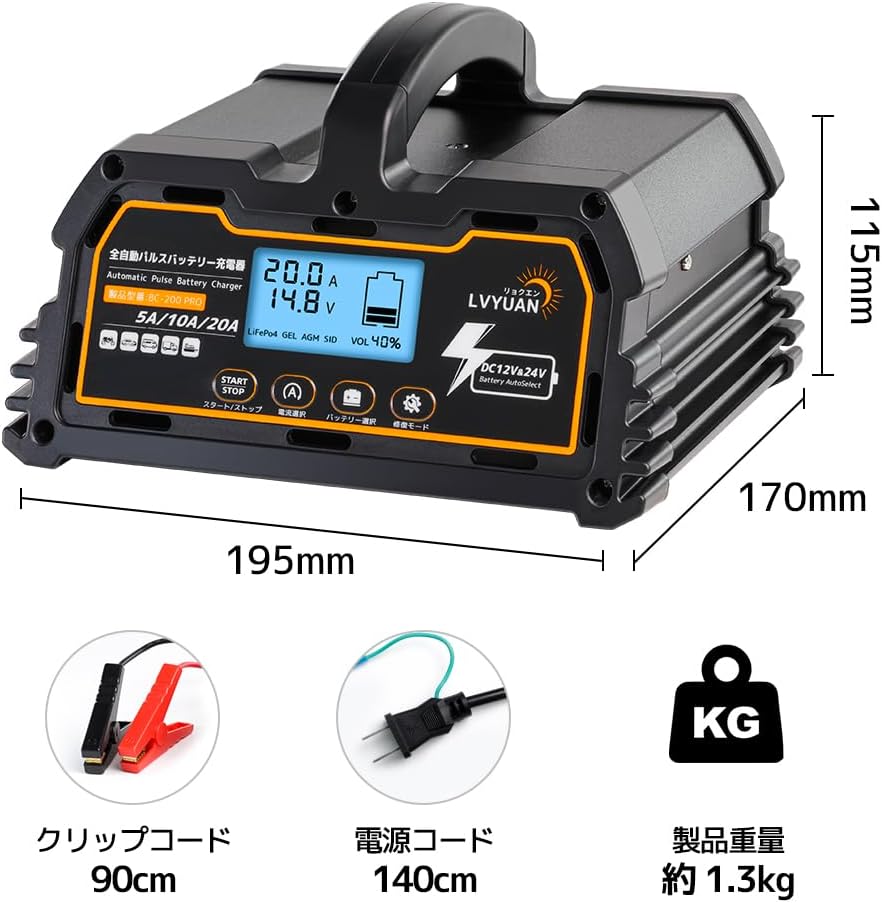
Figure 2: Charger dimensions and included accessories (clip cord, power cord).
3.2 Features
- Automatic 12V/24V Detection: Automatically detects battery voltage.
- 4-Stage Smart Charging: Pre-charge, constant current, constant voltage, and float charge modes.
- Pulse Repair Function: Helps restore weakened batteries by removing sulfation.
- Multi-Protection: Reverse polarity, over-voltage, over-current, over-charge, and short-circuit protection.
- Long-Term Maintenance Charging: Can maintain a full charge for up to 3 months.
- Wide Battery Compatibility: Supports various lead-acid batteries (WET, MF, EFB, GEL, AGM) and 12V LiFePO4 batteries.
- Cooling Fan: Activates when the internal temperature exceeds 45°C.
4. Setup
Follow these steps to set up your LVYUAN BC200PRO charger:
- Position the Charger: Place the charger on a stable, flat surface away from direct sunlight, heat sources, and moisture. Ensure good ventilation around the unit.
- Connect to Battery:
- Ensure the charger's main power switch (on the rear) is OFF.
- Connect the red (+) clamp to the positive (+) terminal of the battery.
- Connect the black (-) clamp to the negative (-) terminal of the battery.
- Ensure connections are secure.
- Connect to Power: Plug the AC power cord into a standard 100V AC outlet.
- Turn On: Flip the main power switch on the rear of the charger to the ON position. The LCD display will illuminate.

Figure 3: Simplified 4-step charging process.
5. Operating Instructions
5.1 Standard Charging
- Initial Display: After turning on, the charger will display the current battery voltage and capacity. It will automatically detect if it's a 12V or 24V battery.
- Select Battery Type: Press the 'CURRENT' button to cycle through the available battery types (Motorcycle, Car, Truck/Tractor, Boat/Small Ship). The charger will automatically select the appropriate charging parameters.
- Select Charging Current: For 12V batteries, you can select 5A, 10A, or 20A by pressing the 'CURRENT' button. For 24V batteries, options are 5A or 10A. A lower current is gentler on the battery if time permits.
- Start Charging: Press the 'START/STOP' button to begin the 4-stage smart charging process. The display will show charging current, voltage, and progress.
- Charging Completion: The charger will automatically stop when the battery is fully charged and switch to float charge mode to maintain the battery.

Figure 4: The 4-stage smart charging process ensures optimal battery health.
5.2 Pulse Repair Mode
The pulse repair mode is designed to desulfate and restore weakened batteries, particularly those that have been discharged for a long time or are over 5 years old. This process can extend battery life.
- Connect Charger: Ensure the charger is connected to the battery and power as described in the Setup section.
- Activate Repair Mode: Press and hold the 'REPAIR MODE' button for approximately 5 seconds. The display will show a wrench icon and indicate 'REPAIR'.
- Monitor Progress: The charger will apply a specific pulse current and voltage (e.g., 2.5A / 15.5V) to desulfate the battery. This process can take up to 24 hours.
- Completion: Once the repair process is complete, the charger will automatically switch to standard charging or float mode.

Figure 5: Pulse charging helps restore battery performance by removing sulfation.
5.3 Video Demonstration
6. Maintenance
Proper maintenance ensures the longevity of your battery charger and the batteries it services.
- Cleaning: Disconnect the charger from power and battery before cleaning. Wipe the exterior with a soft, dry cloth. Do not use harsh chemicals or abrasives.
- Storage: Store the charger in a cool, dry place when not in use. Ensure cables are neatly coiled and not kinked.
- Cable Inspection: Regularly inspect the power cord and connection cables for any signs of damage, fraying, or corrosion. Replace if damaged.
- Long-Term Battery Storage: For vehicles or equipment stored for extended periods, utilize the charger's float charge function to maintain optimal battery levels. The charger can maintain a full charge for up to 3 months.
7. Troubleshooting
If you encounter issues with your LVYUAN BC200PRO charger, refer to the following common problems and solutions:
| Problem | Possible Cause | Solution |
|---|---|---|
| Charger does not turn on. | No power from outlet; Main switch off; Internal fuse blown. | Check power outlet; Ensure main switch is ON; Contact support if fuse is suspected. |
| Charging does not start. | Incorrect battery connection; Battery voltage too low; Battery severely damaged. | Verify positive/negative connections; Try Repair Mode for low voltage/damaged batteries. |
| Display shows error code. | Specific fault detected (e.g., reverse polarity, short circuit). | Refer to the charger's display icons for specific error. Disconnect and reconnect correctly. |
| Charger gets hot. | Normal operation (heat sink); Poor ventilation. | Ensure adequate ventilation. The cooling fan will activate if needed. |
| Pulse Repair Mode not effective. | Battery is beyond repair; Physical damage to battery. | Not all batteries can be fully restored. Consider battery replacement if no improvement. |
8. Specifications
| Feature | Specification |
|---|---|
| Brand | LVYUAN |
| Model Number | BC200PRO |
| Color | Orange, Black |
| Product Dimensions (D x W x H) | 11.5 x 17 x 19.5 cm |
| Output Voltage | 24 Volts (14.8V for 12V batteries, 29.6V for 24V batteries) |
| Input Voltage | 100 Volts (AC) |
| Rated Current | 20 Amperes |
| Max Output Power | 250W |
| Charging Method | Automatic Charging / Pulse Charging |
| Operating Temperature | -20°C to 45°C |
| Compatible Battery Types | DC12V/24V Lead-Acid Batteries (WET/MF/EFB/GEL/AGM), DC12V LiFePO4 Batteries |
| Compatible Battery Capacity | 15AH - 200AH |
| GTIN (UPC) | 765117546734 |
9. Warranty and Support
LVYUAN is committed to providing high-quality products and customer service.
9.1 Warranty Information
This product comes with a 1 Year Warranty Against Manufacturer Defects. Please retain your proof of purchase for warranty claims.
9.2 Customer Support
For any questions, technical assistance, or warranty claims, please contact LVYUAN customer support. Our dedicated team is available to help resolve any issues promptly.

Figure 6: LVYUAN offers comprehensive after-sales support.


