
1. Introduction
This manual provides essential information for the safe and efficient operation of your FLAMEZUM 4000W Pure Sine Wave Inverter. This device converts 12V DC battery power into 230V AC household power, providing a continuous output of 4000W and a peak power of 8000W. Its advanced pure sine wave technology ensures high-quality AC output, suitable for sensitive electronic devices. Please read this manual thoroughly before installation and use.

Figure 1: FLAMEZUM 4000W Pure Sine Wave Inverter
2. Safety Information
Always observe the following safety precautions to prevent injury and damage to the inverter or connected devices:
- Ventilation: Ensure the inverter is installed in a well-ventilated area. Do not block cooling vents.
- Dry Environment: Keep the inverter away from water, moisture, and corrosive materials.
- Correct Voltage: Connect the inverter only to a 12V DC power source. Connecting to other voltages may cause damage.
- Polarity: Always connect battery cables with correct polarity (red to positive, black to negative). Reverse polarity will damage the inverter.
- Grounding: Properly ground the inverter to prevent electrical shock.
- Load Capacity: Do not exceed the inverter's continuous power rating (4000W) or peak power rating (8000W).
- Qualified Personnel: Installation and servicing should be performed by qualified personnel.
- Flammable Materials: Do not operate the inverter near flammable liquids or gases.
3. Product Features
The FLAMEZUM 4000W Pure Sine Wave Inverter is designed with advanced features for reliable power conversion:
- Pure Sine Wave Output: Provides stable and clean AC power, ideal for sensitive electronics like laptops, medical equipment, and audio systems.
- High Power Capacity: Delivers 4000W continuous power and 8000W peak power, suitable for a wide range of appliances.
- Multi-Protection System: Equipped with intelligent chip control for comprehensive protection against:
- Low Voltage Protection
- Front Board Overload
- Overload Protection
- Full Load Alarm
- Short-Circuit Protection
- Thermal Protection
- Over Voltage Protection
- Input Undervoltage Alarm
- Intelligent LCD Display: Real-time monitoring of operational status, including input voltage (BT), output voltage (AC), operating temperature (T), battery power level, appliance power (P), and waveform display.
- Remote Control: A wired remote control with a 4.5m cable allows for convenient power on/off operation from a distance.
- Efficient Cooling System: Features dual intelligent cooling fans that activate when the internal temperature exceeds 41°C (104°F) or when the load exceeds 480W, ensuring optimal performance and longevity.
- Multiple Output Ports: Includes two standard AC outlets, two 3.4A USB ports for charging mobile devices, and heavy-duty AC terminal blocks for high-current applications (1500-2000W heavy duty).
- Wide Application: Suitable for various environments including RVs, camping, outdoor work, yachts, and as a backup power source for home or office.

Figure 2: Multi-Protection System

Figure 3: Intelligent LCD Display

Figure 4: Remote Control

Figure 5: Dual Cooling Fans

Figure 6: Dual USB Ports

Figure 7: Dual AC Sockets

Figure 8: AC Terminal Blocks

Figure 9: Application Scenarios
4. Package Contents
Verify that all items are present and undamaged upon opening the package:
- 1 x FLAMEZUM 4000W Pure Sine Wave Inverter
- 1 x Remote Control (with 4.5m cable)
- 2 x Battery Cables (80cm, 2AWG, 32mm²)
- 6 x Spare Fuses
- 1 x Small Wrench
- 1 x Grounding Cable
- 1 x User Manual
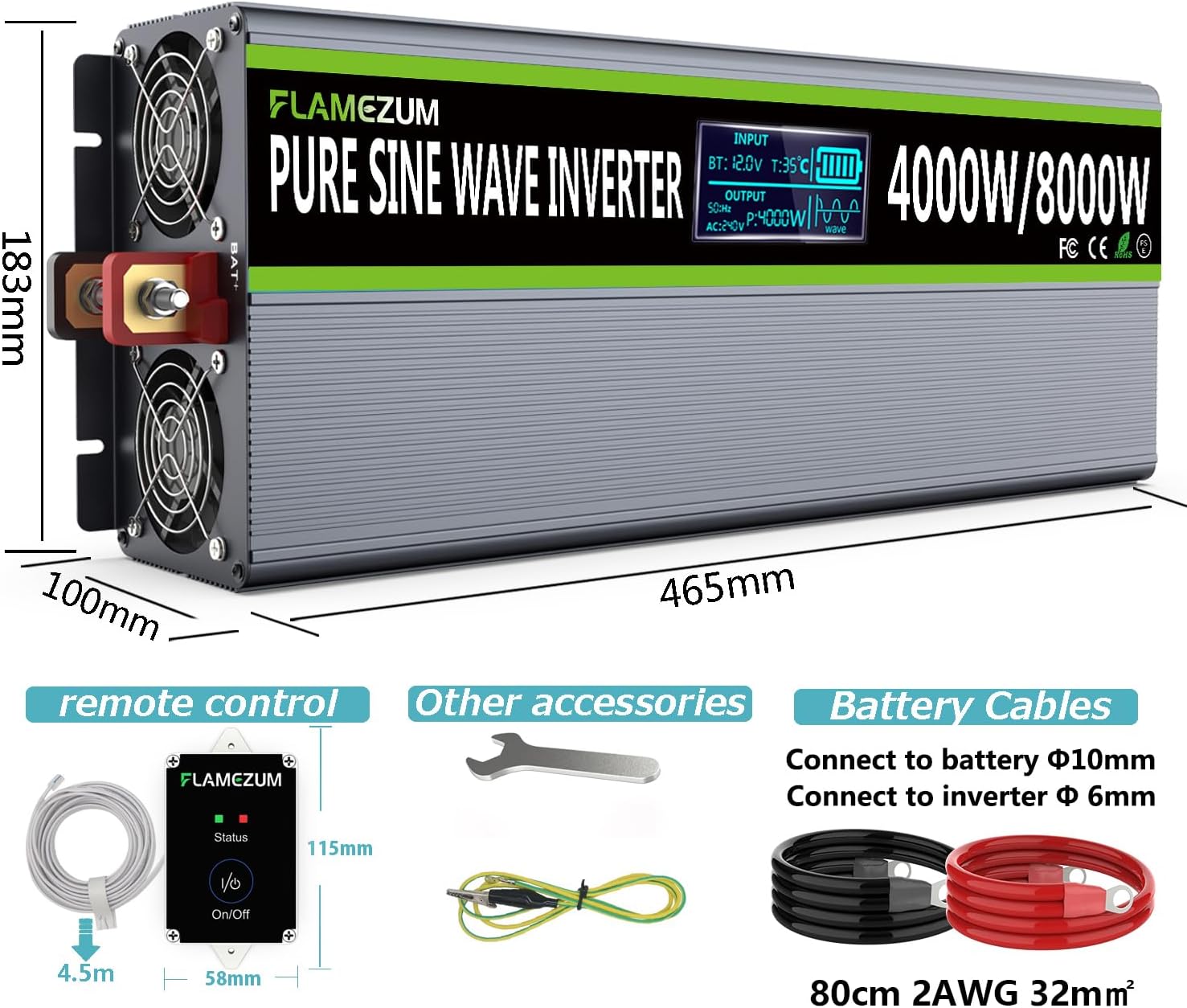
Figure 10: Included Components
5. Setup
Follow these steps for proper installation of your inverter:
- Choose a Location: Select a dry, cool, and well-ventilated area for the inverter. Ensure there is sufficient space around the unit for airflow, especially around the cooling fans. Avoid direct sunlight, heat sources, and areas with excessive dust or moisture.
- Battery Connection:
- Ensure the inverter's power switch is in the 'OFF' position.
- Connect the red battery cable to the positive (+) terminal of your 12V battery.
- Connect the other end of the red cable to the positive (+) terminal on the inverter.
- Connect the black battery cable to the negative (-) terminal of your 12V battery.
- Connect the other end of the black cable to the negative (-) terminal on the inverter.
- Ensure all connections are tight and secure to prevent loose connections and sparking.
- Grounding: Connect the grounding cable from the inverter's grounding terminal to a proper earth ground. This is crucial for safety.
- Remote Control Connection: If desired, plug the remote control cable into the designated 'Remote ON/OFF' port on the inverter.
- Initial Check: Double-check all connections before proceeding to operation.
6. Operating Instructions
To operate your FLAMEZUM inverter:
- Power On: Flip the 'ON/OFF' switch on the inverter to the 'ON' position, or press the 'ON/OFF' button on the remote control. The LCD display will illuminate, showing current operational data.
- Connect Appliances: Plug your AC appliances into the inverter's AC outlets or connect them to the heavy-duty AC terminal blocks. For USB charging, connect devices to the USB ports.
- Monitor Performance: Regularly check the LCD display for input voltage, output power, and temperature. This helps ensure the inverter is operating within safe parameters.
- Power Off: When finished, turn off all connected appliances first, then switch the inverter to the 'OFF' position using either the main switch or the remote control.
7. Maintenance
Regular maintenance ensures the longevity and optimal performance of your inverter:
- Cleaning: Keep the inverter's exterior clean and free of dust. Use a dry, soft cloth. Ensure cooling vents are unobstructed.
- Connection Checks: Periodically inspect all electrical connections (battery cables, grounding wire, AC output) to ensure they are tight and free from corrosion.
- Storage: If storing the inverter for an extended period, disconnect it from the battery and store it in a cool, dry place.
- Battery Maintenance: Ensure your 12V battery is properly maintained and charged according to its manufacturer's guidelines.
8. Troubleshooting
If you encounter issues with your inverter, refer to the following common problems and solutions:
| Problem | Possible Cause | Solution |
|---|---|---|
| No power output / Inverter not turning on | Loose battery connections, low battery voltage, blown fuse, inverter switch off. | Check battery cables for secure connection. Check battery voltage (must be 12V). Replace blown fuses (use spare fuses provided). Ensure inverter switch is ON. |
| Overload alarm / Inverter shuts down | Connected appliance exceeds inverter's continuous power rating. | Disconnect some appliances to reduce the load. Ensure total wattage does not exceed 4000W continuous. |
| Over-temperature alarm / Inverter shuts down | Poor ventilation, blocked cooling fans, excessive ambient temperature, prolonged high load. | Ensure cooling vents are clear. Move inverter to a cooler, well-ventilated area. Reduce load. |
| Low voltage alarm / Inverter shuts down | Battery voltage is too low. | Recharge or replace the 12V battery. |
| High voltage alarm / Inverter shuts down | Input voltage is too high. | Check the input voltage source. Ensure it is a stable 12V DC supply. |
| Short-circuit protection activated | Short circuit in connected appliance or wiring. | Disconnect all appliances. Check appliance wiring for faults. Reconnect one by one to identify the faulty device. |
If the problem persists after attempting these solutions, please contact customer support.
9. Specifications
| Feature | Specification |
|---|---|
| Brand | FLAMEZUM |
| Model Number | FLAMEZUM-12-240V |
| Model Name | Pure Sine Wave Inverter 4000W |
| Input Voltage | 12 Volts DC |
| Output Voltage | 230 Volts AC |
| Continuous Power | 4000 Watts |
| Peak Power | 8000 Watts |
| Total Number of Power Outlets | 4 (2 AC sockets, 2 USB ports) |
| USB Output | 2 x 3.4A USB ports |
| Power Source | Solar and Battery Powered |
| Product Dimensions (L x W x H) | 46.5 x 18.8 x 10 centimeters |
| Recommended Uses | Office, Home, Vehicle |
| Battery Capacity (Recommended) | 200 Amp-hours |
| Spare Parts Availability | Information unavailable on spare parts |
| Software Updates Guaranteed Until | Information not available |
10. Warranty and Support
Warranty information for this product is not explicitly provided in the available product details. For specific warranty terms and conditions, please refer to the documentation included with your purchase or contact the manufacturer directly.
For technical support, troubleshooting assistance, or any questions regarding your FLAMEZUM 4000W Pure Sine Wave Inverter, please contact the seller or manufacturer through their official channels. When contacting support, please have your product model number (FLAMEZUM-12-240V) and purchase details readily available.