
Introduction
Thank you for choosing the XGWTH Double Over Ear Headset Microphone. This high-sensitivity cardioid condenser microphone is designed to provide clear, vibrant audio transmission for various applications, especially when paired with compatible Shure Wireless Systems. Its ergonomic and lightweight design ensures comfort during extended use, making it ideal for stage performances, presentations, and other professional settings. This manual provides essential information for the proper setup, operation, maintenance, and troubleshooting of your new microphone.

Figure 1: XGWTH Double Over Ear Headset Microphone (Model XG-K68S)
This image displays the complete XGWTH Double Over Ear Headset Microphone, showcasing its beige color, dual ear hooks, flexible microphone boom, and the Mini 4-Pin XLR TA4F connector. A small inset shows a close-up of the microphone capsule.
Product Features
- Crystal-Clear Audio: High sensitivity cardioid condenser microphone for clear, vibrant, and stable audio transmission with zero delay.
- Minimum Visibility: Beige flesh-toned color blends with various skin types, making the microphone practically invisible during use.
- Comfortable Design: Ergonomic, lightweight, and flexible double ear hook design with a metal frame for comfortable long-term wear, even with glasses or hats.
- Shure Wireless System Compatibility: Equipped with a Mini 4-Pin XLR TA4F connector, specifically designed for compatibility with Shure L1, 11, LX1, SC1, U1, UC1, UT1, T1, ULX1, UR1, PG1, KCX, Performance Gear, PGX, FP, BLX, SLX, GLX, GLX-D, ULX, QLX, QLX-D, ULXD, and UHF-R Wireless systems. Note: Not compatible with other brands due to differing wiring configurations.
- Versatile Applications: Suitable for stage performances, houses of worship, presenters, broadcasters, TV presenters, lecturers, musicians, actors, and singers requiring hands-free operation and minimal microphone visibility.
- Durable Cable: Features a 3.9 feet (1.2 meters) shielded cable designed for anti-jamming performance.
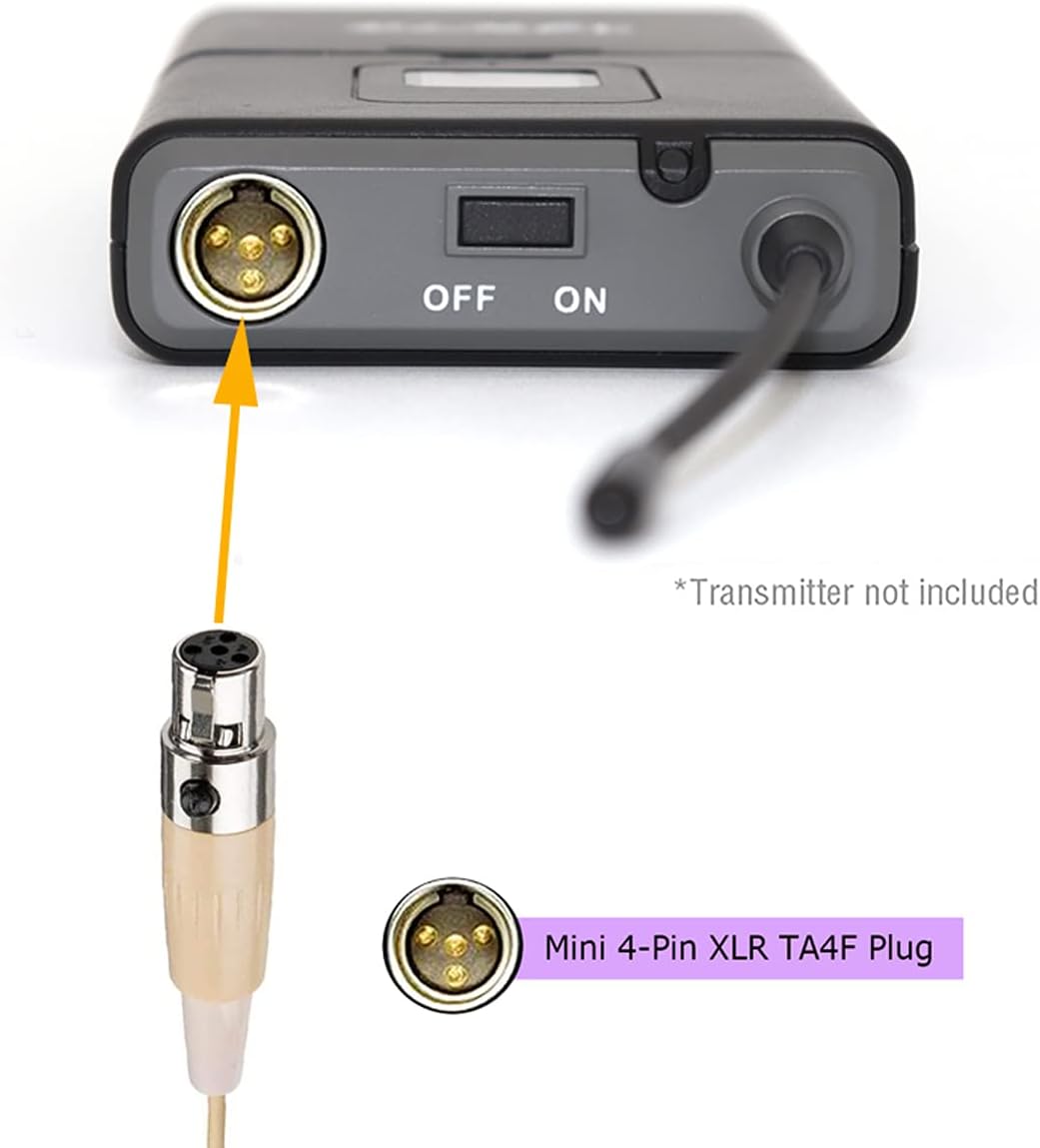
Figure 2: Key Features and Components of the Headset Microphone
This diagram highlights the key features of the headset microphone, including the elastic steel frame covered by soft rubber for comfort, the 1.2m shielded anti-jamming cable, high toughness silicone 8-shaped lock, thick ear hook for long-term comfort, and the adjustable microphone boom.
Setup Instructions
- Unpack the Microphone: Carefully remove the headset microphone from its packaging.
- Identify the Connector: Locate the Mini 4-Pin XLR TA4F connector at the end of the microphone cable.
- Connect to Transmitter: Align the Mini 4-Pin XLR TA4F connector with the corresponding input port on your compatible Shure Wireless System bodypack transmitter. Ensure the connector is securely inserted until it clicks into place.
- Power On Transmitter: Turn on your Shure Wireless System bodypack transmitter according to its specific instructions.
- Perform Sound Check: Before use, perform a sound check to ensure the microphone is properly connected and transmitting audio. Adjust gain levels on your transmitter or mixing console as needed.

Figure 3: Connecting the Microphone to a Shure Wireless Transmitter
This image illustrates the correct method for connecting the Mini 4-Pin XLR TA4F plug of the headset microphone to a compatible Shure wireless bodypack transmitter. The arrow indicates the insertion point for the connector.
Operating Instructions
- Wearing the Headset: Gently place the double ear hooks over both ears. The flexible design allows for easy adjustment to fit various head sizes comfortably. The beige color is designed for minimal visibility.
- Positioning the Microphone Boom: Adjust the flexible microphone boom so that the microphone capsule is positioned approximately 1-2 inches (2.5-5 cm) from the corner of your mouth. This optimal distance helps capture clear audio and minimize plosives.
- Cable Management: Route the microphone cable discreetly down your back and connect it to your bodypack transmitter, which can be clipped to your belt or clothing. Ensure the cable is not under tension and does not interfere with your movement.
- Audio Monitoring: If possible, monitor your audio output through headphones or a sound system to ensure proper microphone placement and gain levels.

Figure 4: Proper Wearing of the Headset Microphone during physical activity
This image demonstrates a person wearing the XGWTH headset microphone during an exercise session, highlighting its secure and discreet fit for active use.

Figure 5: Proper Wearing of the Headset Microphone during musical performance
This image shows an individual wearing the XGWTH headset microphone while playing a guitar, illustrating its suitability for musicians and performers who require hands-free operation.
Maintenance
- Cleaning: Use a soft, dry cloth to wipe down the microphone and cable after each use. For stubborn dirt, a slightly damp cloth with mild soap can be used, but ensure no moisture enters the microphone capsule or connector. Do not use harsh chemicals or abrasive cleaners.
- Storage: Store the microphone in a clean, dry place, away from extreme temperatures and humidity. Avoid tangling the cable; coil it loosely to prevent damage.
- Handling: Handle the microphone and its connector with care. Avoid pulling on the cable to disconnect it; always grasp the connector itself. Do not bend the microphone boom excessively or apply undue force to the ear hooks.
Troubleshooting
| Problem | Possible Cause | Solution |
|---|---|---|
| No Sound Output |
|
|
| Muffled or Unclear Sound |
|
|
| Loud Pops or Static Noise |
|
|
| Microphone Falls Off Ear |
|
|
Specifications
| Feature | Detail |
|---|---|
| Model Name | XG-K68S |
| Brand | XGWTH |
| Connectivity Technology | Wired |
| Connector Type | Mini 4 Pin XLR TA4F Plug (for Shure Wireless Systems only) |
| Microphone Type | Condenser, Cardioid |
| Frequency Response | 20 Hz - 20,000 Hz (20 KHz) |
| Impedance | 2200 Ohm |
| Color | Beige |
| Material | Metal (frame), Rubber (covering) |
| Cable Length | 3.9 feet (1.2 meters) |
| Item Weight | 26 Grams (0.917 ounces) |
| Recommended Uses | Singing, Stage, Presentations, Broadcasting |
| Noise Control | None |
| Water Resistance Level | Not Water Resistant |
Warranty Information
Specific warranty details for the XGWTH Double Over Ear Headset Microphone (Model XG-K68S) are not provided in this manual. For information regarding product warranty, please refer to the product packaging or visit the official XGWTH website. Retain your purchase receipt as proof of purchase for any warranty claims.
Customer Support
If you encounter any issues or have questions not covered in this manual, please contact XGWTH customer support. Contact information can typically be found on the product packaging or the official XGWTH website. Please have your product model number (XG-K68S) and purchase details ready when contacting support.