
1. Introduction
Thank you for choosing the Melchioni Family LUCIFER 12-Liter Air Fryer and Oven. This versatile appliance combines the functions of an air fryer, oven, and rotisserie, allowing you to prepare a wide variety of meals with less oil. Please read this instruction manual thoroughly before first use to ensure safe operation and optimal performance. Keep this manual for future reference.
2. Important Safety Instructions
When using electrical appliances, basic safety precautions should always be followed to reduce the risk of fire, electric shock, and injury. Read all instructions carefully.
- Do not touch hot surfaces. Use handles or knobs.
- To protect against electrical shock, do not immerse cord, plugs, or the main unit in water or other liquid.
- Close supervision is necessary when any appliance is used by or near children.
- Unplug from outlet when not in use and before cleaning. Allow to cool before putting on or taking off parts.
- Do not operate any appliance with a damaged cord or plug, or after the appliance malfunctions or has been damaged in any manner.
- The use of accessory attachments not recommended by the appliance manufacturer may cause injuries.
- Do not use outdoors.
- Do not let cord hang over edge of table or counter, or touch hot surfaces.
- Do not place on or near a hot gas or electric burner, or in a heated oven.
- Extreme caution must be used when moving an appliance containing hot oil or other hot liquids.
- Always attach plug to appliance first, then plug cord into the wall outlet. To disconnect, turn any control to 'off', then remove plug from wall outlet.
- Do not use appliance for other than intended use.
- Ensure the appliance is placed on a stable, heat-resistant surface, away from walls or other appliances to allow adequate air circulation.
- Do not block any ventilation openings.
3. Product Overview
The Melchioni Family LUCIFER Air Fryer and Oven is designed for efficient and healthy cooking. It features a spacious 12-liter capacity and a user-friendly digital interface.

Figure 1: Melchioni Family LUCIFER Air Fryer and Oven. This image shows the front view of the black air fryer and oven with its digital control panel and transparent double glass door, revealing the interior cooking space.
Components:
- Main Unit with Double Glass Door
- Full Touch LCD Control Panel
- Internal Light
- Air Vents
- Power Cord
Control Panel:
The intuitive full-touch LCD panel allows for easy selection of cooking programs, temperature, and time adjustments.
- Preset Program Icons: 12 dedicated icons for various food types (e.g., fries, meat, fish, pizza).
- Temperature Control: '+' and '-' buttons to adjust temperature (50°C - 200°C).
- Time Control: '+' and '-' buttons to adjust cooking time (1 - 60 minutes).
- Power Button: To turn the appliance on/off.
- Light Button: To turn the internal light on/off.
- Rotisserie Button: To activate/deactivate the rotisserie function.
- Child Lock Button: To activate/deactivate the child safety lock.
- Start/Pause Button: To start or pause the cooking process.
4. Setup
Unpacking:
- Carefully remove the appliance and all accessories from the packaging.
- Remove any protective films or stickers.
- Inspect the appliance for any damage. Do not use if damaged.
Placement:
- Place the air fryer on a stable, level, and heat-resistant surface.
- Ensure there is at least 10 cm of clear space around the back and sides of the appliance for proper ventilation.
- Do not place the appliance near flammable materials or heat sources.
Before First Use:
- Clean all accessories (drip tray, mesh basket, grill rack, rotisserie spit, skewers, tongs) with warm soapy water. Rinse thoroughly and dry completely.
- Wipe the interior and exterior of the main unit with a damp cloth.
- Plug the appliance into a grounded electrical outlet.
- Run the air fryer empty for about 10-15 minutes at 180°C to burn off any manufacturing residues. A slight odor may be present; this is normal. Ensure good ventilation during this process.
- Allow the appliance to cool down completely before using it for cooking.
5. Operating Instructions
Basic Operation:
- Plug the appliance into a power outlet. The display will illuminate briefly.
- Press the Power button to turn on the appliance. The default temperature and time will be displayed.
- Place food inside the appliance using the appropriate accessory.
- Adjusting Temperature and Time: Use the + and - buttons next to the temperature and time indicators to set your desired cooking parameters. Temperature range: 50°C - 200°C. Time range: 1 - 60 minutes.
- Press the Start/Pause button to begin cooking.
- To pause cooking, press the Start/Pause button again. Press it once more to resume.
- When cooking is complete, the appliance will beep, and the heating element will turn off.
- Carefully remove the cooked food using heat-resistant tongs or oven mitts.
- Press the Power button to turn off the appliance and unplug it from the wall outlet.
Using Preset Programs:
The appliance features 12 preset programs for common dishes:
- Preheating
- Fries
- Meat
- Chicken Thighs
- Steaks
- Shrimp
- Cakes
- Fish
- Roasted Chicken
- Vegetables
- Chicken Drumsticks
- Pizza
To use a preset program:
- Turn on the appliance.
- Select the desired preset program by touching its icon on the control panel. The display will show the default time and temperature for that program.
- You can adjust the time and temperature manually if needed after selecting a preset.
- Press the Start/Pause button to begin cooking.
Delayed Start Function:
This function allows you to set a delayed start time for cooking, from 1 to 8 hours.
- After setting the desired temperature and time (or selecting a preset program), press the Delayed Start button (if available, or follow specific icon on panel).
- Use the + and - buttons to set the delay time.
- Press Start/Pause to confirm. The appliance will start cooking after the set delay time.
Child Lock:
To prevent accidental operation, the appliance is equipped with a child lock function.
- To activate: Press and hold the Child Lock icon for a few seconds until the lock indicator appears on the display.
- To deactivate: Press and hold the Child Lock icon again for a few seconds until the lock indicator disappears.
6. Accessories and Usage
Your Melchioni Family LUCIFER Air Fryer and Oven comes with several accessories to enhance your cooking experience.
- Drip Tray: Collects excess oil and food particles. Always place at the bottom of the appliance during cooking.
- Mesh Basket: Ideal for air frying smaller items like fries, chicken wings, or vegetables, allowing for 360-degree air circulation.

Figure 2: Mesh Basket. This image shows a cylindrical mesh basket, typically used for tumbling foods like fries or nuts during air frying.
- Grill Rack / Mesh Tray: Used for grilling, toasting, or dehydrating. Can be placed at different levels.
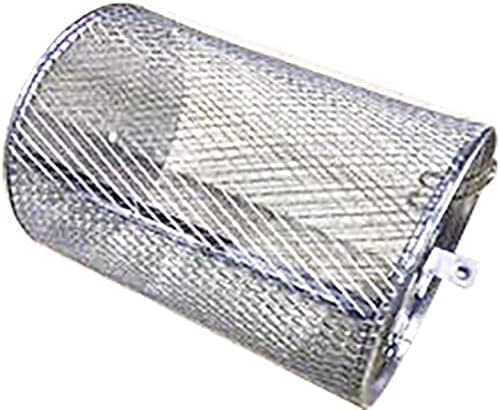
Figure 3: Mesh Tray. This image displays a rectangular mesh tray with handles, suitable for holding food items that require even air circulation.
- Rotisserie Spit with Forks: For roasting whole chickens or larger cuts of meat.

Figure 4: Rotisserie Spit with Skewers. This image shows a rotisserie spit assembly with multiple skewers attached, designed for cooking kebabs or smaller pieces of food evenly.

Figure 5: Rotisserie Forks. This image shows two rotisserie forks, which are used to secure a whole chicken or roast onto the rotisserie spit.
- Tongs: For safely handling hot accessories and food.
7. Cleaning and Maintenance
Regular cleaning ensures optimal performance and extends the lifespan of your appliance.
Before Cleaning:
- Always unplug the air fryer from the power outlet.
- Allow the appliance and all accessories to cool down completely before cleaning.
Cleaning the Main Unit:
- Wipe the exterior with a damp cloth and mild detergent. Do not use abrasive cleaners or scouring pads.
- Clean the interior with a damp cloth. For stubborn food residue, use a non-abrasive sponge and warm soapy water.
- Never immerse the main unit in water or any other liquid.
- Clean the double glass door with a soft cloth and glass cleaner if necessary.
Cleaning Accessories:
- All removable accessories (drip tray, mesh basket, grill rack, rotisserie spit, skewers, tongs) can be washed in warm soapy water.
- For stubborn residue, soak the accessories in warm water for a period before cleaning.
- Rinse thoroughly and dry completely before storing or next use.
- Some accessories may be dishwasher safe; refer to specific accessory instructions if provided.
Storage:
- Ensure the appliance is clean and dry before storing.
- Store the appliance and its accessories in a cool, dry place.
8. Troubleshooting
If you encounter any issues with your appliance, please refer to the following table before contacting customer support.
| Problem | Possible Cause | Solution |
|---|---|---|
| Appliance does not turn on. | Not plugged in. Power outlet not working. | Ensure the power cord is securely plugged into a working outlet. Check the circuit breaker. |
| Food is not cooked evenly. | Overcrowding the basket/tray. Incorrect temperature or time. | Do not overcrowd accessories. Cook in smaller batches if necessary. Shake or flip food halfway through cooking. Adjust temperature and time as needed. |
| White smoke coming from the appliance. | Grease residue from previous use. High-fat food cooking. | Clean the drip tray and interior thoroughly after each use. For high-fat foods, ensure the drip tray is clean and consider using less oil. |
| Appliance emits a burning smell. | Food residue burning. | Unplug immediately. Allow to cool and clean the interior and accessories thoroughly. |
| Child lock is active, and controls are unresponsive. | Child lock feature is engaged. | Press and hold the Child Lock icon for a few seconds to deactivate it. |
9. Specifications
| Feature | Specification |
|---|---|
| Brand | Melchioni Family |
| Model Number | LUCIFER (AIR_FRYER) |
| Capacity | 12 Liters |
| Power | 1800 Watts |
| Voltage | 240 Volts |
| Temperature Range | 50°C - 200°C |
| Timer | 1 - 60 minutes |
| Delayed Start | 1 - 8 hours |
| Dimensions (L x W x H) | 31.5 x 35 x 38 cm |
| Weight | 5.7 Kilograms |
| Material | Plastic, Aluminum |
| Special Features | Temperature Control, Child Lock, Full Touch LCD Display, Double Glass Door |
10. Warranty and Support
Melchioni products are designed and manufactured to the highest quality standards. For information regarding warranty coverage, terms, and conditions, please refer to the warranty card included with your purchase or visit the official Melchioni Family website.
For technical support, troubleshooting assistance beyond this manual, or spare parts inquiries, please contact Melchioni Family customer service. Contact details can typically be found on the product packaging or the official brand website.


