
1. Introduction
This manual provides comprehensive instructions for the assembly, operation, and maintenance of your ToyerBee 70mm Refractor Telescope. Designed for astronomy beginners, this telescope offers a clear view of celestial objects and terrestrial landscapes. Please read this manual carefully before using your telescope to ensure proper function and longevity.
2. Product Components
Before assembly, verify that all components listed below are present in your package:
- Telescope Optical Tube
- Adjustable Aluminum Tripod
- Finder Scope
- H20mm Eyepiece (15X Magnification)
- H6mm Eyepiece (50X Magnification)
- 3X Barlow Lens
- Diagonal Mirror
- Phone Adapter
- Wireless Remote Control
Refer to the diagram below for an overview of the main components:
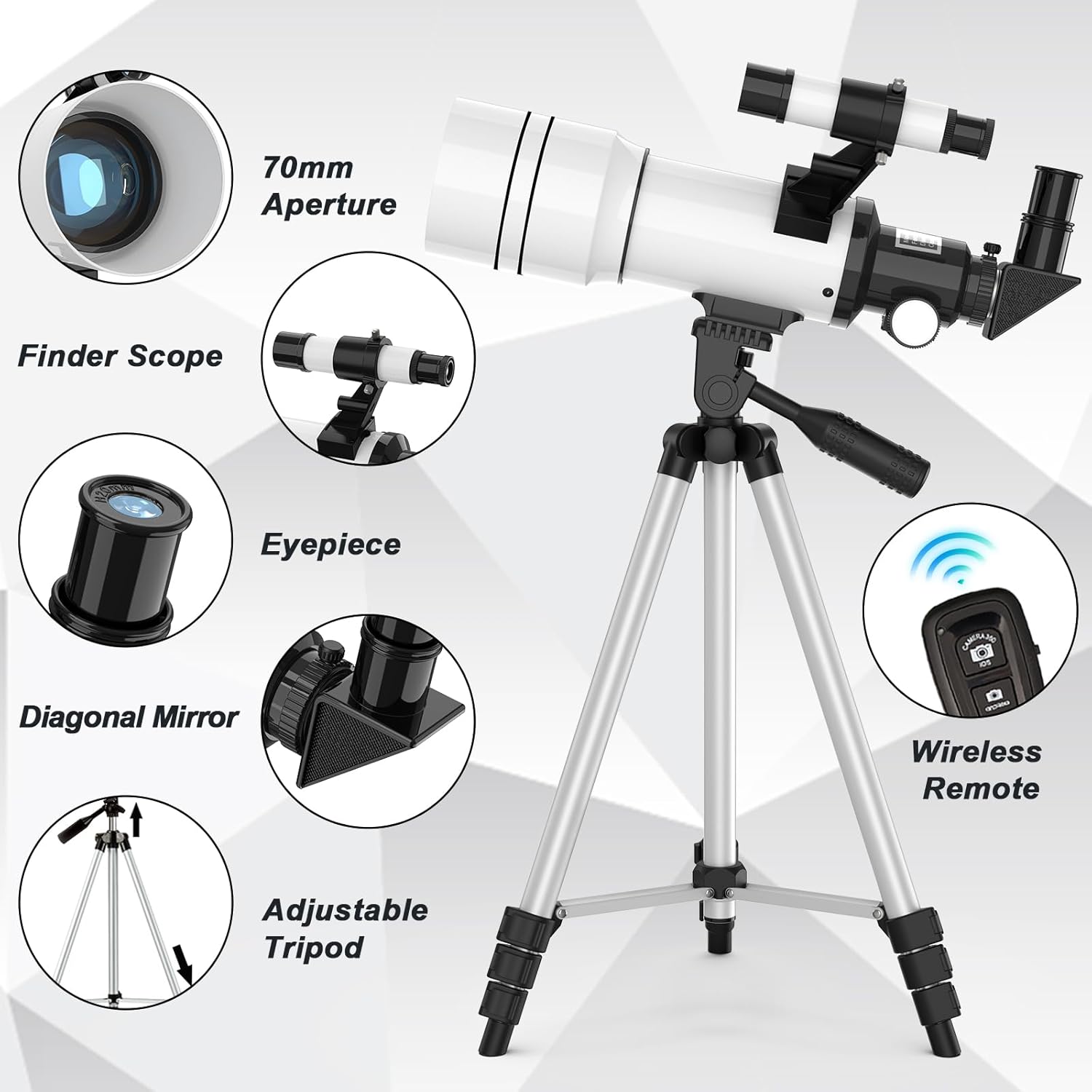
Figure 2.1: Labeled components of the ToyerBee 70mm Refractor Telescope, including the 70mm aperture, finder scope, eyepiece, diagonal mirror, adjustable tripod, and wireless remote.
3. Setup Instructions
Follow these steps to assemble your telescope:
- Set up the Tripod: Extend the aluminum tripod legs to a stable position. Adjust the height as needed using the leg locks. The tripod height is adjustable from 13.8 inches to 40.5 inches.
- Attach the Telescope Tube: Locate the mounting screw on the tripod head. Align the telescope optical tube with the tripod head and secure it using the screw. Ensure it is firmly attached.
- Install the Finder Scope: Slide the finder scope into its bracket on the main telescope tube. Tighten the small screws on the bracket to hold it in place. The finder scope helps in locating objects before viewing them through the main eyepiece.
- Insert the Diagonal Mirror: Remove the dust cap from the focuser tube. Insert the diagonal mirror into the focuser tube and secure it with the small screw on the focuser. The diagonal mirror provides a more comfortable viewing angle.
- Insert an Eyepiece: Choose an eyepiece (H20mm or H6mm) and insert it into the diagonal mirror. Secure it with the small screw on the diagonal mirror. For higher magnification, you can insert the 3X Barlow lens between the diagonal mirror and the eyepiece.
- Install the Phone Adapter (Optional): Follow the steps below to attach your smartphone for photography.

Figure 3.1: Step-by-step instructions for installing the phone adapter onto the telescope eyepiece.
4. Operating Instructions
4.1. Magnification
Your telescope comes with two eyepieces and a 3X Barlow lens, offering various magnification levels:
- H20mm Eyepiece: Provides 15X magnification. (Focal Length of Telescope / Focal Length of Eyepiece = 300mm / 20mm = 15X)
- H6mm Eyepiece: Provides 50X magnification. (300mm / 6mm = 50X)
- With 3X Barlow Lens: Multiplies the magnification of any eyepiece by three.
- H20mm + 3X Barlow: 15X * 3 = 45X
- H6mm + 3X Barlow: 50X * 3 = 150X
Start with the lowest magnification (H20mm eyepiece) to locate objects, then switch to higher magnifications for detailed viewing.

Figure 4.1: Visual representation of magnification levels achieved with different eyepieces and the 3X Barlow lens.
4.2. Focusing
Once an object is centered in your view, slowly turn the focus wheel located on the side of the focuser until the image appears sharp and clear. Fine adjustments may be needed as objects move or as your eyes adjust.
4.3. Using the Phone Adapter
The phone adapter allows you to capture images and videos through the telescope. Attach your smartphone to the adapter, then align your phone's camera lens with the telescope's eyepiece. Ensure the phone is securely fastened to prevent accidental drops.
4.4. Wireless Remote Control
The wireless remote control can be used to trigger your smartphone's camera shutter, reducing vibrations and ensuring clearer images when taking photos through the telescope.

Figure 4.2: The telescope can be used for observing various subjects, including the Moon, wildlife, urban structures, and natural landscapes.
5. Maintenance
- Cleaning Lenses: Use a soft, lint-free cloth specifically designed for optical lenses. Gently wipe the lens surfaces. For stubborn smudges, use a small amount of optical cleaning fluid on the cloth, not directly on the lens. Avoid touching the lens surfaces with your fingers.
- Storage: When not in use, store the telescope in a dry, dust-free environment. Keep all dust caps on the optical tube, focuser, and eyepieces to protect them from dust and moisture.
- Handling: Always handle the telescope and its accessories with care to prevent damage. Avoid exposing the telescope to extreme temperatures or direct sunlight for extended periods.
6. Troubleshooting
| Problem | Possible Cause | Solution |
|---|---|---|
| Image is blurry or out of focus. | Improper focus adjustment. | Adjust the focus wheel slowly until the image is sharp. |
| Cannot find objects. | Finder scope not aligned or object is outside field of view. | Align the finder scope with the main telescope. Start with the lowest magnification eyepiece (H20mm) to locate objects. |
| Image is dim or unclear. | Light pollution, atmospheric conditions, or dirty lenses. | Move to a darker viewing location. Wait for clearer atmospheric conditions. Clean lenses as per maintenance instructions. |
| Telescope is unstable. | Tripod legs not fully extended or secured. | Ensure tripod legs are fully extended and all locks are tightened. Place the tripod on a flat, stable surface. |
7. Specifications
| Feature | Detail |
|---|---|
| Optical Tube Length | 300 Millimeters |
| Objective Lens Diameter | 70 Millimeters |
| Magnification Range | 15X - 150X |
| Eyepieces Included | H20mm, H6mm |
| Barlow Lens | 3X |
| Telescope Mount | Altazimuth Mount |
| Tripod Height (Adjustable) | 13.8 inches to 40.5 inches |
| Focus Type | Manual Focus |
| Finderscope | Reflex |
| Compatible Devices | Smartphone (with included adapter) |
| Item Weight | 3.74 pounds |
| Power Source (for remote) | 1 CR2032 battery (required for remote) |
8. Warranty and Support
ToyerBee offers a 3-year customer service for this product. If you have any questions, require assistance, or encounter issues with your telescope, please contact ToyerBee customer support. Refer to your purchase documentation for specific contact information or visit the official ToyerBee website.