
Introduction
This manual provides instructions for the VINABTY AKB74435311 Replacement Remote Control, designed for various LG Soundbar models. This remote offers direct functionality without requiring any programming.

Image: The VINABTY AKB74435311 replacement remote control, showing its full button layout.
Setup
1. Battery Installation
The remote control requires two AAA batteries for operation. Follow these steps to install them:
- Locate the battery compartment cover on the back of the remote control.
- Press down on the tab and slide the cover off.
- Insert two AAA batteries, ensuring the positive (+) and negative (-) terminals align correctly with the markings inside the compartment.
- Slide the battery compartment cover back into place until it clicks securely.
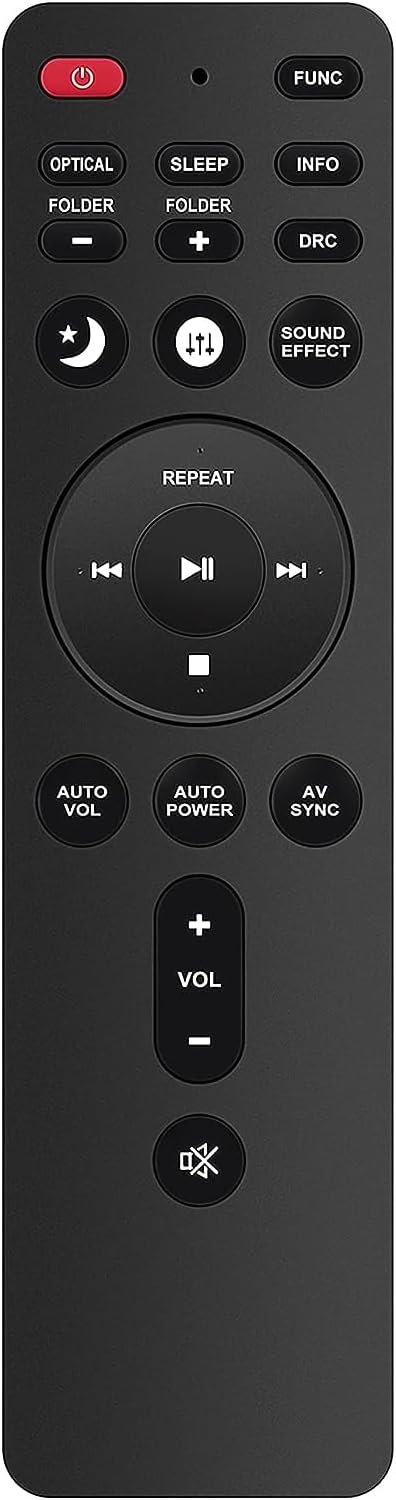
Image: Side view of the remote control, indicating the general area for battery insertion.
2. Initial Use
This replacement remote control is designed to work directly with compatible LG Soundbar models without any programming. Once batteries are installed, point the remote towards your soundbar and begin operation.
Operation
The remote control provides access to various functions of your LG Soundbar. Below is a guide to the primary buttons and their functions:
- Power (⏻): Turns the soundbar on or off.
- FUNC: Cycles through input sources (e.g., Optical, Bluetooth, HDMI).
- OPTICAL: Directly selects the Optical input source.
- SLEEP: Sets a sleep timer for the soundbar.
- INFO: Displays information about the current soundbar status or input.
- FOLDER +/-: Navigates through folders or tracks when playing media.
- DRC (Dynamic Range Control): Adjusts the dynamic range of the audio.
- Sound Effect: Cycles through various sound modes (e.g., Standard, Cinema, Music).
- Volume (+/-): Increases or decreases the soundbar's volume.
- Mute (🔇): Mutes or unmutes the sound.
- Playback Controls (⏮, ⏸, ⏹, ⏭): Control media playback (Previous, Play/Pause, Stop, Next).
- REPEAT: Repeats the current track or playlist.
- AUTO VOL (Auto Volume): Automatically adjusts volume levels to prevent sudden changes.
- AUTO POWER (Auto Power On/Off): Manages automatic power functions.
- AV SYNC (Audio/Video Sync): Adjusts audio delay to synchronize with video.

Image: A hand holding the remote control, pointing towards a soundbar and television setup, demonstrating typical usage.
Maintenance
Cleaning
To maintain the remote control's functionality and appearance:
- Wipe the surface with a soft, dry cloth.
- Do not use liquid cleaners, sprays, or abrasive materials, as these can damage the remote.
Battery Replacement
Replace batteries when the remote's response becomes sluggish or stops working. Always replace both batteries at the same time with new AAA batteries. Do not mix old and new batteries or different types of batteries.
Storage
If the remote control will not be used for an extended period, remove the batteries to prevent leakage and potential damage.
Troubleshooting
If you encounter issues with your remote control, refer to the following common solutions:
- Remote not responding:
- Ensure the batteries are correctly installed with the correct polarity.
- Replace old batteries with new AAA batteries.
- Check for any obstructions between the remote control and the soundbar's infrared receiver.
- Ensure you are within the effective operating range and pointing the remote directly at the soundbar.
- Specific functions not working:
- Verify that your LG Soundbar model is listed as compatible with this remote control.
- Some advanced functions may require specific soundbar settings or modes. Refer to your soundbar's original manual for details.
Specifications
| Model Number | AKB74435311 |
| Brand | VINABTY |
| Compatible Devices | LG Soundbars (LAS751M, LAS855M, LAS950M, LAS55A1-D, LASC55, LAS450H, S45A1-D, LAS550H, S55A2-D, LAS455H, S55A1-D, LAC555H, LAS551H, MusicFlow HS7, HS8, HS9, etc.) |
| Batteries Required | 2 x AAA (not included) |
| Product Dimensions | 4.5 x 2 x 0.75 inches |
| Item Weight | 0.634 ounces |
| Special Feature | Ergonomic design |
| Color | Black |
Warranty & Support
This VINABTY remote control is covered by the manufacturer's standard warranty. For specific warranty details or technical support, please refer to the documentation provided with your purchase or contact the seller directly.
For further assistance, you may also visit the product page on Amazon or contact VINABTY customer service if available.