
YIHUA 929D-V
YIHUA 929D-V Electric Desoldering Soldering Iron Solder Sucker Desoldering Pump
Model: 929D-V | Brand: YIHUA
1. Introduction
The YIHUA 929D-V is an innovative 2-in-1 tool that integrates a soldering iron and a desoldering pump into a single, compact design. This electric desoldering iron is designed for efficient and continuous desoldering of through-hole components and removal of excess solder (solder bridges) without jamming. It features automatic temperature regulation and a fixed operating temperature, making it a plug-and-play solution for various electronics repair and restoration tasks.
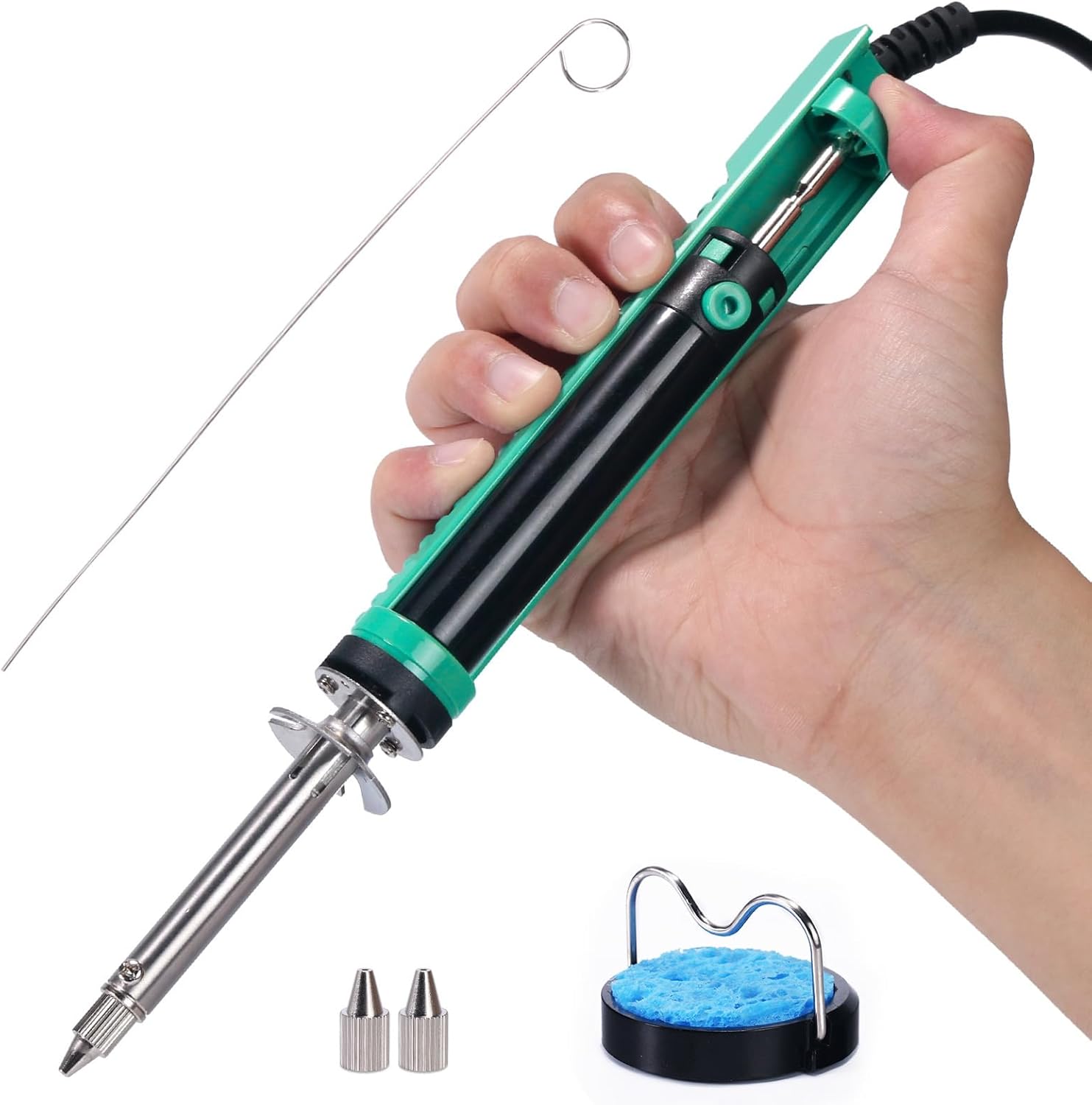
Figure 1: YIHUA 929D-V Desoldering Iron with included accessories.
2. Package Contents
Please verify that all items listed below are included in your package:
- 1 x YIHUA 929D-V Desoldering Iron
- 2 x Desoldering Nozzles (1.0mm | 1.2mm)
- 1 x Heat-Resistant Iron Stand
- 1 x Cleaning Sponge
- 1 x Cleaning Pin

Figure 2: Exploded view of the YIHUA 929D-V and its components.
3. Important Safety Information
WARNING: This device operates at high temperatures. Improper use can cause burns or damage to property.
- Voltage Compatibility: This is a 110V~127V ONLY model. DO NOT CONNECT this device to a 220~240V electricity mains. Doing so will cause severe damage to the unit and may pose a fire hazard.
- Hot Surfaces: The desoldering iron's heating element and metallic assembly become extremely hot during operation. DO NOT allow any object or human body to come into contact with these hot parts.
- Use Iron Stand: Always place the desoldering iron onto the provided heat-resistant iron stand when not actively desoldering.
- Fume Emission: This product contains electrical insulator protective material (mica). It is normal for the product to emit white fumes for up to 20 minutes on first use. Ensure adequate ventilation during initial operation.
- Nozzle Change: Always allow the desoldering iron to cool completely before attempting to change the desoldering nozzles.
4. Setup
- Prepare Work Area: Ensure your workspace is clean, well-ventilated, and free of flammable materials. Have your heat-resistant iron stand ready.
- Connect Power: Plug the power cord of the desoldering iron into a compatible 110V~127V AC power outlet. The heating indicator light will illuminate.
- Preheat: Allow the desoldering iron to preheat for approximately 3 minutes. The iron will reach its optimal fixed temperature during this time.
- Tin the Nozzle: Before first use and periodically during operation, apply a small amount of solder to the nozzle tip. This "tinning" helps prevent oxidation and ensures efficient heat transfer.

Figure 3: Initial setup and preheating process.
5. Operating Instructions
The YIHUA 929D-V is designed for single-handed operation, integrating the heating element and suction pump for seamless desoldering.
- Charge the Pump: With the iron heated, push down the charging handle (piston rod) until it locks into place. This creates the vacuum for suction.
- Position the Nozzle: Place the desoldering nozzle directly over the solder joint you wish to remove, ensuring it covers the component's pin and the surrounding solder pad.
- Melt Solder: Allow the heat from the nozzle to melt the solder completely. This usually takes a few seconds.
- Activate Suction: Once the solder is fully molten, press the release button on the handle. The pump will rapidly suck the molten solder into the storage tube.
- Repeat if Necessary: For larger solder joints or stubborn connections, you may need to repeat the process until all solder is removed.

Figure 4: Continuous desoldering in action.

Figure 5: Ergonomic design with shorter charging handle for single-handed operation.
6. Maintenance
Regular cleaning is crucial for maintaining the performance and longevity of your desoldering iron.
- Cool Down: Always ensure the desoldering iron has cooled down completely before performing any cleaning or maintenance.
- Clean Solder Storage Tube:
- Lift and extract the scrap solder storage tube from the main body.
- Empty any accumulated solder debris.
- Clean the inside of the tube with the provided cleaning pin or a suitable brush.
- Reinsert the storage tube securely.
- Nozzle Cleaning:
- Allow the iron to preheat for approximately 3 minutes.
- Use the supplied cleaning pin to clear any blockages in the nozzle hole.
- Heating Element Cleaning:
- Remove the nozzle and the storage tube once the iron has cooled completely.
- Plug in the power cord and allow the iron to preheat for approximately 3 minutes.
- Use the supplied cleaning pin to clean the inner hole of the heating element.
- Cleaning Sponge: Dampen the cleaning sponge slightly before use to wipe the nozzle clean of excess solder.

Figure 6: Cleaning the solder storage tube.

Figure 7: Nozzle and heating element cleaning procedures.
7. Troubleshooting
| Problem | Possible Cause | Solution |
|---|---|---|
| No suction or weak suction. | Solder tube or nozzle clogged; pump not fully charged. | Clean the solder storage tube and nozzle thoroughly. Ensure the charging handle is pushed down until it locks before desoldering. |
| Iron not heating up. | Not plugged in; power outlet issue; internal fault. | Check power connection and outlet. If still no heat, contact customer support. |
| Solder not melting easily. | Insufficient preheating time; oxidized nozzle. | Allow the iron to preheat for the full 3 minutes. Re-tin the nozzle tip. |
8. Specifications
- Model: 929D-V
- Brand: YIHUA
- Power Source: AC
- Voltage: 110-127V
- Temperature Control: Automatic, fixed temperature (non-adjustable)
- Nozzle Sizes: 1.0mm, 1.2mm (interchangeable)
- Item Weight: 0.3 Kilograms (approx. 10.5 ounces)
- Product Dimensions: 10.24 x 1.38 x 1.06 inches
- Material: Iron
- Specific Uses: Industrial Use, Residential Use

Figure 8: Product dimensions.
9. Warranty and Support
YIHUA offers a 12-month US-exclusive manufacturer technical coverage for the 929D-V Electric Desoldering Soldering Iron. For any technical assistance or product inquiries, please utilize the 24/7 professional assistance available on Amazon.
For further information or to purchase replacement parts, please visit the official YIHUA Store on Amazon: YIHUA Official Store
Ask a question about this manual
Ask about setup, troubleshooting, compatibility, parts, safety, or missing instructions. Manuals+ will review the question and use this page’s manual context to help answer it.