
HONEYWELL MN4CFSWW9
Honeywell 14,000 BTU Portable Air Conditioner User Manual
Model: MN4CFSWW9 | Brand: Honeywell
Introduction
This manual provides detailed instructions for the safe and efficient operation, installation, and maintenance of your Honeywell 14,000 BTU Portable Air Conditioner. This versatile 3-in-1 unit offers cooling, dehumidification, and fan functions for rooms up to 700 square feet. Please read this manual thoroughly before using the appliance.

Figure 1: Honeywell 14,000 BTU Portable Air Conditioner, front view.
Safety Information
Always follow basic safety precautions when using electrical appliances to reduce the risk of fire, electric shock, or injury. This unit features thermal overload protection for enhanced safety. Ensure the unit is placed on a stable, level surface and that the power supply matches the unit's requirements (115V).
- Do not operate the unit with a damaged cord or plug.
- Do not block air openings.
- Keep children and pets away from the unit during operation.
- Unplug the unit before cleaning or servicing.

Figure 2: The portable air conditioner positioned in a living room environment.
Product Features
- 3-in-1 Functionality: Cools, dehumidifies, and circulates air with a fan.
- Cooling Capacity: 14,000 BTU (ASHRAE-128 Standard) / 9,000 BTU (SACC BTU), suitable for rooms up to 700 sq. ft.
- Auto Evaporation System: Eliminates the need for manual draining in cooling mode, except in high humidity conditions.
- Dehumidifier: Removes up to 51 pints of moisture every 24 hours with a continuous drain option.
- Digital Controls & Remote: Easy-to-use digital display with 3 fan speeds, 24-hour timer, and full-function remote control (batteries included).
- Washable Filter: Designed for easy cleaning to maintain performance and extend unit life.
- Portability: Smooth-gliding wheels allow for easy movement between rooms.

Figure 3: Illustration of the air conditioner's cooling and exhaust functions.
Setup and Installation
The Honeywell Portable Air Conditioner is designed for quick and easy installation. It comes with an essential window venting kit for exhausting hot air.
- Unpacking: Carefully remove the unit and all accessories from the packaging.
- Positioning: Place the unit on a flat, stable surface near a window and a power outlet. Ensure there is at least 20 inches of space around the unit for proper airflow.
- Window Kit Assembly:
- Assemble the window bracket adapter and exhaust hose connector.
- Attach the exhaust hose to the unit and the window bracket.
- Secure the window bracket in your window opening, ensuring a tight seal to prevent air leakage.
- Power Connection: Plug the unit into a grounded 115V electrical outlet.
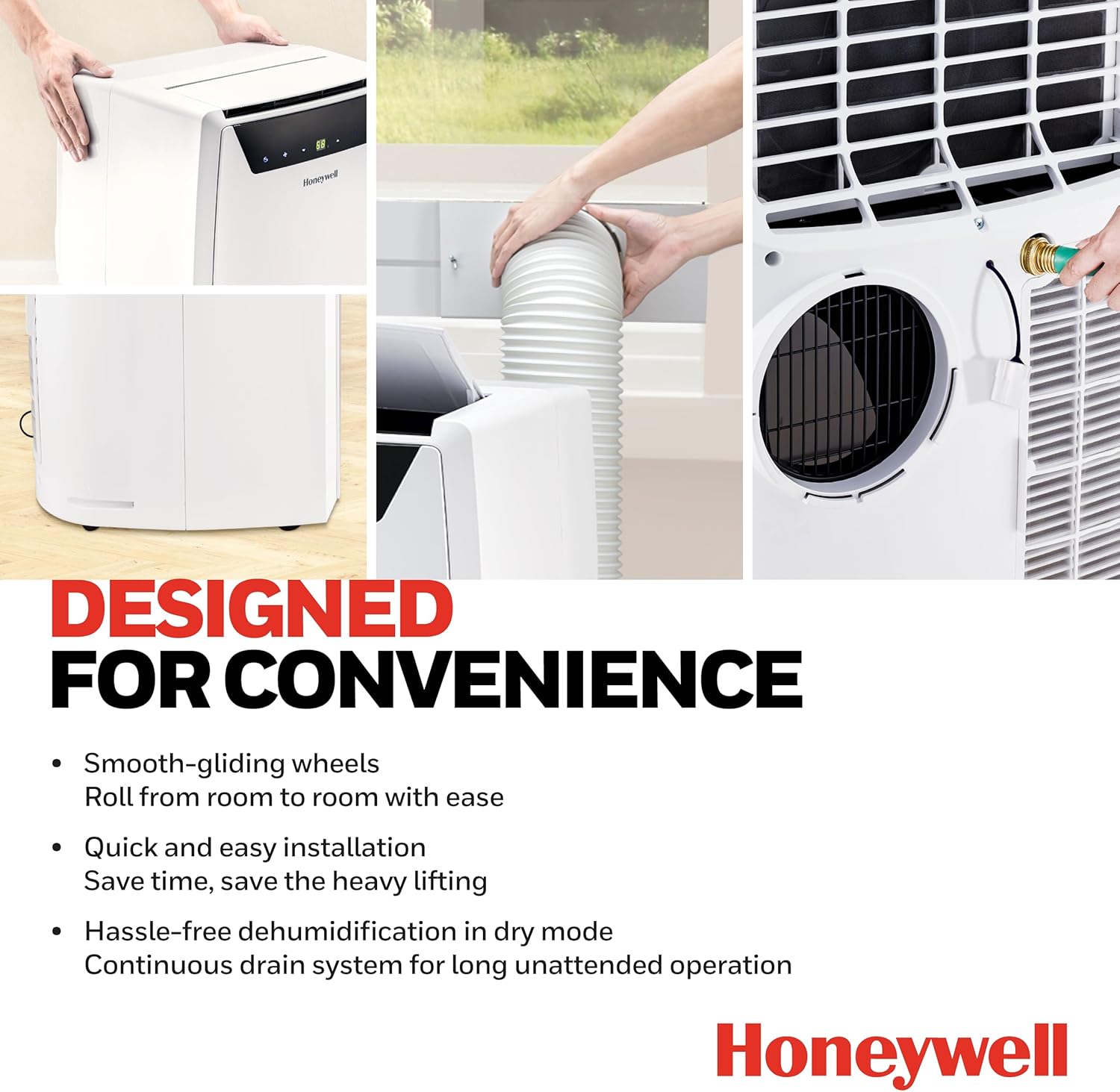
Figure 4: Key features for convenience, including smooth-gliding wheels and quick installation.
Installation Video Guide
Video 1: Official Honeywell MN Series Installation Guide. This video demonstrates the step-by-step process for setting up your portable air conditioner, including attaching the exhaust hose and installing the window kit.
Operating Instructions
Your portable air conditioner can be operated using the digital control panel on the unit or the included remote control.
Control Panel Overview

Figure 5: Close-up of the digital control panel with various settings.
- Power Button: Press to turn the unit ON or OFF.
- Mode Button: Cycle through Cooling, Dehumidifier, and Fan modes.
- Temperature Adjustment: Use the Up/Down arrows to set your desired temperature.
- Fan Speed: Select from 3 fan speeds (Low, Medium, High) to adjust airflow.
- Timer: Set a 24-hour energy-saving timer for automatic ON/OFF operation.
Remote Control
The full-function remote control allows you to conveniently operate all features from a distance.

Figure 6: The compact remote control for convenient operation.
Features Overview Video
Video 2: Official Honeywell 3-in-1 Features video. This video highlights the various modes and functions of the portable air conditioner.
Maintenance
Regular maintenance ensures optimal performance and extends the lifespan of your air conditioner.
- Filter Cleaning: The unit features a washable filter. A "Filter Clean Alert" will indicate when cleaning is needed. Simply remove the filter and wash it under running water. Allow it to dry completely before reinserting.
- Drainage: In cooling mode, the auto-evaporation system typically handles moisture. However, in high humidity, you may need to use the continuous drain option. Connect a drain hose (not included) to the continuous drain outlet for unattended operation.
- Storage: Before storing the unit for an extended period, ensure all water is drained and the filter is clean and dry.

Figure 7: The washable filter can be easily cleaned under running water.
Troubleshooting
If you encounter issues with your unit, refer to the following common troubleshooting tips:
| Problem | Possible Cause | Solution |
|---|---|---|
| Unit does not turn on | No power; Power cord unplugged; Circuit breaker tripped. | Check power outlet; Ensure plug is fully inserted; Reset circuit breaker. |
| Unit not cooling effectively | Air filter dirty; Room too large; Window kit not properly sealed; Exhaust hose blocked. | Clean air filter; Ensure unit is sized for the room; Check window kit seal; Clear any obstructions from exhaust hose. |
| Water leakage | Drain plug not secured; Unit not level; High humidity causing excess condensation. | Ensure drain plug is tightly closed; Place unit on a level surface; Use continuous drain option in high humidity. |
| Unit is noisy | Unit not on a level surface; Fan speed too high; Internal components vibrating. | Ensure unit is level; Reduce fan speed; Contact customer support if noise persists. |
Specifications
| Attribute | Value |
|---|---|
| Model Number | MN4CFSWW9 |
| Cooling Capacity (ASHRAE) | 14,000 BTU |
| Cooling Capacity (SACC) | 9,000 BTU |
| Coverage Area | Up to 700 Sq. Ft. |
| Voltage | 115 Volts |
| Dehumidifier Capacity | 51 Pints/24 hours |
| Sound Level | 54 dB |
| Dimensions (D x W x H) | 15.2" x 18.1" x 29.4" |
| Item Weight | 70.5 pounds |
| Color | White |
| Material | Plastic |
| Included Components | Portable air conditioner, window install kit, manual, warranty card, remote, batteries |

Figure 8: Product dimensions for planning placement.
Warranty and Support
This Honeywell Portable Air Conditioner comes with a 1 Year Limited Warranty. For warranty claims, technical support, or additional assistance, please refer to the contact information provided in the included warranty card or visit the official Honeywell support website.
For a complete user guide, you can download the PDF version here: User Manual (PDF).
Ask a question about this manual
Ask about setup, troubleshooting, compatibility, parts, safety, or missing instructions. Manuals+ will review the question and use this page’s manual context to help answer it.