
1. Introduction
This manual provides essential instructions for the safe and effective operation, maintenance, and troubleshooting of your R R CARER CR-P5W 5L Adjustable Oxygen Concentrator. Please read this manual thoroughly before using the device to ensure proper function and user safety. This oxygen concentrator is designed to provide continuous single oxygen flow.
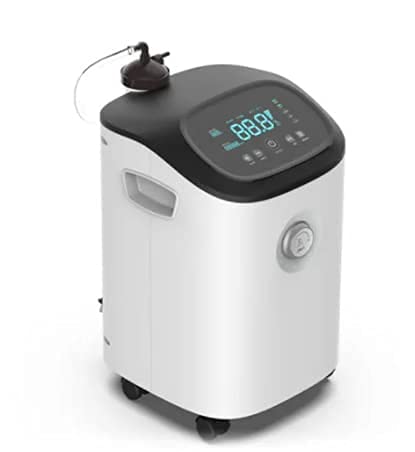
Image 1.1: Front view of the R R CARER CR-P5W 5L Oxygen Concentrator. This image displays the main unit with its control panel, oxygen outlet, and integrated wheels for mobility.
2. Safety Information
Always adhere to the following safety guidelines to prevent injury or damage to the device:
- Do not operate the device near open flames or flammable materials.
- Ensure adequate ventilation around the concentrator. Do not block air inlets or outlets.
- Keep the device dry and away from water sources.
- Only use accessories and parts approved by the manufacturer.
- Regularly inspect the power cord for damage. Do not use if damaged.
- Consult a healthcare professional for appropriate oxygen flow settings and usage duration.
- Keep out of reach of children and pets.
3. Product Overview
3.1 Key Features
- Continuous Oxygen Flow: Provides a steady supply of oxygen.
- Adjustable Flow Rate: Allows for customization of oxygen delivery.
- Efficient Oil-Free Compressor: Utilizes a pure copper core compressor for stable, reliable performance and extended service life.
- Low Noise Operation: Engineered for quiet performance, operating at approximately 42 dB to minimize disturbance.
- Advanced Filtration: Equipped with an Italian HEPA filter, capable of filtering 99.99% of particles above 0.3 microns, exceeding PM2.5 standards. Includes a bacteria filter.
- High Purity Oxygen: Features a molecular sieve imported from the USA, ensuring oxygen concentration up to 95.1% through PSA technology.
- Wireless Remote Control: For convenient operation from a distance.
- Integrated Fault Detection: Automatically detects and alarms or shuts down for safety in case of issues like current overload, power cord disconnection, compressor high temperature, pressure cycle failure, or low oxygen concentration.
- Mobility: Equipped with wheels for easy movement.
3.2 Components

Image 3.1: Close-up of the R R CARER CR-P5W control panel. This image highlights the digital display, control buttons, and the oxygen flow adjustment knob.
The R R CARER CR-P5W consists of the main unit, which includes:
- Control Panel: Digital display and buttons for power, timing, voice, and oxygen/nebulizing functions.
- Oxygen Outlet: Where the oxygen tubing connects.
- Flow Adjustment Knob: To set the desired oxygen flow rate (e.g., 5L).
- Humidification Bottle: For adding moisture to the oxygen.
- Inlet Filter & Filter Cotton: For initial air purification.
- Bacteria Filter: Provides additional filtration for clean oxygen.
- Power Inlet: For connecting the power cord.
- Wheels: For easy portability.

Image 3.2: Detailed view of internal components and accessories. This image illustrates the Italian HEPA filter, inlet filter cotton, inlet filter, humidification bottle, bacteria filter, molecular sieve, and the wireless remote control.

Image 3.3: The wireless remote control for the R R CARER CR-P5W. This remote allows for convenient adjustment of settings from a distance.
4. Setup
- Unpacking: Carefully remove the oxygen concentrator and all accessories from the packaging. Retain packaging for future transport or storage.
- Placement: Place the concentrator on a flat, stable surface, ensuring at least 10 cm (4 inches) of clear space around all sides for proper ventilation. Avoid placing it on soft furnishings that could block air vents.
- Humidifier Bottle Installation: Fill the humidification bottle with distilled water up to the indicated level. Attach the bottle securely to the designated port on the concentrator.
- Oxygen Tubing Connection: Connect one end of the oxygen tubing to the oxygen outlet on the concentrator and the other end to your nasal cannula or mask.
- Power Connection: Plug the power cord into the power inlet on the concentrator, then plug the other end into a grounded electrical outlet.
5. Operating Instructions
- Power On: Press the 'ON/OFF' button on the control panel or the remote control to turn on the device. The digital display will illuminate.
- Adjust Flow Rate: Rotate the flow adjustment knob to set the desired oxygen flow rate, typically between 0.5 L/min and 5 L/min, as prescribed by your healthcare professional.
- Set Timer (Optional): Use the 'Timing' button on the control panel or remote to set a specific operating duration if needed.
- Voice Function (Optional): If available, use the 'Voice' button to activate or deactivate voice prompts.
- Oxygen Delivery: Once the desired flow rate is set, oxygen will begin to flow through the tubing to your nasal cannula or mask.
- Power Off: When finished, press the 'ON/OFF' button again to turn off the device.
6. Maintenance
Regular maintenance ensures optimal performance and longevity of your oxygen concentrator.
- Clean Humidifier Bottle: Daily, empty and rinse the humidifier bottle with clean water. Refill with distilled water. Periodically disinfect with a mild disinfectant solution as per manufacturer guidelines.
- Clean Inlet Filters: Weekly, remove the inlet filter cotton and inlet filter. Wash them with mild soap and water, rinse thoroughly, and allow them to air dry completely before reinserting. Do not operate the device without dry filters.
- Clean Exterior: Wipe the exterior of the concentrator with a damp cloth. Do not use abrasive cleaners or solvents.
- Bacteria Filter Replacement: The bacteria filter should be replaced periodically according to usage and manufacturer recommendations. Refer to the product packaging or contact support for specific intervals.
- Professional Servicing: For internal components like the molecular sieve or compressor, professional servicing is recommended at specified intervals or if performance degrades.
7. Troubleshooting
The CR-P5W features an integrated fault detection system. If an issue occurs, the device may alarm or shut down. Common fault indicators and solutions are listed below:

Image 7.1: Diagram illustrating the fault detection functions and other features of the R R CARER CR-P5W. This includes details on the efficient oil-free compressor and low noise operation.
| Fault Indicator / Symptom | Possible Cause | Solution |
|---|---|---|
| Current Overload | Excessive electrical current draw. | Unplug the device, wait 5 minutes, then plug back in. If the issue persists, contact support. |
| Power Cord Falls Off | Loose or disconnected power cord. | Ensure the power cord is securely connected to both the device and the electrical outlet. |
| Compressor High Temperature | Overheating of the compressor. | Ensure adequate ventilation around the device. Turn off and allow to cool for at least 30 minutes. If the problem recurs, contact support. |
| Pressure Cycle Failure | Issue with internal pressure regulation. | Turn off the device and restart. If the error persists, contact technical support. |
| Low Oxygen Concentration | Oxygen purity below acceptable levels. | Check and clean all filters. Ensure the humidifier bottle is correctly installed. If the issue continues, contact support. |
| Error Codes (e.g., E1, E2, E6) | General system malfunction. | These codes indicate specific internal errors. Turn off the device, unplug it, wait 1 minute, then plug it back in and restart. If the error code reappears, note the code and contact customer support for assistance. |
If you encounter any issues not listed here or if the suggested solutions do not resolve the problem, please contact customer support.
8. Specifications
| Parameter | Value |
|---|---|
| Model | CR-P5W |
| Oxygen Flow Rate | 0.5 - 5 L/min |
| Oxygen Concentration | 93% ± 3% |
| Power | 450 VA |
| Noise Level | 45 dB(A) |
| Net Weight | 17 kg |
| Gross Weight | 19.4 kg |
| Dimensions (L x W x H) | 34 x 34 x 54 cm |
| Package Size (L x W x H) | 43 x 42 x 63 cm |
| ASIN | B094X41FWK |
| First Available Date | 22 May 2021 |
Note: Lab test data may vary slightly from product to product.
9. Warranty and Support
For warranty information, please refer to the documentation provided with your purchase or contact the retailer. For technical support, service, or to inquire about replacement parts, please contact the manufacturer or your authorized dealer. Keep your purchase receipt as proof of purchase for warranty claims.