
Qiumi BAC-1000ELW
Qiumi Smart WiFi Thermostat User Manual
Model: BAC-1000ELW
Brand: Qiumi
1. Product Overview
Modern touchscreen room thermostats of the BAC-1000 series are designed to control fans and valves in air conditioning applications. They achieve comfort and energy saving by comparing the ambient temperature with the set temperature.
Key Features
- Soft screen lighting, simple display, energy-saving, and eye protection.
- Integrated with Alexa, Google Home, and Tmall Genie for convenient voice control.
- WiFi control via mobile application (Android/iOS) or computer, enabling remote temperature management from anywhere.
- Precise comfort control maintains the temperature within 0.5°C of your set level.
- Easy-to-use LCD interface, providing clear readability even in low light conditions.

Image 1.1: The Qiumi Smart WiFi Thermostat alongside a smartphone demonstrating its remote control capabilities via the dedicated mobile application.
2. Important Precautions
Please read the following precautions carefully before installation and operation to ensure safe and proper use of your thermostat.
- The thermostat currently supports 2.4GHz Wi-Fi networks only and does not support 5GHz networks. Ensure your router is configured accordingly.
- The thermostat's power board is designed as a wall panel and can be connected directly to a wall or installed within a standard electrical cassette.
3. System Types: Two-Pipe vs. Four-Pipe
Understanding your HVAC system type is crucial for proper installation and functionality.
Two-Pipe System
A two-pipe system utilizes a single set of pipes for both cooling and heating. While simpler in design, it cannot simultaneously provide both cooling and heating. The system operates in one mode at a time.
Four-Pipe System
A four-pipe system offers greater flexibility, allowing for simultaneous cooling and heating without the loss of efficiency from mixing hot and cold water. It features separate supply and return pipes for both cooling and heating, creating two independent systems for cold and hot return water.
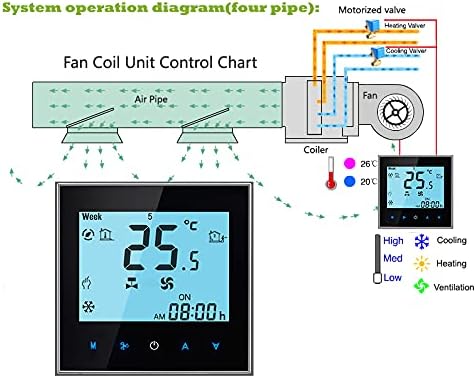
Image 3.1: System operation diagram for a four-pipe fan coil unit, showing separate heating and cooling valves and air distribution.
4. Setup and Installation
This section provides guidance for the physical and electrical installation of your Qiumi thermostat.
Wiring Diagram (Four-Pipe System)
Refer to the following diagram for proper wiring of the four-pipe system. It is essential to ensure all connections are secure and comply with local electrical codes. If you are unsure, please consult a qualified electrician.
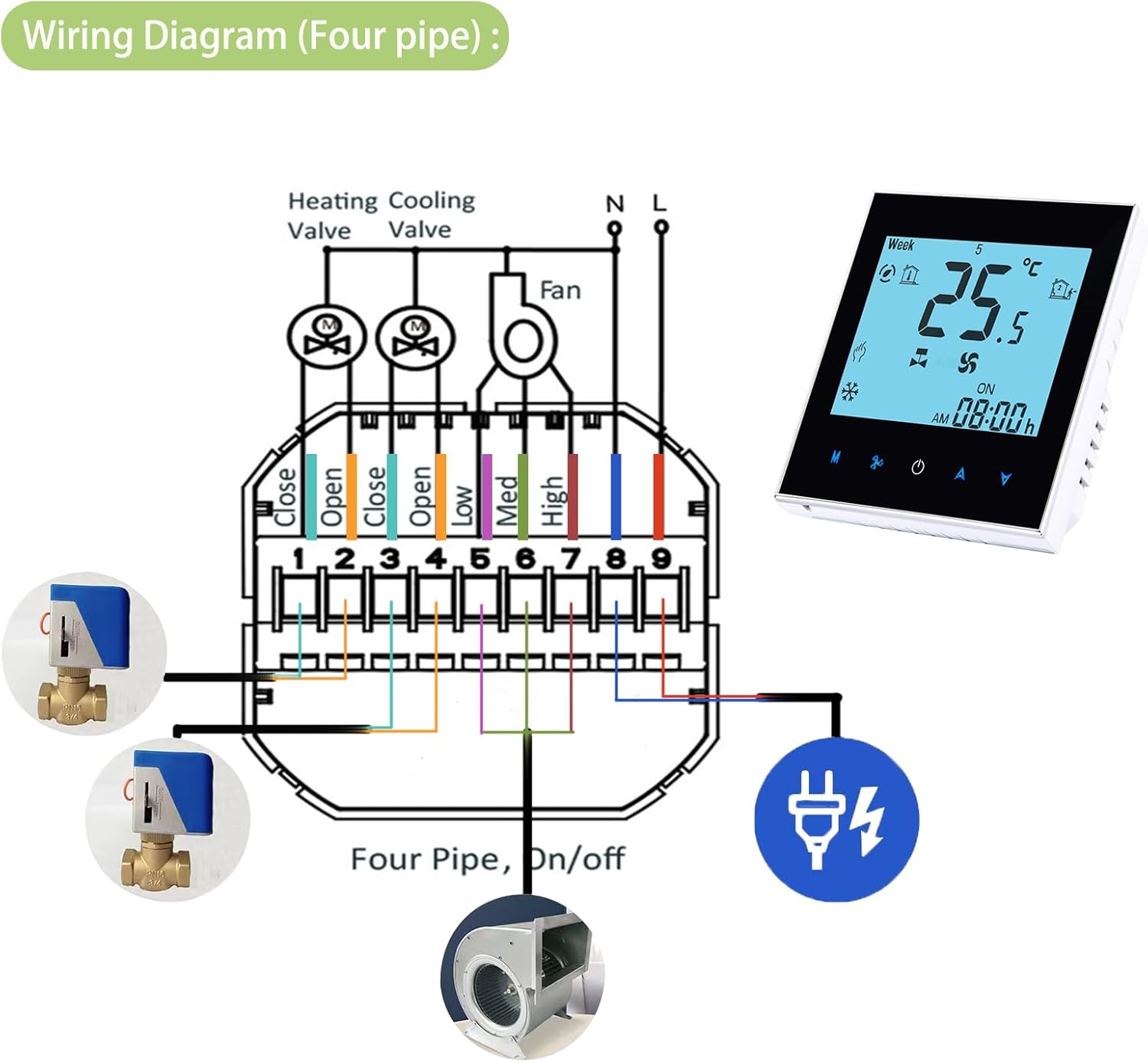
Image 4.1: Detailed wiring diagram for the four-pipe thermostat system, showing connections for heating/cooling valves, fan speeds, and power supply.
Physical Installation
The thermostat is designed for easy wall mounting or installation within a standard electrical cassette. Ensure the installation box dimensions are suitable (60x86x86mm for square or European round boxes).

Image 4.2: Dimensional drawing of the Qiumi Smart Thermostat, indicating its width, height, and depth for installation planning.
5. Operating Instructions
Learn how to effectively use your Qiumi Smart WiFi Thermostat through its display, mobile app, and voice control features.
Display Overview
Familiarize yourself with the thermostat's LCD display and control buttons for manual operation.

Image 5.1: Labeled diagram highlighting various indicators and buttons on the thermostat's display, including Week Display, Temperature, Fan Speed, Mode Switch, and Power.
App Control
The thermostat can be controlled remotely via a dedicated mobile application, providing convenience and flexibility.
- For iOS devices: Search for "My BecaSmart" in the Apple App Store and download.
- For Android devices: Search for "My BecaSmart" in Google Play and download.
- The thermostat also supports the popular "Smart Life" application for broader smart home integration.

Image 5.2: The Qiumi Smart Thermostat displayed with Amazon Alexa and Google Home devices, illustrating its compatibility with voice control platforms.
Voice Control
Integrate your Qiumi thermostat with leading voice assistants for hands-free control of your home's climate.
- Works seamlessly with Amazon Alexa.
- Compatible with Google Home for voice commands.

Image 5.3: The Qiumi Smart Thermostat integrated into a living room environment, demonstrating its discreet and functional presence.
6. Specifications
Detailed technical specifications for the Qiumi BAC-1000ELW Smart WiFi Thermostat.
| Feature | Detail |
|---|---|
| Power Supply | 95 ~ 240 VAC, 50 ~ 60HZ |
| Model Number | BAC-1000ELW (JMY-BAC-1000ELW-Black) |
| Type | Air Conditioner Thermostat |
| Connectivity | WiFi, Alexa, Google Home |
| Shell Material | PC + ABS (flame retardant) |
| Accuracy | ±0.5°C |
| Temperature Range | 5 ~ 35°C |
| Installation Box | 60*86*86mm square or European round box |
| Color | Black |
| Dimensions (L x W x H) | 8.6 x 8.6 x 3.76 cm |
| Voltage | 240 Volts (AC) |
| Included Components | Thermostat, user manual, mounting screws |
| Control Type | Digital and remote |

Image 6.1: The Qiumi Smart Thermostat seamlessly integrated into a child's room, demonstrating its compact design and aesthetic appeal.

Image 6.2: The Qiumi Smart Thermostat mounted on a wall in a contemporary bedroom, highlighting its sleek profile and unobtrusive presence.
7. Troubleshooting
This section provides solutions to common issues you might encounter with your Qiumi Smart WiFi Thermostat.
Common Issues and Solutions
- No Power/Display Off: Ensure the thermostat is correctly wired to a 95-240V AC power source. Check circuit breakers.
- Wi-Fi Connectivity Issues: Verify that your Wi-Fi network is 2.4GHz. Ensure the thermostat is within range of your router. Restart both the thermostat and your router.
- Incorrect Temperature Reading: Ensure the thermostat is not exposed to direct sunlight, drafts, or heat sources that could affect its sensor.
- App Control Not Working: Confirm your smartphone has an active internet connection. Ensure the "My BecaSmart" or "Smart Life" app is updated to the latest version and the thermostat is properly paired within the app.
If issues persist after attempting these solutions, please refer to the warranty and support section for further assistance.
8. Warranty and Customer Support
For warranty information, technical support, or any inquiries regarding your Qiumi Smart WiFi Thermostat, please contact Qiumi customer service. Details on how to reach support are typically provided with your product packaging or on the official Qiumi website.
Please have your model number (BAC-1000ELW) and purchase information ready when contacting support to facilitate a quicker resolution.
Ask a question about this manual
Ask about setup, troubleshooting, compatibility, parts, safety, or missing instructions. Manuals+ will review the question and use this page’s manual context to help answer it.