
Product Overview
This document provides essential information for the installation, operation, maintenance, and troubleshooting of the replacement press buttons for WPM/Welhome coffee machines. These buttons are designed as direct replacements for the original parts on compatible models, ensuring continued functionality of your coffee machine's control panel.
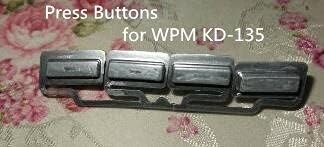
This image displays a set of four replacement press buttons designed for the WPM KD-135 coffee machine. The buttons are silver-grey, rectangular, and are shown still connected by their manufacturing frame, indicating they are new and ready for installation.
Compatible Models
These replacement press buttons are compatible with the following WPM/Welhome coffee machine models:
- WPM/Welhome KD-135
- WPM/Welhome KD-210
- WPM/Welhome KD-310
- WPM/Welhome KD-410

This close-up view shows the control panel of a WPM KD-210 coffee machine, featuring the installed press buttons. The buttons are dark grey with white labels, including 'POWER', 'MANUAL', and icons representing coffee functions. This illustrates how the replacement buttons would appear once installed on a compatible machine.
Installation Guide (Setup)
Replacing the press buttons requires careful handling. If you are unsure about any step, it is recommended to seek assistance from a qualified technician.
Safety Precautions:
- Always disconnect the coffee machine from the power outlet before beginning any installation or repair work.
- Ensure your hands are dry and free of static electricity.
- Use appropriate tools to avoid damaging the machine's casing or internal components.
Step-by-Step Installation:
- Disconnect Power: Unplug the coffee machine from the electrical outlet.
- Access Button Panel: Carefully locate and open the casing or panel that provides access to the existing press buttons. This may involve removing screws or gently prying open clips. Refer to your specific coffee machine's service manual if available for detailed instructions on accessing internal components.
- Remove Old Button(s): Identify the button(s) to be replaced. Gently detach the old button(s) from their mounting points. Note how they are seated and connected.
- Install New Button(s): Align the new replacement button(s) with the mounting points. Press firmly but gently until the button(s) click securely into place. Ensure they are seated correctly and move freely.
- Reassemble: Carefully reattach any panels or casing removed in step 2, ensuring all screws are tightened and clips are secured.
- Test Functionality: Plug the coffee machine back into the power outlet. Power on the machine and test the newly installed button(s) to ensure they respond correctly and activate the intended functions.
Operation
The replacement press buttons are designed to function identically to the original parts. Once installed, they will control the specific operations of your WPM/Welhome coffee machine as intended by the manufacturer.
For detailed instructions on the specific functions associated with each button (e.g., power, brew, steam, program), please refer to the original user manual provided with your WPM/Welhome coffee machine model (KD-135, KD-210, KD-310, or KD-410).
Maintenance
Proper maintenance can extend the lifespan of your coffee machine's components, including the press buttons.
Cleaning:
- Exterior Cleaning: Gently wipe the surface of the buttons and the surrounding control panel with a soft, damp cloth. Avoid using abrasive cleaners, solvents, or excessive moisture, as these can damage the button material or internal electronics.
- Dust Removal: Use a soft brush or compressed air to remove any dust or debris that may accumulate around the edges of the buttons, which could impede their movement.
Storage:
If storing the coffee machine for an extended period, ensure it is clean, dry, and stored in a cool, dry place away from direct sunlight and extreme temperatures.
Troubleshooting
This section addresses common issues that may arise with the press buttons.
- Button Not Responding:
- Ensure the coffee machine is properly plugged in and powered on.
- Verify the button is correctly seated and not obstructed. Re-seat the button if necessary, ensuring it clicks into place.
- Check for any visible damage to the button or the underlying switch mechanism. If damaged, replacement may be necessary.
- If multiple buttons are unresponsive, the issue might be with the coffee machine's internal electronics rather than the button itself. Consult a technician.
- Button Feels Stuck or Sticky:
- Clean around the button edges to remove any accumulated debris, coffee residue, or spills.
- Ensure the button is not misaligned. Gently try to re-center it.
- If the issue persists after cleaning, the internal spring or mechanism might be faulty, requiring replacement of the button.
For issues not covered here, or if troubleshooting steps do not resolve the problem, please contact customer support or a qualified service professional.
Specifications
| Feature | Detail |
|---|---|
| Brand | Generic |
| Part Model Number | LIWMQ-1005001915124232-001 |
| Type | Coffee Maker Press Button Repair Part |
| Material | Other |
| Color | Press Button Kd-135 (referring to the specific button color/design for KD-135) |
| Compatible Coffee Machine Models | WPM/Welhome KD-135, KD-210, KD-310, KD-410 |
| ASIN | B094VT5Z5R |
| Date First Available | 13 May 2021 |
Warranty and Support
This product comes with a Lifetime Friendly Warranty, ensuring free replacement or a full refund without the need for return in case of quality issues.
If you encounter any issues or require assistance, please do not hesitate to contact the seller directly via the "contact seller" option on the purchase platform. Customer satisfaction is a priority, and support is available to address any concerns.