
1. Introduction
This manual provides instructions for the WINFLIKE RC-928R replacement remote control. This remote is designed to be fully compatible with various Onkyo AV Receiver models, offering a direct replacement for your original remote without the need for complex programming.
Please read this manual carefully before using your new remote control to ensure proper operation and to familiarize yourself with its features.
2. Setup: Battery Installation
The RC-928R remote control requires two (2) AAA batteries for operation. Follow these steps to install the batteries:
- Locate the battery compartment on the back of the remote control.
- Slide the battery compartment cover downwards and remove it.
- Insert two AAA batteries, ensuring the positive (+) and negative (-) terminals align correctly with the markings inside the compartment.
- Replace the battery compartment cover by sliding it back into place until it clicks securely.
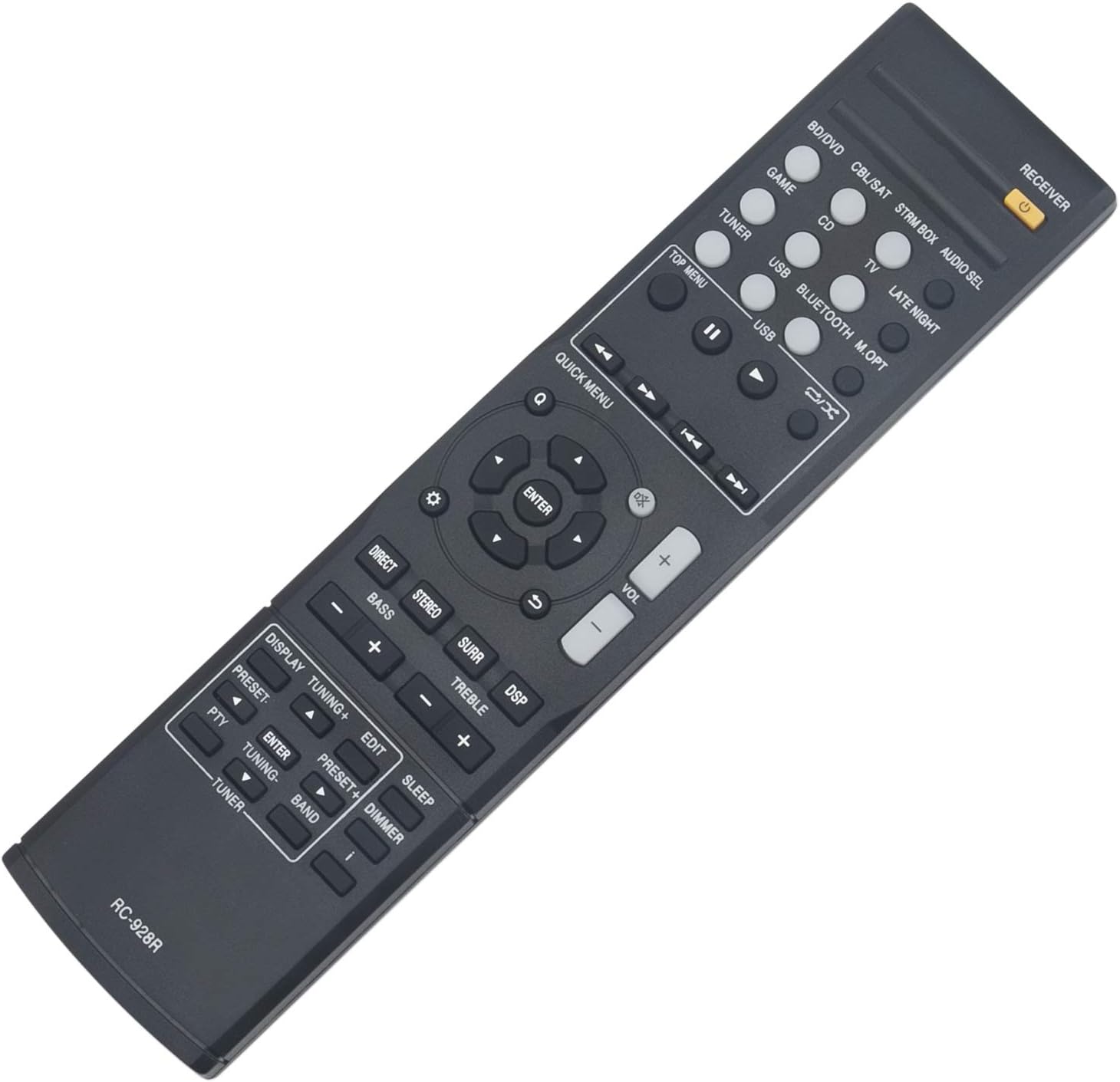
Image: Rear view of the remote control with the battery cover open, illustrating the correct placement for two AAA batteries.
Note: Always use new batteries and replace both batteries at the same time. Do not mix old and new batteries or different types of batteries.
3. Operating Instructions
The WINFLIKE RC-928R remote control is designed for immediate use with compatible Onkyo AV Receivers. No programming or code entry is required. Once batteries are installed, the remote is ready to operate your receiver.

Image: Front view of the RC-928R remote control, displaying its layout and various function buttons.
To operate your Onkyo AV Receiver:
- Power On/Off: Press the RECEIVER button (usually orange) at the top right to power your receiver on or off.
- Input Selection: Use the dedicated input buttons (e.g., BD/DVD, CBL/SAT, STRM BOX, CD, TUNER, USB, BLUETOOTH) to select your desired audio/video source.
- Volume Control: Adjust the volume using the VOL + and VOL - buttons.
- Navigation: Use the directional arrow buttons (up, down, left, right) and the ENTER button in the center to navigate menus on your receiver's display.
- Sound Modes: Buttons like DIRECT, STEREO, SURR (Surround), and DSP (Digital Signal Processor) allow you to select different audio modes.
- Tone Control: Use BASS +/- and TREBLE +/- buttons to adjust audio tone.
- Display/Tuning: Buttons such as DISPLAY, TUNING +/-, PRESET +/-, PTY, EDIT, BAND, and TUNER are for radio and display functions.
- Sleep/Dimmer: The SLEEP button sets a timer for the receiver to power off, and DIMMER adjusts display brightness.

Image: The RC-928R remote control highlighting its plug-and-play functionality, requiring only battery insertion to operate.
4. Maintenance
- Cleaning: Wipe the remote control with a soft, dry cloth. Do not use abrasive cleaners, solvents, or alcohol, as these can damage the surface.
- Battery Replacement: Replace batteries when the remote's response becomes sluggish or stops working. Always replace both batteries simultaneously.
- Storage: If the remote will not be used for an extended period, remove the batteries to prevent leakage and potential damage to the remote.
- Environment: Avoid exposing the remote to extreme temperatures, direct sunlight, high humidity, or liquids.
5. Troubleshooting
| Problem | Solution |
|---|---|
| Remote is not working. |
|
| Some buttons are not responding. |
|
| Remote works intermittently. |
|
6. Specifications
- Model: RC-928R (WINFLIKE WL-RC-928R-S2-210513)
- Compatibility: Onkyo AV Receiver models TX-SR252, TX-SR353, TX-SR373, TX-SR383, HTP-395, HT-R395, HT-R397, HT-S3800, HT-S3900
- Power Source: 2 x AAA Batteries (not included)
- Dimensions: 8.7 x 2 x 0.6 inches (22.1 x 5.1 x 1.5 cm)
- Item Weight: 2.11 ounces (60 grams)
- Special Features: Ergonomic design, Lightweight, No Programming Required
- Color: Black
7. Warranty and Support
WINFLIKE is committed to providing high-quality products and customer satisfaction. This replacement remote control is designed for durability and reliable performance.
If you encounter any issues with your WINFLIKE RC-928R remote control or have questions regarding its operation, please do not hesitate to contact WINFLIKE customer service. We are available to assist you with any problems or concerns.
For support, please refer to the contact information provided with your purchase or visit the official WINFLIKE website.