
1. Introduction
Thank you for choosing the LSAPT Bluetooth Headset V5.0. This wireless earpiece is designed for clear communication and audio playback, featuring noise-canceling technology, a comfortable fit, and long battery life. It is suitable for various uses including business calls, driving, and office work. This manual provides detailed instructions for setup, operation, and maintenance to ensure optimal performance.
2. What's in the Box
Upon opening your LSAPT Bluetooth Headset package, you should find the following items:
- LSAPT Bluetooth Headset (Model RM)
- Protective Case
- USB Charging Cable
- Multiple Ear Tip Sizes (6 different sizes)
- User Manual
Please inspect all contents for any damage or missing parts. If anything is amiss, contact customer support.

Image: Unboxing the LSAPT Bluetooth Headset, showing the headset, charging cable, and ear tips.
3. Product Overview
Familiarize yourself with the various components and controls of your LSAPT Bluetooth Headset.

Image: A detailed diagram of the LSAPT Bluetooth Headset, highlighting the Multifunction Button, Volume Up/Previous Track, Volume Down/Next Track, LED Indicator, Mute Switch, Siri Activation, Microphone, and Charging Port.
- Multifunction Button: Power on/off, Play/Pause, Answer/End call, Redial last number.
- Vol+/Pre Track: Increase volume, skip to previous track.
- Vol-/Next Track: Decrease volume, skip to next track.
- LED Indicator: Displays status (pairing, connected, charging).
- Mute Switch: Mute/unmute microphone during calls.
- Siri Activation: Activates voice assistant (Siri, Google Assistant) in standby mode.
- Microphone: Built-in HD omnidirectional microphone with CVC6.0 noise reduction.
- Charging Port: For connecting the USB charging cable.
4. Charging the Headset
Before first use, fully charge the headset. A full charge takes approximately 1.5 to 2.5 hours.
- Connect the small end of the USB charging cable to the charging port on the headset.
- Connect the larger end of the USB charging cable to a USB power source (e.g., computer USB port, USB wall adapter).
- The LED indicator will show a red light during charging and turn blue when fully charged.
The headset provides up to 6-8 hours of talk time and 6-7 hours of music playback on a single charge, with up to 180 hours in standby mode.
Video: Demonstrates connecting the charging cable to the headset and a laptop's USB port for charging.
5. Setup and Pairing
Follow these steps to pair your LSAPT Bluetooth Headset with your device.
- Power On: Press and hold the Multifunction Button until the LED indicator flashes red and blue alternately, indicating it is in pairing mode.
- Activate Bluetooth: On your mobile phone or other Bluetooth-enabled device, go to the Bluetooth settings and ensure Bluetooth is turned on.
- Search for Devices: Your device will automatically search for nearby Bluetooth devices.
- Select Headset: Look for "A8" or a similar name in the list of available devices and select it to connect.
- Confirmation: Once connected, the LED indicator on the headset will flash blue slowly, and you will hear a voice prompt confirming the connection.
The headset supports connecting to two Bluetooth devices simultaneously. After pairing with the first device, disable Bluetooth on the first device, then pair with the second device. Re-enable Bluetooth on the first device, and the headset should automatically connect to both.
Video: Demonstrates the pairing process of the LSAPT Bluetooth Headset with two mobile phones, showing the headset entering pairing mode and connecting to each device.
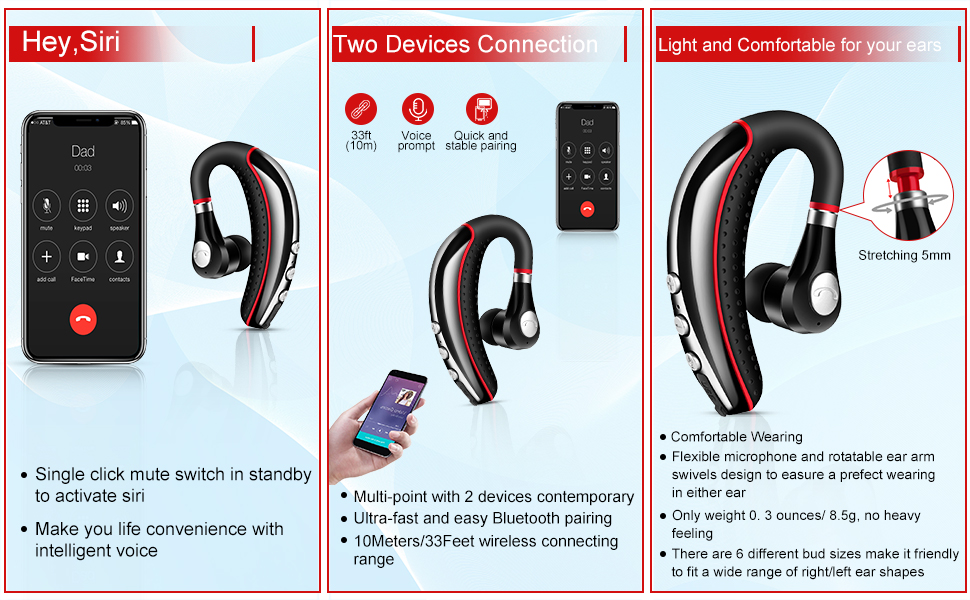
Image: Illustrates the headset's multi-point connection feature, allowing simultaneous connection to two devices, and the activation of voice assistants like Siri.
6. Operating Instructions
Power On/Off
- Power On: Press and hold the Multifunction Button for approximately 3 seconds until the LED indicator flashes blue.
- Power Off: Press and hold the Multifunction Button for approximately 3 seconds until the LED indicator flashes red and then turns off.
Call Management
- Answer/End Call: Short press the Multifunction Button.
- Reject Call: Press and hold the Multifunction Button for 2 seconds.
- Redial Last Number: Double-press the Multifunction Button.
- Mute/Unmute: During a call, press the Mute Switch button.
Music Playback
- Play/Pause: Short press the Multifunction Button.
- Volume Up: Short press the Vol+ button.
- Volume Down: Short press the Vol- button.
- Previous Track: Long press the Vol+ button.
- Next Track: Long press the Vol- button.
Voice Assistant
- Activate Siri/Google Assistant: In standby mode, press the Siri Activation button to activate your device's voice assistant.
7. Comfort and Fit
The LSAPT Bluetooth Headset is designed for comfort and a secure fit. The ear hook can rotate 180 degrees, allowing you to wear it on either your left or right ear. The earbud also features a 5mm stretchable design for optimal positioning.

Image: The LSAPT Bluetooth Headset illustrating its 180-degree rotatable ear hook and 5mm stretchable earbud for a customized and comfortable fit.
Six different ear tip sizes are included to accommodate a wide range of ear shapes, ensuring a snug and comfortable experience even during extended use.
8. Maintenance
To ensure the longevity and optimal performance of your headset, follow these maintenance guidelines:
- Cleaning: Regularly wipe the headset with a soft, dry cloth. Avoid using harsh chemicals or abrasive materials.
- Storage: When not in use, store the headset in its protective case to prevent damage from dust, moisture, and impacts.
- Water Resistance: The headset features IPX5 water resistance, meaning it can withstand sweat and light splashes. Do not submerge it in water or expose it to heavy rain.
- Temperature: Avoid exposing the headset to extreme temperatures (hot or cold) as this can affect battery life and internal components.

Image: The LSAPT Bluetooth Headset shown with icons indicating its IPX5 waterproof rating, Bluetooth 5.0, 8-hour playing time, and built-in microphone.
9. Troubleshooting
If you encounter any issues with your LSAPT Bluetooth Headset, refer to the following common solutions:
- Headset not turning on: Ensure the headset is fully charged. Connect it to a power source and check the LED indicator.
- Cannot pair with device:
- Ensure the headset is in pairing mode (LED flashing red and blue alternately).
- Make sure Bluetooth is enabled on your device.
- Move the headset closer to your device (within 10 meters/33 feet).
- Turn off and on your device's Bluetooth, then try pairing again.
- Clear previous Bluetooth connections on your device if you have too many saved.
- No sound or low volume:
- Increase the volume on both the headset and your connected device.
- Ensure the headset is properly connected to your device.
- Check if the audio output is set to the headset on your device.
- Poor call quality:
- Ensure the microphone is not muted.
- Move to an area with less interference.
- Ensure the headset is positioned correctly for optimal microphone pickup.
- Headset disconnects frequently:
- Ensure the headset is within the 10-meter Bluetooth range of your device.
- Check for low battery on the headset.
- Avoid physical obstructions between the headset and your device.
If these steps do not resolve the issue, please contact LSAPT customer support for further assistance.
10. Specifications
Detailed technical specifications for the LSAPT Bluetooth Headset V5.0 (Model RM):
| Brand | LSAPT |
| Model Number | RM |
| Connectivity Technology | Wireless (Bluetooth) |
| Bluetooth Version | 5.0 |
| Bluetooth Range | 10 Meters (33 feet) |
| Ear Placement | Over Ear |
| Form Factor | In Ear |
| Noise Control | Active Noise Cancellation (CVC6.0) |
| Microphone | Built-in HD Omnidirectional |
| Battery Life (Talk Time) | Up to 6-8 hours |
| Battery Life (Music Playback) | Up to 6-7 hours |
| Standby Time | Up to 180 hours |
| Battery Charge Time | 1.5-2.5 hours |
| Water Resistance Level | IPX5 (Sweatproof) |
| Item Weight | 0.3 Ounces |
| Compatible Devices | Bluetooth-enabled devices (Android, iOS, Windows) |
11. Warranty and Support
LSAPT products are designed for reliability and performance. For warranty information, please refer to the documentation included with your purchase or visit the official LSAPT website. If you require technical support, have questions about product functionality, or need assistance with troubleshooting, please contact LSAPT customer service. Details for contacting support can typically be found on the product packaging or the brand's official website.