1. Introduction
This manual provides detailed instructions for the setup, operation, and maintenance of your Fire-Boltt SPO2 Smartwatch, model BSW003. Please read this manual thoroughly before using the device to ensure proper functionality and to maximize your user experience. Keep this manual for future reference.
2. Product Overview
The Fire-Boltt SPO2 Smartwatch BSW003 is a feature-rich device designed to enhance your daily activities and health monitoring. It features a 1.3-inch full-touch color HD screen and a unique 360-degree rotating user interface.
Key Features:
- Display: 1.3-inch full-touch color HD screen.
- User Interface: 360-degree rotating menu and quick access list.
- Health Monitoring: Real-time blood oxygen saturation (SpO2) and heart rate monitoring.
- Fitness Tracking: 8 multi-sport modes (cycling, jumping, badminton, swimming, running, football, walking, basketball).
- Battery Life: Up to 8 days in normal mode, 20 days in standby.
- Durability: IP67 water and dust resistance.
- Entertainment: Built-in games (Bird Game, 2048).
- Customization: Approximately 100 unique watch faces, including 4 built-in customizable options.
Device Components:
The smartwatch consists of the main watch unit with a touchscreen display, a comfortable strap, and sensors on the rear for health monitoring. The package typically includes the smartwatch and a charging cable.
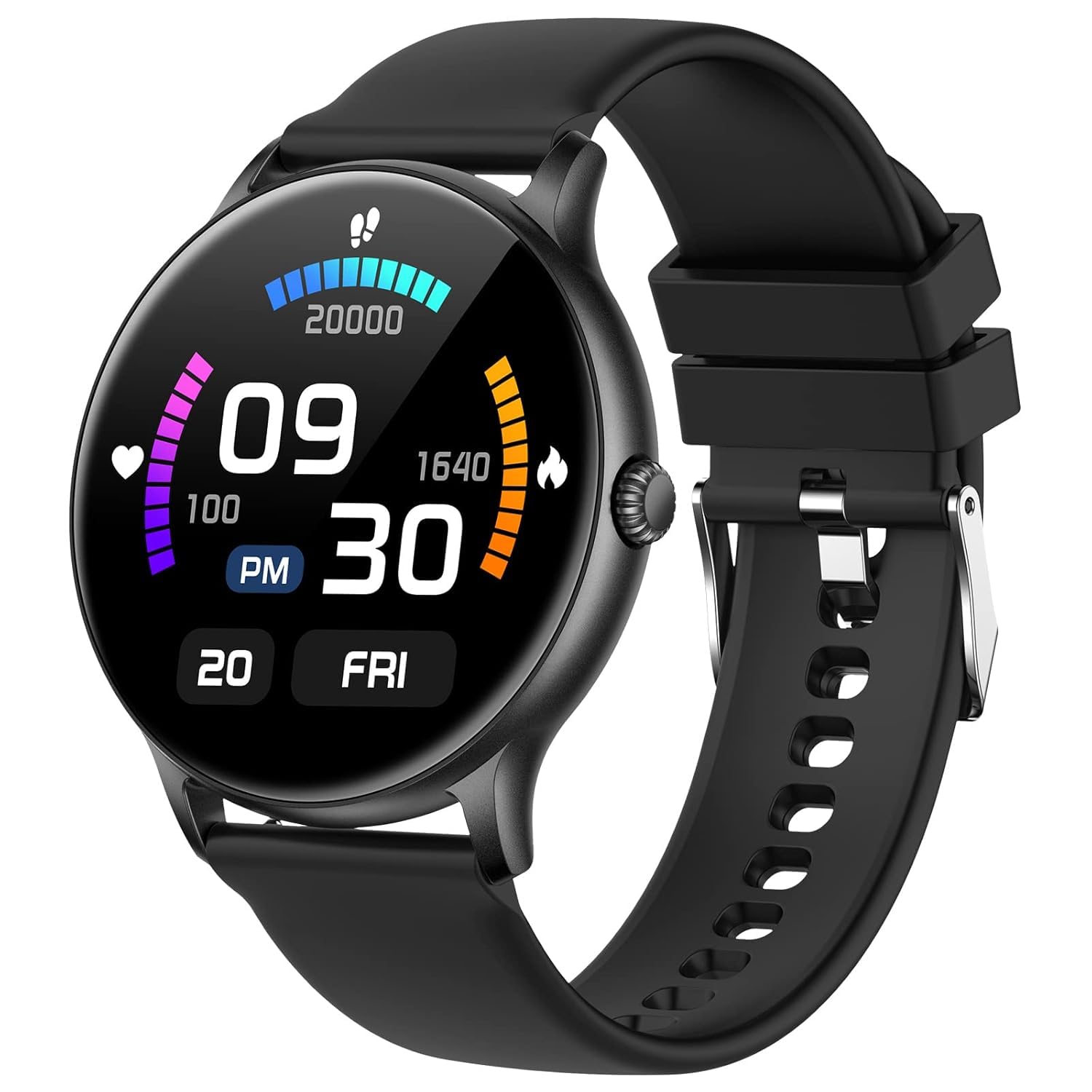
Figure 2.1: Front view of the Fire-Boltt SPO2 Smartwatch BSW003, showcasing its round display and sleek design.
3. Setup
3.1 Charging the Smartwatch
- Connect the magnetic charging cable to the charging pins on the back of the smartwatch.
- Plug the USB end of the cable into a standard USB power adapter (5V/1A recommended) or a computer's USB port.
- The watch display will show a charging indicator. Ensure the watch is fully charged before first use. A full charge typically takes 2-3 hours.
3.2 Pairing with Your Smartphone
- Download the official Fire-Boltt application from your smartphone's app store (Google Play Store for Android, Apple App Store for iOS).
- Ensure Bluetooth is enabled on your smartphone.
- Open the Fire-Boltt application and follow the on-screen instructions to create an account or log in.
- In the app, navigate to the device pairing section and select your BSW003 smartwatch from the list of available devices.
- Confirm the pairing request on both your smartphone and the smartwatch.
- Once paired, the watch will synchronize data with the app, and you can customize settings.
4. Operating Instructions
4.1 Basic Navigation
- Touch Screen: Tap to select, swipe left/right/up/down to navigate through menus and notifications.
- 360-degree Rotating Menu: The unique rotating user interface allows for intuitive navigation through apps and features.
- Quick Access: Swipe down from the top of the screen for quick settings and notifications.
4.2 Health Monitoring
- Heart Rate Monitoring: Access the heart rate function on the watch or through the app. Ensure the watch is snug on your wrist for accurate readings. The watch provides real-time heart rate data.
- Blood Oxygen (SpO2) Monitoring: Navigate to the SpO2 measurement function. Keep your arm still during measurement. The watch measures real-time blood oxygen saturation.
- Respiratory Rate & Breathing Exercises: The smartwatch can display your respiratory rate and guide you through meditative breathing exercises to help manage stress.
Important Note: The health monitoring features of this smartwatch are for general fitness and wellness purposes only and are not intended for medical use. If you have a medical condition, please consult a healthcare professional and use medical devices prescribed by a doctor.
4.3 Sports Modes
The smartwatch supports 8 multi-sport modes to track your physical activity. Select the desired mode before starting your workout:
- Cycling
- Jumping
- Badminton
- Swimming (refer to IP67 limitations)
- Running
- Football
- Walking
- Basketball
4.4 Built-in Games
Enjoy built-in games directly on your wrist. The BSW003 includes:
- Bird Game
- 2048
4.5 Watch Faces
Customize your smartwatch with a variety of watch faces. The device offers approximately 100 unique watch faces, including 4 built-in options that can be adjusted to suit your preference.
5. Maintenance
5.1 Cleaning
To maintain the appearance and functionality of your smartwatch:
- Wipe the screen and strap regularly with a soft, dry cloth.
- Avoid using harsh chemicals or abrasive materials, as these can damage the device.
- Ensure the charging pins are clean and dry before charging.
5.2 Water and Dust Resistance (IP67)
The Fire-Boltt BSW003 smartwatch is rated IP67 for water and dust resistance. This means it is protected against dust ingress and can withstand immersion in water up to 1 meter for 30 minutes. However, it is not designed for deep water swimming or prolonged submersion. Avoid exposing the watch to hot water, steam, or high-pressure water jets.
6. Troubleshooting
If you encounter issues with your smartwatch, refer to the following common solutions:
- Watch not turning on: Ensure the watch is fully charged. Connect it to the charger and wait a few minutes before attempting to power it on.
- Unable to pair with smartphone:
- Ensure Bluetooth is enabled on your phone and the watch.
- Make sure the watch is within the Bluetooth range of your phone.
- Restart both your phone and the smartwatch.
- Clear the app's cache or reinstall the app.
- Inaccurate health readings: Ensure the watch is worn snugly on your wrist, not too tight or too loose. Clean the sensors on the back of the watch.
- Short battery life: Reduce screen brightness, disable unnecessary notifications, and limit continuous health monitoring if not required.
For further assistance, please contact Fire-Boltt customer support.
7. Specifications
| Feature | Specification |
|---|---|
| Brand | Fire-Boltt |
| Model Number | BSW003 |
| Product Dimensions | 4.5 x 4.5 x 1.1 cm; 46 grams |
| Operating System | Watch OS |
| Memory Storage Capacity | 128 MB |
| Special Features | Activity Tracker, Multi-Sport Tracker, Daily Exercise Memory, Camera, Sleep Monitor |
| Connectivity Technology | Bluetooth |
| Wireless Communication Standard | Bluetooth |
| Battery Cell Composition | Lithium Ion |
| GPS | No GPS |
| Shape | Round |
| Screen Size | 1.3 Inches |
8. Warranty and Support
For information regarding product warranty, returns, or technical support, please refer to the official Fire-Boltt website or contact their customer service directly. Warranty terms and conditions may vary by region and retailer. Always retain your proof of purchase for warranty claims.


