
1. Product Overview
The Cobra 2.5A Micro USB Hardwire Kit (Model CA-MICROUSB-003) is designed to provide a reliable power connection for compatible Cobra SC Series Dash Cams. This kit enables advanced features such as Parking Mode and Motion Detection, enhancing vehicle security. It includes a 15-foot cable for flexible installation and discreet wiring within your vehicle.
Key Features:
- 15-Foot Cable: Provides ample length for concealed wiring, with 9 feet from the DC converter to the Micro USB plug.
- Enables Parking Mode: Allows your dash cam to monitor your vehicle while parked.
- Enables Motion Detection: Activates recording upon detecting motion around your vehicle.
- Intelligent Power Management: Protects against overcurrent, overvoltage, short circuits, overtemperature, and low battery voltage.
- Power Input/Output: DC 12/24V Input & DC 5V/2.5A Output.

Image 1.1: The Cobra 2.5A Micro USB Hardwire Kit, showing the main power module, Micro USB cable, and hardwiring leads.
2. Installation Guide
2.1 What's in the Box:
- CA-MICROUSB-003 Hardwire Kit
2.2 Installation Steps:
- Identify Power Sources: Locate a constant 12V/24V power source and an accessory (switched) 12V/24V power source in your vehicle's fuse box. Consult your vehicle's manual or a professional for assistance.
- Connect Wiring: Connect the red wire (constant power) and yellow wire (accessory power) from the hardwire kit to their respective fuse taps (not included, may require separate purchase) and then to the vehicle's fuse box. Connect the black wire (ground) to a metal part of the vehicle chassis.
- Route Cable: Carefully route the 15-foot Micro USB cable from the hardwire module to your dash cam's mounting location, concealing the wiring along the vehicle's trim or headliner for a clean installation.
- Connect to Dash Cam: Plug the Micro USB connector into your compatible Cobra dash cam.
- Test Functionality: Start your vehicle to ensure the dash cam powers on. Turn off your vehicle to verify Parking Mode and Motion Detection features activate correctly.
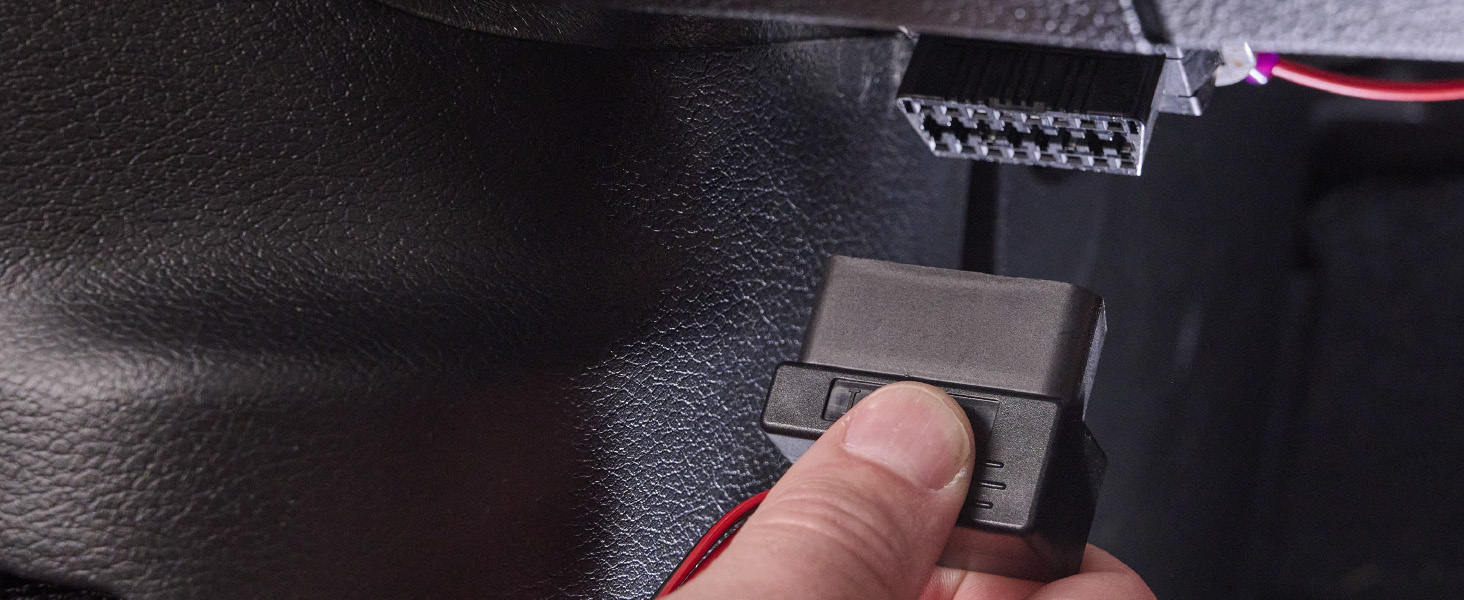
Image 2.1: Example of connecting a device to a vehicle's power source, often found near the fuse box or OBD-II port.

Image 2.2: A Cobra dash cam properly mounted on a vehicle's windshield, ready for connection.
2.3 Product Overview Video:
Video 2.1: An official product overview video demonstrating the Cobra 2.5A Micro USB Hardwire Kit and its components.
3. Operation
Once installed, the hardwire kit provides continuous power to your compatible Cobra dash cam, enabling its advanced parking surveillance features. This includes:
- Parking Mode: When your vehicle is turned off, the dash cam will enter Parking Mode, drawing power directly from the vehicle's battery via the hardwire kit. This allows the dash cam to continue monitoring for incidents.
- Motion Detection: In Parking Mode, the dash cam can utilize motion detection to automatically begin recording if movement is detected around your parked vehicle, providing evidence in case of bumps or vandalism.
Refer to your specific Cobra dash cam's user manual for detailed instructions on configuring Parking Mode and Motion Detection settings.
4. Power Management and Safety
The Cobra 2.5A Micro USB Hardwire Kit incorporates intelligent power management features to protect both your dash cam and vehicle's electrical system. These safeguards include:
- Overcurrent Protection: Prevents damage from excessive electrical current.
- Overvoltage Protection: Shields against damage from voltage spikes.
- Short Circuit Protection: Automatically cuts power in case of a short circuit.
- Overtemperature Protection: Monitors and prevents overheating of the unit.
- Low Battery Voltage Protection: Automatically cuts power to the dash cam if your vehicle's battery voltage drops below a safe level, preventing battery drain.
5. Compatibility
This Cobra dash camera hardwire kit is compatible with the following Cobra dash cam models:
- SC 100
- SC 200
- SC 201
- SC 200D
- SC 400
- SC 400D
- DASH2208
- DASH2216D
- DASH2308
- DASH2316D
- CCDC4500
- CDR 835
- CDR 855 BT
- CDR 875 G
- CDR 895 D
- CDR 900
- CDR 905 DBT
- CDR995 DI
- CCDC4420
- CCDC4488
6. Specifications
| Brand | COBRA |
| Model Name | CA-MICROUSB-003 |
| Vehicle Service Type | Car |
| Connectivity Technology | USB |
| Special Feature | Motion Sensing |
| Included Components | CA-MICROUSB-003 Hardwire Kit |
| Power Input | DC 12/24V |
| Power Output | DC 5V/2.5A |
| Cable Length | 15 Feet |
| Item Weight | 0.25 Pounds |
| Manufacturer | Cobra Electronics |
| UPC | 028377315824 |
7. Troubleshooting
If you encounter issues with your Cobra 2.5A Micro USB Hardwire Kit, consider the following:
- No Power to Dash Cam: Check all wiring connections, especially the fuse box connections and ground wire. Ensure the vehicle's fuses are intact.
- Parking Mode Not Activating: Verify that Parking Mode is enabled in your dash cam's settings. Ensure the hardwire kit is correctly connected to both constant and accessory power sources.
- Battery Drain: The kit includes low battery voltage protection. If your vehicle's battery is old or weak, it might trigger this protection prematurely. Consider having your vehicle's battery tested.
- Intermittent Power: Inspect the Micro USB connection to the dash cam and the connections to the hardwire module for looseness.
For further assistance, refer to your dash cam's specific manual or contact Cobra customer support.
8. Warranty and Support
8.1 Warranty Information:
This Cobra 2.5A Micro USB Hardwire Kit is covered by a 1 Year Limited Manufacturer's Warranty. Please retain your proof of purchase for warranty claims.
8.2 Customer Support:
For technical support, warranty service, or additional product information, please visit the official Cobra Electronics website or contact their customer service department. Contact details can typically be found on the manufacturer's website or in the packaging materials.


