
1. Introduction
Thank you for purchasing the BESTEK 150W Car Power Inverter MRI1510NU. This device is designed to convert your vehicle's DC 12V power into household AC 100V power, along with providing two USB charging ports. It is ideal for powering and charging a wide range of electronic devices on the go, ensuring you stay connected and powered during road trips, outdoor activities, or even during emergency power outages. Please read this manual thoroughly before use to ensure safe and optimal operation.
2. Product Overview
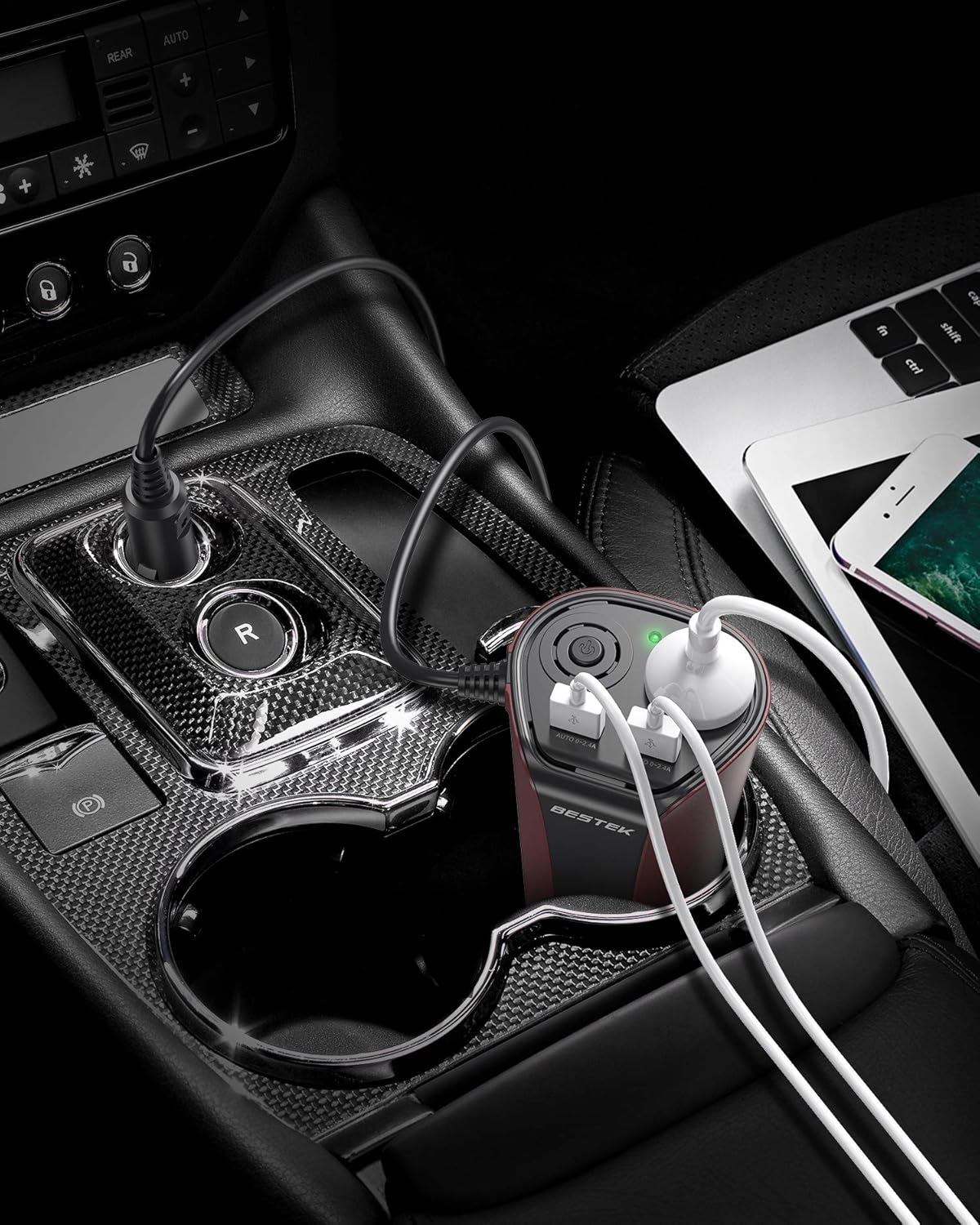
The BESTEK 150W Car Power Inverter features a compact design with multiple output options. Familiarize yourself with the components shown below.

- LED Indicator: Shows power status.
- AC Power Switch: Turns the AC output on/off.
- AC Outlet (100V): For devices requiring AC power.
- USB Output Ports (2 ports, 5V): For charging USB-powered devices.
- Internal Cooling Fan: Dissipates heat to maintain optimal operating temperature.
- Heat Dissipation Vents: Allows airflow for cooling.
- DC 12V Input: Connects to the car's cigarette lighter socket.
3. Safety Features
The BESTEK 150W Car Power Inverter is equipped with six levels of protection to ensure the safety of both the device and your connected electronics.

- Output Overload Protection: Automatically cuts AC output if connected devices exceed the inverter's maximum output.
- Output Short Circuit Protection: Cuts AC output if a short circuit is detected.
- Input Short Circuit Protection: An internal fuse will blow, preventing damage.
- Abnormal Temperature Protection: Cuts AC output if the internal temperature exceeds approximately 65°C.
- Input Undervoltage Protection: Cuts AC output if an abnormally low voltage is detected from the input.
- Input Overvoltage Protection: Prevents AC output if an abnormally high voltage is detected from the input.
The inverter also features a heat-dissipating aluminum alloy casing and V0 standard fire-retardant material for enhanced safety and durability.
4. Setup and Operation
4.1. Connecting the Inverter
- Ensure your vehicle is turned off before connecting the inverter.
- Inspect the car's cigarette lighter socket for any debris and remove it.
- Insert the inverter's DC 12V plug firmly into the car's cigarette lighter socket.
- Turn on your vehicle's ignition. The LED indicator on the inverter should light up, indicating it is powered.
4.2. Using AC Outlets
- Press the AC power switch to turn on the AC output.
- Plug your AC-powered device (e.g., laptop, small appliance) into the AC outlet. Ensure the device's power consumption does not exceed 150W.
- After use, turn off the AC power switch and unplug your device.
4.3. Using USB Ports
- Connect your USB charging cable to one of the two USB output ports on the inverter.
- Connect the other end of the cable to your USB-powered device (e.g., smartphone, tablet).
- The device will begin charging automatically.

4.4. Video Demonstration
Watch this short video to see the BESTEK 150W Car Inverter in use:
5. Specifications
Detailed technical specifications for the BESTEK 150W Car Power Inverter MRI1510NU.
| Feature | Specification |
|---|---|
| Brand | BESTEK |
| Model Number | MRI1510NU |
| Power Source | Battery Powered |
| Wattage | 150 W |
| Color | Brown |
| Included Components | Instruction Manual |
| Number of Outlets | 1 (AC) |
| Input Voltage | 12 Volts (DC) |
| Sound Level | 150 Watts |
| Standby Power Cutoff | Over 85% |
| Output Voltage | 100 Volts (AC) |
| Peak Output Power | 150 Watts |
| Electrical Output Waveform | Square Wave |
| Frequency | 55 Hz |
| Product Weight | 262 Grams |
| Manufacturer | BESTEK |
| Warranty | One Year |
| Country of Origin | China |

6. Important Notes and Warnings
- This product is designed for DC12V negative ground vehicles only. Do not use it with other voltage systems (e.g., DC24V) or positive ground vehicles.
- If using devices with a total power exceeding 150W, please use separate battery connection clips (not included) directly to the car battery.
- When connecting battery connection clips to the battery terminals, ensure correct polarity: connect (+) to (+) and (-) to (-). Reversing polarity can cause severe damage to the inverter and vehicle.
- Do not drive the car while the inverter is connected directly to the car battery using battery clips.
- Before inserting the inverter into the car's cigarette lighter socket, ensure the socket is clean and free of any debris.
- When charging an iPhone, always use a genuine charging cable to ensure compatibility and safety.
- Avoid exposing the inverter to direct sunlight, heat sources, or moisture.
- Do not disassemble or modify the inverter. This will void the warranty and may lead to safety hazards.
7. Troubleshooting
If you encounter issues with your BESTEK 150W Car Power Inverter, please refer to the following common problems and solutions:
- No Power/LED Off:
- Check if the inverter is securely plugged into the cigarette lighter socket.
- Ensure the vehicle's ignition is on.
- Verify the car's cigarette lighter fuse is not blown.
- Check if the inverter's internal fuse (if accessible) is intact.
- AC Output Not Working:
- Ensure the AC power switch on the inverter is turned on.
- Check if the connected device's power consumption exceeds 150W.
- The inverter may have entered protection mode (overload, overheat, undervoltage, overvoltage). Disconnect devices, turn off the inverter, wait a few minutes, and try again.
- USB Charging Not Working:
- Ensure the USB cable is properly connected to both the inverter and the device.
- Try a different USB cable or device to rule out cable/device issues.
- Inverter Overheating:
- Ensure the inverter's vents are not blocked and there is adequate airflow.
- Reduce the load by unplugging some devices.
- Operate the inverter in a cooler environment.
If the problem persists after trying these steps, please contact BESTEK customer support.
8. Maintenance
To ensure the longevity and optimal performance of your inverter, follow these maintenance guidelines:
- Cleaning: Regularly wipe the exterior of the inverter with a soft, dry cloth. Do not use abrasive cleaners or solvents.
- Ventilation: Keep the ventilation openings clear of dust and debris to prevent overheating.
- Storage: When not in use, store the inverter in a cool, dry place away from direct sunlight and extreme temperatures.
- Cable Care: Avoid bending or crimping the power cord excessively.
9. Warranty and Support
BESTEK provides a one-year warranty service for this product. In the unlikely event of a quality defect or if you require assistance, please contact BESTEK customer support. We are committed to providing sincere and dedicated support.
For support, please refer to the contact information provided with your purchase or visit the official BESTEK website.