
Introduction
This manual provides essential instructions for the safe and efficient operation, maintenance, and troubleshooting of your Braun CareStyle 3 Pro IS3155VI Steam Generator Iron. Please read these instructions carefully before first use and keep them for future reference.

Image: The Braun CareStyle 3 Pro IS3155VI Steam Generator Iron, featuring a white and purple design with the iron resting on its base unit, connected by a steam hose.
Safety Instructions
Always observe the following safety precautions to prevent electric shock, fire, or injury:
- Ensure the voltage indicated on the appliance corresponds to your mains voltage.
- Do not immerse the iron or base unit in water or other liquids.
- Do not leave the iron unattended while it is switched on or connected to the mains.
- Keep the iron and its cord out of reach of children.
- The soleplate of the iron can become extremely hot and cause burns. Avoid direct contact.
- Always unplug the iron from the mains before filling or emptying the water tank, and during cleaning or maintenance.
- Do not operate the iron if it has been dropped, if there are visible signs of damage, or if it is leaking.
- Only use the iron for its intended purpose, which is ironing clothes.
Product Components
Familiarize yourself with the main parts of your steam generator iron:
- Iron Unit: Features the Eloxal Plus soleplate, handle, and steam trigger.
- Base Unit: Houses the water tank, control panel, and steam generator.
- Removable Water Tank: 2-liter capacity for extended ironing sessions.
- Steam Hose: Connects the iron unit to the base unit.
- Control Panel: Includes power button, mode selection (iCare, Turbo, Eco), and CalcClean indicator.
- Safety Lock: Secures the iron to the base unit for safe transport and storage.
Setup
- Unpacking: Carefully remove all packaging materials and ensure all components are present.
- Positioning: Place the steam generator iron on a stable, heat-resistant surface, such as an ironing board designed for steam generators.
- Filling the Water Tank:
- Remove the 2-liter water tank from the base unit.
- Fill the tank with tap water up to the 'max' level indicator. Distilled water can be used in areas with very hard water.
- Reinsert the water tank securely into the base unit.
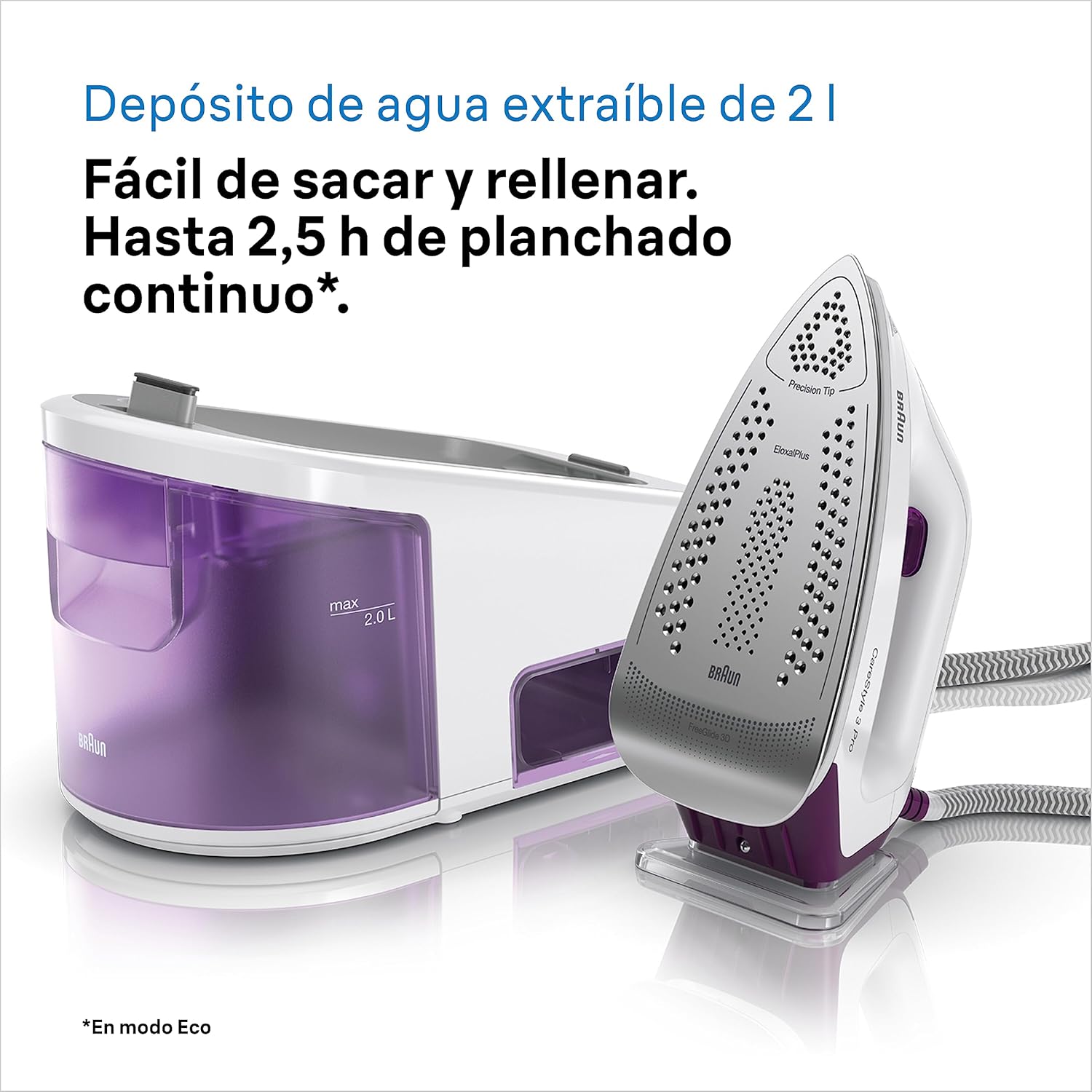
Image: A close-up view of the removable 2-liter water tank on the Braun CareStyle 3 Pro base unit, showing the 'max' fill line. This tank is easy to remove and refill.
- Connecting to Power: Plug the power cord into a grounded electrical outlet.
Operating Instructions
Powering On and Heating Up
- Press the power button on the control panel. The indicator light will flash, indicating the iron is heating up.
- Once the light stops flashing and remains solid, the iron is ready for use. This typically takes a few minutes.
Selecting Ironing Modes
The CareStyle 3 Pro offers various modes for optimal ironing results:

Image: A close-up of the control panel on the Braun CareStyle 3 Pro, illustrating the four distinct ironing modes: Vertical Steaming, Turbo Mode for maximum steam, iCare Mode for fabric protection, and Eco Mode for energy saving.
- iCare Mode: (Default) Automatically sets the safe temperature for all fabrics, from delicate silks to tough denim, without needing manual adjustments. This protects your clothes and saves time.
- Turbo Mode: Provides maximum steam output (430 g/min steam shot) and higher temperature for stubborn creases and thicker fabrics. Press the 'Turbo' button to activate.
- Eco Mode: Reduces steam output and temperature to save energy, suitable for delicate fabrics or lighter ironing tasks. Press the 'Eco' button to activate.
- Vertical Steaming: For refreshing hanging garments or curtains. Hold the iron vertically and press the steam trigger.
Ironing Technique
- FreeGlide 3D Technology: The Eloxal Plus soleplate is designed to glide effortlessly over any fabric, even backwards, making it easy to navigate around buttons, pockets, and zippers.
- Press the steam trigger under the handle to release steam. For a powerful steam shot, press the trigger firmly.
- Move the iron smoothly over the fabric.

Image: The Braun CareStyle 3 Pro iron unit, highlighting the FreeGlide 3D soleplate technology. This design allows for smooth gliding over fabric obstacles like buttons and zippers in all directions.
Automatic Shut-off and Safety Lock
- The iron features an automatic shut-off function for safety and energy saving. If left unused for a certain period, it will automatically turn off.
- Use the safety lock system to secure the iron to its base unit when carrying or storing the appliance.
Maintenance
Cleaning the Soleplate
- Allow the iron to cool completely before cleaning.
- Wipe the soleplate with a damp cloth. Do not use abrasive cleaners or scouring pads, as these can damage the Eloxal Plus coating.
Easy CalcClean System (Descaling)
The CalcClean system helps maintain optimal steam performance by removing mineral deposits. The iron will alert you when descaling is needed.
- Ensure the water tank is filled.
- Place a container under the CalcClean valve on the base unit.
- Follow the specific instructions in the full manual for initiating the CalcClean cycle. This process typically involves pressing and holding the CalcClean button until the cycle completes.
- Empty the collected water and rinse the CalcClean collector.
Troubleshooting
| Problem | Possible Cause | Solution |
|---|---|---|
| No steam is produced. | Water tank is empty or not properly inserted. Iron not heated sufficiently. | Fill the water tank. Ensure the tank is correctly seated. Wait for the iron to reach operating temperature (indicator light solid). |
| Water drips from the soleplate. | Iron temperature is too low for steam generation. | Allow the iron to heat up fully. Use iCare or Turbo mode for sufficient heat. |
| CalcClean indicator light is on. | Descaling is required. | Perform the Easy CalcClean procedure as described in the Maintenance section. |
| Iron does not heat up. | Not plugged in. Power outlet malfunction. | Check power connection. Test the outlet with another appliance. |
For further assistance, please refer to the full product manual or contact Braun customer support.
Specifications
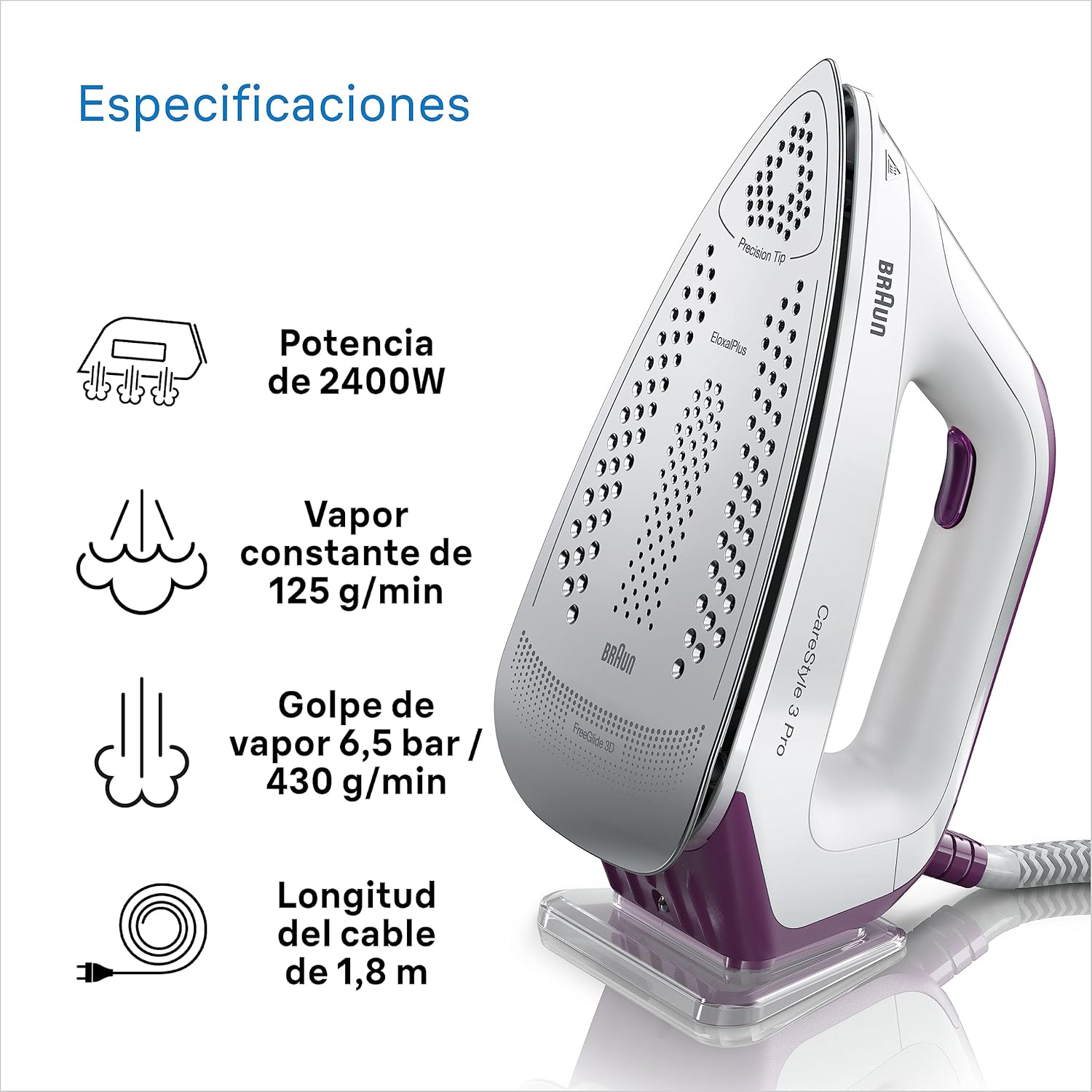
Image: An illustration detailing the key specifications of the Braun CareStyle 3 Pro iron, including its 2400W power, 125 g/min continuous steam, 430 g/min steam shot at 6.5 bar, and a 1.8-meter power cable length.
- Model: IS3155VI
- Power: 2400 Watts
- Steam Pressure: 6.5 bar
- Continuous Steam Output: 125 g/min
- Steam Shot: 430 g/min
- Water Tank Capacity: 2 Liters (removable)
- Soleplate: Eloxal Plus with FreeGlide 3D Technology
- Dimensions (L x W x H): 32 x 19 x 21 cm (approx.)
- Weight: 3.4 kg (approx.)
- Voltage: 230 Volts
- Cable Length: 1.8 meters
- Special Features: iCare Technology, Turbo Mode, Eco Mode, Vertical Steaming, Automatic Shut-off, Easy CalcClean System, Safety Lock.

Image: A visual representation of the Braun CareStyle 3 Pro's dimensions, showing a length of 32 cm, a width of 19 cm, and a height of 21 cm, illustrating its compact design.
Warranty and Support
Your Braun CareStyle 3 Pro IS3155VI comes with a 5-year warranty. Braun is known for its German reliability and quality products, designed for durability.
- Warranty Period: 5 years from the date of purchase. This includes an additional 3 years beyond the standard legal warranty.
- Claiming Warranty: Retain your proof of purchase. For warranty claims or technical support, please visit the official Braun Household website or contact their customer service.
- Online Support: For more information and support, visit www.braunhousehold.com.


