
YIHUA 939-II
YIHUA 939-II Wood Burning Kit Station Instruction Manual
Model: 939-II | Brand: YIHUA
1. Introduction
The YIHUA 939-II Wood Burning Kit is a professional-grade pyrography station designed for precision artwork on various materials such as wood, leather, and gourds. This kit provides a stable and adjustable temperature control, allowing for a wide range of burning techniques and effects. With its comprehensive set of accessories, it is suitable for both hobbyists and experienced artists.
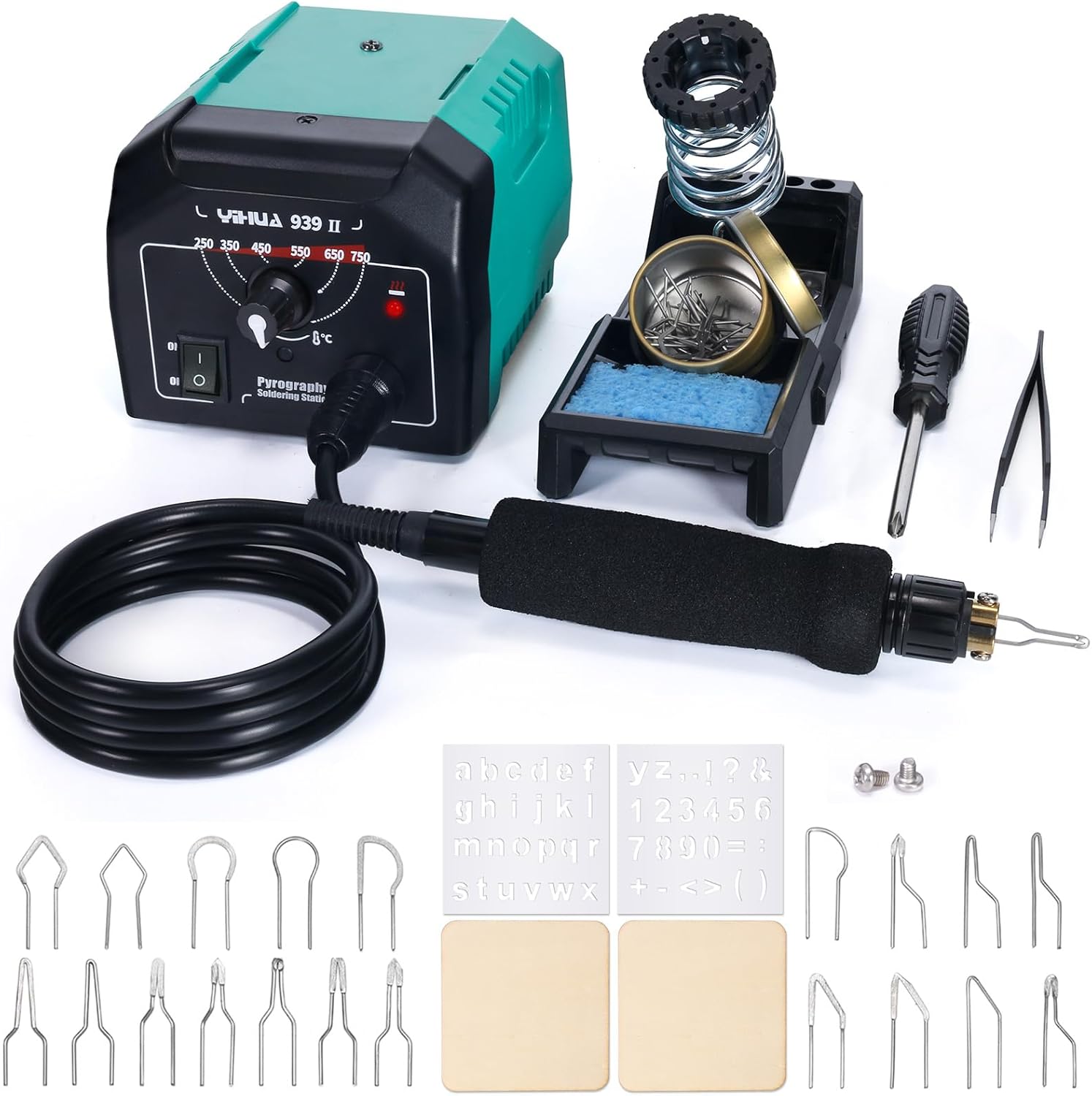
Image 1.1: Overview of the YIHUA 939-II Wood Burning Kit, showing the main station, pyrography pen, pen holder, various wire nibs, stencils, scrap wood, tweezers, and pliers.
2. Safety Information
Please read and understand all safety instructions before operating the YIHUA 939-II Wood Burning Kit. Failure to follow these instructions may result in electric shock, fire, or serious injury.
- Always operate the unit in a well-ventilated area to avoid inhaling fumes from burning materials.
- The pyrography pen tip becomes extremely hot during operation. Avoid direct contact with skin or flammable materials.
- Always place the pyrography pen in its designated safety holder when not in use or during cool-down.
- Ensure the power cord is not damaged and is properly connected to a grounded 110-127V 60Hz power outlet.
- Do not leave the unit unattended while powered on.
- Keep out of reach of children and pets.
- Allow the unit and nibs to cool completely before cleaning or changing nibs.
- Wear appropriate safety glasses to protect your eyes from potential debris or fumes.
3. Package Contents
Verify that all items listed below are included in your package:
- 1 x YIHUA 939-II Pyrography Station
- 1 x Pyrography Pen with Comfort Grip
- 1 x Stable Pen Holder with Cleaning Sponge and Nibs Collector Tin
- 20 x Assorted Wire Nibs (Skew, Wire, Shader types)
- 2 x Stencils (Alphabet and Numbers/Symbols)
- 2 x Scrap Wood Pieces for practice
- 1 x Stainless Steel Tweezers
- 1 x Pliers
- 1 x Mini Screwdriver
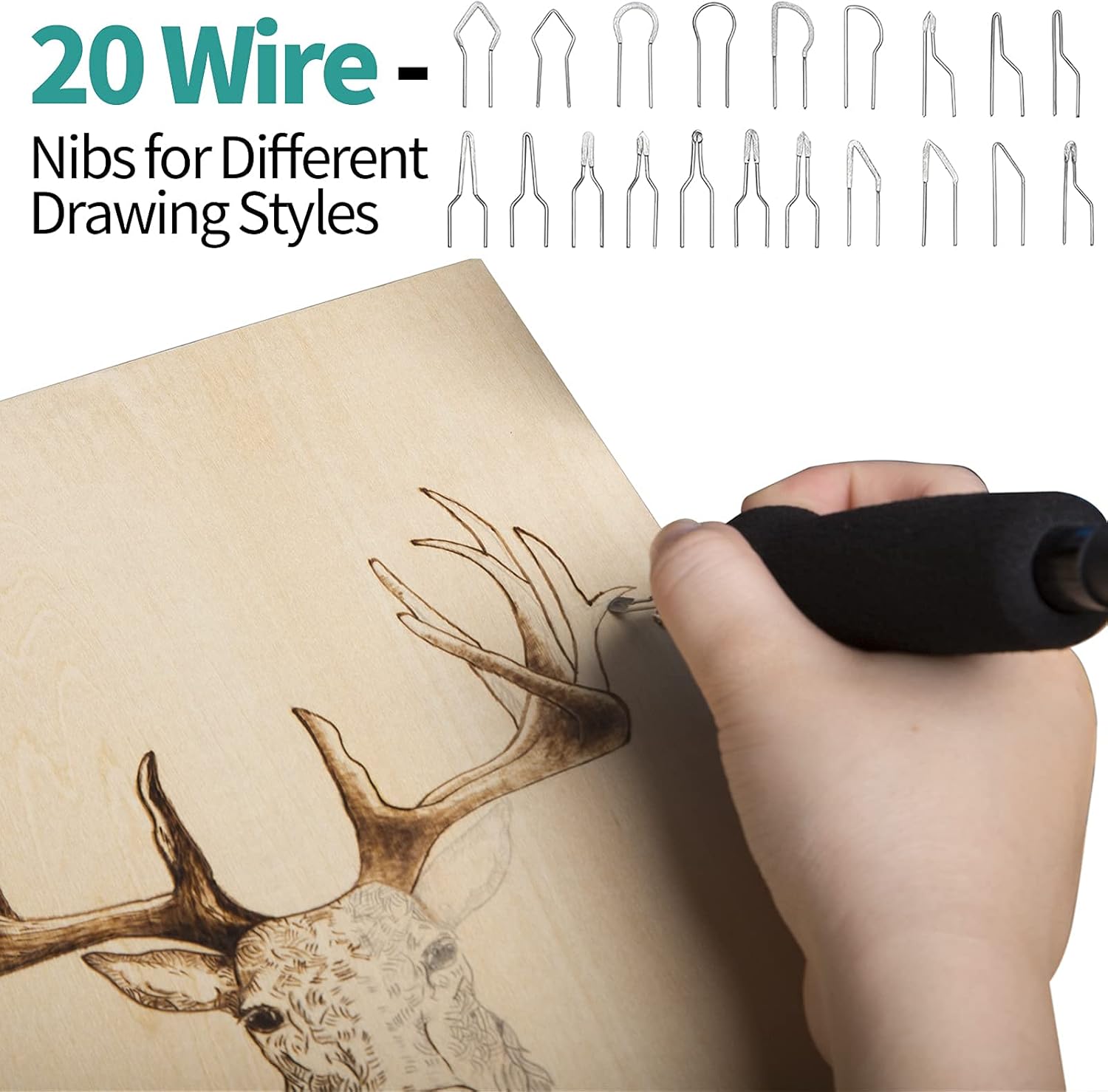
Image 3.1: A selection of the 20 different wire nibs included in the kit, designed for various burning techniques and effects.
4. Setup
Follow these steps to set up your YIHUA 939-II Pyrography Station:
- Unpack Components: Carefully remove all items from the packaging and place them on a stable, heat-resistant surface.
- Position the Station: Place the main pyrography station unit in a secure location, ensuring adequate ventilation around the unit.
- Assemble Pen Holder: Attach the pen holder to the designated slot on the station. Ensure the cleaning sponge is moistened and placed in its tray. The nibs collector tin can be placed in its slot.
- Connect Pyrography Pen: Connect the pyrography pen cable to the output port on the front of the station. Ensure the connection is secure.
- Install a Wire Nib: Select the desired wire nib. Using the pliers or your fingers (ensure the unit is off and cool), carefully insert the ends of the wire nib into the two small holes on the pyrography pen's tip assembly. Tighten the screws on the pen tip with the mini screwdriver to secure the nib. Ensure the nib is inserted 100% and correctly tightened for consistent performance.
- Connect Power: Plug the power cord into a standard 110-127V 60Hz electrical outlet.
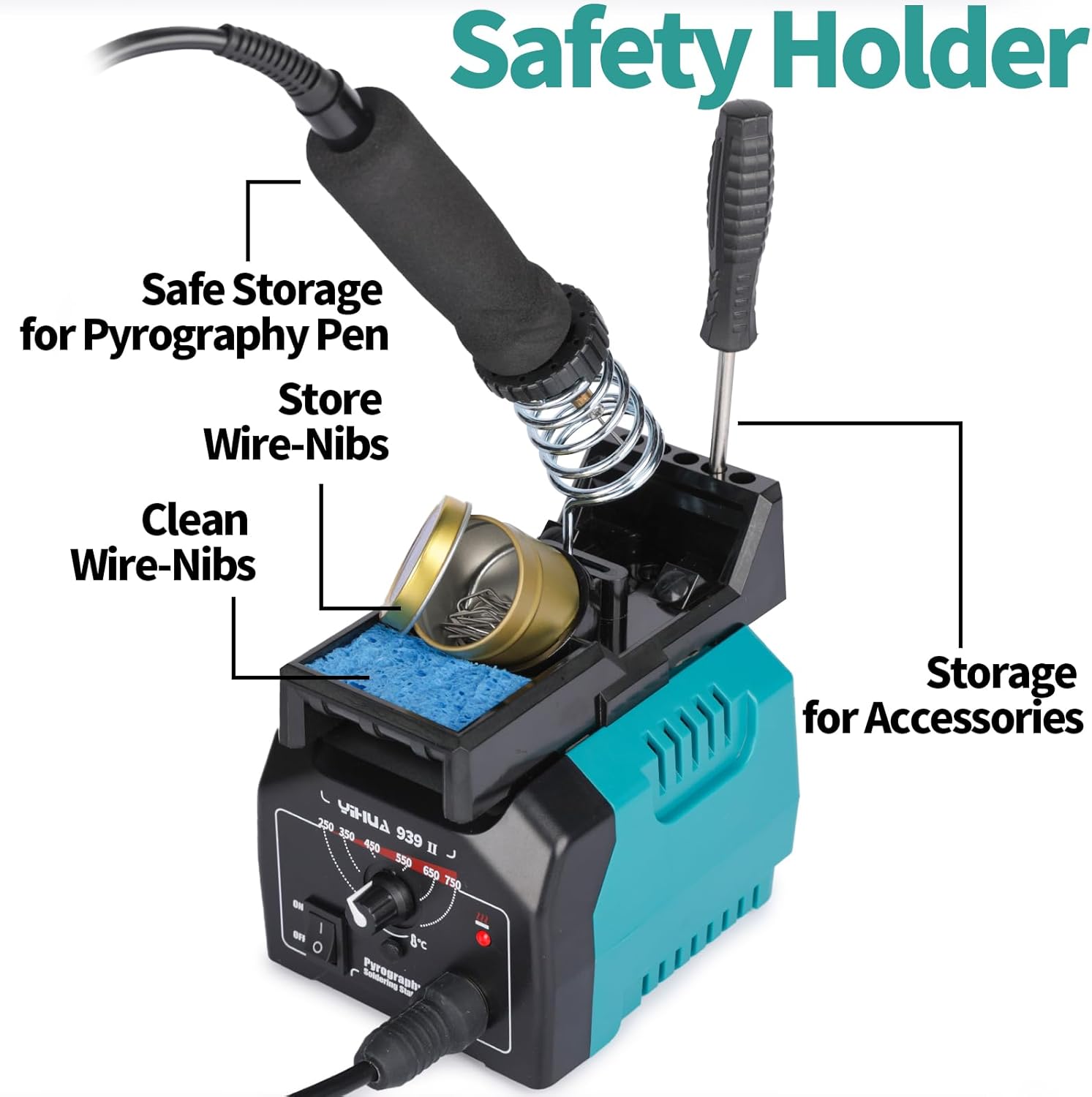
Image 4.1: The safety holder provides secure storage for the pyrography pen, a compartment for wire nibs, and a cleaning sponge for maintenance.

Image 4.2: The pyrography pen features a detachable connection for easy interchangeability and replacement.

Image 4.3: Visual guide demonstrating correct and incorrect installation of a pyrography tip. Correct installation ensures the tip is fully inserted and screws are tightened, leading to consistent heat and color. Incorrect installation (partially inserted or over-tightened) can result in no heat or inconsistent heating.
5. Operating Instructions
Operating the YIHUA 939-II Pyrography Station is straightforward. Always perform a test burn on scrap material before working on your final project.
- Power On: Flip the 'ON/OFF' switch on the front panel to the 'ON' position. The power indicator light will illuminate.
- Set Temperature: Rotate the temperature control knob to select your desired temperature. The range is 250~750℃ (482~1382℉). The station heats up quickly.
- Practice and Adjust: Different types of wood and materials require different temperatures. We recommend trying out various temperature settings on practice/scrap wood to find the optimal temperature for your desired burn effect. If the burn color is too light, increase the temperature.
- Begin Pyrography: Once the desired temperature is reached, carefully begin your artwork. The pyrography pen features a comfort grip for extended use.
- Changing Nibs: To change nibs, turn off the station and allow the pen and nib to cool completely. Once cool, loosen the screws on the pen tip, remove the current nib, and install the new nib as described in the Setup section.
- Power Off: When finished, turn the 'ON/OFF' switch to the 'OFF' position. Unplug the unit from the power outlet. Allow the pen and nib to cool completely before storing.
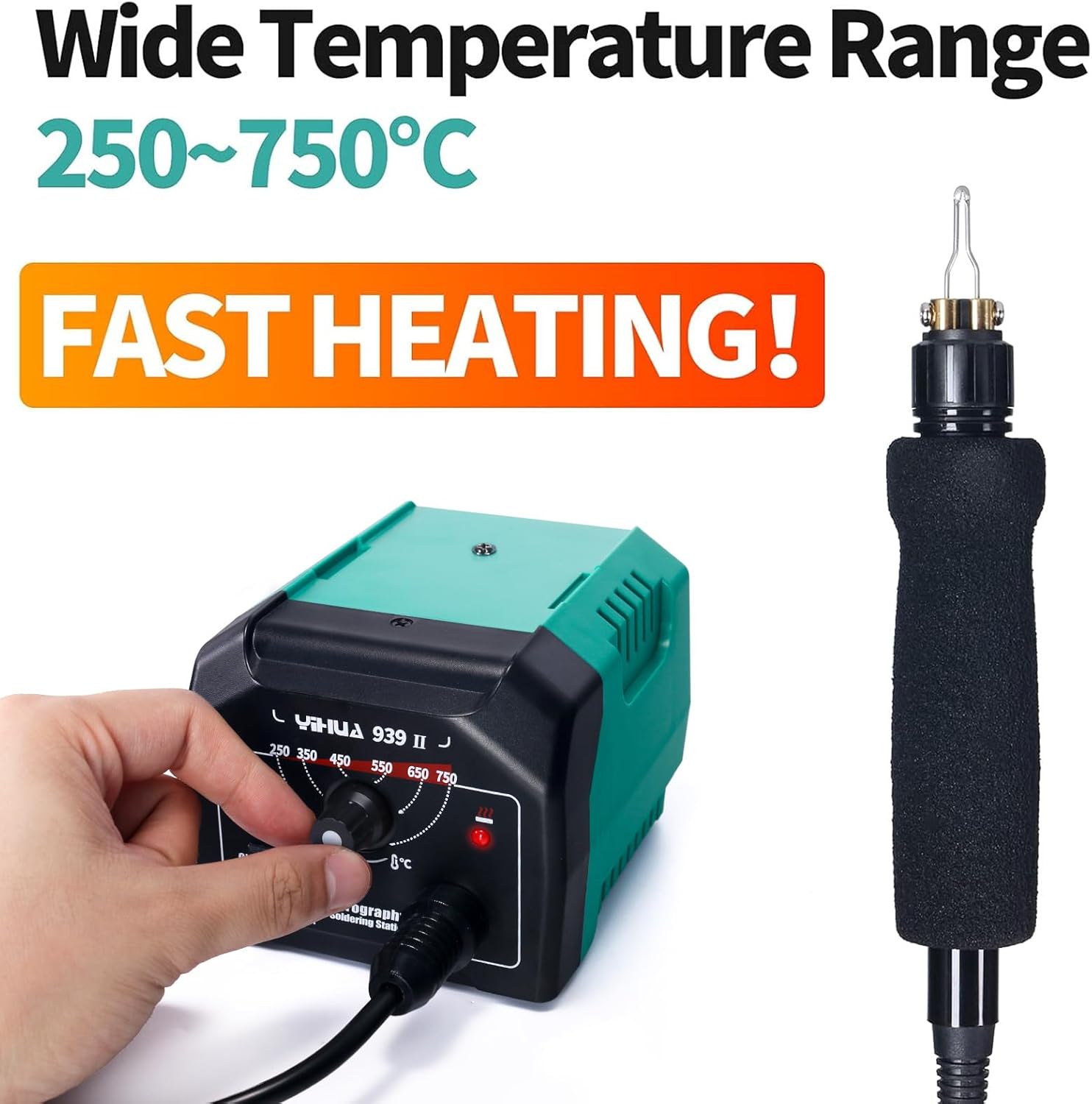
Image 5.1: The YIHUA 939-II station features a wide temperature range from 250~750℃ (482~1382℉) and boasts fast heating capabilities for efficient operation.

Image 5.2: A user practicing wood burning on a small circular wood slice, demonstrating the importance of trying different temperature settings and wire nibs on scrap wood to achieve desired results.

Image 5.3: The pyrography pen is designed with a soft, heat-insulated comfort grip, shaped for better handling during extended use.
6. Maintenance
Proper maintenance ensures the longevity and optimal performance of your YIHUA 939-II Wood Burning Kit.
- Cleaning Nibs: Regularly clean the carbon buildup from the wire nibs using the moistened sponge in the pen holder. For stubborn residue, gently scrape with a non-abrasive tool or fine-grit sandpaper once the nib is cool.
- Station Cleaning: Wipe the main station unit with a soft, dry cloth. Do not use abrasive cleaners or solvents. Ensure the unit is unplugged before cleaning.
- Storage: Store the unit and all accessories in a clean, dry place away from direct sunlight and extreme temperatures. Ensure all components are cool before storing.
- Cord Inspection: Periodically inspect the power cord and pen cable for any signs of damage. If damaged, discontinue use and contact customer support.
7. Troubleshooting
If you encounter issues with your YIHUA 939-II Wood Burning Kit, refer to the following common problems and solutions:
| Problem | Possible Cause | Solution |
|---|---|---|
| No heat from the nib. | Unit not powered on; Power cord loose; Nib incorrectly installed; Faulty nib. | Ensure unit is ON and plugged in. Check pen cable connection. Verify nib is fully inserted and screws are tightened (refer to Image 4.3). Try a different nib. |
| Inconsistent heat or light burn. | Temperature setting too low; Nib not fully secured; Material density. | Increase temperature setting. Re-check nib installation for tightness. Practice on scrap wood to find optimal temperature for your material. |
| Unit not turning on. | No power from outlet; Unit switch off; Internal fault. | Check power outlet with another device. Ensure ON/OFF switch is in 'ON' position. If problem persists, contact customer support. |
| Smoke or unusual odor. | Burning material; Overheating; Internal fault. | Ensure adequate ventilation. Reduce temperature if material is charring excessively. If odor is from the unit itself, immediately power off and unplug, then contact support. |
8. Specifications
- Model: YIHUA 939-II
- Input Voltage: 110-127V AC, 60Hz
- Temperature Range: 250~750℃ (482~1382℉)
- Product Dimensions: 5.67 x 4.92 x 3.54 inches
- Item Weight: 3.8 pounds
- Manufacturer: Guangzhou Yihua Electronic Equipment Co., Ltd.
9. Warranty and Support
The YIHUA 939-II Wood Burning Kit is backed by a 12-month US-exclusive manufacturer technical coverage. For any technical assistance or warranty claims, please contact YIHUA customer support. You can find contact information on the official YIHUA website or through your purchase platform.
Enjoy creating beautiful pyrography art with your new YIHUA 939-II Wood Burning Kit!
Ask a question about this manual
Ask about setup, troubleshooting, compatibility, parts, safety, or missing instructions. Manuals+ will review the question and use this page’s manual context to help answer it.