
Introduction
The MAUJOY LSNZ Large Talking Button Clock is designed to provide clear, audible time and date announcements with a simple press of a button. This device is particularly beneficial for individuals with visual impairments, seniors, or anyone who prefers an auditory method for checking the time. Its user-friendly design focuses on ease of operation and clear communication.
Product Features
- Large Button Activation: A single, oversized button for easy activation of time and date announcements.
- Clear Voice Announcement: Provides clear and loud verbal announcements of the current time, day, and date.
- Adjustable Volume: Features a HI/LO switch to adjust the announcement volume according to user preference.
- Alarm Function: Includes an alarm feature for reminders or wake-up calls.
- Battery Powered: Operates on 3 AAA batteries (included), offering portability and convenience.
- Durable Construction: Made from high-quality hard plastic for long-lasting use.
Package Contents
- 1 x MAUJOY LSNZ Large Talking Button Clock
- 3 x AAA Batteries
Setup
1. Battery Installation
The clock requires 3 AAA batteries for operation. These batteries are included with your purchase.
- Locate the battery compartment on the bottom of the clock.
- Open the battery compartment cover.
- Insert 3 AAA batteries, ensuring correct polarity (+ and - terminals).
- Close the battery compartment cover securely.
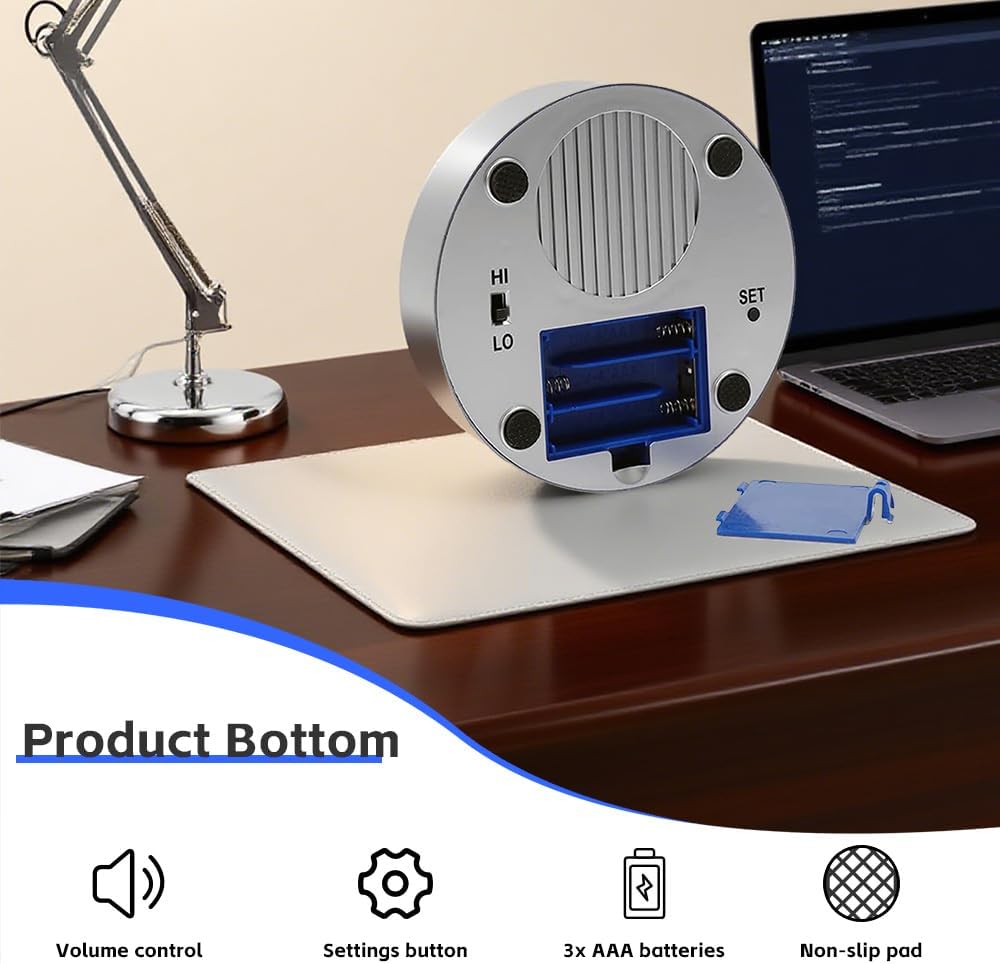
This image displays the underside of the clock, highlighting the battery compartment for three AAA batteries, the 'HI' and 'LO' volume control switch, and the 'SET' button used for configuring time and alarm settings.
2. Initial Setup (Setting Time and Date)
It is recommended to set the correct time and date upon first use or after battery replacement. While designed for simplicity, careful attention to the steps is advised.
- Locate the small 'SET' button on the bottom of the clock (refer to the 'Product Bottom' image).
- Press and hold the 'SET' button for approximately 3 seconds until you hear a voice prompt indicating entry into setting mode (e.g., "Set Hour").
- Setting Hour: The clock will announce the current hour setting. Press the large blue button on top of the clock repeatedly to advance the hour. The clock will announce each hour as it changes. Pay attention to AM/PM.
- Setting Minute: Once the hour is correct, short press the 'SET' button to move to minute setting mode. Press the large blue button repeatedly to advance the minutes.
- Setting Year: Short press the 'SET' button to move to year setting mode. Press the large blue button repeatedly to adjust the year.
- Setting Month: Short press the 'SET' button to move to month setting mode. Press the large blue button repeatedly to adjust the month.
- Setting Day: Short press the 'SET' button to move to day setting mode. Press the large blue button repeatedly to adjust the day.
- Exiting Setting Mode: After setting the day, short press the 'SET' button again to cycle through any remaining settings (like alarm) or press and hold the 'SET' button for 3 seconds, or simply wait for approximately 10 seconds without interaction, and the clock will automatically exit setting mode.
Operating Instructions
1. Announcing Time and Date
To hear the current time and date announcement:
- Simply press the large blue button located on the top of the clock.
- The clock will audibly announce the current time (e.g., "The time is 10:30 AM") followed by the date (e.g., "The date is August 10th, Sunday").

This image shows the primary interaction with the clock: a hand pressing the large blue button on top to activate the voice announcement.

An elderly man is shown pressing the clock's button, demonstrating how the clock announces the current time and date verbally.
2. Adjusting Volume
The clock features a two-level volume control (HI/LO).
- Locate the 'HI/LO' switch on the bottom of the clock (refer to the 'Product Bottom' image).
- Slide the switch to 'HI' for a louder announcement volume.
- Slide the switch to 'LO' for a quieter announcement volume.
3. Setting the Alarm
The alarm function can be set to provide audible reminders.
- Enter setting mode by pressing and holding the 'SET' button for 3 seconds.
- Repeatedly short press the 'SET' button until you hear a voice prompt related to alarm settings (e.g., "Set Alarm Hour").
- Setting Alarm Hour: Press the large blue button to adjust the alarm hour.
- Setting Alarm Minute: Short press the 'SET' button to move to alarm minute setting. Press the large blue button to adjust the alarm minutes.
- Alarm ON/OFF: Short press the 'SET' button again. The clock will announce the alarm status (e.g., "Alarm On" or "Alarm Off"). Press the large blue button to toggle the alarm on or off.
- Exit setting mode by pressing and holding the 'SET' button for 3 seconds or waiting for automatic timeout.
4. Stopping the Alarm
When the alarm sounds, press the large blue button on top of the clock to silence it. The alarm will reset for the next day if it is still enabled.
Maintenance
- Cleaning: Wipe the clock with a soft, dry cloth. Do not use abrasive cleaners or immerse the clock in water.
- Battery Replacement: Replace batteries when the voice announcements become faint or the clock stops functioning. Always replace all 3 AAA batteries at the same time with new ones.
- Storage: If storing the clock for an extended period, remove the batteries to prevent leakage.
Troubleshooting
| Problem | Possible Cause | Solution |
|---|---|---|
| Clock does not announce time/date. | Batteries are dead or incorrectly installed. | Check battery polarity. Replace with new AAA batteries. |
| Voice is too quiet or too loud. | Volume switch is set incorrectly. | Adjust the HI/LO volume switch on the bottom of the clock. |
| Difficulty setting time/date/alarm. | Incorrect sequence or timing of button presses. | Refer to the 'Initial Setup' and 'Setting the Alarm' sections. Ensure you press and hold 'SET' for 3 seconds to enter/exit setting mode, and short press 'SET' to cycle through options. Use the large button to adjust values. Practice the steps carefully. |
| Alarm does not sound. | Alarm is not enabled or set incorrectly. | Verify the alarm time is set correctly and the alarm function is toggled 'ON' in the setting mode. |
Specifications
| Feature | Detail |
|---|---|
| Brand | MAUJOY |
| Model Number | LSNZ |
| Color | Blue |
| Display Type | Digital (Auditory) |
| Power Source | 3 AAA Batteries (included) |
| Product Dimensions | 4.53"W x 2.28"H (115mm x 58mm) |
| Item Weight | 5.61 Ounces (approx. 160g with batteries) |
| Material | Plastic |
| Special Features | One-button operation, clear voice, time/date announcement, volume control, alarm function. |

This diagram illustrates the physical dimensions of the MAUJOY Talking Button Clock, measuring approximately 115mm (4.53 inches) in width and 58mm (2.29 inches) in height.
Warranty Information
This MAUJOY LSNZ Large Talking Button Clock comes with a Limited Warranty. For specific details regarding the warranty period and coverage, please refer to the product packaging or contact MAUJOY customer support.