
Product Overview
The temeirui 7011A is a universal 7-inch in-dash Android car stereo designed for enhanced in-car entertainment and navigation. It features a responsive capacitive multi-touch screen, integrated GPS, Wi-Fi, and Bluetooth connectivity, offering a comprehensive multimedia experience.
Key Features
- Latest Android Operating System
- Quad-core CPU Processor
- 7-inch 1080P HD Capacitive Multi-touch Screen
- 1GB RAM and 16GB ROM
- Built-in GPS Navigation with Voice Guidance (60 language types)
- Integrated Wi-Fi Module for Online Maps and Internet Access
- Bluetooth for Hands-free Calling and Music Streaming
- Mirror-Link Functionality for Mobile Phone Integration
- FM Radio Tuner
- Support for Steering Wheel Controls
- Dual USB Inputs for Media Playback and Device Charging
- Rear Video Input for Backup Camera (camera included)
- No DVD/CD Functionality
Package Contents
- 1 x Car Stereo MP5 Player
- 1 x Audio Video Cable
- 1 x Electrical Wiring Harness
- 1 x GPS Antenna
- 2 x USB Cables
- 2 x Mounting Brackets
- 1 x Rear View Camera (special cable included)
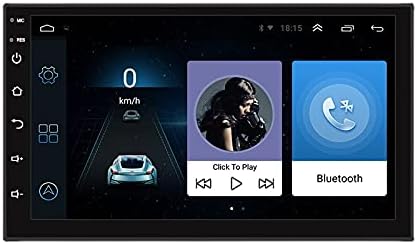
Figure 1: Front view of the temeirui 7011A 7-inch Android Car Stereo, showing the display and control buttons.
Setup and Installation
Proper installation is crucial for the optimal performance of your car stereo. It is recommended to have this unit installed by a professional technician.
Wiring Diagram
Before connecting any wires, ensure your vehicle's battery is disconnected to prevent electrical shorts. Refer to the included wiring harness for specific connections. Common connections include power (ACC, B+, GND), speaker outputs, antenna, and auxiliary inputs/outputs.
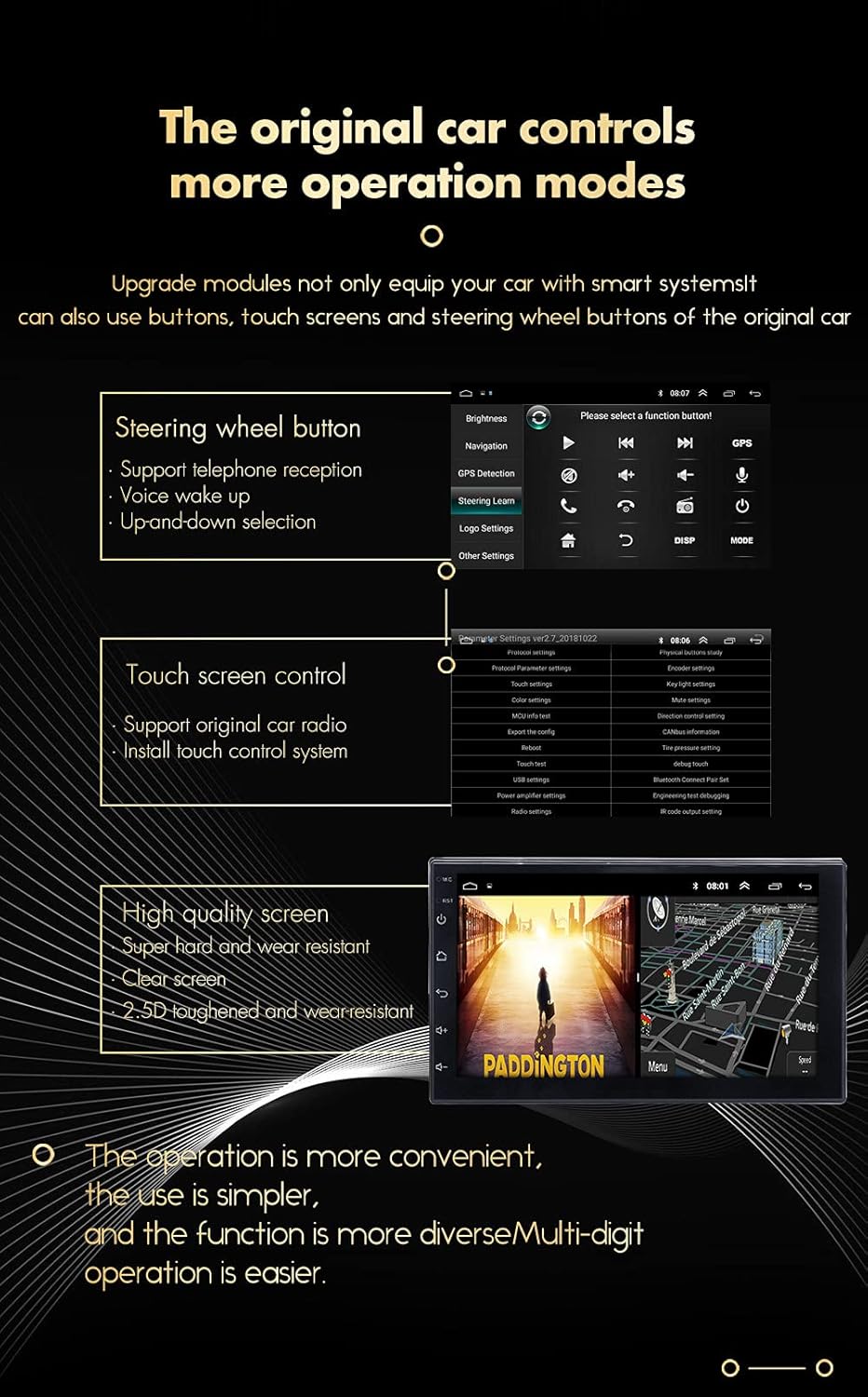
Figure 2: Rear view of the car stereo, illustrating the various input and output ports for wiring connections.
Mounting Instructions
Use the provided mounting brackets to secure the unit into your vehicle's double DIN dash opening. Ensure the unit is firmly in place to prevent vibrations and damage during driving.

Figure 3: The car stereo unit shown with the included mounting brackets, ready for installation into a double DIN slot.
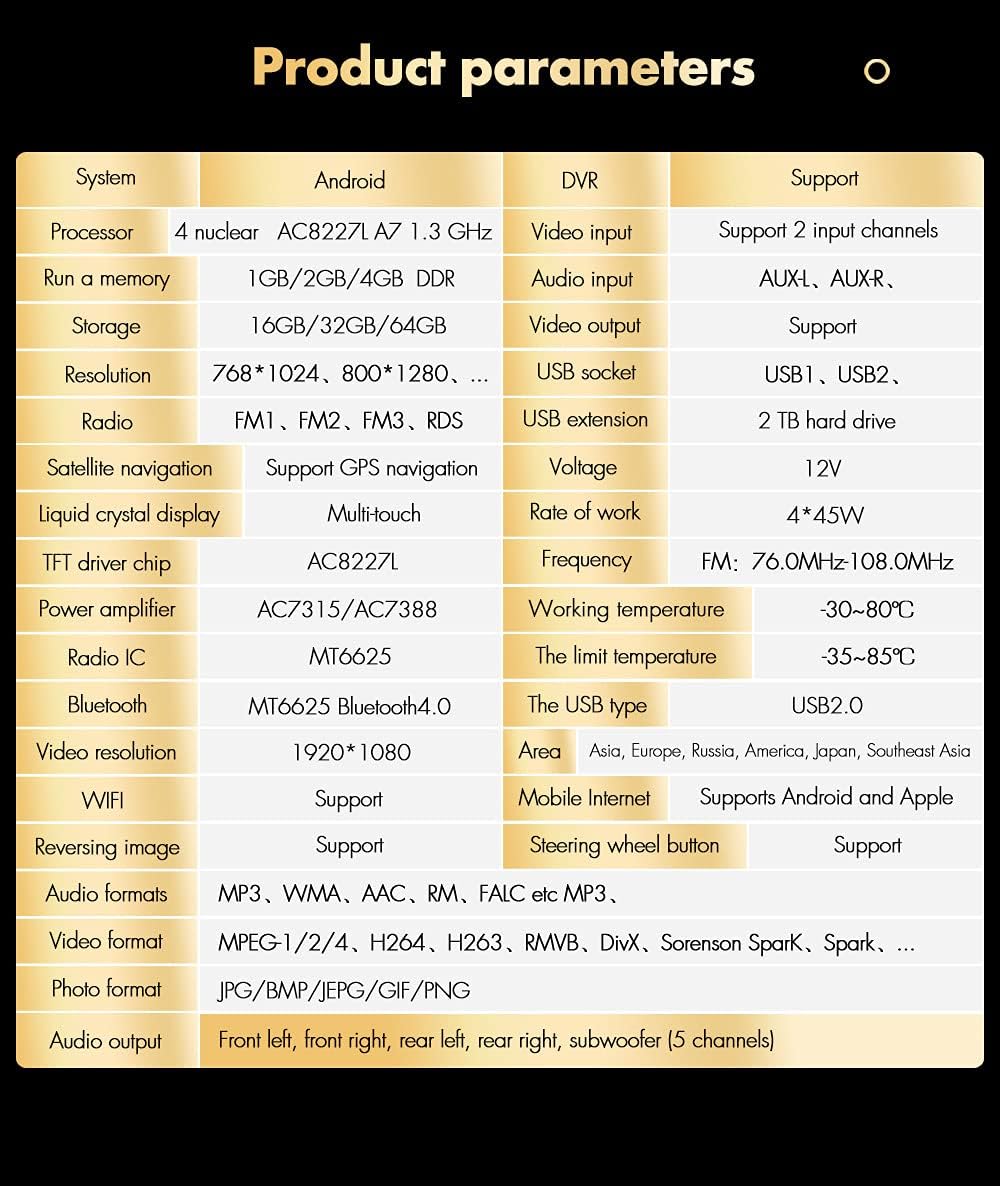
Figure 4: Dimensional diagram of the car stereo, providing measurements for proper fitment.
Operating Instructions
Basic Operation
Upon powering on, the unit will boot into the Android home screen. Use the capacitive touch screen to navigate through applications and settings. Physical buttons on the left side of the unit provide quick access to power, volume, home, and back functions.

Figure 5: The main Android interface of the car stereo, displaying various app icons and widgets.
GPS Navigation
Tap the "Navigation" icon to launch the pre-installed GPS application. Ensure the GPS antenna is properly connected and positioned for optimal signal reception. The system supports 2D/3D maps and voice guidance in 60 languages.

Figure 6: The GPS navigation screen showing a map view and route information.
Bluetooth Connectivity
To pair your phone, go to the Bluetooth settings on the stereo and enable Bluetooth on your mobile device. Search for available devices and select "temeirui" (or similar name) to connect. Once paired, you can make hands-free calls and stream audio.
Mirror-Link Function
The Mirror-Link function allows you to display your smartphone's screen directly on the car stereo. Connect your phone via USB or Wi-Fi and follow the on-screen prompts to activate screen mirroring. This feature is compatible with both Android and iOS devices.

Figure 7: Illustration of the Mirror-Link function, displaying a smartphone's interface on the car stereo screen.
Wi-Fi Connection
Access online content by connecting the stereo to a Wi-Fi hotspot (e.g., from your smartphone or a portable hotspot). Go to Settings > Wi-Fi, select your network, and enter the password. This enables online maps, app downloads, and internet browsing.
Rear Camera Input
When the vehicle is shifted into reverse, the stereo automatically displays the view from the connected rear camera. This feature enhances safety during parking and maneuvering.

Figure 8: The car stereo screen displaying the live feed from the rear view camera, including parking guidelines.
Troubleshooting
If you encounter issues with your temeirui 7011A car stereo, refer to the following common problems and their solutions.
Common Issues and Solutions
- No Power:
- Check the power connections (B+, ACC, GND) to ensure they are securely connected and receiving power.
- Verify the vehicle's fuse for the stereo is not blown.
- No Sound:
- Ensure speaker wires are correctly connected and not short-circuited.
- Check the volume level and mute settings on the stereo.
- Verify the audio source is selected correctly.
- GPS Not Working / Poor Signal:
- Ensure the GPS antenna is properly connected and placed in an area with a clear view of the sky (e.g., dashboard).
- Check GPS settings within the unit to ensure GPS is enabled.
- Bluetooth Connection Issues:
- Make sure Bluetooth is enabled on both the stereo and your mobile device.
- Delete previous pairings on both devices and try pairing again.
- Restart both the stereo and your mobile device.
- Touch Screen Unresponsive:
- Perform a soft reset by pressing the RST button (if available) or by turning the unit off and on.
- Ensure the screen is clean and free of debris.
Specifications
| Feature | Specification |
|---|---|
| Operating System | Latest Android |
| CPU | Quad-core Processor |
| Screen Size | 7 inches |
| RAM | 1GB |
| ROM | 16GB |
| Display Type | Capacitive Multi-touch Screen |
| GPS | Built-in, supports 2D/3D maps, voice guidance |
| Bluetooth | Built-in microphone, hands-free calls, music streaming |
| Wi-Fi | Built-in module |
| Radio | FM (MP3, WMA, AAC, RM, LFAC audio formats) |
| USB Input | Dual USB ports, supports playback while navigating |
| Rear Camera Input | Supported (camera included) |
| Steering Wheel Control | Supported |
| Power Output | 4*45W (typical) |
Warranty and Support
Warranty Information
This temeirui 7011A car stereo comes with a 1-year warranty from the date of purchase. This warranty covers manufacturing defects and malfunctions under normal use. Please retain your proof of purchase for warranty claims.
The warranty does not cover damage caused by improper installation, misuse, accidents, unauthorized repairs, or natural disasters.
Customer Support
For technical assistance, troubleshooting beyond this manual, or warranty inquiries, please contact the seller or manufacturer directly. Refer to your purchase documentation for specific contact details.


