
Introduction
This manual provides comprehensive instructions for the assembly, operation, and maintenance of your VANLINNY JJ01 RC Tank Robot Kit. Designed as a STEM educational kit, this programmable remote-controlled tank offers an interactive learning experience for users aged 13 and above, focusing on robotics, engineering, and programming.
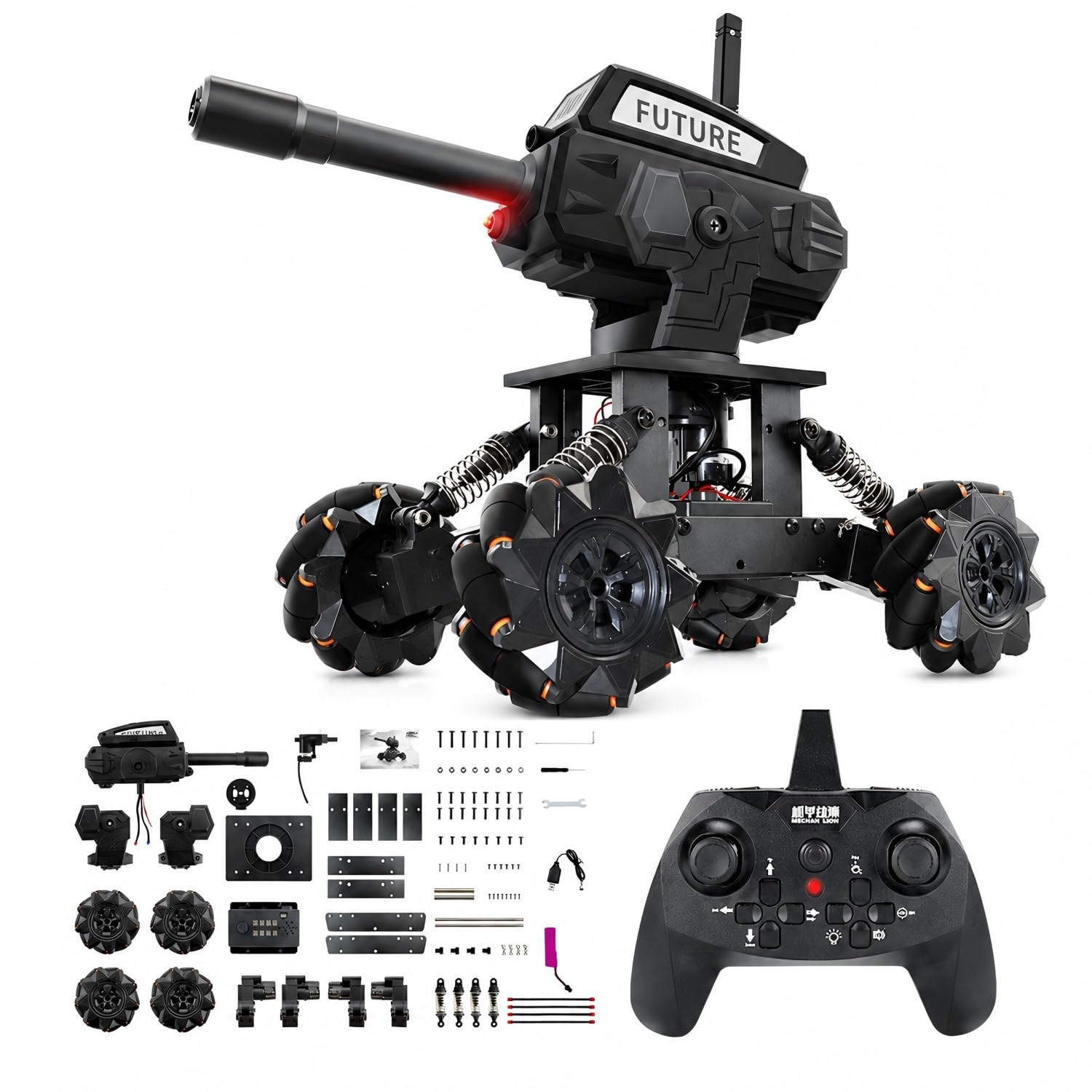
Image: The VANLINNY JJ01 RC Tank Robot Kit, showcasing the assembled tank and its retail packaging.
Safety Information
- Adult Supervision: This kit is recommended for ages 13+. Adult supervision is advised during assembly and operation, especially for younger users.
- Water Exposure: Do not expose wires, batteries, or electronic components to water. Water damage can lead to malfunction or electrical hazards.
- Battery Safety: Use only the provided rechargeable battery and USB charging cable. Do not attempt to charge non-rechargeable batteries. Do not short-circuit, disassemble, or expose batteries to extreme temperatures.
- Small Parts: The kit contains small parts that may pose a choking hazard for young children. Keep out of reach of children under 3 years old.
- Operation Environment: Operate the RC tank on flat, clear surfaces. Avoid rough terrain, sand, or water to prevent damage to the wheels and internal components.
- Projectile Safety: When using the water bead turret, ensure no people or animals are in the firing path. Do not aim at eyes or face.
Package Contents
Verify that all components listed below are present in your kit. If any parts are missing, please contact customer support.

Image: An overview of the various components included in the VANLINNY RC Tank Robot Kit, showing the main chassis, turret, Mecanum wheels, remote control, battery, and numerous small parts for assembly.
- RC Tank Chassis (unassembled)
- Water Bead Turret
- Mecanum Wheels (4x)
- Remote Control
- Rechargeable Battery
- USB Charging Cable
- Assembly Tools (e.g., screwdriver, wrenches)
- Water Beads (initial supply)
- Various metal and plastic components for assembly
- Instruction Manual (this document)
Setup
1. Assembly
The VANLINNY JJ01 RC Tank Robot Kit requires assembly. Follow the detailed step-by-step instructions provided in the separate assembly guide included in your package. The assembly process typically takes 1 to 3 hours, depending on experience. Ensure all screws are tightened securely, but do not overtighten.

Image: A child engaged in the assembly process of the robot kit, demonstrating the hands-on building experience.
2. Battery Installation and Charging
- Locate the battery compartment on the tank chassis.
- Carefully connect the rechargeable battery to the tank's power connector.
- Close the battery compartment securely.
- To charge the battery, connect the USB charging cable to the battery and a compatible USB power source (e.g., computer USB port, USB wall adapter). The charging indicator will show the charging status.
- Allow the battery to fully charge before first use.
3. Remote Control Setup
- Install 2x AA batteries (not included) into the remote control.
- Turn on the remote control and the tank. They should automatically pair. If not, refer to the specific pairing instructions in the assembly guide.
4. Water Bead Preparation
The water beads must be properly hydrated before use to ensure optimal firing performance and prevent jamming.
- Place the dry water beads in a container.
- Add a sufficient amount of clean water to cover the beads.
- Allow the beads to soak for at least 3-4 hours, or until they have expanded to their full size (approximately 7-8mm in diameter).
- Drain any excess water before loading the beads into the tank's turret hopper.
Operating Instructions
Familiarize yourself with the remote control functions for optimal operation.

Image: A diagram illustrating the various movement capabilities of the RC tank, including forward, backward, lateral, and diagonal movements, controlled by the remote.
1. Basic Movement
- Forward/Backward: Use the left joystick (or corresponding button) to move the tank forward or backward.
- Left/Right Turn: Use the left joystick (or corresponding button) to rotate the tank left or right.
- Omnidirectional Movement: The Mecanum wheels allow for 360° drifting and horizontal/diagonal movement. Use the right joystick (or corresponding buttons) to achieve these advanced movements.

Image: The VANLINNY RC Tank in action, highlighting its 30-meter shooting range, all-metal body construction, and premium omnidirectional Mecanum wheels for 360° parallel movement.
2. Turret Control and Firing
- Turret Rotation: Use the designated buttons on the remote control to rotate the turret left or right.
- Turret Elevation: Use the designated buttons to adjust the turret's angle up or down.
- Firing Water Beads: Load prepared water beads into the turret's hopper. Press the firing button on the remote control to shoot. Ensure the turret is clear of obstructions.
Video: Demonstration of the VANLINNY RC Tank's movement capabilities and water bead firing function.
Programming Features
The VANLINNY JJ01 RC Tank supports simple programming, allowing users to create custom movement sequences and actions.

Image: An illustration of the tank's user-friendly programming system, featuring easy coding, drag & drop functionality, and smart logic for creating custom actions like movement routes and firing.
- Easy Coding: Utilize the intuitive programming interface to define sequences of movements and actions.
- Drag & Drop: Create complex commands by arranging simple, pre-defined blocks.
- Smart Logic: Implement conditional actions and loops to enhance the tank's autonomous behavior.
- Refer to the dedicated programming guide (if included) or online resources for detailed instructions on using the programming system.
Maintenance
- Cleaning: Wipe the tank with a dry, soft cloth after use. Avoid using water or harsh chemicals.
- Wheel Inspection: Regularly check the Mecanum wheels for debris or hair that might impede movement. Clean as necessary.
- Battery Care: Store the battery in a cool, dry place when not in use. Do not leave the battery fully discharged for extended periods.
- Water Bead Turret: After use, ensure the turret is clear of any remaining water beads or residue to prevent blockages.
Troubleshooting
| Problem | Possible Cause | Solution |
|---|---|---|
| Tank does not move or respond to remote. |
|
|
| Water beads jam in the turret. |
|
|
| Tank's power button does not function. |
|
|
| Poor movement on certain surfaces. |
|
|
Specifications
- Model Number: JJ01
- Brand: VANLINNY
- Material Type: Plastic (with durable metal structure)
- Item Dimensions (L x W x H): 11.3 x 7.5 x 7.4 inches (28.7 x 19.05 x 18.8 cm)
- Item Weight: 1.5 pounds (0.68 kg)
- Age Range: Youth (Manufacturer Minimum Age: 13 years / 156 months)
- Educational Objective: Creative Skills, Hand-Eye Coordination, Imagination Development, STEM
- UPC: 787146750036

Image: A diagram illustrating the physical dimensions of the assembled VANLINNY RC Tank Robot Kit and its remote control.
Warranty and Support
VANLINNY stands behind the quality of its products.
- Warranty: If any issues arise with your item within the first 18 months of ownership, please contact us.
- Customer Support: For technical assistance, missing parts, or warranty claims, please contact VANLINNY customer support through the retailer's platform or visit the official VANLINNY website for contact information.