
1. Important Safety Instructions
Please read these instructions carefully before installation and use. Keep this manual for future reference.
- Electrical Safety: Installation should be performed by a qualified electrician in accordance with all local and national electrical codes. Ensure the power supply is disconnected before installation, maintenance, or cleaning.
- Grounding: This product must be properly grounded to prevent electric shock.
- Voltage: Ensure the power supply voltage (230V) matches the product's requirements.
- Operating Environment: The floodlight is rated IP65 for outdoor use, protecting against dust and water jets. Do not submerge the product in water.
- Heat: The floodlight may become hot during operation. Do not touch the light surface directly when in use or immediately after use.
- Light Source: Do not stare directly into the LED light source when it is illuminated, as this may cause eye strain or damage.
2. Product Overview
The EXTRASTAR 50W LED Floodlight is designed for efficient and bright illumination in various indoor and outdoor settings. It features a durable aluminum body, tempered glass, and an IP65 waterproof rating.

Image 2.1: Front view of the EXTRASTAR 50W LED Floodlight, showing its key specifications and compliance markings.
Key Features:
- High Brightness: 50W LED chip provides 4250 lumens of cool white (6500K) light.
- Energy Efficient: Replaces traditional 240W incandescent bulbs, saving over 85% energy.
- Durable Design: Constructed from die-cast aluminum and ultra-thin tempered glass, rust-proof with high-quality electrostatic surface treatment.
- IP65 Waterproof: Suitable for various indoor and outdoor applications, resistant to dust and water jets.
- Efficient Heat Dissipation: Ultra-thin body and integrated heat sink design ensure optimal performance and extended lifespan.
- Adjustable Mounting: 180-degree adjustable metal bracket for flexible installation.

Image 2.2: Visual representation of the floodlight's features including LED quality, light distance, waterproofing, and anti-glare properties.
3. Specifications
| Feature | Specification |
|---|---|
| Brand | EXTRASTAR |
| Power | 50 Watts |
| Luminous Flux | 4250 Lumens |
| Color Temperature | 6500 Kelvin (Cool White) |
| Voltage | 230 Volts |
| Material | Aluminum, Tempered Glass |
| IP Rating | IP65 (Waterproof) |
| Product Dimensions (L x W x H) | 15 x 3 x 17 cm |
| Item Weight | 1.12 Kilograms |
| Installation Type | Surface Mount, Ceiling Mount, Wall Mount |
| Power Source | Corded Electric |
| Special Features | Waterproof |
| Indoor/Outdoor Use | Outdoor, Indoor |
4. Setup and Installation
Before beginning installation, ensure the main power supply is turned off at the circuit breaker to prevent electric shock.
4.1 Package Contents:
- EXTRASTAR 50W LED Floodlight (x2)
- Mounting bracket (pre-attached)

Image 4.1: The EXTRASTAR 50W LED Floodlight, typically sold in a set of two.
4.2 Dimensions:

Image 4.2: Detailed dimensions of the floodlight for planning installation space.
4.3 Mounting Steps:
- Choose Location: Select a suitable mounting surface (wall, ceiling, or floor) that can support the weight of the floodlight and is within reach of the power supply.
- Mark Drilling Points: Use the pre-attached mounting bracket as a template to mark the drilling points on the chosen surface.
- Drill Holes: Drill appropriate holes for your mounting screws (not included). Insert wall plugs if necessary.
- Secure Bracket: Attach the mounting bracket securely to the surface using suitable screws.
- Adjust Angle: The bracket allows for 180-degree rotation. Adjust the floodlight to the desired angle before tightening the bracket screws.

Image 4.3: The adjustable mounting bracket allows for flexible positioning of the floodlight.
4.4 Wiring:
The floodlight comes with a short electrical cable. Ensure proper connections to your main power supply. It is recommended to use a waterproof junction box for outdoor installations to maintain the IP65 rating.
- Connect the Live (Brown) wire from the floodlight to the Live wire of your power supply.
- Connect the Neutral (Blue) wire from the floodlight to the Neutral wire of your power supply.
- Connect the Earth (Green/Yellow) wire from the floodlight to the Earth wire of your power supply.
Note: If you are unsure about electrical wiring, consult a qualified electrician.
5. Operating Instructions
Once installed and wired correctly, operating the EXTRASTAR 50W LED Floodlight is straightforward.
- Power On: Restore power to the circuit at the main breaker.
- Activate: If connected to a switch, turn the switch to the 'ON' position. The floodlight will illuminate instantly with 6500K cool white light.
- Power Off: To turn off the floodlight, switch off the connected power switch or disconnect the power supply.
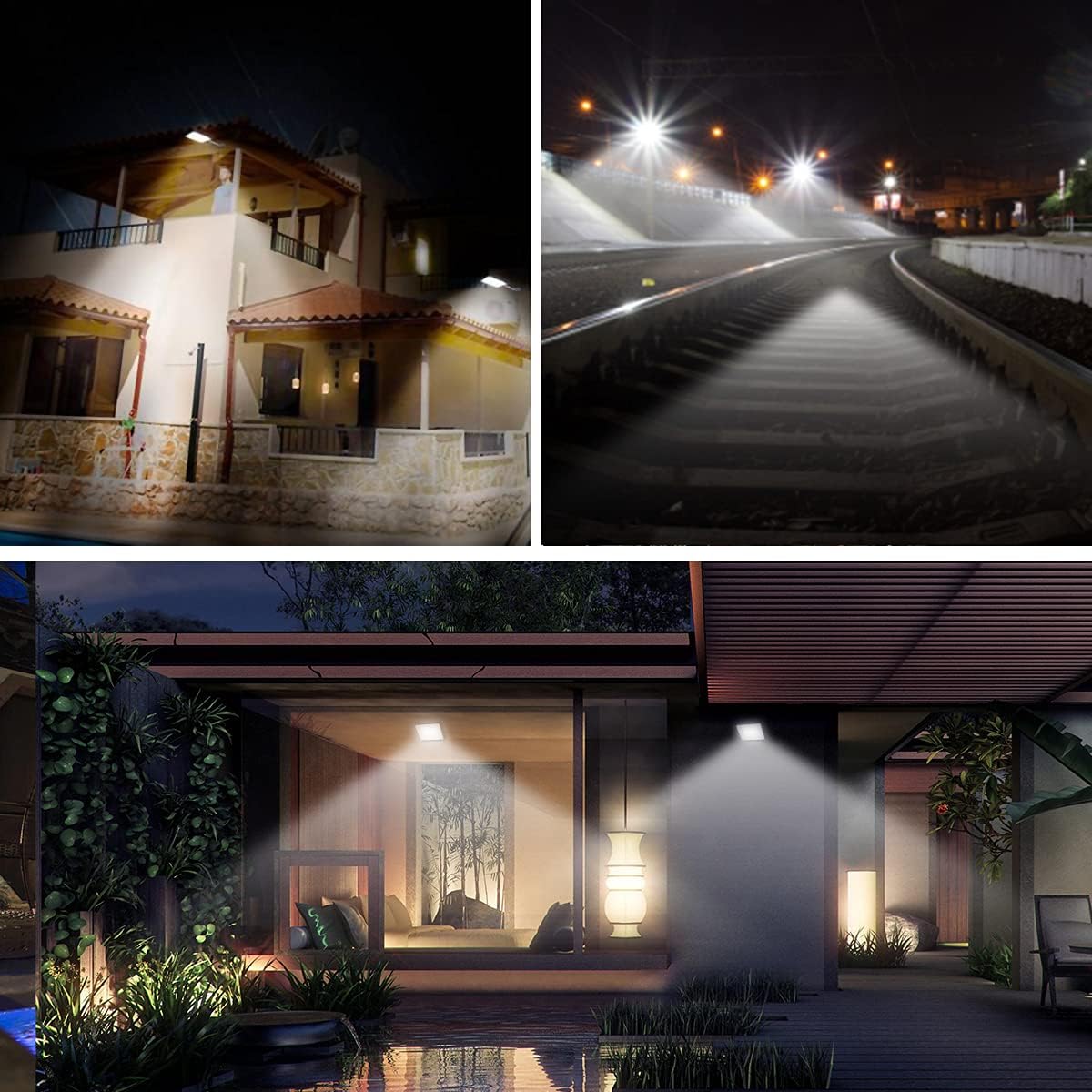
Image 5.1: Examples of the floodlight's wide application in different environments.
6. Maintenance
Regular maintenance ensures optimal performance and longevity of your floodlight.
- Cleaning: Periodically clean the tempered glass surface with a soft, damp cloth to remove dust and debris. Do not use abrasive cleaners or solvents. Ensure the power is off before cleaning.
- Inspection: Regularly check the mounting bracket and wiring connections for any signs of wear, corrosion, or damage. Tighten any loose screws.
- No User-Serviceable Parts: The LED light source is integrated and not user-replaceable. Do not attempt to open or repair the floodlight yourself.

Image 6.1: The IP65 rating ensures the floodlight's durability in outdoor conditions like rain.
7. Troubleshooting
If you encounter issues with your EXTRASTAR LED Floodlight, refer to the following common problems and solutions:
| Problem | Possible Cause | Solution |
|---|---|---|
| Light does not turn on | No power supply Loose wiring connection Faulty switch/breaker | Check power supply and circuit breaker. Verify all wiring connections are secure (ensure power is off first). Test the switch or breaker. |
| Light is dim or flickers | Unstable power supply Loose connection Product defect | Ensure stable power supply. Check wiring connections. If problem persists, contact customer support. |
| Water inside the casing | Improper installation Damage to casing/seal | Ensure all seals are intact and installation is correct. If damaged, discontinue use and contact customer support. |
If these troubleshooting steps do not resolve the issue, please contact EXTRASTAR customer support.
8. Warranty and Support
EXTRASTAR products are manufactured to high-quality standards. For warranty information, please refer to the terms and conditions provided at the point of purchase or visit the official EXTRASTAR website.
For technical support, product inquiries, or assistance with installation, please contact EXTRASTAR customer service through their official channels. Keep your purchase receipt or proof of purchase handy when contacting support.
Website: EXTRASTAR Official Store