
1. Introduction
This manual provides essential information for the safe operation and maintenance of your KIDOMO F02 Mini Drone. Please read this manual thoroughly before operating the drone to ensure proper usage and to prevent damage or injury. Keep this manual for future reference.
2. Package Contents
Verify that all items listed below are included in your package. If any items are missing or damaged, please contact customer support.
- KIDOMO F02 Mini Drone
- Remote Control
- Modular Batteries (2 units)
- USB Charging Cable
- Spare Propellers
- Propeller Guards
- Screwdriver
- User Manual
- Storage Pouch/Case
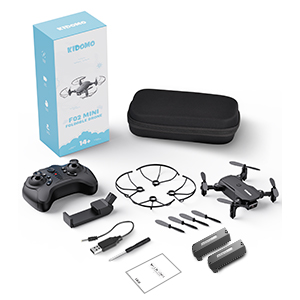
Image: Complete package contents of the KIDOMO F02 Mini Drone.
3. Product Overview
Familiarize yourself with the main components of the KIDOMO F02 Mini Drone and its remote control.

Image: The KIDOMO F02 Mini Drone, remote control, and accessories.
Drone Components:
- Foldable Arms with Motors and Propellers
- 1080P HD FPV Camera
- Power Button
- Battery Compartment
- LED Indicator Lights
Remote Control Components:
- Left Control Stick (Throttle/Yaw)
- Right Control Stick (Forward/Backward/Left/Right)
- One Key Take-off/Landing Button
- Headless Mode Button
- Speed Switch Button
- 360° Flip Button
- Phone Holder
4. Setup
4.1 Drone Preparation
- Unfold the Drone Arms: Gently unfold the four arms of the drone until they lock into position.
- Install Propeller Guards: Attach the propeller guards to the drone's arms for added protection, especially during initial flights.
- Install Battery: Insert a fully charged modular battery into the drone's battery compartment until it clicks securely into place.
4.2 Remote Control Preparation
- Install AAA Batteries: Open the battery compartment on the back of the remote control and insert 3 AAA batteries (not included), ensuring correct polarity. Close the compartment.
- Attach Phone Holder: If using the FPV camera features, attach the phone holder to the remote control.
4.3 App Installation
To access FPV (First Person View) and advanced control features, download the dedicated app to your smartphone:
- Scan the QR code provided in the quick start guide or on the product packaging to download the official KIDOMO drone app.
- Install the app on your iOS or Android device.
5. Operating Instructions
5.1 Pairing the Drone and Remote
- Place the drone on a flat, level surface.
- Press and hold the power button on the drone until the LED lights begin to flash.
- Turn on the remote control. The remote's indicator light will flash.
- Push the left control stick (throttle) all the way up, then all the way down. The drone and remote indicator lights will become solid, indicating successful pairing.
5.2 One Key Take-off and Landing
The drone features a simplified take-off and landing function.
- Take-off: After pairing, press the One Key Take-off/Landing button on the remote. The drone will automatically ascend and hover at a stable altitude.
- Landing: During flight, press the One Key Take-off/Landing button again. The drone will slowly descend and land automatically.

Image: Visual guide for One Key Start/Landing, Headless Mode, and Altitude Hold.
5.3 Basic Flight Controls
- Left Stick (Throttle/Yaw):
- Push up/down to control altitude.
- Push left/right to rotate the drone (yaw).
- Right Stick (Directional):
- Push up/down to move forward/backward.
- Push left/right to move sideways (strafe).
5.4 Special Flight Features
- Altitude Hold: The drone automatically maintains its current altitude, allowing for stable hovering. This feature is active by default after take-off.
- Headless Mode: Press the Headless Mode button. In this mode, the drone's orientation is irrelevant; it will always move relative to the pilot's position. Press again to exit.
- 360° Flip: Press the 360° Flip button, then push the right control stick in the desired direction (forward, backward, left, or right) to perform an aerial flip.

Image: The drone performing a 360-degree flip.
- Trajectory Flight: Open the app and draw a flight path on your smartphone screen. The drone will automatically follow the drawn trajectory.

Image: Drone following a custom flight path drawn on a smartphone.
- Gesture Control: When the drone's camera is active, make a 'High five' gesture to take a photo or a 'Fist' gesture to record a video.
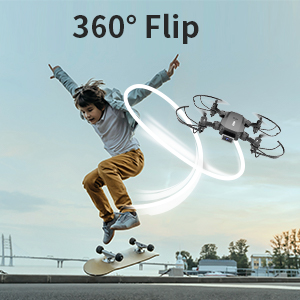
Image: Drone responding to a hand gesture for control.
- Gravity Control: Through the app, enable gravity control to maneuver the drone by tilting your smartphone.
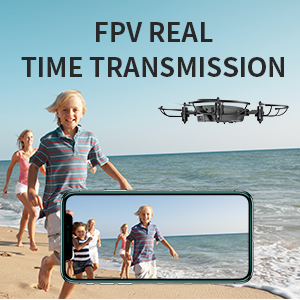
Image: Smartphone being tilted to control drone movement via gravity control.
5.5 Camera Operation (Photos & Videos)
The KIDOMO F02 is equipped with a 1080P HD FPV camera.
- FPV View: Connect your smartphone to the drone's Wi-Fi network (details in app) to view live footage from the drone's camera on your phone screen.
- Taking Photos: Use the dedicated photo button in the app or the gesture control ('High five') to capture images.
- Recording Videos: Use the dedicated video recording button in the app or the gesture control ('Fist') to start/stop video recording.

Image: Comparison illustrating the clarity of 1080P HD camera output.
6. Battery Information
6.1 Charging the Batteries
The drone uses 650mAh modular batteries. Use only the provided USB charging cable.
- Connect the modular battery to the USB charging cable.
- Plug the USB cable into a 5V/1A USB power adapter (e.g., computer USB port, phone charger).
- The indicator light on the charging cable will show charging status (e.g., red for charging, green for fully charged).
- Charging typically takes approximately 60-90 minutes per battery.
6.2 Battery Life
Each 650mAh modular battery provides approximately 8-12 minutes of flight time. With two batteries, you can achieve a total flight time of 16-24 minutes.

Image: Illustration of extended flight time with two batteries.
6.3 Battery Safety
- Do not overcharge or over-discharge batteries.
- Do not expose batteries to extreme temperatures or direct sunlight.
- If a battery is swollen, leaking, or damaged, discontinue use immediately and dispose of it properly.
- Always supervise charging.
7. Maintenance
- Cleaning: Use a soft, dry cloth to clean the drone and remote control. Avoid using water or solvents.
- Propeller Replacement: If propellers are damaged, replace them with spare parts using the provided screwdriver. Ensure correct propeller (A or B) is installed on the corresponding motor.
- Storage: Store the drone and accessories in a cool, dry place, away from direct sunlight and extreme temperatures. Remove batteries from the remote control if storing for extended periods.
8. Troubleshooting
| Problem | Possible Cause | Solution |
|---|---|---|
| Drone does not respond to remote. | Not paired; low battery (drone/remote). | Re-pair drone and remote; charge drone battery; replace remote batteries. |
| Drone drifts during flight. | Not calibrated; windy conditions. | Perform gyroscope calibration (refer to quick start guide); fly in calm conditions. |
| Short flight time. | Battery not fully charged; old battery. | Ensure battery is fully charged; consider replacing old batteries. |
| FPV image is blurry or disconnected. | Weak Wi-Fi signal; app issue. | Ensure strong Wi-Fi connection; restart app and drone; try a different device. |
| Drone crashes easily. | Lack of experience; propeller damage. | Practice in open areas; install propeller guards; replace damaged propellers. |
9. Specifications
| Feature | Detail |
|---|---|
| Model | F02 |
| Brand | KIDOMO |
| Drone Dimensions (Unfolded) | 10 x 12.5 x 3 cm (approx.) |
| Drone Dimensions (Folded) | 8 x 6.5 x 3 cm (approx.) |
| Drone Weight | Less than 200 g (7.05 oz) |
| Camera | 1080P HD FPV |
| Battery | 2 x 650mAh Modular Batteries |
| Flight Time | Approx. 8-12 minutes per battery (16-24 minutes total) |
| Remote Control Batteries | 3 x AAA (not included) |
| Control Distance | Varies based on environment |
| Special Features | One Key Take-off/Landing, Headless Mode, Altitude Hold, Trajectory Flight, 360° Flip, Gesture Control, Gravity Control, Foldable Design |
10. Safety Guidelines
Adhere to these safety guidelines to ensure a safe and enjoyable flight experience:
- Pre-Flight Check: Always inspect the drone, propellers, and batteries for any damage before each flight.
- Environment: Fly in open, unobstructed areas, away from people, animals, buildings, and power lines. Avoid flying in strong winds or adverse weather conditions.
- Line of Sight: Always maintain visual line of sight with your drone.
- Age Recommendation: This drone is recommended for users aged 14 and above. Younger users should be supervised by an adult.
- Respect Privacy: Be mindful of privacy laws and do not use the camera to record individuals without their consent.
- Battery Safety: Follow all battery charging and handling instructions carefully.
- Emergency Landing: In case of emergency, use the One Key Landing function or cut power if necessary, ensuring the drone lands in a safe area.
11. Warranty and Support
KIDOMO products are designed for reliability and performance. For warranty information, technical support, or inquiries regarding your F02 Mini Drone, please refer to the contact details provided on the product packaging or the official KIDOMO website. Please retain your proof of purchase for warranty claims.
