
1. Introduction
The STIGMA EM146-3 is a high-quality rotary tattoo machine designed for precision and reliability. It features a CNC carved body, a powerful coreless Germany motor, and an adjustable stroke mechanism to suit various tattooing styles. This manual provides essential information for the safe and effective use of your tattoo machine.

Image 1: STIGMA EM146-3 Rotary Tattoo Machine.
2. Setup Instructions
- Unpacking: Carefully remove all components from the packaging. Verify that all parts are present according to the product list.
- Connecting Power: Connect the RCA cord to the machine's RCA port and to a compatible power supply. Ensure the connection is secure.
- Attaching Cartridge Needle: Insert a sterile cartridge needle into the machine's grip. Twist gently to secure it in place.
- Adjusting Needle Protrusion: Rotate the grip to adjust the needle protrusion to your desired depth (0-4mm).
- Changing Stroke Cam: The machine comes with a default 3.5mm stroke cam. For 3.0mm or 4.0mm stroke lengths, carefully replace the existing cam with the desired one. Refer to the diagram below for cam replacement.
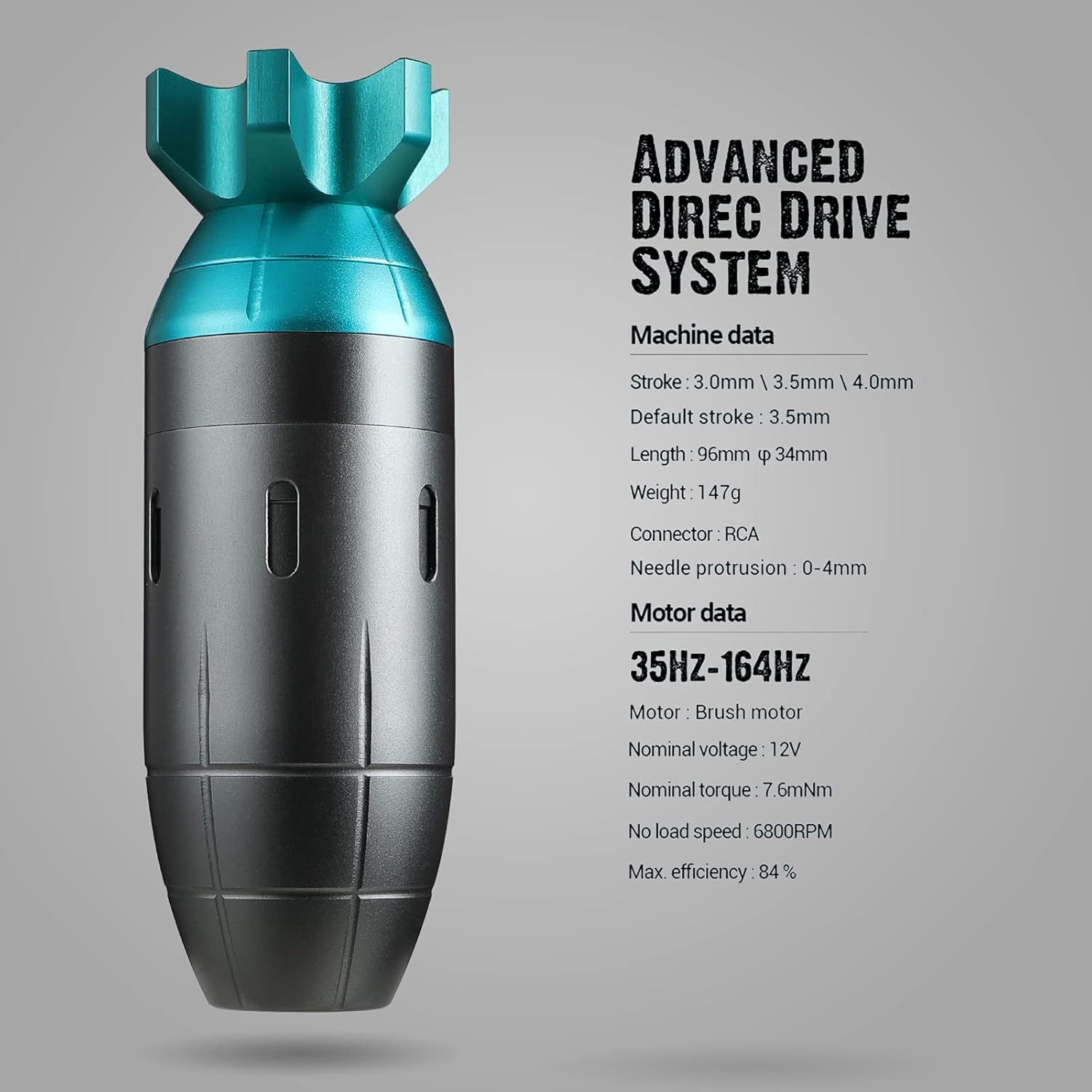
Image 2: Interchangeable stroke cams for stroke length adjustment.
Video 1: Official demonstration of the STIGMA CLIMBER rotary tattoo short pen features and operation.
3. Operating Instructions
- Power On: Turn on your power supply. The machine starts working at 5V.
- Recommended Voltage: The optimal working voltage for the STIGMA EM146-3 is between 8V and 12V. Adjust the voltage on your power supply according to your preference and the specific task (lining, shading, color packing).
- Performance: This rotary machine is designed for smooth blending and efficient ink saturation without excessive skin trauma. Its coreless motor ensures quiet and stable operation.
- Safety Precaution: Always operate the machine under 12V to ensure longevity of the motor and power supply.

Image 3: Proper handling of the STIGMA EM146-3 during tattooing.
4. Maintenance
Proper maintenance is crucial for the longevity and performance of your STIGMA EM146-3 tattoo machine.
- Cleaning: After each use, thoroughly clean the machine's exterior with a suitable disinfectant. Ensure no liquids enter the motor housing.
- Lubrication: Periodically apply a small amount of machine oil to moving parts as recommended by professional tattoo equipment maintenance guidelines.
- Storage: Store the machine in a clean, dry environment away from direct sunlight and extreme temperatures.
- Inspection: Regularly inspect the RCA connection and stroke cam for any signs of wear or damage.
5. Troubleshooting
If you encounter issues with your STIGMA EM146-3, refer to the following common troubleshooting steps:
- Machine Not Starting:
- Check if the RCA cable is securely connected to both the machine and the power supply.
- Ensure the power supply is turned on and functioning correctly.
- Verify the voltage setting on your power supply is within the recommended range (5V-12V).
- Excessive Vibration or Noise:
- Ensure the cartridge needle is properly seated and secured.
- Check for any loose parts on the machine.
- Operating above 12V can cause increased vibration and noise; reduce the voltage.
- Inconsistent Needle Protrusion:
- Confirm the grip is tightened correctly after adjustment.
- Inspect the stroke cam for damage or improper installation.
If problems persist after following these steps, please contact STIGMA customer support.
6. Specifications
| Feature | Detail |
|---|---|
| Model | EM146-3 |
| Motor | Coreless Germany Motor |
| Stroke Lengths | 3.0mm, 3.5mm (default), 4.0mm |
| Operating Voltage | Start at 5V, Best 8V-12V |
| Frequency | 35Hz-164Hz |
| Nominal Torque | 7.6mNm |
| No Load Speed | 6800 RPM |
| Max. Efficiency | 84% |
| Length | 96mm |
| Diameter | 34mm |
| Weight | 147g |
| Connector Type | RCA |
| Needle Protrusion | 0-4mm |
| Certifications | CE Certified |
7. Warranty and Support
The STIGMA EM146-3 Rotary Tattoo Machine comes with a one-year warranty from the date of purchase. This warranty covers manufacturing defects under normal use. Please retain your proof of purchase for warranty claims.
For technical support, warranty service, or any inquiries regarding your product, please contact STIGMA customer service through the official website or your retailer. Always refer to official STIGMA channels for assistance to ensure you receive authentic support.


