
WINFLIKE BN59-01315E BN5901315E
User Manual for WINFLIKE BN59-01315E Remote Control
Model: BN59-01315E
Introduction
This manual provides detailed instructions for the use and maintenance of your WINFLIKE BN59-01315E replacement remote control. This remote is designed to be a direct replacement for original Samsung TV remote models, offering seamless compatibility without the need for complex programming.

The BN59-01315E remote control in a typical living room setup, demonstrating its intended use with a television.
Setup
The BN59-01315E remote control requires no programming or pairing. Simply insert the batteries, and it will be ready for immediate use with compatible Samsung TV models.
Inserting Batteries
- Locate the battery compartment on the back of the remote control.
- Slide the battery cover downwards to open the compartment.
- Insert two (2) AAA alkaline batteries, ensuring the positive (+) and negative (-) terminals align correctly with the indicators inside the compartment.
- Slide the battery cover back into place until it clicks securely.

Rear view of the remote control with the battery cover open, illustrating the correct orientation for battery insertion.
Once batteries are installed, the remote is ready to operate your compatible Samsung TV.
Operating Instructions
The BN59-01315E remote control provides full functionality for compatible Samsung Smart LED 4K TVs. Below are the primary functions of the buttons:
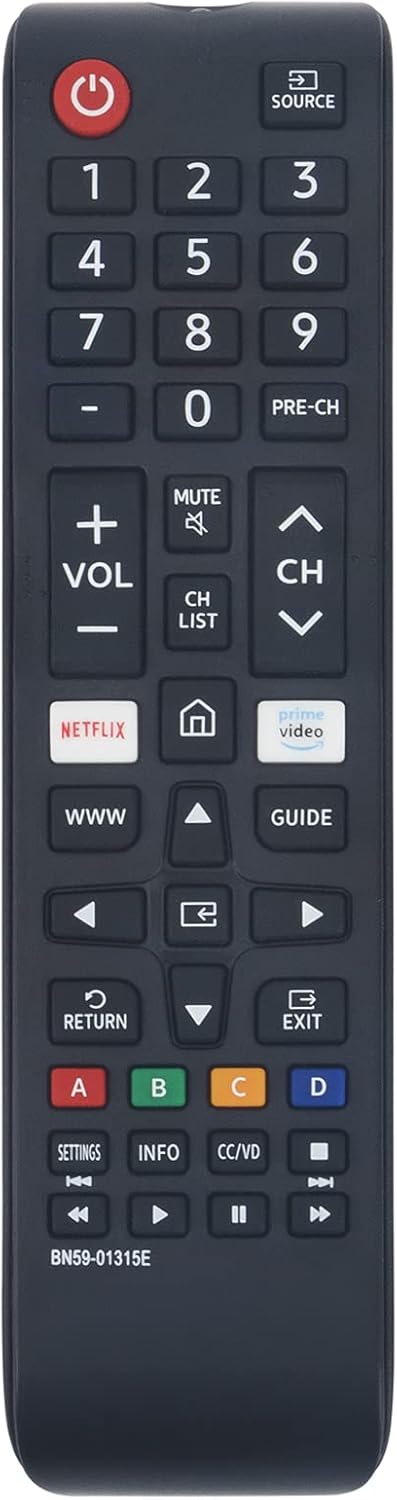
Front view of the BN59-01315E remote control, displaying the layout of all functional buttons.
- Power (Red Button): Turns the TV on or off.
- Source: Selects the input source (HDMI, AV, etc.).
- Number Pad (0-9): Directly enters channel numbers.
- PRE-CH: Returns to the previous channel.
- VOL (+/-): Adjusts the volume level.
- MUTE: Mutes or unmutes the TV sound.
- CH (Up/Down): Changes channels.
- CH LIST: Displays the channel list.
- NETFLIX: Direct access to the Netflix application.
- Home (House Icon): Accesses the Smart Hub or Home screen.
- Prime Video: Direct access to the Amazon Prime Video application.
- WWW: Direct access to the web browser.
- Arrow Buttons (Up/Down/Left/Right): Navigates menus and selections.
- GUIDE: Displays the electronic program guide.
- OK/Enter (Center Button): Confirms selections.
- RETURN: Returns to the previous screen or menu.
- EXIT: Exits the current menu or application.
- Color Buttons (A, B, C, D): Used for specific functions within certain applications or menus as indicated on-screen.
- SETTINGS: Accesses TV settings.
- INFO: Displays information about the current program or input.
- CC/VD: Toggles Closed Captions/Video Description.
- Media Control Buttons (Play, Pause, Stop, Fast Forward, Rewind): Controls media playback.
Compatible Models
This remote control is compatible with a wide range of Samsung Smart LED 4K TV models, including but not limited to:
- UN43TU7000F, UN43TU7000FXZA, UN43TU700DF, UN43TU700DFXZA
- UN50TU7000F, UN50TU7000FXZA
- UN55TU7000F, UN55TU7000FXZA
- UN58TU7000F, UN58TU7000FXZA, UN58TU700DF, UN58TU700DFXZA
- UN65TU7000F, UN65TU7000FXZA, UN65TU700DF, UN65TU700DFXZA
- UN70TU7000F, UN70TU7000FXZA, UN70TU700DF, UN70TU700DFXZA
- UN75TU7000F, UN75TU7000FXZA, UN75TU700DF, UN75TU700DFXZA
- UN82TU6950FXZA
Maintenance
Proper care and maintenance will extend the life of your remote control.
Cleaning
To clean the remote control, gently wipe the surface with a soft, dry cloth. For stubborn dirt, slightly dampen the cloth with water or a mild, non-abrasive cleaner. Do not use harsh chemicals or immerse the remote in water.
Battery Replacement
Replace batteries when the remote's response becomes sluggish or it stops functioning. Always replace both batteries at the same time with new AAA alkaline batteries. Do not mix old and new batteries, or different types of batteries.
Troubleshooting
If you experience issues with your remote control, try the following troubleshooting steps:
- Remote not responding:
- Ensure the batteries are inserted correctly with the proper polarity.
- Replace the batteries with fresh ones.
- Ensure there are no obstructions between the remote control and the TV's infrared receiver.
- Point the remote directly at the TV.
- Specific buttons not working:
- Check for any debris or stickiness around the button. Gently press the button multiple times.
- If only certain buttons fail, the remote may be damaged and require replacement.
Specifications
| Feature | Detail |
|---|---|
| Model Number | BN59-01315E |
| Brand | WINFLIKE |
| Compatible Devices | Samsung Smart LED 4K Televisions |
| Power Source | 2 x AAA Batteries (not included) |
| Color | Black |
| Dimensions (L x W x H) | 6.97 x 1.73 x 1.06 inches |
| Item Weight | 2.22 ounces |
| Special Features | Ergonomic Design, No Programming Required |
Support
For any issues with your WINFLIKE BN59-01315E remote control, please contact our customer service. We are committed to providing a satisfactory response within 24 hours.
Please refer to your purchase documentation or the retailer's website for specific contact information.
Related Documents - BN59-01315E BN5901315E
 |
Samsung Remote Control User Guide and Compatibility Comprehensive guide to Samsung remote control functions, installation steps, and compatibility with various Samsung TV models. Includes model numbers for easy reference. |
 |
Samsung BN59-01259E Universal Smart TV Remote Control User Manual User guide for the Samsung BN59-01259E Universal Smart TV Remote Control, covering usage steps, safety restrictions, and CE certification details. |
 |
BN59-01315B Replacement Remote Control for Samsung Smart TVs - User Guide Detailed specifications and features for the BN59-01315B replacement remote control, compatible with various Samsung Smart TV models. Includes safety advisories and CE compliance information. |
 |
Samsung BN59-00516A Replacement Remote Control Guide This guide provides button mapping details for the Samsung BN59-00516A replacement remote control, covering TV, DVD, STB, and CABLE-VCR functions. Compare original remote buttons to their replacements. |
 |
Samsung Universal Remote Control BN59-01315A User Guide Comprehensive user guide for the Samsung BN59-01315A universal remote control. Learn about its features, compatibility with Samsung smart TVs, setup, and programming instructions for seamless TV and cable/satellite box operation. |
 |
Samsung Universal-Fernbedienung: Benutzerhandbuch & Kompatibilitätsliste Umfassendes Benutzerhandbuch für die Samsung Universal-Fernbedienung. Erfahren Sie mehr über Produktübersicht, unterstützte Modelle (KU, RU, Q, TU Serien), Installation, Tastenfunktionen, Fehlerbehebung und Sicherheitshinweise. |
Ask a question about this manual
Ask about setup, troubleshooting, compatibility, parts, safety, or missing instructions. Manuals+ will review the question and use this page’s manual context to help answer it.